
dsh-deepseek-usage
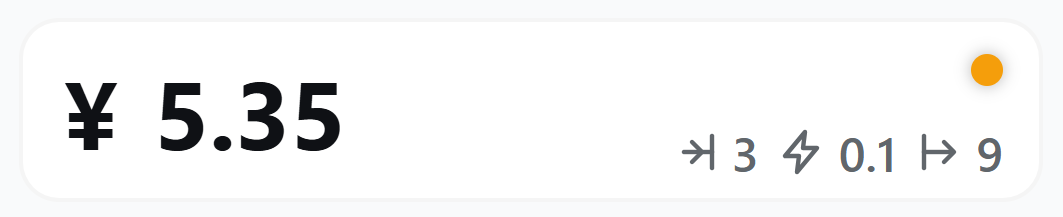
Manifest validShows a card in the sidebar footer with the DeepSeek account balance (read from the official /user/balance endpoint with the API key DSH already stores) and the unit prices of the active model — input
@dougen/dsh-deepseek-usage
A sidebar plugin for the DeepSeek Harness (DSH) Web UI that answers two questions without leaving the app: how much balance is left, and what the model costs right now — the second one for official DeepSeek models, whose prices the built-in table and DeepSeek's peak/off-peak windows cover.
What it does
- Balance in the sidebar footer: your DeepSeek account balance (the symbol follows the account currency:
¥/$). - Unit prices of the active model: input / input cache / output for the billing window in effect right now. They change when you switch models and when the peak/off-peak window flips.
- Peak / off-peak dot with a countdown: orange during peak hours (Mon–Fri, excluding Chinese public holidays, 9:00–12:00 and 14:00–18:00 Beijing Time), green otherwise — weekends, public holidays and the make-up workdays that fall on a weekend are all off-peak; next to it, the time left until the next switch (
2d 15h,5h 47m,23m). - Unit prices and the peak/off-peak dot are for official DeepSeek models only. When the active model is not one of them (a third-party provider's model, or a router that reports the provider name as the model), the card shows the balance alone: the built-in price table and DeepSeek's peak/off-peak windows do not apply, so any figure derived from them would not match your bill.
- Refreshes every 30 seconds, and immediately when you click the card or switch models. Follows the app light/dark theme and the DSH language (Chinese / English).
DSH compatibility
| DSH | Plugin version |
|---|---|
0.2.x (0.2.0-rc.1 and later) | 0.11.0 and later |
0.1.x (0.1.0-rc.6 and later) | 0.10.x, or 0.11.0 and later |
dsh --version prints your DSH version. Installing without a version picks the newest compatible release; name an exact version (@dougen/dsh-deepseek-usage@0.10.2) when the newest does not match your DSH.
Install, uninstall, common errors
Install
- Configure
DEEPSEEK_API_KEYin DSH (model settings). dsh plugin --profile web add @dougen/dsh-deepseek-usage- Restart
dsh weband open the URL it prints — the card sits at the bottom of the sidebar, below the Cordis panel button.
Uninstall
dsh plugin --profile web remove @dougen/dsh-deepseek-usage
Then restart dsh web.
A blank card means the balance could not be read
The card then shows the reason instead of numbers:
DEEPSEEK_API_KEYis not configured — set it in DSH settings and restart.- The balance request or the network failed — click the card to retry.
DEEPSEEK_BASE_URLpoints at a third-party gateway — the official balance endpointhttps://api.deepseek.com/user/balancemay be unavailable or answer differently; only DeepSeek's official platform is supported.
Prices differ from the official page
- Prices are the built-in table
PRICE_TABLEinlib/pricing.js, a snapshot of the official pricing page. It changes only when a new version of the plugin ships — there is no local price file and no background sync. - The card only shows unit prices and the peak/off-peak dot when the active model is an official DeepSeek model (
deepseek-flash,deepseek-v4-pro,deepseek-chat,deepseek-reasonerand the legacy names). Any other model — a third-party provider's, or a router reporting the provider name as the model — has no official peak/off-peak pricing, so the card hides both instead of showing a figure that would not match your bill. - An official model newer than this plugin release is not in the table either, and the card hides prices for it until the table is updated.
- Off-peak days come from the holiday table
HOLIDAY_RANGESinlib/pricing.js. The State Council usually publishes next year's arrangement in November; update it then. Until you do, holidays are treated as ordinary workdays and the card shows peak prices during them.
How it works
- The host half (
lib/index.js,lib/pricing.js) registersGET /api/deepseek-usage. Per request it reads the API key from DSH credentials, asks the official balance API, resolves the active model's price from the built-in price table, and answers with balance, tier prices, the peak flag and the next switch time.GET /api/deepseek-usage/holidayshands the browser half the same public-holiday table. - The browser half (
lib/client.js) renders that answer into thesidebar.footer.actionslot, re-reads it every 30 seconds, and refreshes on click or on a model change. The peak state and the countdown come from the same answer, so the card itself holds no pricing logic.
中文文档
一个 DeepSeek Harness(DSH)网页界面的侧边栏插件:不离开 DSH 就能知道账号还剩多少钱;当前用的是 DeepSeek 官方模型时,还能看到它现在什么价——内置价格表与官方峰谷时段覆盖的正是这些模型。
这个插件做什么
- 余额:侧边栏底部显示 DeepSeek 账号余额(符号随账号币种
¥/$)。 - 当前模型的档单价:输入 / 输入缓存 / 输出,按此刻生效的计费时段显示;切换模型、跨过峰谷切换点时会跟着变。
- 峰谷指示灯 + 倒计时:高峰(周一至周五、不含中国法定节假日,9:00–12:00、14:00–18:00 北京时间)橙色,其余时间绿色——周末、法定节假日全天,以及调休上班的周末都是空闲;指示灯旁给出距下次切换的剩余时间(
2d 15h、5h 47m、23m)。 - 档单价与峰谷指示灯只对 DeepSeek 官方模型显示。当前模型不是官方模型时(第三方供应商的模型,或路由器把供应商名当模型名上报),卡片只显示余额:内置价格表与官方峰谷时段对它不成立,据此算出的数字与实际账单不符。
- 每 30 秒自动刷新;点击卡片或切换模型时立即刷新。跟随应用明暗主题与 DSH 语言(中文 / English)。
DSH 版本对应关系
| DSH | 插件版本 |
|---|---|
0.2.x(0.2.0-rc.1 起) | 0.11.0 及以后 |
0.1.x(0.1.0-rc.6 起) | 0.10.x,或 0.11.0 及以后 |
dsh --version 查看当前 DSH 版本。不带版本号安装会取最新的兼容版本;最新版与你的 DSH 不匹配时,用 @dougen/dsh-deepseek-usage@0.10.2 这样的完整版本号指定。
安装、卸载与常见错误
安装:
- 在 DSH 设置(模型页)里配置
DEEPSEEK_API_KEY。 dsh plugin --profile web add @dougen/dsh-deepseek-usage- 重启
dsh web,打开它打印的地址:卡片位于侧边栏底部、Cordis 面板按钮下方。
卸载:
dsh plugin --profile web remove @dougen/dsh-deepseek-usage
然后重启 dsh web。
卡片空白说明余额没读到,此时卡片会写明原因:
- 没有配置
DEEPSEEK_API_KEY:在 DSH 设置里配置后重启。 - 余额接口或网络失败:点击卡片重试。
DEEPSEEK_BASE_URL指向第三方中转:官方余额接口https://api.deepseek.com/user/balance可能不可用或返回异常,本插件只支持 DeepSeek 官方平台。
价格与官方不一致时:
- 价格是
lib/pricing.js的内置表PRICE_TABLE(官方价格页的快照),只在发布新版本时更新——没有本地价格文件,也没有后台同步。 - 只有当前模型是 DeepSeek 官方模型(
deepseek-flash、deepseek-v4-pro、deepseek-chat、deepseek-reasoner及旧名)时,卡片才显示档单价与峰谷指示灯;其他模型(第三方供应商的模型、路由器把供应商名当模型名上报)没有官方峰谷定价,卡片把这两项都隐藏,而不是显示一个与实际账单不符的数字。 - 比本插件版本更新的官方模型同样不在表里,卡片会隐藏价格,直到价格表更新。
- 放假日期维护在
lib/pricing.js的HOLIDAY_RANGES。国务院办公厅通常在前一年 11 月发布次年安排,届时更新;未更新前,节假日会按普通工作日处理,白天显示高峰价。
简单的工作原理
- 宿主侧(
lib/index.js、lib/pricing.js)注册GET /api/deepseek-usage:每次请求读取 DSH 凭据里的 API Key、调用官方余额接口、从内置价格表解析当前模型档单价,返回余额、档单价、峰谷状态与下次切换时刻;GET /api/deepseek-usage/holidays把同一份法定节假日表交给浏览器侧。 - 浏览器侧(
lib/client.js)把这份响应渲染进sidebar.footer.action槽位,每 30 秒重新读一次,点击卡片或模型变化时立即刷新;峰谷状态与倒计时同样来自这次响应,界面自身不做计价逻辑。
License
MIT
Comments
Loading…
Similar plugins
by The-five-stooges
Shows the DeepSeek account balance as a row in the sidebar footer with a refresh button, and opens a popover with the balance card, daily token and estimated-cost charts over a 7/30-day window, a per-
★ 0
MIT
JavaScript
Sep 18, 2026
dsh plugin --profile web add dsh-deepseek-usageShows the DeepSeek account balance and the current peak / off-peak phase in the sidebar, and estimates per-session and per-turn cost using the official peak and off-peak rates.
★ 0
dsh plugin --profile web add dsh-balance-usageby Rannist
Shows DeepSeek account balance and current-session token and cost usage in the sidebar footer and composer dock, including peak and off-peak billing and subagent consumption.
★ 2
↓ 651/wk
MIT
JavaScript
Oct 17, 2026
dsh plugin --profile web add balance-dshHolds DeepSeek model calls for the rest of each peak-hour window you configure instead of sending them, so they are billed at off-peak rates; also pauses active goals while it waits and shows the acco
★ 0
dsh plugin --profile web add dsh-offpeakby xtd1145
Real-time DeepSeek API balance (official endpoint) and today-spend estimate (this DSH instance session-log usage x per-model price table) for the DSH web: composer dock strip, always-on floating badge
★ 0
MIT
JavaScript
Sep 7, 2026
dsh plugin --profile web add dsh-deepseek-cost-liveReal-time DeepSeek API usage: account balance with low-balance alerts (browser notification on threshold crossing), token & request stats (total/today/last-60s windows, per-model and per-session), est
★ 0
↓ 177/wk
dsh plugin --profile web add dsh-deepseek-usage