
dsh-open-with-control
Manifest validReplaces the session header Open with split button with a configurable one: remove and reorder its entries, pin the default application, and add applications installed on this machine with their real
dsh-open-with-control
English | 中文
自定义 DeepSeek Harness 会话头部右上角的**「打开方式」**菜单:选择显示哪些应用、调整顺序、设定默认应用,并把本机已安装的应用加进来——带真实图标。
DeepSeek Harness 自带一个「打开方式」分裂按钮,用已安装的应用打开当前工作目录。但那个菜单是固定的:宿主能探测到的应用全部列出、顺序固定、只记住上次选择。本插件用一个可配置的控件替换它。
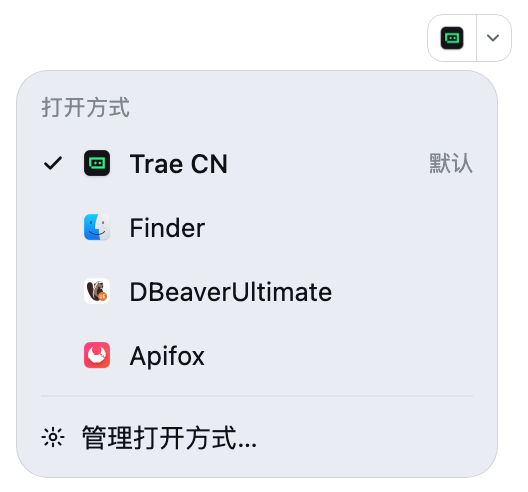
功能
- 决定显示哪些应用——不需要的应用直接移除;之后可从折叠的「已移除」区恢复
- 调整顺序——上移/下移,菜单按你的顺序排列
- 设定默认应用——主按钮用它打开;在菜单里点选某个应用也会把它设为默认
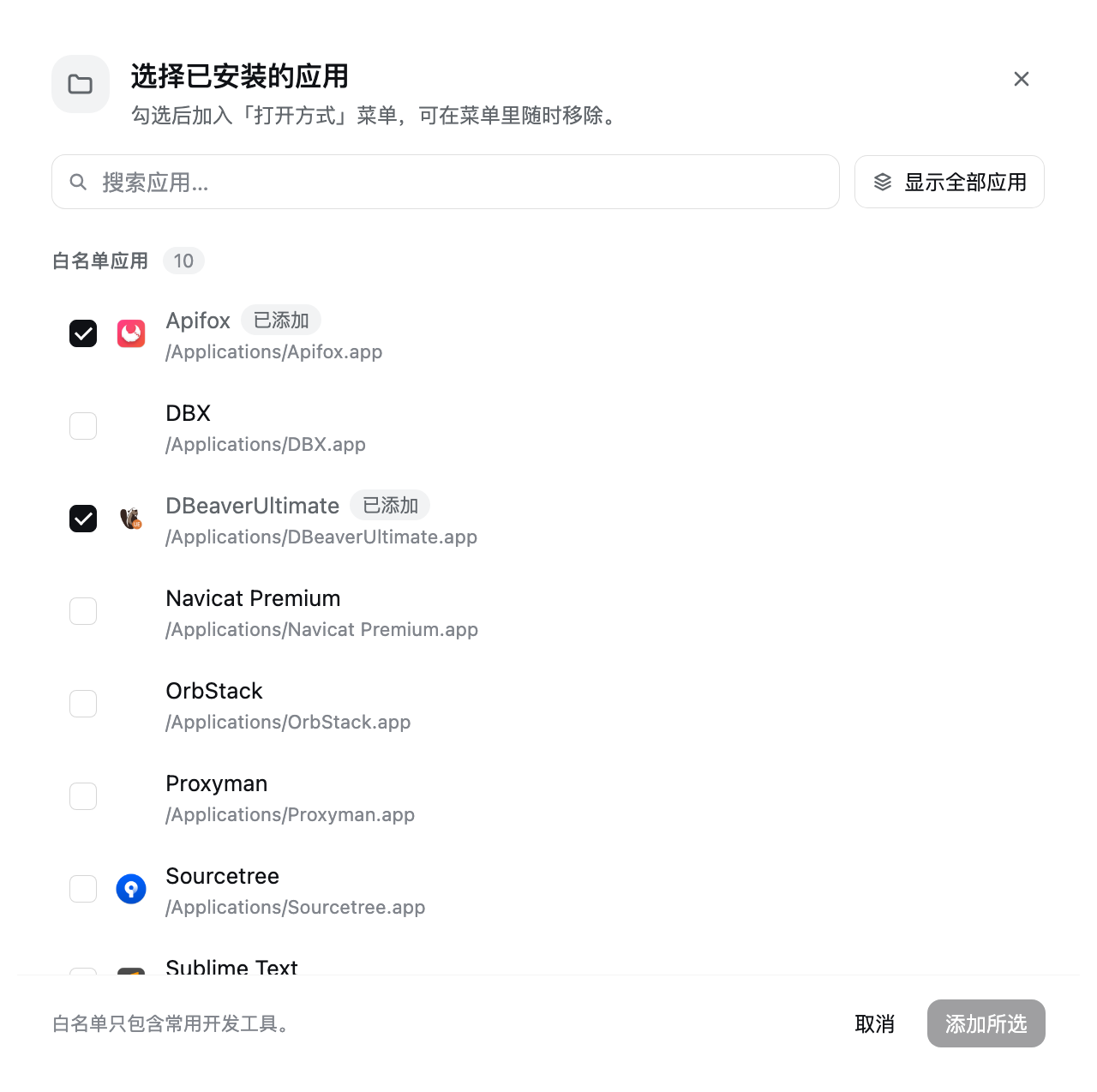
- 添加已安装的应用——打开应用目录,默认只列白名单里的开发工具,一个按钮切换到本机全部应用(再点一次切回)
- 真实图标——macOS 取
.icns,Windows 提取可执行文件图标 - 中英双语
- 保底约束——菜单里至少保留一个应用
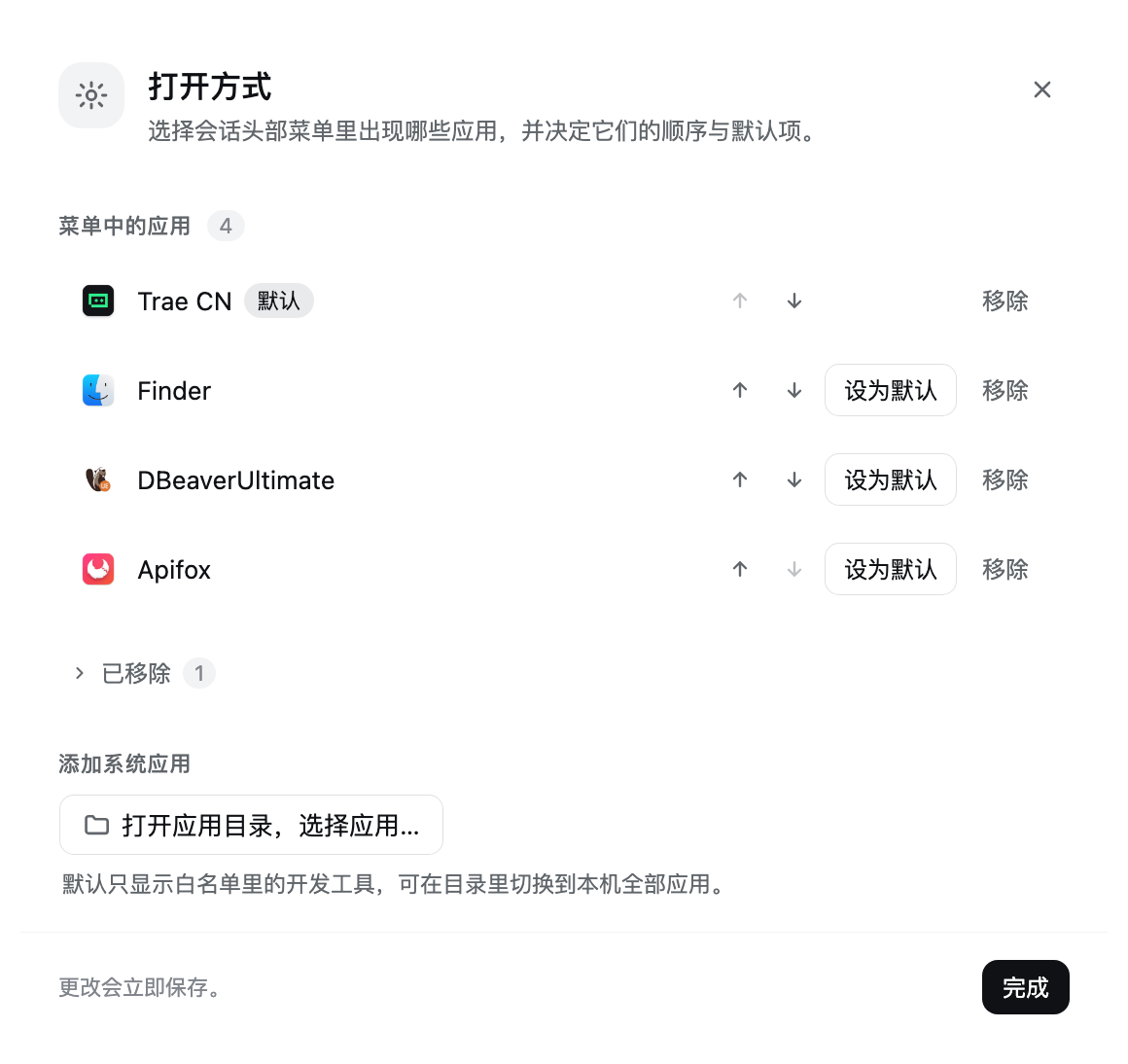
管理面板:
应用目录默认只列白名单应用,一个按钮切换全量列表:
环境要求
- DeepSeek Harness 的 Web 形态(
dsh web或桌面版) - 官方自带的
@deepseek-ai/dsh-host-open-in-app与@deepseek-ai/dsh-client-ui-open-in-app两行(它们属于@deepseek-ai/dsh-web-app捆绑包,Web 形态默认就有)
安装
dsh plugin --profile <profile> add dsh-open-with-control
或从本地目录安装:
dsh plugin --profile <profile> add /absolute/path/to/dsh-open-with-control
然后刷新页面。会话头部的「打开方式」控件菜单底部会多出一行 「管理打开方式…」。
使用
点「打开方式」按钮右侧的箭头,再点「管理打开方式…」:
| 区块 | 可以做什么 |
|---|---|
| 菜单中的应用 | 用箭头调整顺序、设为默认、移除 |
| 已移除 | 默认折叠;恢复某个应用,或把自定义应用彻底删除 |
| 添加系统应用 | 点「打开应用目录,选择应用…」,默认只列白名单应用(带图标);点「显示全部应用」看本机全部应用,再点「只看白名单」切回;勾选后加入 |
在头部菜单里点选某个应用时,会同时用它打开当前目录,并把它设为新的默认应用。
实现方式
插件把自己的控件注册进 conversation.session.header.utilities,并以比官方更低的 slot 优先级占用同一个格子,从而替换掉那个控件,而不需要改动官方包。内置目录应用继续复用官方的 open-in-app 路由做列举和启动;插件额外提供:
| 路由 | 用途 |
|---|---|
GET/POST /open-with-control/state | 读取或替换偏好文档 |
POST /open-with-control/open | 用自定义应用打开某个目录 |
GET /open-with-control/system-apps | 列出本机已安装的白名单应用,供选择器使用 |
GET /open-with-control/system-apps?all=1 | 同上,但不套白名单,列出本机全部应用 |
POST /open-with-control/system-open | 用已安装的应用打开某个目录 |
GET /open-with-control/system-icon?path=… | 以 PNG 返回某个应用的图标 |
所有路由都在部署的 connection 信任校验之后。偏好保存在 $DSH_HOME/storages/open-with-control.json,采用原子写入。
平台说明
macOS
- 应用是
/Applications与~/Applications下的.app包,默认按白名单过滤(编辑器与 IDE、终端、Git 客户端、数据库与 API 工具、容器、抓包、图像工具) - 图标通过
plutil读CFBundleIconFile,再用sips转成 PNG - 启动使用
open -a <应用包> <目录>,应用收到的是目录本身
Windows
- 应用是
Program Files与Program Files (x86)下最多三层的.exe,每个根目录各有独立的条目预算。命令行工具目录(Git、MSYS2、nodejs、Windows Kits 等)和辅助程序(卸载程序、更新程序、pythonw、bin_*启动器)会被跳过,一两个字母的名字视为命令行垫片而丢弃 - 图标通过 PowerShell 的
System.Drawing提取 - 启动时把目录作为参数传给该可执行文件
Windows 上需要知道的限制:
- 目录参数是否生效取决于应用本身。 Windows 没有
open -a这种统一入口,路径只是作为普通参数传入。支持接收目录参数的编辑器/IDE(VS Code、Cursor 等)没问题;忽略参数的应用则只会被启动。 - 会扫出辅助程序。 递归扫描会把
uninstall.exe、vc_redist.x64.exe之类也列出来,需要自己甄别。 - Microsoft Store(UWP)应用不会出现——它们不在 Program Files 下。
- 图标提取依赖 PowerShell 的
System.Drawing。 提取失败时该条目只是没有图标,不影响使用。
Linux
暂不支持:应用选择器没有 Linux 探测逻辑,因此会显示没有应用。官方包提供的目录应用仍然可用。
已知限制
- 内置目录应用只能移除,不能删除。 宿主每次加载都会重新探测已安装的编辑器、终端和文件管理器,所以「移除」只是记录下来,这也是「已移除」区能恢复它们的原因。你自己添加的应用则是真正删除。
- 已安装应用列表是按需读取的。 页面打开期间新装的应用,需要重新打开选择器才会出现。
- 白名单是写死的开发工具清单。 默认视图只认清单里的应用;清单外的应用(包括你后来装的)要先用「显示全部应用」切到全量列表才看得到。
开发
本包是一个 Cordis 捆绑包:index.js 是宿主端,client.js 是浏览器端,cordis.patch.yml 负责挂载。没有构建步骤,两端都直接以源码发布。
node --check index.js
node --check client.js
许可证
MIT
Comments
Loading…
Similar plugins
by jinwendijv
DSH 的应用启动器插件:自动扫描本机已安装的电脑应用,在侧边栏“设置”图标上方提供一键启动,像 Windows 开始菜单一样,扫描添加后可以点击启动应用
★ 0
MIT
JavaScript
Aug 27, 2026
dsh plugin --profile web add dsh-applauncherby TussalZeus18028
Adds an "Open folder" item to the session-row ⋯ menu in the DSH workspace sidebar, opening the session's workspace folder with the host OS file manager.
★ 2
MIT
JavaScript
Aug 30, 2026
dsh plugin --profile web add dsh-open-folderA restart button in the window title strip, right of the sidebar toggle, that stops every process the desktop app owns (Electron shell, Host, renderers and tool subprocesses) and starts the executable
★ 0
dsh plugin --profile web add dsh-restart-appby foreee
Adds a Restart application section to the desktop app Settings; quits gracefully and relaunches the whole application.
★ 0
MIT
JavaScript
Nov 5, 2026
dsh plugin --profile web add dsh-app-restartby SanYe-SanJiu
Windows-only process control for the harness: a sidebar button that shuts DSH down through the host's own graceful exit path, an app-window / normal-tab switch on the Plugins card that rewrites the de
★ 0
MIT
JavaScript
Oct 21, 2026
dsh plugin --profile web add dsh-power-switchby Irrow627
DSH-plugin: open the session's workspace folder, a terminal, or VS Code straight from the conversation header — plus a settings dialog for their order and visibility.
★ 0
JavaScript
Nov 17, 2026
dsh plugin --profile web add dsh-quick-actions