
dsh-move-up
Manifest validAdds one row to the DeepSeek Harness workspace menu: move this workspace to the top, once. No favorites, pins or auto-sorting; no runtime dependencies, no saved state. MIT.
Move Up





中文 · English · 日本語 · Español · Français · Deutsch · Русский · Português
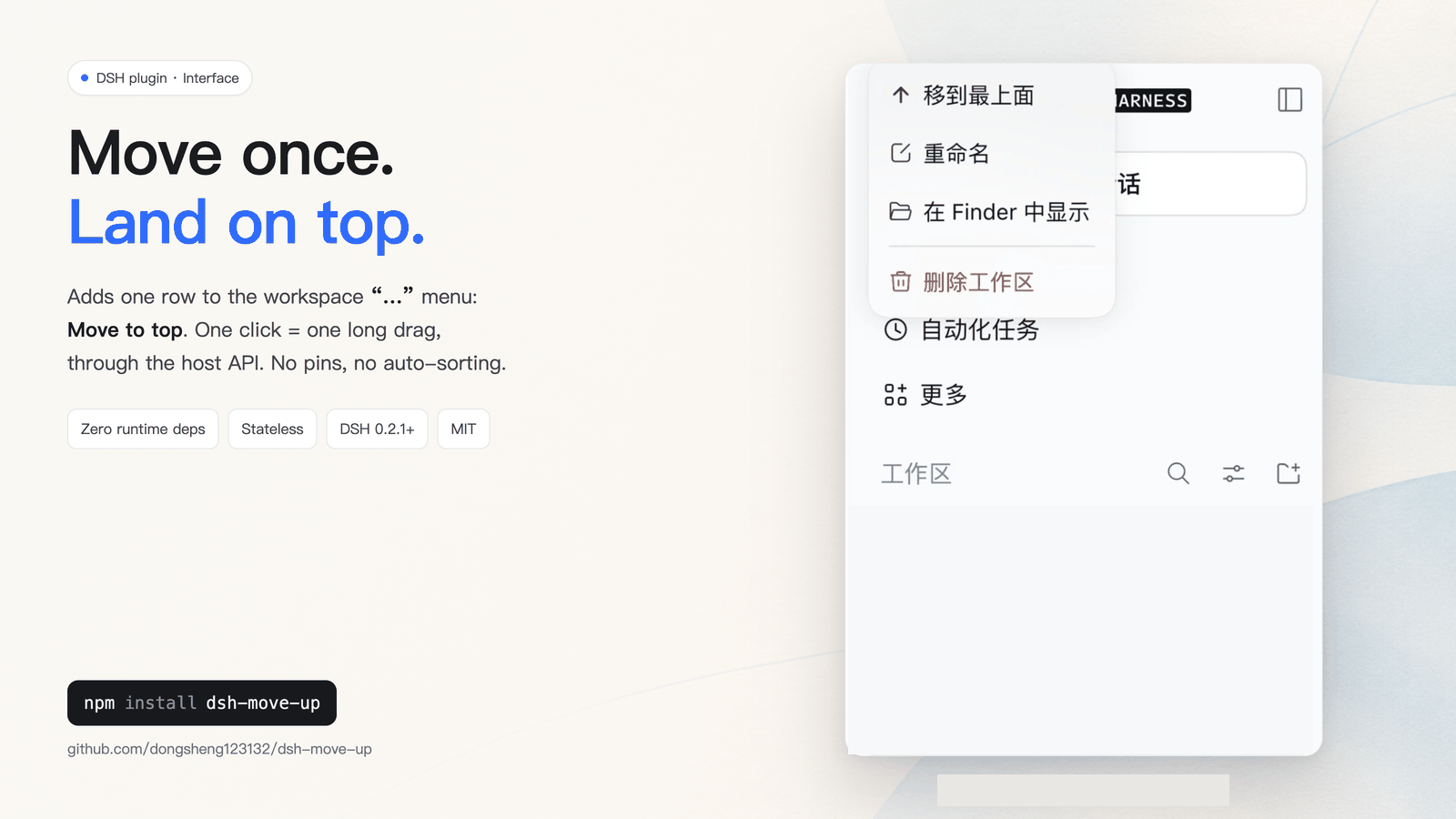
Adds Move to top to a DeepSeek Harness workspace's … menu. One click performs one reorder through the host's own workspaceRegistry.insertBefore API — the same durable write a long manual drag uses.
- One action only. No stars, favorites, pinned categories, startup re-sorting, or background work. If you never click it, nothing happens.
- No state, no dependencies, no data collection. The package ships a server half and a client half; neither writes a file.
- Manual dragging stays yours. Moving a workspace once never fights a later drag.
Verified in a real browser
Checked against the real web UI and the real Windows desktop app, both on the structured context-menu backend:
- macOS, DSH
0.2.2-rc.1web: the row renders above Rename with an up-arrow glyph; clicking it on the 4th workspace moved it to first (toast Moved to top) and the durable order in storage changed; clicking it on the workspace that was already first reported Already at the top and wrote nothing. - Windows 11, DSH desktop
0.2.2-rc.3(Electron): same row with the same glyph — the 3rd workspace moved to first with the Moved to top toast, andstorages/workspace.jsonlisted it first.
Install
In the DSH desktop app: Settings → Plugins → Add plugin, then enter:
dsh-move-up@0.4.3
For a headless or CLI-managed profile:
dsh plugin --profile <profile> add dsh-move-up@0.4.3
Upgrading from an older package name
This feature was published under two older names before it had its own repository:
| Old package | Status |
|---|---|
dsh-plugin-workspace-move-top | same feature, superseded (deprecated in favour of dsh-move-up) |
dsh-plugin-workspace-favorites | misleading name: it never had favorites or pins, it also only moved a workspace to the top; superseded |
Remove the old plugin before adding dsh-move-up, otherwise both implementations add a row and the menu shows the action twice. To roll back, remove dsh-move-up and re-add the old package — nothing else on disk is touched.
Compatibility policy
The package declares one requirement, engines.dsh: ">=0.2.1-rc.5" — a lower bound only, so a DSH upgrade never blocks the plugin from loading. Two client backends are picked at runtime:
- Structured menu (
ctx.contextMenus.register({ target: 'workspace' })) — the same public client API the built-in Rename/Delete workspace actions use. Available on DSH ≥ 0.2.2; the host renders the row, handles keyboard navigation, closes the menu and reports failures. - DOM fallback — decorates the rendered workspace menu on hosts without that API, with tolerant selectors and a duplicate guard.
If a future host moves an API, the plugin degrades to a readable error in the UI instead of breaking the client entry or reordering anything on its own. The tested window, the evidence and the five-minute upgrade runbook live in COMPATIBILITY.md.
Menu copy is localized for the eight host locales (zh, en, ja, es, fr, de, ru, pt) and falls back to English.
Add it to DSH Discover (optional)
DSH's experimental plugin market ships no official catalog: Discover lists only index sources a user adds. This repository is one:
https://raw.githubusercontent.com/dongsheng123132/dsh-move-up/main/plugin-index.json
Open Plugins → Discover → Add index source, paste the URL, then search for Move Up. Installing from Discover still goes through the normal plugin confirmation and npm.
Verify locally
npm ci
npm run check          # typecheck + build + 22 tests
npm run compat:matrix  # installs real host versions and re-runs the composition suite
npm run check proves the server composition, the client structured path and the DOM fallback. It is not a click-through of the desktop GUI; that is what the installer verifies.
License
MIT
Comments
Loading…