

dsh-find-in-conversation
Manifest validProvides a macOS-style find bar for the current DeepSeek Harness session, supporting ⌘F search, case sensitivity, highlight all, loop prompts, and IME-friendly search.

dsh-find-in-conversation
A macOS-style find bar for the current DeepSeek Harness conversation.



English | 中文
Why
DeepSeek Harness keeps long conversations in one scrollable transcript. This plugin adds a small, keyboard-first find bar so you can jump through matches without losing your place.
Screenshot
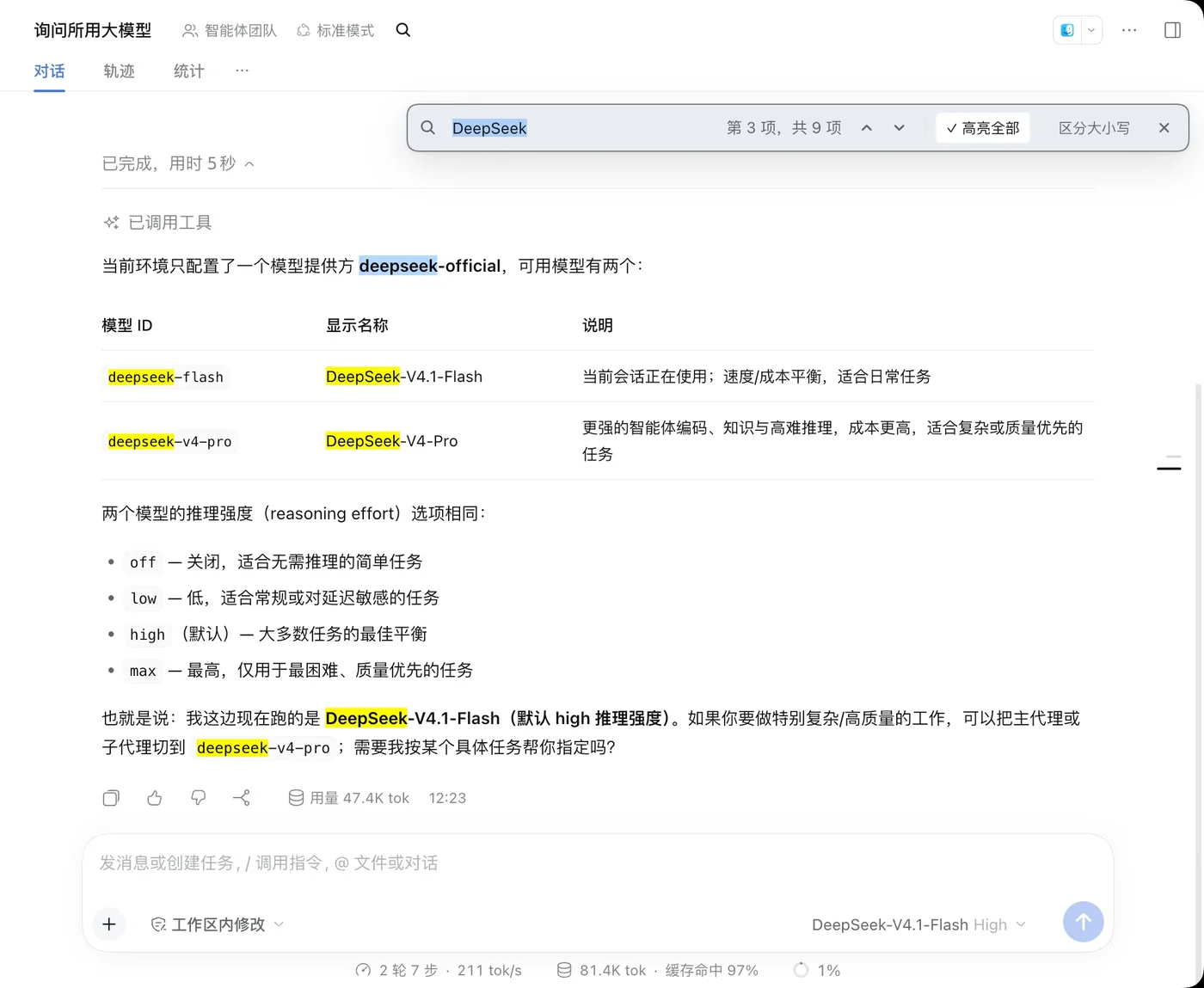
The screenshot shows the find bar over a conversation. Other matches stay yellow; the active match settles into blue after the 500 ms pulse.
It is intentionally client-only: no host tools, no session events, no network requests, and no changes to the conversation text.
Features
- Search from where you are. The first match is chosen from the current viewport. A match must be fully visible to count; a sliver at the edge is skipped in favor of the next fully visible match.
- Page-turn aware. Matches already on screen reveal with minimal movement. A match on another screen is centered so it is easy to spot.
- Navigation follows the viewport. After you scroll manually, the next
⌘G/⇧⌘Gre-anchors to the first fully visible match on the current screen instead of continuing from the old active index; later presses move from that anchor. - Readable highlights. Every match uses
#FFFB00with black text. The active match starts yellow with a short scaled halo, then settles into#B4D8FDwith black text. - Per-line halos. Wrapped matches get one halo per rendered line instead of one large box around the whole range.
- Wrap feedback. Moving past the last match or before the first shows a brief centered toast so the loop is obvious.
- IME aware. While a Chinese/Japanese input-method candidate window is open, search is paused and highlights are cleared; the final text is searched after the candidate is committed.
- Scoped shortcuts. The find shortcut is only captured when focus is in the conversation, on the find trigger, on the page body, or while the bar is open. Settings, sidebars, and terminals keep their normal keyboard behavior.
- Localized. English and Chinese UI copy and plugin metadata.
Keyboard shortcuts
| macOS | Windows / Linux | Action |
|---|---|---|
⌘F | Ctrl+F | Open the find bar and focus the input. Press again to reselect the query. |
⌘G | Ctrl+G | Next match. |
⇧⌘G | Ctrl+Shift+G | Previous match. |
Esc | Esc | Close the bar and restore the previous focus. |
Enter / ⇧Enter | Enter / Shift+Enter | Next / previous match while the input is focused. |
On macOS, Ctrl+F is deliberately not intercepted. On Windows and Linux,
the Meta key is not intercepted.
Install
Install the bundle from npm as dsh-find-in-conversation.
From DSH
Open the Plugins page in DeepSeek Harness, install
dsh-find-in-conversation, and enable it.
If you use the DSH CLI, install through the plugin command (check
dsh plugin --help for the exact profile flag on your build):
dsh plugin --profile <profile> add dsh-find-in-conversation
Remove it with:
dsh plugin --profile <profile> remove dsh-find-in-conversation
Open a conversation and press ⌘F on macOS or Ctrl+F on Windows/Linux.
From GitHub
Installing directly from the repository is also supported:
git+https://github.com/donggongailv/dsh-find-in-conversation.git
Use the Plugins page's external-bundle install or:
dsh plugin --profile <profile> add git+https://github.com/donggongailv/dsh-find-in-conversation.git
From source
For development, clone the repository and install the directory through the DSH Plugin Manager or your profile's bundle list:
git clone https://github.com/donggongailv/dsh-find-in-conversation.git
cd dsh-find-in-conversation
npm install
npm test
Requirements:
- DeepSeek Harness
>=0.2.2-rc.1 <0.3.0-0 - A Chromium-based DSH client with the CSS Custom Highlight API
- macOS, Windows, or Linux
The plugin is client-only; there is no server-side configuration.
How it works
- The find bar renders through
conversation.session.header.actionsand uses a body portal for its fixed-position UI. - Search walks text nodes inside the active
[data-conversation-session]transcript and ignores the composer, sidebar, and plugin UI. - Matches are painted with
CSS.highlights; conversation DOM is never wrapped or rewritten. - A debounced
MutationObserverkeeps results fresh while a response streams or collapsible content changes. - Timers, observers, listeners, styles, and locale registrations are owned by React/Cordis effects so closing the bar, HMR, or uninstalling the plugin removes them.
Scope and limitations
- Search covers the currently rendered transcript. History that has not been loaded, virtualized rows, and collapsed content that is not in the DOM are not searchable.
- Search is literal text, not a regular expression or fuzzy search.
- The plugin relies on the browser's CSS Custom Highlight API; a browser without it still gets counting and navigation, but not painted highlights.
- The active-match halo is a separate overlay because highlight pseudo-elements cannot scale glyphs. The yellow fill is exact; the scaling is the halo around it.
- The icon is an original SVG drawn for this project in the same visual language as the built-in DSH plugin icons, and licensed under MIT.
Development
git clone https://github.com/donggongailv/dsh-find-in-conversation.git
cd dsh-find-in-conversation
npm install
npm test
npm run check
npm run format:check
There is no build step. client.js is the browser module loaded directly by the
Harness module loader; React and React DOM are supplied by the platform, not
bundled.
npm test validates the manifest, patch, locales, client entry point, icon, and
license files. npm run check also runs node --check client.js.
Project layout
| Path | Purpose |
|---|---|
client.js | The complete client-side plugin: UI, search, highlights, shortcuts. |
index.js | Host half; intentionally empty because the plugin is client-only. |
package.json | Package metadata and DSH client/bundle declarations. |
cordis.patch.yml | Inserts the dsh-find-in-conversation plugin row. |
locale/ | Plugin Manager title and description metadata. |
assets/icon.svg | Original vector icon in the DSH house style. |
test/ | Manifest, asset, and packaging checks. |
.github/workflows/ci.yml | Formatting and test CI. |
Links
License
MIT © imhansai.
The icon is an original SVG drawing, licensed under MIT.
Comments
Loading…
Similar plugins
by beijingwahw
dsh-conv-search(对话内文本搜索)— in-conversation text search plugin for DeepSeek Harness (Ctrl+F, match case, whole word, streaming-aware)
★ 3
MIT
TypeScript
Aug 22, 2026
dsh plugin --profile web add @dsh-external/dsh-conv-searchby Ryuu-64
DSH web plugin: a Cmd/Ctrl+F find bar for the DeepSeek Harness desktop shell that searches the WHOLE conversation, not just the rendered tail.
★ 9
MIT
JavaScript
Nov 17, 2026
dsh plugin --profile web add dsh-find-allby WildPickledPepper
Ctrl+F in-conversation search for DeepSeek Harness
★ 0
MIT
JavaScript
Oct 29, 2026
dsh plugin --profile web add dsh-quick-findby uckkk
DSH 会话全文搜索:跨所有本地会话按关键词检索(支持 zstd 与明文存储)。Full-text search across DeepSeek Harness sessions.
★ 0
MIT
JavaScript
Aug 17, 2026
dsh plugin --profile web add dsh-session-searchby lingchunya
为 DeepSeek Harness 提供 Codex 风格工作区会话绑定、会话顶部快捷归档及已归档会话管理中心
★ 0
MIT
TypeScript
Sep 9, 2026
dsh plugin --profile web add dsh-workspace-enhanceby drscrewdriver
给 DeepSeek Harness 侧边栏加一个会话内容检索——标题/内容一键切换,还能按用户/回复/工具筛选
★ 9
↓ 19/wk
MIT
TypeScript
Nov 16, 2026
dsh plugin --profile web add dsh-session-search-toggle