

dsh-archive-cleaner
DiscoveredDeepSeek Harness (DSH) Plugin: Clean up archived conversations/sessions, move them to a quarantine zone or delete them directly to free up disk space. Clean up archived DSH sessions and reclaim disk space.
dsh-archive-cleaner


DeepSeek Harness(DSH)插件:清理已归档的对话/会话,释放磁盘空间。
中文说明 · English · 更新日志 · MIT License
DSH 里的「归档」只是把对话从侧栏藏起来,
session.v4.jsonl.zstd一个字节都不会删, 而且界面上没有任何删除入口。用久了,几百 MB 没人会再打开的会话就一直躺在磁盘上。 这个插件在 设置 → 通用 里加一行,列出全部已归档会话(工作区、创建时间、占用大小), 勾选后把它们移进隔离区——或者,如果你明确勾选,直接删除。
适用关键词:DeepSeek Harness 插件 / DSH plugin / 会话归档清理 / 对话清理 / 磁盘空间 / archive cleaner / session cleanup / cordis bundle。
中文说明
问题:归档 ≠ 删除
DSH 把每个会话的完整日志写在:
$DSH_HOME/sessions/<工作区>/<session-id>/session.v4.jsonl.zstd
「归档」只是把 id 记进 $DSH_HOME/storages/workspace.json 的 global.archivedSessionIds,
界面上从此看不见它——但文件、统计缓存 session_projcache.json 里的记录,全都还在。
官方的右键菜单只有「置顶 / 归档 / 取消归档 / 重命名 / 派生 / 复制 Session ID」,没有删除。
实测一个用了几个月的 profile:38 个已归档会话,合计 133.9 MB,其中一个单会话就有 10.2 MB。
它做什么
| 步骤 | 结果 |
|---|---|
| 打开 设置 → 通用 | 多出一行「清理已归档工作区」 |
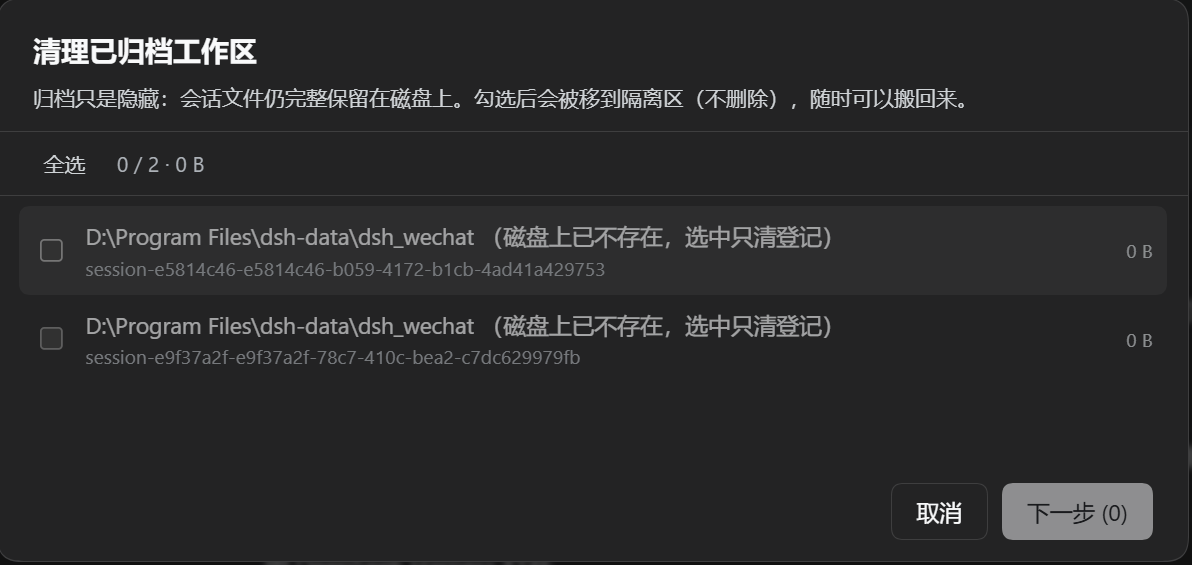
| 点「开始清理」 | 弹窗列出全部已归档会话:工作区路径、创建时间、会话 id、占用大小、勾选框 |
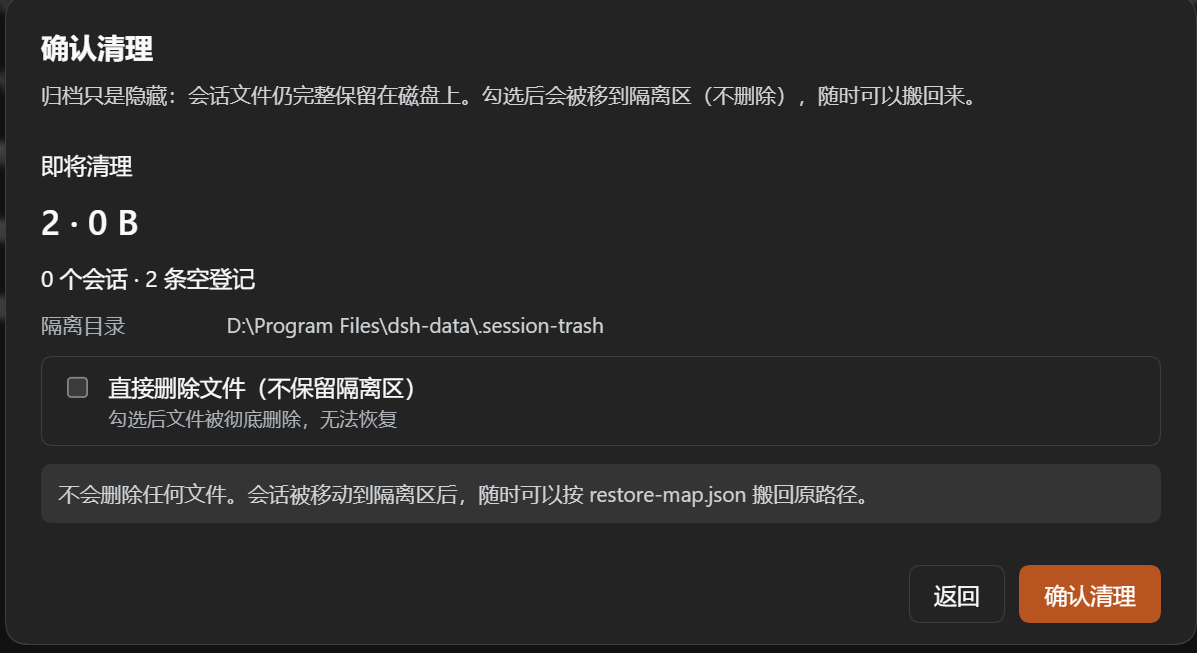
| 勾选后点「下一步」 | 进入确认页:条数、合计大小、隔离目录,以及「直接删除文件」选项 |
| 确认 | 所选会话被移到 $DSH_HOME/.session-trash/<时间戳>/,并在旁边写 restore-map.json |
| 勾选「直接删除文件(不保留隔离区)」 | 同上,但目录被真正删除:没有隔离区、没有 restore-map,不可恢复 |
| 重启 DSH | 侧栏不再列出这些会话 |
界面
1. 选择要清理的会话——工作区路径、会话 id、占用大小;磁盘上已无文件的会标注 「磁盘上已不存在,选中只清登记」。
2. 二次确认——条数、合计大小、隔离目录,以及「直接删除文件」选项。默认不删除, 按钮是「确认清理」;勾选删除后按钮变成「彻底删除」。
两种清理模式
| 模式 | 行为 | 可否恢复 |
|---|---|---|
| 隔离(默认) | rename() 到 .session-trash/<时间戳>/<id>,写 restore-map.json 记录原路径与工作区 | 可以:把目录搬回 restore-map.json 里的路径,重启即可 |
| 直接删除(需在确认页显式勾选) | rm -rf 会话目录,只保留注册表裁剪 | 不可以 |
两种模式都会把 id 从 workspace.json 的三处(archivedSessionIds、pinnedSessionIds、
各工作区的 sessionIds)和 session_projcache.json 里剔除,改写前先存
*.bak-<时间戳> 备份。
安装
最省事的方式(会把依赖写进 profile,之后 pnpm install 不会把它清掉):
dsh plugin add github:dongfangxy/dsh-archive-cleaner
应用内同样可以:设置 → 插件 → Add plugin,填同一串。
不要把仓库目录手工拷进 node_modules——下一次 pnpm install 会把它当多余包删除。
要改源码,就声明一个 link: 依赖:
// <profile>/package.json
"dependencies": {
  "dsh-archive-cleaner": "link:<本仓库的绝对路径>"
}
然后 pnpm install --dir <profile>,重启 DSH。
安全设计
- 只认「已归档」的 id:会话必须同时出现在
archivedSessionIds里,否则跳过并说明原因; - 客户端不传路径:前端只发 id 与模式,目录由宿主自己解析;
- 路径越界拒绝:解析后的目录必须仍在
$DSH_HOME/sessions/之内; - 未知模式直接拒绝:
mode只接受quarantine/purge,其他值在任何文件被碰之前返回错误; - 注册表改写前备份:
workspace.json.bak-<时间戳>、session_projcache.json.bak-<时间戳>; - 只剩登记的空会话也可清:磁盘上已无文件的已归档 id 会标成「磁盘上已不存在,选中只清登记」, 选中后只删登记、不动文件——这正是手工清理留下的残留条目。
已知限制
- 入口在 设置 → 通用,不在侧栏账号菜单里:那个菜单编译在
@deepseek-ai/dsh-client-ui-settings-account里,没有留给第三方的插槽; - 运行中清理的会话,要重启 DSH 后才会从侧栏消失(侧栏状态在宿主内存里);
- 插件直接读 profile 的
workspace.json;未来 DSH 若改变该文件结构,列表会变空而不是瞎猜; - Windows / macOS / Linux 通用,单元测试不依赖平台。
开发
npm test # node --test "test/*.test.mjs"
测试会在系统临时目录里搭一个假 profile,覆盖:列目录与统计、隔离、注册表裁剪、
直接删除、非法 id、路径穿越、空选择、空归档集。client.js 由宿主的模块加载器执行,
可以 require('react')、require('react-dom')。
许可
MIT © Chengxi Zhang
English
A DeepSeek Harness (DSH) plugin that cleans up archived conversations and frees disk space.
The problem: archiving is not deleting
DSH keeps every session log at $DSH_HOME/sessions/<workspace>/<session-id>/session.v4.jsonl.zstd.
Archiving only appends the id to global.archivedSessionIds in
$DSH_HOME/storages/workspace.json, which hides the row from the sidebar — the bytes, and the
entry in session_projcache.json, stay exactly where they were. The row menu offers pin,
archive, unarchive, rename, fork and copy-session-id, but no delete.
On one profile in daily use this added up to 38 archived sessions, 133.9 MB, with a single session taking 10.2 MB.
What it does
| Step | Result |
|---|---|
| Open Settings → General | One extra row: Clean archived workspaces |
| Click Open | A dialog lists every archived session: workspace, creation time, id, size, checkbox |
| Select rows, click Next | A confirmation page repeats the count, the total size and the quarantine folder |
| Confirm | Selected sessions move to $DSH_HOME/.session-trash/<timestamp>/ with a restore-map.json |
| Tick Delete the files instead of quarantining them | Same flow, but the directories are removed: no quarantine, no restore map, irreversible |
| Restart DSH | The sidebar stops listing them |
Screenshots
1. Choose what to clean — workspace path, session id, size. Sessions whose files are already gone are marked no longer on disk and only lose their registry entry.
2. Confirm — count, total size, quarantine folder, and the delete option. With the box unticked the button reads Confirm cleanup; ticking it switches the button to Delete permanently.
Two modes
| Mode | Behaviour | Reversible |
|---|---|---|
| Quarantine (default) | rename() into .session-trash/<timestamp>/<id>, with a restore-map.json recording the original path and workspace | Yes — move the directory back and restart |
| Delete (opt-in on the confirm page) | rm -rf the session directory; only the registry entries are pruned | No |
Both modes prune the id from three places in workspace.json (archivedSessionIds,
pinnedSessionIds, every workspace's sessionIds) and from session_projcache.json, writing a
*.bak-<timestamp> copy of each file first.
Install
dsh plugin add github:dongfangxy/dsh-archive-cleaner
The same string works in the app: Settings → Plugins → Add plugin.
Do not copy the checkout into node_modules: the next pnpm install prunes it. For a local
checkout declare a link: dependency in <profile>/package.json and run
pnpm install --dir <profile>.
Safety
- Only ids that the profile calls archived are actionable; anything else is skipped with a reason.
- The client sends ids and a mode, never a path — the host resolves every directory itself.
- A resolved directory must still live under
$DSH_HOME/sessions/, or it is refused. modeacceptsquarantineorpurgeonly; an unknown value is rejected before any file is touched.- Registry rewrites are backed up as
*.bak-<timestamp>. - Archived ids whose files are already gone are listed as no longer on disk and only lose their registry entry — the usual leftover after a manual cleanup.
Known limitations
- The entry lives in Settings → General, not the sidebar account menu: that menu is compiled
into
@deepseek-ai/dsh-client-ui-settings-accountand exposes no slot. - Sessions cleaned while DSH runs disappear from the sidebar after a restart.
- The plugin reads the profile registry directly; if a future DSH changes
workspace.json, the list comes back empty rather than guessing. - Windows, macOS and Linux; the unit tests are platform independent.
Development
npm test # node --test "test/*.test.mjs"
The tests build a throwaway profile under the OS temp directory and cover listing,
quarantine, registry pruning, purge, malformed ids, path traversal, empty selection and an
empty archive set. client.js runs under the host module loader and may require('react')
and require('react-dom').
License
MIT © Chengxi Zhang
Comments
Loading…
Similar plugins
by lxchapu
DSH(DeepSeek Harness)插件:把会话从磁盘上彻底删除。任意会话的「…」菜单里可删单条,侧边栏切到「仅显示已归档」时可一键删除全部已归档会话;两者都先弹二次确认,正在运行的会话会被拒绝删除。
★ 1
MIT
JavaScript
Oct 3, 2026
dsh plugin --profile web add @lxchapu/dsh-session-purgeby luckamuu
DeepSeek Harness 插件:提供删除已归档会话的入口(可以彻底删除不会在次出现)
★ 0
MIT
JavaScript
Oct 8, 2026
dsh plugin --profile web add @local/archived-sessionsby chen1pengvincent
DSH (DeepSeek Harness) plugin: manage archived sessions — native unarchive, recoverable quarantine, permanent purge, search/filter/sort, retention. 归档会话管理插件。
★ 0
MIT
JavaScript
Nov 5, 2026
dsh plugin --profile web add dsh-archived-managerby DelayNooMore
DSH (DeepSeek Harness) 会话回收站插件:移入回收站、恢复、永久删除,设置页管理
★ 1
MIT
JavaScript
Oct 2, 2026
dsh plugin --profile web add dsh-plugin-session-trashby lanlandeli
DeepSeek Harness 会话管理插件|归档与恢复、批量操作、工作区分组、子代理关系、活动详情、记录目录与安全文件清理
★ 2
↓ 20/wk
NOASSERTION
TypeScript
Aug 18, 2026
dsh plugin --profile web add dsh-conversation-managerby Dubai1210
DSH Plugin(DeepSeek Harness 插件):在会话菜单「归档会话」下方增加「删除会话」,一次点按删除该会话及其全部数据。Adds a Delete item under Archive that removes a session and all of its data.
★ 0
MIT
JavaScript
Oct 22, 2026
dsh plugin --profile web add dsh-session-delete