
dsh-sidebar-restart
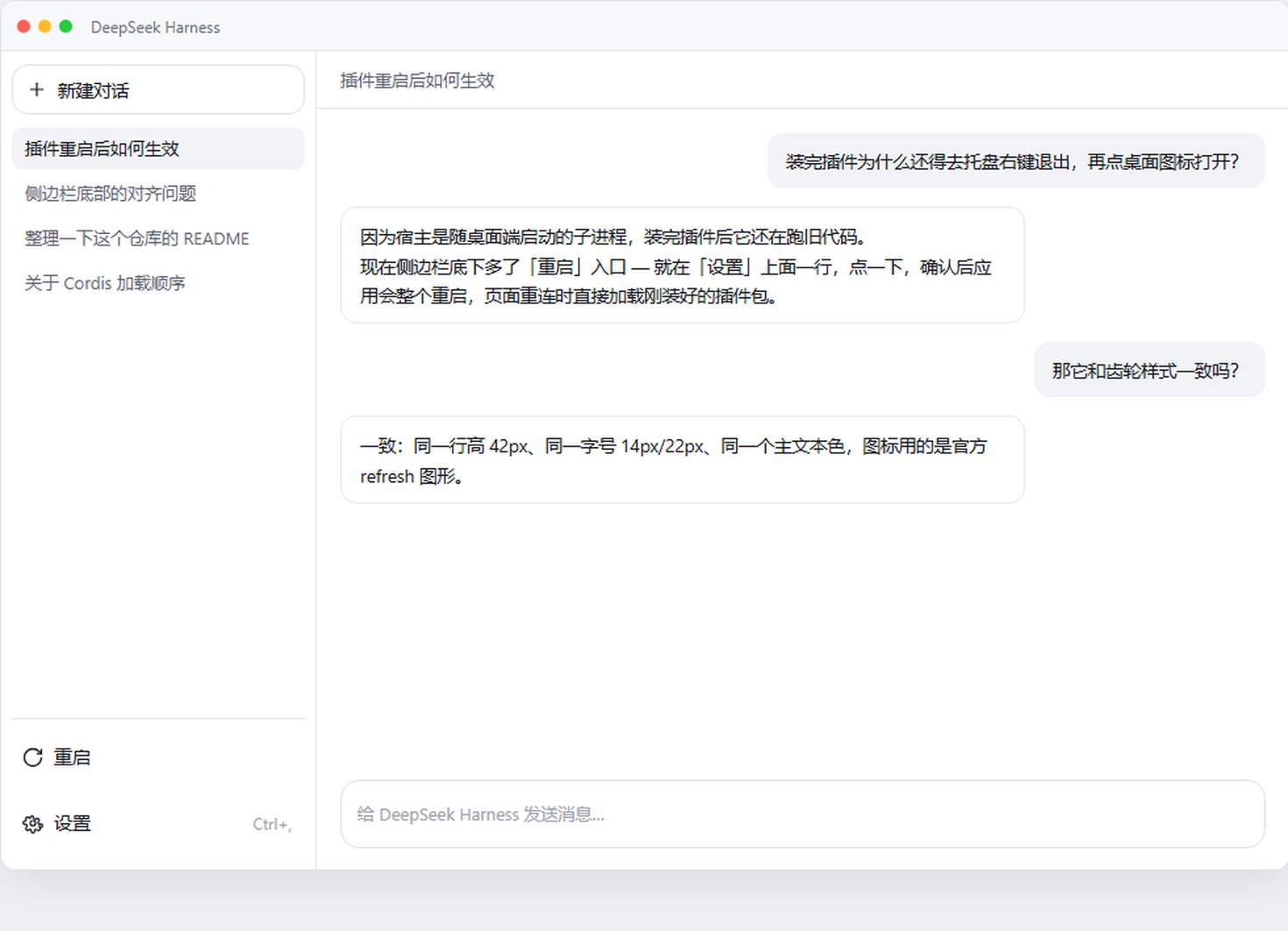
Manifest validAdds a Restart row to the desktop app's sidebar foot beside Settings that restarts the app and reloads the page onto the newly installed plugin bundle.
dsh-sidebar-restart
One row in the sidebar foot, beside the settings gear: restarts the DSH desktop app in a single click, instead of quitting from the tray and relaunching by hand.

Install
dsh plugin --profile desktop add dsh-sidebar-restart # once it is on npm
or straight from the repository:
dsh plugin --profile desktop add github:DONGBIN007/dsh-sidebar-restart
Then restart the app once by hand so the plugin loads — which is the last time you have to do that, since this button is what you use from then on.
Desktop only. On a plain dsh web profile the row renders disabled and says
why; there is no desktop process to replace there. If you wanted the Web server
restarted, that is a different plugin
(dsh-restart-button).
What it does, in one line
Adds a Restart row to the desktop app's sidebar foot beside Settings. Clicking it asks the Host to restart; a detached helper kills the Electron main process and the Host by PID, waits until both are gone, starts the app again, and the tab reloads itself once the replacement answers with a new boot id — so a plugin you installed a moment ago is actually running afterwards.

What it looks like
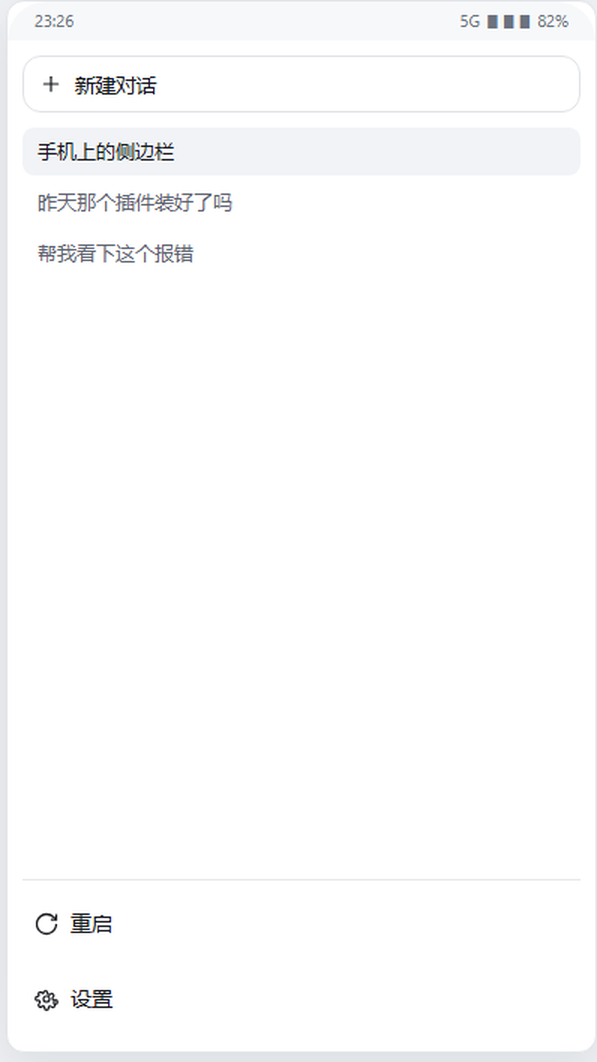
| Desktop app (wide sidebar) | Mobile drawer |
|---|---|
| |
Both follow the host's own rule rather than a breakpoint of mine: the label appears exactly where the host shows one for the gear, i.e. when the sidebar is wide. In the narrow 56px rail the row stays icon-only and keeps the gear's 36×36 target.
The control is a copy of the gear row next door
The seat is sidebar.footer.action — "optional actions beside Settings at the
sidebar foot". The shipped sidebar renders it as footerActions, a flex row that
footArea lays out above settingsArea (the gear row). So in the plain host
footer this control sits directly above the gear.
It is deliberately styled as the gear's twin, with every value read from the
shipped .wCInkW_trigger (ui-settings-general) and the seat's own sibling
.dsh-mobile-control__trigger, which agree:
| Property | Value | Why |
|---|---|---|
| colour | --dsw-alias-label-primary | the gear uses the primary label colour; a secondary-coloured icon beside it is a visible mismatch |
| height | 42px | the footer row height both host controls use |
| padding | 0 10px 0 8px, gap 8px | the gear's own padding and icon/label gap |
| radius | --dsw-radius-md | the gear's radius, not the small one |
| label | 14px / 22px, font: inherit | the gear label's typography |
| row box | calc(100% + 4px), margin 4px -2px | the gear's row is .wCInkW_triggerRow{width:calc(100% + 4px);margin:4px -2px} — it bleeds 2px past the column on each side, so its content begins at parentLeft − 2 + 8 = +6. Without the same bleed this row's icon and label sit 2px to the right of the gear's, and the two never line up. This button is its own row, so it carries both the bleed and the padding. |
Verified on a real phone screenshot (1216×2640, so ≈3.5 device px per CSS px), measuring the dark ink of each row directly:
| row, on the device | icon ink left | label ink left | icon ink | row centre |
|---|---|---|---|---|
| before the bleed: 重启 | 73 | 157 | 50 | 2356.5 |
| before the bleed: 设置 | 67 | 150 | 48 | 2531.5 |
| after the bleed: 重启 | 66 | 150 | 50 | — |
| after the bleed: 设置 | 67 | 150 | 48 | — |
So the old geometry sat +6 device px (≈2 CSS px) right of the gear — the 2px the
CSS predicted — and the shipped geometry lands within 1 device px on the icon and
exactly 0 on the label. The two row centres are 175 device px apart, which is
175 / 3.5 = 50.0 CSS px — precisely the designed 21 + 4 + 4 + 21.

The orange line is the gear's own icon left edge. Before, the ↻ icon and the 重启 label both sit to its right; after, they land on it.
The equivalent check against the host's shipped CSS in a controlled 340px column gives the same result to the hundredth:
| row | icon left | label left |
|---|---|---|
| the gear | 5.67 | 29.67 |
| this button, before the bleed | 7.67 (+2.00) | 31.67 (+2.00) |
| this button, after the bleed | 5.67 (0.00) | 29.67 (0.00) |

One residual is not a CSS mismatch and is deliberately left alone: on the device
the ↻ ink is 50px against the gear's 48px. Both icons are the host's own primitives at
the host's own wide ? 16 : 18, drawn on the same 16px box with the same 1.3 stroke —
a near-full circle simply carries more ink than a compact gear. Making the two inks
match would mean drawing the shipped artwork below the size the host asks for, which
is the one thing this row must not do.
The label follows the host's own wide convention — no invented breakpoint.
The gear's TriggerContent renders wide ? <icon size 16> + label : <icon size 18>,
and dsh-mobile, the seat's other occupant, does wide ? <label> : undefined.
The two icons can never disagree, because both seats are handed the same
wide. In the shipped sidebar there is one source:
const wide = windowsTitlebar ? !collapsed : !collapsed || !settled;
renderSlot("sidebar.footer.action", { wide })   // this plugin
renderSlot("sidebar.settings",      { wide })   // the gear
and the gear forwards it unchanged to settings.trigger. So this plugin's
wide ? 16 : 18 is the gear's wide ? 16 : 18, by construction.
The registered component must forward the seat's props. One that takes no
parameters drops wide, and the control then stays in its icon-only shape in every
state while still rendering "fine" — a defect invisible in review and obvious on a
phone. That is exactly what the first mobile screenshot showed: a bare icon in the
open wide drawer, above a labelled 设置. test/client.test.mjs now pins the
forwarding, and the check was confirmed by reintroducing the bug and watching it
fail rather than trusting a green run.
- Wide column (desktop sidebar; also the mobile drawer while it is open): icon + the word 重启 / Restart, in the gear's font and colour.
- Collapsed 56px rail: 36×36, icon grown to 18px, no label — the gear's rail
state. Note this is the one place the two host references differ, and the gear
wins:
.wCInkW_trigger.wCInkW_railkeeps--dsw-radius-md(12px), whiledsh-mobile's.is-railswaps toborder-radius: 50%. A circle beside a rounded square reads as a different control family, so this plugin uses the gear's rounded square.
On mobile specifically (dsh-mobile, overlay breakpoint (max-width:720px), the
drawer is min(88vw, 340px)): the mobile bundle's !important rules target the
composer, the settings options page and sidebar row menus — none of them
touch sidebar.footer.action or the gear, and mobile defines no icon-size
variable. It only reads the host sidebar's own _collapsed class to decide
whether the drawer is open. So the two icons stay in step by construction, not by
a mobile-specific override.
Two skins/layouts are served by the same code, with no branching: with a skin that
folds the footer into the account popover (for example dsh-claude-style's
collapseFooter, on by default), the skin hoists this same entry into its menu and
renders it as a menu row — where the identical icon still reads as part of the set.
The glyph is the shipped IconRefreshOutlineArtwork from
@deepseek-ai/dsh-client-ui-primitives, copied rather than imported (a plain-JS
bundle may not load a Harness Client package, and importing one is what the plugin
rules forbid). Same 16×16 box, same 1.3 medium stroke, same currentColor and
default caps, so it reads as part of the host's own icon set.
Why the restart works this way
The obvious implementation is not available, and each dead end was verified against the installed build rather than assumed:
- The button cannot go inside the account menu. Its items (
settings,contact,signout) are a hard-coded array in@deepseek-ai/dsh-client-ui-settings-account; the menu exposes no plugin seat. - There is no restart API for plugins.
window.dshDesktopexposes onlybrowser,deviceInfo,keyboard,shortcutsandupdates; none of the 25dsh-desktop:*IPC channels restarts anything. The Host is a plain Node child of the Electron main process (ELECTRON_RUN_AS_NODE=1), so it cannot callapp.relaunch(). The built-in "Restart App and Host" menu item exists but is gated on!app.isPackaged, so a released build never shows it. - Closing the window does not quit.
window.on('close')hides to the tray. Launching the app again is also a no-op: the single-instance lock turns the second launch into "focus the existing window".
So the restart is an out-of-process handoff: the Host answers 202, then a
detached helper kills the Electron main process and the Host by PID, waits
until both are really gone (which is what keeps the relaunch from being demoted
by the single-instance lock), and starts the application again with the Node-mode
marker removed.
What the tab does while that happens
The page cannot be told "restart finished" by a connection that is being torn
down, so after the 202 it polls the status route and compares the boot id.
A different boot id means the new process is answering, and the tab then calls
location.reload(). That reload is the point of the whole feature: it is what puts
the browser on the newly installed bundle instead of leaving it on the old code —
and it is why the progress dialog is dismissable (Escape, the scrim, or its
button) rather than a modal trap if the handoff never lands. The poll is read-only
and stops after POLL_LIMIT attempts, handing the UI back.
Endpoints
Both are same-origin, loopback-only.
| Route | Method | Purpose |
|---|---|---|
/dsh-desktop-restart/status | GET | boot id, PIDs, and whether a restart is possible here (with the reason when it is not) |
/dsh-desktop-restart/restart | POST | performs the restart; answers 202 before the app is killed |
POST refuses any request that carries a forwarding header, does not come from
loopback, has an Origin that disagrees with Host, or is not
application/json (a cross-site page cannot send that content type without a
preflight this server does not answer). A single-flight latch makes a second
click during a restart a no-op instead of a second application.
Settings
| Key | Default | Meaning |
|---|---|---|
handoffDelayMs | 400 | How long the helper waits before killing, so the 202 reaches the browser. |
Logs
Each restart writes dsh-desktop-restart-<timestamp>.log to the system temp
directory; the path is shown in the progress dialog and returned by the 202.
Limits
- It is a hard restart. It does not run the shell's quit inspection, and running tasks are interrupted — which is why the button confirms first.
- Freshly installed bundles may still need one manual restart to load. After that, this button is the way to restart.
- If a future DSH release changes the process model, the plugin degrades to a disabled button with a stated reason rather than damaging the app.
Development
node --check index.js && node --check client.js
npm test
test/client.test.mjs pins the parts of the client half that are invisible until
they are wrong: that it loads React and no Harness package, that the glyph is the
official artwork rather than a redraw, that the control matches the gear row's
colour/metrics/typography, that the label follows the host's wide convention,
that every visible colour is a theme token, and that its only mutation is the JSON
restart POST.
Comments
Loading…
Similar plugins
by FuriousKinght
A button at the foot of the sidebar that restarts the DSH desktop app and reloads the page when it comes back.
★ 0
MIT
JavaScript
Oct 15, 2026
dsh plugin --profile web add dsh-restart-buttonAdds a refresh button to the sidebar footer that reloads the plugin list and the page so newly installed plugins take effect without restarting the desktop app.
★ 0
dsh plugin --profile web add dsh-refreshby StabCut
DSH Desktop sidebar restart button: orderly relaunch of DSH Desktop from the sidebar settings row (based on desktopActions.requestRestart).
★ 0
MIT
JavaScript
Aug 21, 2026
dsh plugin --profile web add dsh-plugin-restart-desktopby IHS470
DeepSeek Harness restart button in the DSH desktop window title bar
★ 3
↓ 55/wk
MIT
JavaScript
Oct 3, 2026
dsh plugin --profile web add dsh-plugin-restartby yizhixiaokong
Adds a restart row to Settings → General that relaunches dsh web with the same invocation through a detached helper, refuses under a detected systemd supervisor unless allowRestart is true, and tests
★ 0
MIT
JavaScript
Sep 28, 2026
dsh plugin --profile web add dsh-simple-restartby hadesybil-hub
Adds a restart button next to the shutdown button in the bottom-right of the DSH Web GUI; the server comes back up and the browser reopens.
★ 0
MIT
JavaScript
Sep 28, 2026
dsh plugin --profile web add dsh-restart-button