

DuckBI-DSH
DiscoveredLocal-first DuckDB analytics for DeepSeek Harness — chat with your Excel & logs, get charts and reports.
DuckBI · 让 AI 直接分析你电脑里的 Excel 和日志
中文 | English
本地 DuckDB 引擎 · 对话式取数 · 一键出图出报表 不用上传文件、不用建仓库、不用学 BI 工具 —— 指一个目录,然后开始聊天。
#dsh-plugin · DuckDB · local-first · Excel / Log / CSV / JSON · MIT


30 秒看懂
| 传统做法 | DuckBI | |
|---|---|---|
| 数据怎么进来 | 手动上传到 SaaS / 建数仓 / 写 ETL | 指一个文件夹,自动建表 |
| 怎么取数 | 拖拽维度、写 DAX、找人提需求 | 说一句话,AI 写 SQL |
| 大文件 | 网页传不动、Excel 打不开 | 1.3 GB 日志 9 秒入库,370 万行秒级聚合 |
| 报表 | 模板工具里拼 | 一句话导出 Excel / PDF |
| 数据边界 | 全量上传云 | 原始文件永不外发;计算全在本机 |
它不是一个"上传文件给 AI 看"的工具,而是一个装在你机器上的分析引擎,AI 只负责下命令。
三步装好(约 2 分钟)
前提:装了 DeepSeek Harness(桌面版或 dsh CLI),且至少启动过一次(这样 profile 已存在)。
git clone https://github.com/don2ccc/DuckBI-DSH.git
cd DuckBI-DSH\packages\dsh-plugin-duckbi
npm install
node install.mjs
装完确认一眼:
Get-Content "$env:USERPROFILE\.dsh\duckbi\plugin-loaded.json"
看到 "ok": true 就装好了 → 重启一次 Harness(首次加载需要)→ 在对话里说:
把
D:\数据\销售加进来,看看有哪些数据
没装 git?用「Code → Download ZIP」解压后从
cd那步继续。 换 profile、离线、手动安装、排错见下面的 安装详解。
它能做什么
① 指个目录,就变成数据库
你:把 D:\data\销售 加进来
AI:→ 扫描 13 个文件 → 建了 3 张表(1,099,083 行),9.4 秒
支持 .log .csv .tsv .json .jsonl .ndjson .parquet .xlsx .xlsm,
压缩包(.gz / .zst)直接读,GB18030 中文编码自动识别转码,
Excel 多个工作表自动拆成多张表,中文表头原样保留。
② 聊天就是 SQL 编辑器
你:North 区各产品月度退货率
AI:(发现每个格子只有 1–3 单 → 主动降维到半年口径重算,并告诉你为什么)
模型会先看表结构再写 SQL,跑完看结果,不对就改。你可以只聊业务,不说 SQL。
③ 图直接在对话里显示
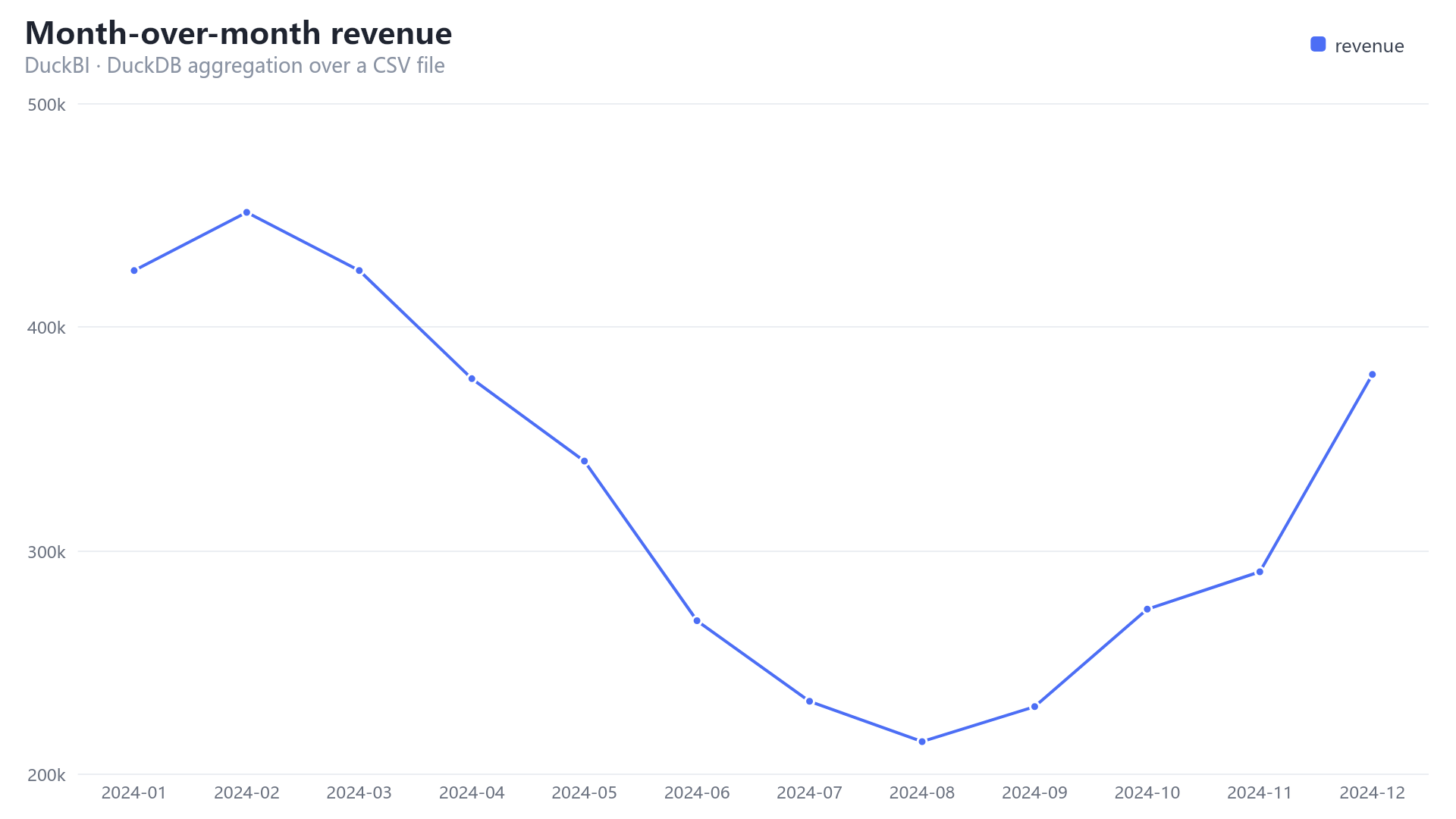
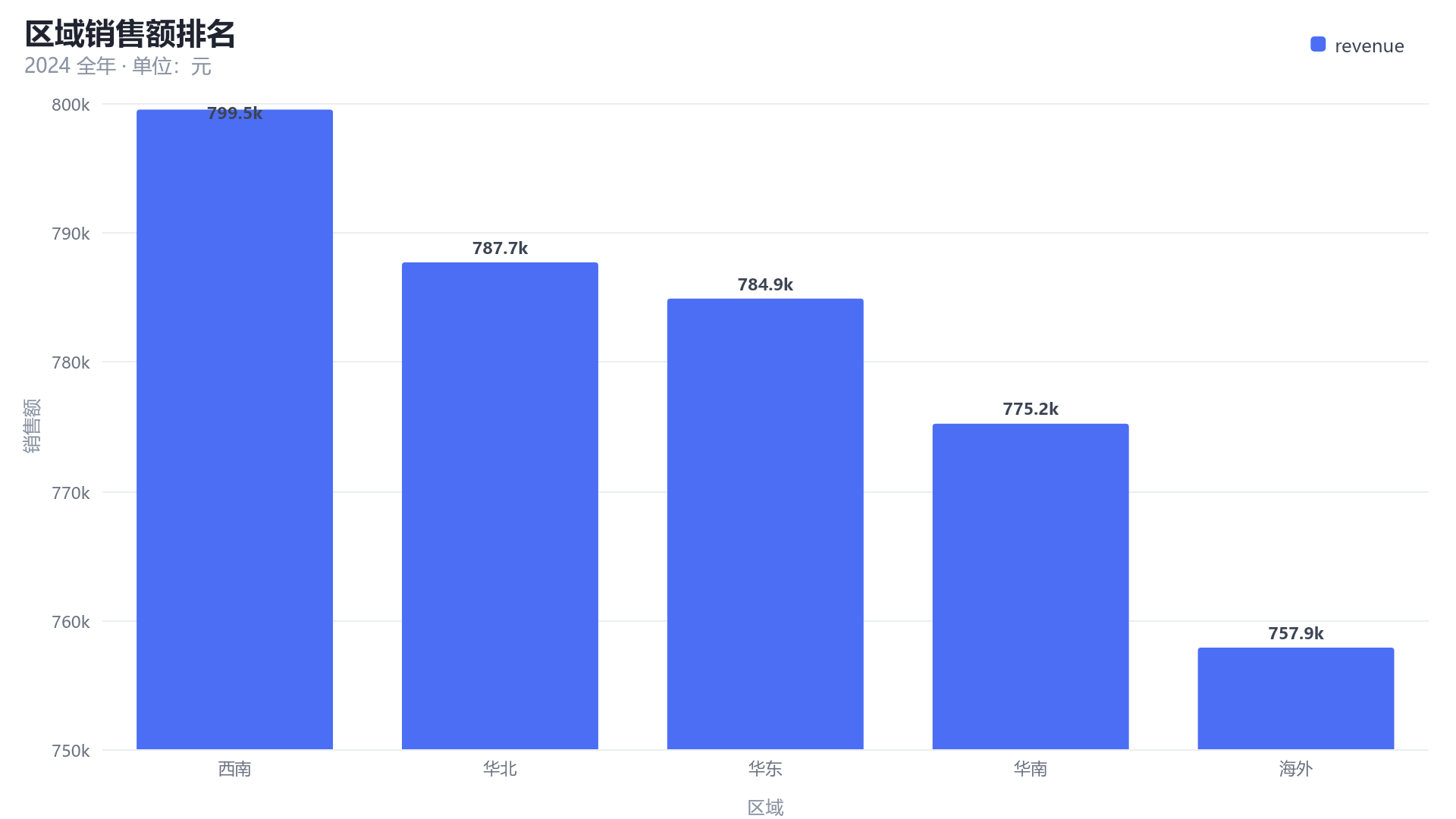
柱状、折线、面积、环形、散点,服务端用 Canvas 渲染成 PNG,有附件服务时直接内嵌在聊天里。
中文标题、千分位刻度、自动折叠 Other 都处理好了。
④ 报表一句话落地
你:按这个口径做份报表,我要给总监汇报
AI:→ 多节 PDF(区域积分卡 / 同期增长 / 交叉表,带图表与口径说明)+ 同口径 Excel
版式定下来后可以固化成模板,之后 node scripts/report.mjs <源文件> 一条命令重跑,
不经过模型、0 token,适合日报/周报。
Excel 带表头样式、冻结窗格、筛选、数字格式、生成信息页;PDF 是 A4 横向、跨页重复表头、页码、 中文字体内嵌。
数据到底去了哪儿(重要,请读完)
没有任何文件被上传。 具体边界如下:
| 环节 | 在哪执行 | 会离开你的机器吗 |
|---|---|---|
| 读 Excel / 日志、建表、SQL 聚合 | 本机 DuckDB(嵌入式,无服务、无端口) | 不会 |
| 图表渲染、Excel / PDF 生成 | 本机 Node.js | 不会 |
| 原始文件内容 | —— | 永不外发 |
| 列名、表结构、查询结果表(默认 ≤ 200 行) | 随对话发给模型 | 云端模型:会 |
| 你打的字、模型写的 SQL | 随对话发给模型 | 云端模型:会 |
也就是说:能本地算的绝不外发,模型只看到"你允许它看到的聚合结果",看不到你的原始文件。
想要绝对零外发?换成本地模型即可
Harness 支持任意 OpenAI 兼容端点。把它指向你局域网里的推理服务(Ollama / vLLM / LM Studio 都行), 再配合本插件,整条链路——数据、计算、模型推理——全部不出机器:
# cordis.patch.yml
- id: llm-pi-ai
  name: '@deepseek-ai/dsh-llm-pi-ai'
  config:
    providers:
      local:
        api: openai-completions
        baseURL: http://127.0.0.1:11434/v1   # 你的本地推理服务
        apiKeyEnv: LOCAL_LLM_KEY
        models: [{ id: qwen2.5-coder:14b, name: Qwen2.5 Coder 14B }]
再把 maxRows 调小、只让模型看聚合结果(GROUP BY 之后再问),外发面就趋近于零。
安装详解
安装 = 把包放进 profile 能解析的位置 + 在 profile 的补丁文件里加一条 insert。
仓库自带 install.mjs 把这两步做完,也可以手动做(见下文,脚本只做这两件事,不碰别的)。
0. 前置条件
| 要求 | 怎么确认 | 说明 |
|---|---|---|
| DeepSeek Harness | 桌面版能打开,或 dsh --version 有输出 | 桌面版与 CLI 都可以 |
| Node.js 20+ | node -v | 只用于安装与跑脚本;插件运行时用的是 Harness 自带的 Node |
| 至少一个 profile | dir %USERPROFILE%\.dsh\profiles(macOS/Linux:ls ~/.dsh/profiles) | 没看到 desktop 就先启动一次桌面版,或改用 --profile web |
DSH_HOME默认是%USERPROFILE%\.dsh(macOS/Linux 是~/.dsh)。装在别处的话所有命令加--home <你的路径>。
方式 A:git clone(推荐)
git clone https://github.com/don2ccc/DuckBI-DSH.git
cd DuckBI-DSH\packages\dsh-plugin-duckbi
npm install            # 按你的平台拉原生二进制(约 130 MB,首次约 10 秒)
node install.mjs       # 默认装到 desktop profile
要装到别的 profile、或顺便预登记数据目录:
node install.mjs --profile web
node install.mjs --sources D:\日志,D:\台账 --warmup eager
方式 B:下载 ZIP(没有 git)
- 仓库页 → Code → Download ZIP → 解压,例如
D:\DuckBI-DSH-main - 然后同方式 A:
cd D:\DuckBI-DSH-main\packages\dsh-plugin-duckbi
npm install
node install.mjs
方式 C:一行命令装发布包(最快)
# 1) 直接把 GitHub Release 的包装进 profile(依赖随之安装;pnpm 会解析这个 tarball URL)
dsh plugin --profile desktop add https://github.com/don2ccc/DuckBI-DSH/releases/download/v0.1.0/duckbi-dsh-plugin-duckbi-0.1.0.tgz

# 2) 再写配置(包已在 node_modules 里,用 --no-link 跳过软链)
node "$env:USERPROFILE\.dsh\profiles\desktop\node_modules\@duckbi\dsh-plugin-duckbi\install.mjs" --no-link
也可以先用浏览器下载 Releases 里的 .tgz,
或者拿同事发你的包,把第一步换成本地路径:
dsh plugin --profile desktop add .\duckbi-dsh-plugin-duckbi-0.1.0.tgz
自己打包给同事:
cd packages\dsh-plugin-duckbi
npm pack          # -> duckbi-dsh-plugin-duckbi-0.1.0.tgz(约 80 KB,不含 node_modules)
不要把
node_modules拷给别人。@duckdb/node-api和@napi-rs/canvas带平台原生二进制, Windows 的.node文件在 macOS/Linux 上会直接加载失败。让对方自己npm install。
安装器到底做了什么(可以逐条核对)
-
把包链接到
<home>/profiles/node_modules/@duckbi/dsh-plugin-duckbi(Windows 用 junction,macOS/Linux 用 symlink)——不复制node_modules; -
往
<home>/profiles/<profile>/cordis.patch.yml追一段带标记的配置:# >>> DuckBI (managed by install.mjs) >>> - insert: - id: duckbi name: '@duckbi/dsh-plugin-duckbi' config: dataDir: 'C:\Users\me\.dsh\duckbi' warmup: lazy sources: [] # <<< DuckBI (managed by install.mjs) <<<你原有的配置一行都不动;重复安装会原地替换这一段(不会写出两份); 如果 profile 还是空层
[],安装器会把[]换掉而不是傻追加(否则 YAML 非法)。 -
创建数据目录
<home>/duckbi(DuckDB 文件、导出文件、临时转码副本都在这)。
除此之外不改任何东西,不需要管理员权限。
手动安装(不想跑脚本)
# 1) 建目录并链接(Windows;macOS/Linux 用 ln -s)
New-Item -ItemType Directory -Force "$env:USERPROFILE\.dsh\profiles\node_modules\@duckbi"
New-Item -ItemType Junction `
  -Path "$env:USERPROFILE\.dsh\profiles\node_modules\@duckbi\dsh-plugin-duckbi" `
  -Target "D:\DuckBI-DSH\packages\dsh-plugin-duckbi"
# macOS / Linux
mkdir -p ~/.dsh/profiles/node_modules/@duckbi
ln -s /path/to/DuckBI-DSH/packages/dsh-plugin-duckbi ~/.dsh/profiles/node_modules/@duckbi/dsh-plugin-duckbi
然后在 ~/.dsh/profiles/desktop/cordis.patch.yml 末尾追加(若文件只有 [],请把 [] 删掉):
- insert:
    - id: duckbi
      name: '@duckbi/dsh-plugin-duckbi'
      config:
        dataDir: 'C:\Users\me\.dsh\duckbi'   # 必须单引号,双引号会把 \U 当转义
        warmup: lazy
        sources: []
最后 mkdir 一下 dataDir 再启动 Harness。
验证装好了
Get-Content "$env:USERPROFILE\.dsh\duckbi\plugin-loaded.json"
# macOS/Linux: cat ~/.dsh/duckbi/plugin-loaded.json
{
  "plugin": "@duckbi/dsh-plugin-duckbi",
  "version": "0.1.0",
  "pid": 41008,
  "electron": "44.0.0",
  "duckdb": "v1.5.6",
  "ok": true
}
- 文件存在且
ok: true→ 插件已在你正在运行的 Harness 进程里加载,并且成功跑过一次 DuckDB 查询。 - 文件不存在 → 插件没被加载,看下面的排错表。
排错
| 现象 | 原因 / 处理 |
|---|---|
对话里看不到 duckbi_* 工具 | 改过源码必须重启 Harness(只改 cordis.patch.yml 会热加载,改代码不会)。先确认 plugin-loaded.json 存在 |
找不到 profile "desktop" | 桌面版没启动过。启动一次,或用 --profile web 换成本机已有的 profile 名 |
npm install 卡住 / 失败 | 原生包 @duckdb/node-bindings-*、@napi-rs/canvas-* 需要能下载;换网络或镜像后重试 |
第一次读 .xlsx 报 excel 扩展错误 | 需要联网一次自动安装 DuckDB excel 扩展;内网机器把 ~/.dsh/duckbi/extensions 整个目录拷过去即可离线 |
another process is using it | DuckDB 单写者:同一个数据目录同时只能有一个 Harness 在写 |
| 中文全是乱码 | GB18030 会自动转码;若仍乱码,确认不是 UTF-16 或已被其他工具二次编码 |
| 配置改了不生效 | cordis.patch.yml 被监听,通常几秒内热加载;不行就重启 |
| Windows 路径报 YAML 解析错 | 路径必须用单引号;双引号里 \U、\. 会被当转义 |
升级 / 卸载 / 多 profile
# 升级(软链到仓库,所以代码是跟着 git 走的)
cd DuckBI-DSH; git pull
cd packages\dsh-plugin-duckbi; npm install; node install.mjs   # 幂等,原地替换配置块
# 然后重启 Harness

# 卸载
node install.mjs --remove        # 移除配置块与链接,保留 ~/.dsh/duckbi 数据

# 多 profile:每个 profile 各跑一次
node install.mjs --profile web
node install.mjs --profile headless
平台与配置
- Windows x64 / macOS(Intel 与 Apple Silicon)/ Linux x64 都有预编译原生包;其他架构需自行编译。
- 仓库里的
install.mjs是不带依赖的纯 JS(只用 Node 内置模块),所以链接这一步不需要先npm install; 但插件运行时需要依赖,所以别跳过npm install。
配置项(dataDir / warmup / sources / maxRows / allowedRoots / allowWriteSql …)与
完整说明见 插件 README。
真实对话片段
一次完整的多轮分析,原文见 docs/examples/console.txt:
### 区域销售额排名            [duckbi_query]     9 ms
| region | orders | revenue | avg_order | share_pct |
| :---   |  ---:  |    ---: |      ---: |      ---: |
| 西南   |    295 | 799,501 |     2,710 |     20.47 |
…

### 数据体检                  [duckbi_query]
发现 5 个口径问题:Date 与 OrderDate 完全重复、StoreLocation 与 Region 逻辑矛盾、
FREESHIP 促销的运费没有归零、单价与商品无关、退货率 24.8% 且与任何维度无关。
它不只出数,还会告诉你这批数据能不能用。
为什么快
- DuckDB 列存 + 向量化:370 万行聚合是毫秒级(demo 里 9 ms)。
- 物化表,不是视图:首次扫描有成本,之后每次查询都命中本地列存。
- 增量扫描:按
(大小, mtime)判断,改一个文件只重算一个文件。 - 报表可 0 token 重跑:口径定下来后,
node scripts/report.mjs直接出 PDF,不经过模型。
它明确不做什么
- 不做数据可视化大屏、不做实时流、不做多租户 BI 平台。
- 不解析
.xls(老二进制格式);不支持跨平台拷node_modules(原生包与平台绑定)。 - 不是"把文件塞进上下文让模型读"——那是几万 token 起步且会算错;这里 SQL 在本地算。
项目结构
packages/dsh-plugin-duckbi/   插件本体(可分发的 npm 包,78 KB tarball)
  lib/                        engine / ingest / catalog / sql / chart / exporters / tools
  install.mjs                 自包含安装器(软链 + 写配置 + 卸载)
  test/                       55 项端到端断言 + 图表/导出冒烟测试
scripts/
  install.mjs                 仓库内安装入口(转发到包内安装器)
  demo.mjs                    造演示数据,跑通全流程,产出样例
  report.mjs                  报表模板:一条命令出 PDF + Excel
docs/
  architecture.zh.md          设计文档:摄入路径、并发模型、取舍
  examples/console.txt        真实对话输出
开发
cd packages/dsh-plugin-duckbi
npm install
node test/run-tests.mjs      # 55/55:真实 cordis + 真实工具管线 + 真实 DuckDB
node test/chart.smoke.mjs    # 图表 15 例
node test/export.smoke.mjs   # Excel/PDF 87 项断言
测试要跑真实的 @deepseek-ai/cordis 与工具运行时,它们作为 devDependencies 装在本地,
所以不需要机器上预先装 Harness(CI 就是这么跑的)。想改成测某个已安装的 profile,设
DSH_HOME=<你的 Harness home> 即可——解析顺序是「本地 node_modules → profile」。
插件运行时不 import 任何
@deepseek-ai/*,只用ctx.tools;那些包只在测试里出现。
设计取舍、失败案例与限制见 docs/architecture.zh.md。
许可
MIT · 见 LICENSE。
Comments
Loading…
Similar plugins
by duyanta123
Turn CSV data into insight reports — profile datasets, run DuckDB queries, and generate charts and structured report templates.
★ 4
↓ 317/wk
MIT
JavaScript
Oct 1, 2026
dsh plugin --profile web add dsh-data-insightby Iambatman1928
Chat agent for a DeepSeek Harness session: characters and personas, several archive threads per character, an undoable/rewindable local transcript, and an event book.
★ 0
MIT
JavaScript
Sep 25, 2026
dsh plugin --profile web add dsh-xingyeby omdsh-dev
Connect DSH to your database for conversational data analysis and actionable business insights.
★ 209
↓ 731/wk
MIT
JavaScript
Sep 29, 2026
dsh plugin --profile web add @yejiming/dsh-data-agentby hancao97
Local-first A-share research workbench for DeepSeek Harness: market dashboards, watchlists, valuation, four investor agents, versioned reports, and continuous post-report chat.
★ 118
MIT
TypeScript
Oct 18, 2026
dsh plugin --profile web add hanai-investment-dshby 2327644800
Personal usage analytics & activity dashboard for the DeepSeek Harness (dsh) web GUI: token totals, session activity, GitHub-style contribution heatmap, model / reasoning-effort / tool / skill / plugin rankings, streaks and insights. Aggregates real session events through ctx.sessionPersistence; no dsh core changes, no prompt content leaves the machine.
★ 0
Apache-2.0
JavaScript
Aug 26, 2026
dsh plugin --profile web add dsh-usage-analyticsby guhanfei-ai
Local-first self-observability for DeepSeek Harness — events, personal metrics and reality feedback.
★ 0
MIT
JavaScript
Sep 17, 2026
dsh plugin --profile web add dsh-introspect