

dsh-workbench
Manifest validA VS Code-style workbench (Preview + Files/Git panels) plugin for the DSH Web GUI
dsh-workbench — DSH Web GUI right-side workbench
English | 中文
A single-package plugin that adds a VS Code-style workbench to the right side of the DSH Web GUI: a Preview column plus a Files / Git panel — all rendered in-page, backed by a real filesystem + git service on the host.
Screenshots
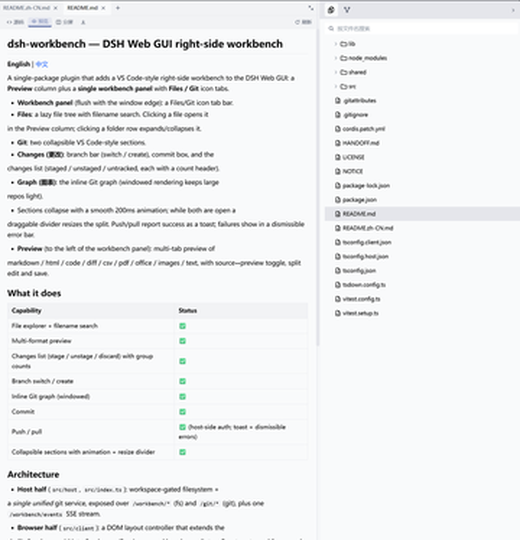
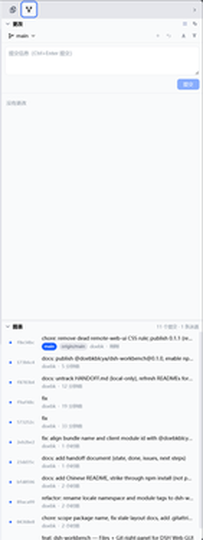
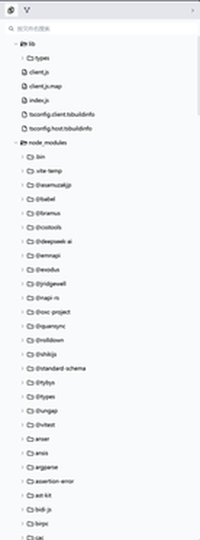
| Git panel — collapsible Changes + Graph sections | Files tree with search |
|---|---|
 |  |
Features
- Files — a lazy file tree with filename search; clicking a file opens it in the Preview column (drag it into the input to insert the path).
- Git — two collapsible VS Code-style sections:
- Changes: branch bar (switch / create), commit box, and the changes list (staged / unstaged / untracked, each with a count header).
- Graph: the inline Git graph with lanes and ref labels — windowed rendering keeps large repos light.
- Sections collapse with a smooth 200 ms animation; while both are open a draggable divider resizes the split (18%–80%).
- Push/pull report success as a toast; failures show in a dismissible error bar with actionable copy (auth / no-upstream / diverged / identity…).
- Preview — multi-tab preview of markdown / html / code / diff / csv / pdf / office / images / text, with source↔preview toggle, split edit and save (write-conflict protected).
What it does
| Capability | Status |
|---|---|
| File explorer + filename search | ✅ |
| Multi-format preview | ✅ |
| Changes list (stage / unstage / discard) with group counts | ✅ |
| Branch switch / create | ✅ |
| Inline Git graph (windowed) | ✅ |
| Commit | ✅ |
| Push / pull | ✅ (host-side auth; toast + dismissible errors) |
| Collapsible sections with animation + resize divider | ✅ |
Architecture
The plugin ships two halves in one package; the browser UI and the host service talk over HTTP + an SSE change stream (fs watch + git poll merged).
flowchart LR
  subgraph Host[DSH web server · Node.js]
    H["Host half (src/host)<br/>gated fs + unified git service<br/>routes · workspace gate · poll guard"]
  end
  subgraph Page[Browser · DSH Web GUI]
    C["Client half (src/client)<br/>React panels · framework-free stores<br/>DOM layout controller"]
  end
  H <-->|"HTTP /workbench/* · /git/*<br/>+ SSE /workbench/events"| C
- Host half (
src/host): workspace-gated filesystem + a single unified git service (the two upstream git services merged into one gate, one repo cache, one operation-marker probe — 1 git spawn instead of 7). - Browser half (
src/client): a DOM layout controller that extends the shell's grid with the Preview + workbench columns, React components, and framework-free stores (layout / explorer / scm / preview / git) with per-project persistence.
Usage
Install the published package:
dsh plugin --profile web add @doebkblcya/dsh-workbench
In any project session the panel appears on the right:
- Files tab — browse the tree; click a file to open it in Preview.
- Git tab — stage/discard from the changes list, write a message and commit (Ctrl+Enter), then push/pull from the branch bar; the graph shows the history with refs and lanes.
Development
npm install
npm run build        # tsc -b && tsdown → lib/index.js + lib/client.js
npm run typecheck
# link the local checkout into your profile:
dsh plugin --profile web add link:<path-to-this-repo>
License & attribution
BSD-3-Clause. This package is a derivative work of the dsh-web-ui monorepo
(https://github.com/zhu1090093659/dsh-web-ui) — specifically
dsh-aionui-panel and dsh-git-graph (both 0.1.15). The right-panel design
was itself re-implemented from AionUi (iOfficeAI/AionUi, Apache-2.0). See
LICENSE and NOTICE for full attribution.
Note: upstream's
package.jsonmetadata saysApache-2.0while the shipped packageLICENSEfiles areBSD-3-Clause(the repo root LICENSE is Apache-2.0). This fork follows the shipped package license (BSD-3-Clause); both are permissive and derivative development is compliant either way.
Compatibility
Versions
| Latest version | Published | Size |
|---|---|---|
| 0.1.0 | — | — |
| 0.1.1 | — | — |
| 0.1.2 | — | — |
| 0.1.3 | — | — |
| 0.1.4 | — | — |
| 0.1.5 | — | — |
Comments
Loading…
Similar plugins
by Pasumao
[Discontinued 2026-09-11: DSH >=0.1.5 ships a built-in workspace file tree + document preview — use that instead] VS Code-style workspace file explorer for the dsh web GUI (published versions remain i
★ 7
↓ 179/wk
MIT
TypeScript
Sep 11, 2026
dsh plugin --profile web add dsh-plugin-workbenchby lsq-dsh-plugins
Rearranges DSH Web into a three-column workbench with file editing, Git views, Markdown preview, and workspace terminals.
★ 4
↓ 182/wk
MIT
TypeScript
Sep 10, 2026
dsh plugin --profile web add @lsq64737/dsh-workbench-layoutby dd2673
Codex-style Git workbench: workspace-scoped changes, diff, stage, commit, guarded branch operations, graph history, fetch, fast-forward pull, and upstream push through official plugin APIs.
★ 1
Apache-2.0
TypeScript
Aug 16, 2026
dsh plugin --profile web add dsh-wending-git-workbenchby ai-daming
DSH web plugin: a right-side panel that fetches and renders GitHub issues / PRs via the local gh CLI.
★ 17
TypeScript
Sep 21, 2026
dsh plugin --profile web add clickvibeby xing-shuyin
Developer tools panel for the DSH web UI: file browser with preview, edit, and path-only file mentions; multi-tab terminals with quick commands; Git panel with commit, push, pull, and branch switching
★ 6
↓ 142/wk
JavaScript
Aug 19, 2026
dsh plugin --profile web add dsh-ui-toolsby jdz321
DSH plugin: current workspace Git status in the Web GUI composer tool row (branch, change counts, expandable file list, auto-refresh) plus a git_status agent tool.
★ 0
MIT
TypeScript
Oct 13, 2026
dsh plugin --profile web add dsh-plugin-git-status