
dsh-mathtype
Manifest validMathType OLE equations for DeepSeek Harness: convert LaTeX placeholders in a Word .docx into real MathType objects (Equation.DSMT4), preserving equation numbers, SEQ fields, bookmarks and cross-references.
dsh-mathtype
A DeepSeek Harness plugin that converts LaTeX placeholders in a Word .docx
into real MathType OLE objects — ProgID="Equation.DSMT4", a CFB container
holding an Equation Native stream — through the MathType SDK. The equations
double-click into MathType like any hand-authored one. They are not Word's
built-in OMML equations and not pictures.
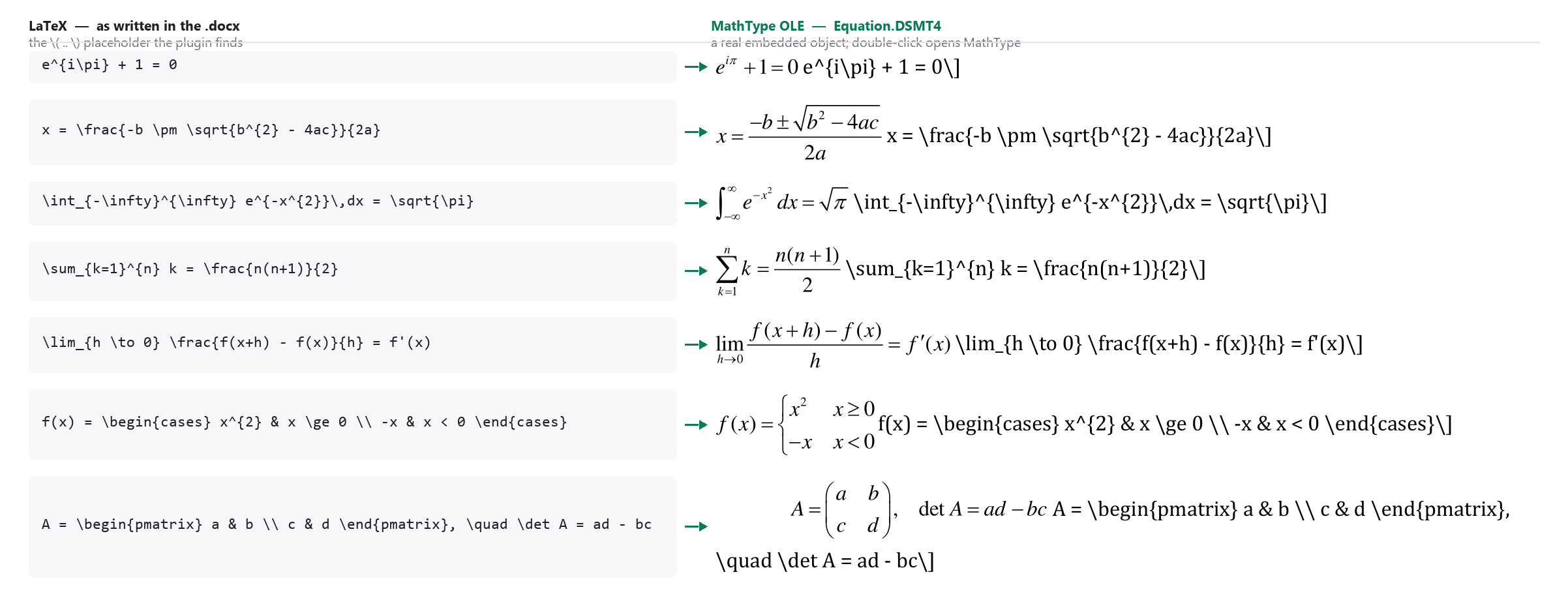
Left: the \[ ... \] LaTeX as written in the .docx. Right: what Word holds
after the run — real Equation.DSMT4 objects, rendered here by Word itself.
The examples are textbook identities, chosen to show the format change rather
than any one manuscript's content.
Because the document is edited in place through Word's own automation model,
existing equation numbers, SEQ fields, bookmarks, REF cross-references,
figures, tables and styles are never rebuilt.
What it ships
One model-invocable skill, mathtype, registered into ctx.skills when the
plugin mounts:
| Path | Role |
|---|---|
mt_env.py | Discovers MathType, MT6.dll, Word and Python deps; smoke-tests the SDK. |
mt_sdk.py | MT6.dll wrapper: connect, set_latex, get_text, close. |
mt_prefs.py | Equation size via the MathType registry block, restored afterwards. |
word_session.py | Word session that survives RPC crashes and late-binding failures. |
convert_docx.py | The conversion. --dry-run, --overrides, --report. |
verify_docx.py | Structural proof: ProgID, CFB, Equation Native, rels, ShapeID, bookmarks, fields. |
render_check.py | Export PDF, render page and per-equation QA sheets. |
make_fixture.py | Build a 6-equation test document with real SEQ fields. |
No JavaScript dependencies: the registrar uses only node:fs, node:path and
node:url, so the package installs offline.
Requirements
| Component | Requirement |
|---|---|
| OS | Windows 10/11. COM and OLE have no macOS or Linux equivalent. |
| MathType | MathType 7 desktop, full install — the fonts-only package has no System\<arch>\MT6.dll. |
| Word | Desktop Word 2016/2019/2021/365. Not a viewer, not LibreOffice. |
| Python | 3.10+, bitness matching MT6.dll (64-bit Python ↔ System\64\MT6.dll). |
| Python packages | pywin32, lxml. Optional: pymupdf + Pillow for the render check. |
python -m pip install pywin32 lxml
python -m pip install pymupdf Pillow     # optional, render check only
Nothing is hard-coded: the MathType directory, SDK DLL and preference files are resolved from the registry at run time, so a non-default install location works.
Install
# from GitHub — use the profile you actually run (`desktop` or `web`)
dsh plugin --profile desktop add github:DIPPER12138/dsh-mathtype

# or from a local checkout, for development
dsh plugin --profile desktop add /absolute/path/to/dsh-mathtype
Restart dsh afterwards. The mathtype skill then appears in the skill catalog.
If you previously copied this skill into ~/.dsh/skills/mathtype by hand, delete
that copy — otherwise the same skill is registered twice.
Verify the machine first
The plugin cannot install MathType, Word or Python for you, and it cannot install Python packages. Check the environment before converting anything:
python <skill-dir>/scripts/mt_env.py
It reports the resolved MathType directory and DLL, the Word version, dependency
status and a live MTAPIConnect result, and exits 0 only when the machine is
ready. On a new machine, prove the whole chain with the bundled fixture first
(about two minutes):
python scripts/make_fixture.py -o fixture.docx -f
python scripts/convert_docx.py fixture.docx -o fixture-out.docx --size 10.5
python scripts/verify_docx.py fixture.docx fixture-out.docx --expect 6
Use
# what would be converted? (reads the .docx package only — no Word, no COM)
python scripts/convert_docx.py manuscript.docx -o manuscript-MathType.docx --dry-run

# convert (54 equations take roughly 10-15 minutes)
python scripts/convert_docx.py manuscript.docx -o manuscript-MathType.docx \
        --size 10.5 --report conversion.json

# prove the objects are real MathType equations
python scripts/verify_docx.py manuscript.docx manuscript-MathType.docx --expect 54

# optional: PDF export plus page/equation QA sheets
python scripts/render_check.py manuscript-MathType.docx --outdir qa
Recognised placeholders, one per paragraph:
| Source | Result |
|---|---|
\[a=b\tag{7}\] | centred MathType object, number (7) right-aligned |
\[a=b\tag{2a}\] | number (2a); sub-lettering survives |
\[a=b\] | centred object, no number |
$a=b$ | inline object |
Numbers inside \tag{...} are never regenerated: an existing SEQ field,
bookmark or literal 2a is kept verbatim, so every REF still resolves.
--size sets the equation size (accepts 10.5 or "10.5 pt"); the previous
MathType setting is restored afterwards. --align none leaves paragraph layout
untouched. --overrides fixes.json replaces individual equations by label.
Limitations
- Windows only.
- It converts existing LaTeX placeholders; it does not author or validate mathematics.
- It does not convert MathType back to LaTeX in batch (the SDK wrapper exposes
get_text()for single equations). - It does not produce Word OMML — that is the other direction.
- Requires the real MathType installation; the SDK DLL is never redistributed with this plugin.
Uninstall
dsh plugin --profile desktop remove dsh-mathtype
License
MIT. See LICENSE.
MathType is a trademark of Design Science. This plugin uses the MathType SDK installed on the user's machine and ships none of it.
Comments
Loading…