
dsh-long-input-window
IdentifiedAdds a full-screen dialog for writing long messages: Markdown on the left rendered live by marked on the right, with a draggable splitter that remembers its ratio. Confirming writes the text back to t
dsh-long-input
DeepSeek Harness Web 输入框的「长内容 Markdown 编辑弹窗」插件。点击输入框底部的「长内容输入」按钮,弹出左右分栏窗口——左边写 Markdown,右边实时预览,确认后一次写回输入框。
English | 简体中文
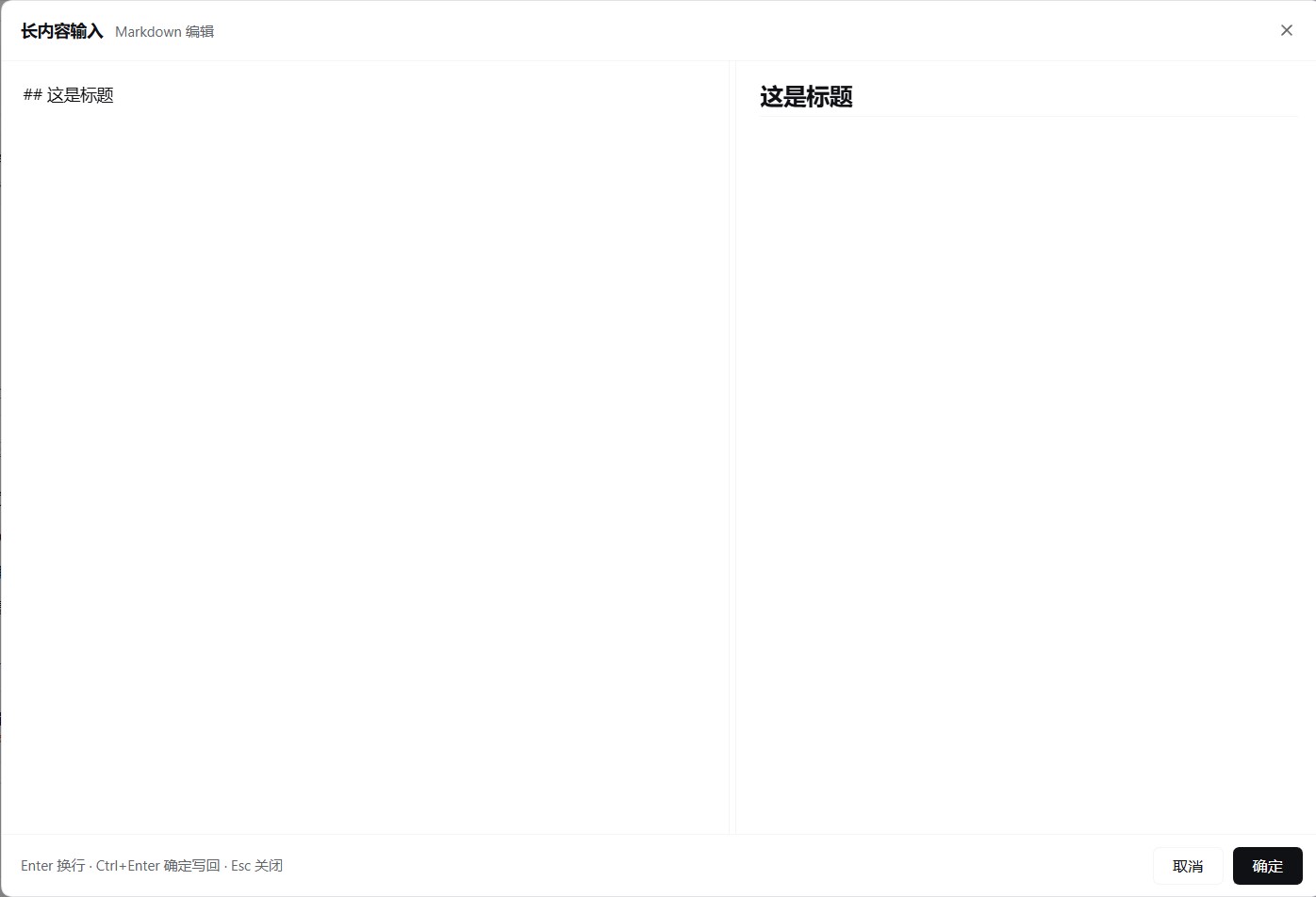
功能
- 输入框底部工具栏(权限/计划控件右侧)出现「长内容输入」按钮,按钮文字跟随界面语言。
- 打开弹窗时自动带入当前输入框的草稿,随后两侧独立编辑、互不同步。
- 左侧纯文本编辑,右侧实时渲染 Markdown(GFM、支持换行),渲染由内置 marked 完成。
- 中缝可拖动调整左右宽度(20%–80%),比例自动记住。
- 写回时保留原输入框里的指令(如
/goal)与@文件引用,它们作为固定前缀重新附加,不会被删除。 - 关闭窗口(X / 取消 /
Esc)时询问「不写回」还是「写回」,可勾选「记住我的选择」;也能在插件设置页里预先设定,或恢复为每次询问。 - 跟随明暗主题与界面语言,无需额外配置。
快捷键
| 操作 | 快捷键 |
|---|---|
| 换行 | Enter |
| 写回输入框 | Ctrl+Enter / Cmd+Enter |
| 关闭弹窗 | Esc |
安装
本插件已发布到 npm,包名 dsh-long-input。插件自带预构建产物,安装后无需任何构建步骤。
从 npm 安装(推荐)
dsh plugin --profile web add dsh-long-input
桌面版(Desktop)请改用 desktop profile:
dsh plugin --profile desktop add dsh-long-input
图形界面安装
设置 → 插件 → 「+ 添加插件」→ 输入 dsh-long-input → 安装 → 重启 DeepSeek Harness。
安装后
重启 DSH(命令行下 Ctrl+C 后重新 dsh web,桌面版从应用菜单重启)并刷新浏览器页面,按钮即会出现在输入框底部工具栏。
更新与卸载
dsh plugin --profile web add dsh-long-input@latest   # 更新到最新
dsh plugin --profile web remove dsh-long-input       # 卸载
设置
设置 → 插件 → dsh-long-input:
- 关闭窗口时:选择「退出窗口不写回」或「退出并写回」;两个都不选则每次关闭都询问。
- 恢复默认设置:清空该选择,并把分栏比例重置为 50%。
说明
- 写回是整体覆盖输入框草稿;指令与
@引用会被保留并移到正文之前。 - 预览不对原始 HTML 做消毒,请勿粘贴不可信的第三方 HTML。
- 弹窗打开期间切换会话会自动关闭,避免写回错误的会话。
- 勾选「记住我的选择」后关闭不再询问;想恢复询问,在插件设置页取消选择或点「恢复默认设置」。
Comments
Loading…
Similar plugins
by latte03
Select text in the dsh web conversation to attach it as an annotation to your next message. The source text keeps a dashed highlight with an ordinal badge in place, and the composer summary lists, edi
★ 3
MIT
TypeScript
Oct 27, 2026
dsh plugin --profile web add dsh-select-quoteby AL-Yichen
A fullscreen input plugin for DeepSeek Harness.
★ 4
MIT
JavaScript
Oct 17, 2026
dsh plugin --profile web add dsh-fullscreen-inputby kyanray-dev
Markdown input for the composer that keeps the typed Markdown as the sent text while drawing bullets and checkboxes, styling bold, italic, inline code, strikethrough, headings, quotes and fenced code
★ 0
Apache-2.0
JavaScript
Sep 30, 2026
dsh plugin --profile web add dsh-markdown-inputby long6177
a dsh‑plugin for enhancing users' Markdown input experience | 一个 用于增强用户 markdown 输入体验的 dsh-plugin
★ 0
MIT
TypeScript
Oct 7, 2026
dsh plugin --profile web add dsh-markdown-inputIn-chat preview for produced files: click a produced-file chip to render Markdown (server-side markdown-it + highlight.js), images, or plain text right in the conversation; system-app open and reveal-
★ 0
dsh plugin --profile web add dsh-markdown-previewby konglong87
dsh 常用内容插件:保存、编辑提示词,点击回填输入框,不自动发送。deepseek harness 插件
★ 2
MIT
JavaScript
Sep 23, 2026
dsh plugin --profile web add dsh-input-list