

dsh-sfx-pad
Manifest validEvent sound pad for DeepSeek Harness: bind test/build/recording/publish outcomes to local audio files, preview, one-click mute, and mute profiles that follow the current app. Reads local audio only.
dsh-sfx-pad
给 DeepSeek Harness 的事件音垫:把「测试通过 / 测试失败 / 构建失败 / 开始录屏 / 发布完成」这类事件绑成一组本地音效,可试听、可一键静音,并按当前应用自动切静音档。全程只读本地音频文件,不联网。
为什么要有它
生态里的语音插件都在解决「把文字读出来」(例如 ziyouti/dsh-read-aloud 这类 TTS 插件)。没有人处理另一半问题:界面事件该发出什么声音。
写代码、跑测试、录屏、发布的时候,人是把视线放在终端和别的窗口上的。等你看回 DSH,3 分钟已经过去了。声音是唯一不需要把视线转过去的反馈通道——但把「整段读出来」塞进这个场景会变成噪音,你需要的是一声不同的「叮」。
它做什么
挂在 DSH 真实的事件钩子上,命令文本和退出码是判定依据:
| 事件 | 触发条件 | 默认音 |
|---|---|---|
| 测试通过 | npm/pnpm/yarn test、node --test、pytest、go test、cargo test、vitest、jest、dotnet test … 零退出 | 上行双音 |
| 测试失败 | 同上,非零退出 | 下行低鸣 |
| 构建通过 | npm run build、tsc、vite build、next build、cargo build、go build、msbuild、make … 零退出 | 短促上行 |
| 构建失败 | 同上,非零退出 | 下行闷响 |
| 开始录屏 | obs --startrecording、ffmpeg … gdigrab/x11grab/avfoundation、screencapture -v、wf-recorder | 两声高音滴 |
| 结束录屏 | 前台录制进程正常返回,或 --stoprecording | 两声下行滴 |
| 发布完成 | git push、gh release create、npm publish、cargo publish 成功 | 三音琶音 |
| 等你决定 | ask_user_question 调用、审批请求 | 双短提醒 |
| 本轮结束 | agent 回到 idle | 一声轻点 |
| 运行出错 | agent 抛错或中断 | 双闷响 |
细节:
- 只有证据才发声。 判定读的是命令文本 + 退出码(
meta.exitCode,或输出里的exit code: N)。缺少证据一律安静——错的声音比没有声音更糟。 - 一条命令里串了好几步时,最后一步决定结果(
npm run build && npm test报的是测试的退出码)。 - 测试的用例数会一起记下(
# pass 30→ 面板显示「30 个用例通过」)。
静音档
三个档:默认(全开)、专注(只留失败、出错、等你决定、录屏边界)、静音(全关)。
「按当前应用自动切档」= 三层判断,优先级从高到低:
- 一键静音(面板开关,或输入框左边的喇叭按钮)——压过一切。
- 按应用名匹配——
obs、teams、zoom、腾讯会议、录屏默认映射到「静音」,支持obs*这种整名通配。应用名来自客户端焦点上报,或任何本机程序POST /dsh-sfx-pad/scene。 - 离开 DSH——页面失焦时切到「专注」档(可关)。
边界(重要):这个插件看不到别的进程。浏览器只能告诉它「DSH 窗口有焦点 / 没焦点」,给不出「你现在用的是 OBS 还是飞书」。所以「按应用切档」的精确应用名需要外部推给它(一行 curl 就够),否则退化成一个诚实的近似:你一离开 DSH,非关键事件就不再出声。这一点在下面的「它不做什么」里也写了。
安装
dsh plugin --profile <你的 profile> add dsh-sfx-pad
也可以直接从 GitHub 装:
dsh plugin --profile <你的 profile> add github:dingchenhui0618-arch/dsh-sfx-pad
装好后对话视图里出现「声音台」Tab;输入框左边多一个喇叭按钮,一键静音不用切视图。
面板
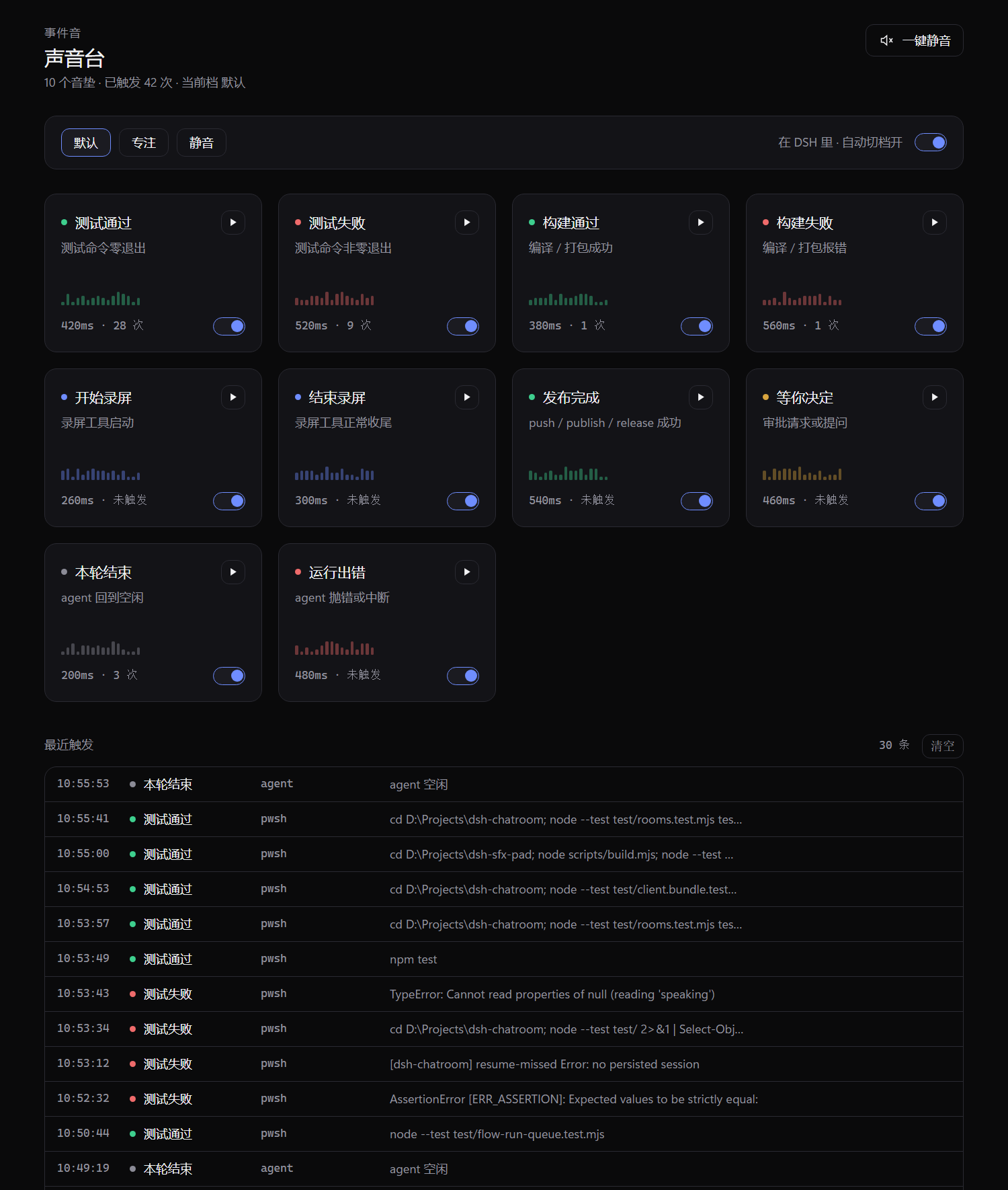
- 顶栏:音垫数、累计触发次数、当前档与它为什么生效(手动 / 离开 DSH / 按应用 / 一键静音)
- 音垫网格:每个事件的名字、判定条件、长度、触发次数、独立开关、试听
- 最近 30 条触发:时间、来源工具、细节(例如
30 个用例通过),被静音的那条会标出原因
换成自己的音效
音频只在运行时读,不改写、不下载。默认 10 个 WAV 在 assets/cues/,是 node scripts/make-cues.mjs 确定性合成的(仓库里入库的是产物,换机不需要重新生成)。
要换成自己的,把目录指过去即可:
- id: dsh-sfx-pad
  config:
    cueDir: D:\my-sounds        # 文件名对齐:test-pass.wav / build-fail.mp3 / …
识别 wav mp3 ogg m4a flac,按音垫 id 找同名文件,先查 cueDir 再回落到内置;单个文件上限 8 MB。找不到就用内置的,不会变哑。
HTTP 接口
面板用的就是这几个(同源,带 cookie):
| 方法 | 路径 | 用途 |
|---|---|---|
| GET | /dsh-sfx-pad/state | 全量快照(音垫、档位、最近触发) |
| GET | /dsh-sfx-pad/events | SSE 实时推送 |
| GET | /dsh-sfx-pad/audio/<id> | 读取音效文件(只认音垫 id + 允许的扩展名) |
| POST | /dsh-sfx-pad/mute | {muted?} 一键静音 / 开关 |
| POST | /dsh-sfx-pad/profile | {profile} 手动选档 |
| POST | /dsh-sfx-pad/auto | {enabled} 自动切档 |
| POST | /dsh-sfx-pad/pad | {id, enabled?, gain?} 单个音垫 |
| POST | /dsh-sfx-pad/scene | {app?, focused?} 上报当前应用 |
| POST | /dsh-sfx-pad/preview | {id} 拿试听地址(不写历史) |
| POST | /dsh-sfx-pad/fire | {id} 走完整策略地手动触发 |
| POST | /dsh-sfx-pad/clear | 清空最近触发 |
从任何本机脚本推一个应用名:
curl -X POST http://127.0.0.1:3080/dsh-sfx-pad/scene -H "content-type: application/json" -d "{\"app\":\"OBS Studio\",\"focused\":false}"
它不做什么(重要)
- 不联网。 没有下载、没有上传、没有云音效库。音频只从本机磁盘读。
- 看不到别的进程。 没有原生依赖、没有平台 API 调用,所以拿不到「系统前台是哪个应用」。精确的应用名要靠
/scene推送,否则只有焦点近似。 - 不改名、不放音效库。 不内置音乐、不长于 1 秒、不做混音——它是 UI 反馈音,不是播放器。
- 不替你做决定。
tools/pre-execute和approval/request上的监听器永远继续调用next(),声音不会影响任何工具是否执行、审批是否通过。任何一条路径抛异常都被吞掉。 - 不写你的文件。 只写一个偏好文件
$DSH_HOME/sfx-pad.json(原子替换),音频文件永远是只读的。 - 不是安全边界。 它只是把你的注意力叫回来,不保证你听到的一定是真相。
开发
node scripts/make-cues.mjs   # 确定性重新合成 10 个 WAV(已经是入库产物)
node scripts/build.mjs       # 零依赖构建,产出 lib/
node --test                  # 70 个测试
面板截图是怎么来的
node scripts/preview.mjs 4174 起一个本地预览服务:它把真实的 lib/client.js 挂在同一个 React 替身上渲染,并把 /dsh-sfx-pad/* 转发给正在运行的 harness。然后用无头 Chrome 按 1000×1180、1.5 倍缩放渲染:
chrome --headless=new --screenshot=docs/screenshot-1.png \
       --window-size=1000,1180 --force-device-scale-factor=1.5 \
       http://127.0.0.1:4174/
为什么不直接截桌面端窗口:桌面端 web 的浏览器会话 token 只活在自己的进程里(dsh-client-connection 用 WeakMap 按宿主存 launch token),外部浏览器拿不到登录态,也就不该去拿。这个预览页拿的是真实 host 数据(state、SSE、音频字节都来自运行中的服务)和真实组件与样式,省掉的只有外层应用外壳——所以它显示的是真事件,不是摆拍。
零依赖:src/ 是手写源码,scripts/build.mjs 把它们复制进 lib/ 并内联样式表,没有打包器、没有 npm install、没有会在 CI 上执行的安装脚本。
测试分六组:
cues—— 音垫表与磁盘上的 WAV 字节一致(riff 头、时长与声明对得上、不是静音文件)policy—— 静音档、应用匹配、增益、脏配置降级triggers—— 命令文本与退出码的真实形状,含「不发声」的反例store—— 偏好文件损坏、只读目录、原子写host—— 用 stub ctx 驱动真实apply():五个事件、路由、音频字节、SSE、卸载client—— 用window.__ModuleLoader__真跑lib/client.js,钉住两个插槽的注册与卸载
参考与差异
- 骨架:零依赖构建、
cordis.patch.yml、host/client 双半区、README 与测试结构,照用户指定的dsh-warden(同一位作者)搭的。两个仓库各自独立实现,没有 fork,没有 clone 后在别人的仓库上改,也没有搬运代码。 - 方向证据:
ziyouti/dsh-read-aloud证明了「语音类插件只处理把文字读出来」这个观察,本插件补的是另一半(事件 → 声音),与它没有代码关系,也没有复用它任何实现。 - DSH 接口:
tools/pre-execute、tools/result、agent/status、agent/error、approval/request、conversation.view、conversation.input.left都是当前 harness 真实存在的事件与插槽,用cordis_inspect_query逐条核对过签名,不是猜的。
License
MIT
Comments
Loading…
Similar plugins
by AI-Galaxy-GPU
DeepSeek Harness(DSH)Web 端插件:回合完成、审批、提问、计划评审、目标受阻、任务失败各有独立提示音与音量,内置合成音 / 静音 / 本地音频文件,Web 设置面板可配置。
★ 13
↓ 11/wk
MIT
JavaScript
Sep 15, 2026
dsh plugin --profile web add dsh-soundPlay different configurable sounds for five conversation events in the DeepSeek Harness web GUI: normal completion, interrupt, error, approval wait, and auto-retry success; each event has its own audi
★ 0
dsh plugin --profile web add dsh-done-soundLocal-first podcast player and transcriber for DeepSeek Harness: plays audio files from your disk, transcribes with local ASR, shows bilingual subtitles and exports SRT or Markdown.
★ 0
MIT
JavaScript
dsh plugin --profile web add dsh-podwaveby hifengzy
Sound notifications for DeepSeek Harness (DSH): play a sound when a task completes, fails, or waits for approval — with per-category switches.
★ 0
MIT
JavaScript
Oct 24, 2026
dsh plugin --profile web add dsh-sound-notifyby 3274375092
Voice input plugin for DeepSeek Harness: mic → local/browser speech recognition → text submitted as a normal chat message. Input-only and preset-agnostic.
★ 8
↓ 132/wk
MIT
TypeScript
Oct 1, 2026
dsh plugin --profile web add @nn12138/dsh-voiceby Nixz0824
Short Web Audio cues when a session needs your attention (approval, question, or plan review) and when a task finishes. No popups or OS notifications.
★ 0
BSD-3-Clause
JavaScript
Sep 26, 2026
dsh plugin --profile web add @dsh-external/dsh-sound-cue