

dsh-readme-reel
Manifest validTurn a plugin repo's screenshots into a 6-second silent looping hero reel: transparent-background webm + gif + cover frame, for README first screens and plugin marketplace entries.
dsh-readme-reel
把插件仓库里的截图排成一条 6 秒无声循环短片:透明背景 webm + 通用 gif + 封面帧,直接放进 README 首屏或插件市场条目。
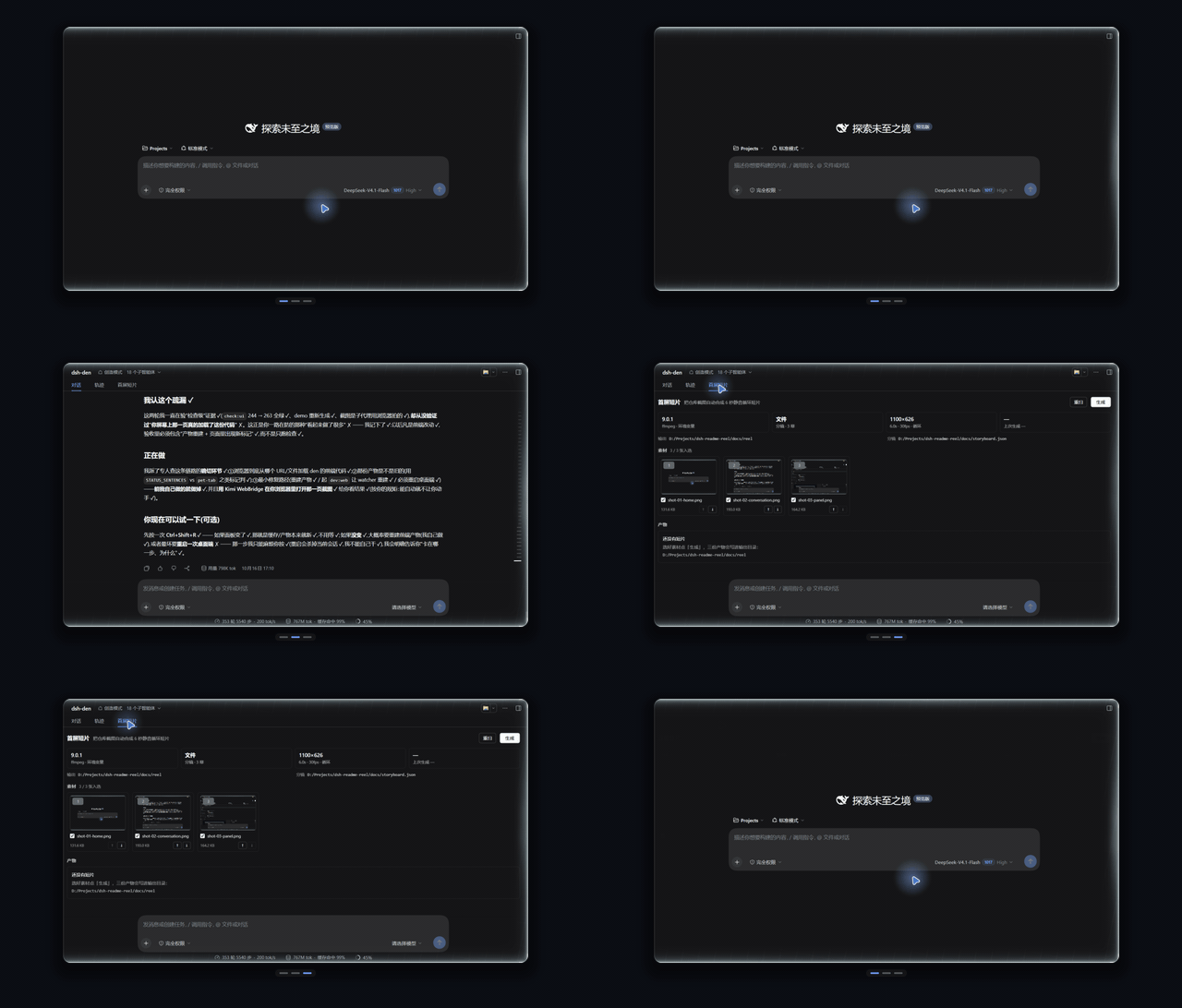
上面这条片子由仓库里的三张真实截图(docs/shots/)生成,重跑一条命令就能复现:
node bin/reel.mjs docs/storyboard.json
为什么要有它
插件市场里绝大多数条目只有一张静态截图。一张图说不清「从哪进来、点哪个页签、得到什么」,而录屏要人举着鼠标、剪掉首尾、压到几百 KB,还得让它首尾接得上——对仓库里已经存在的截图来说,这些全是可自动化的机械活。
这个插件把这件机械活收成一条管线:截图是唯一素材,排版、交叉淡入、进度条指示、精确到毫秒的时间轴由它算,编码交给 ffmpeg。它不叠字、不配音、不依赖字体——截图本身是唯一的信息源,你不需要为短片再写一遍文案。
长什么样
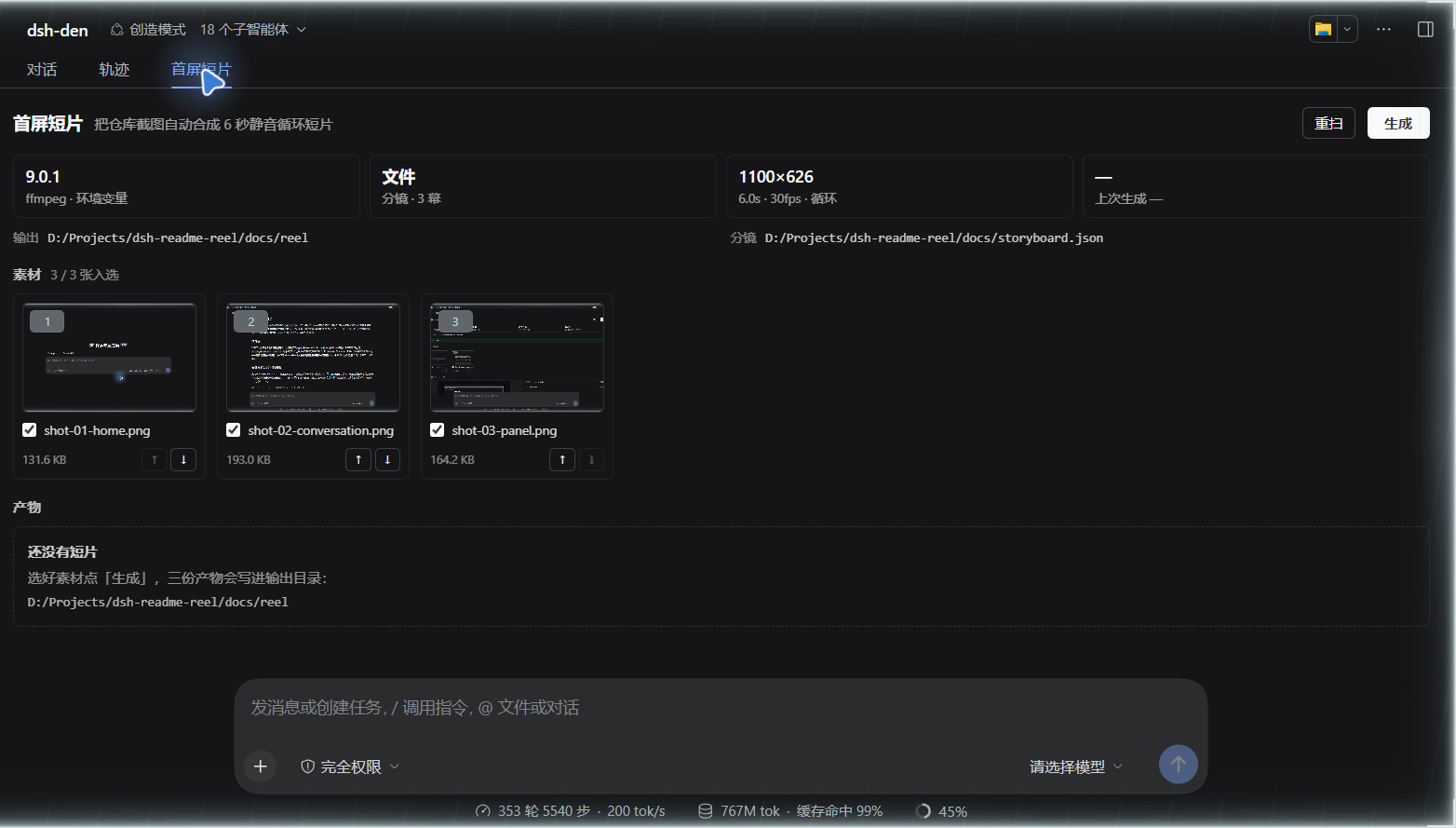
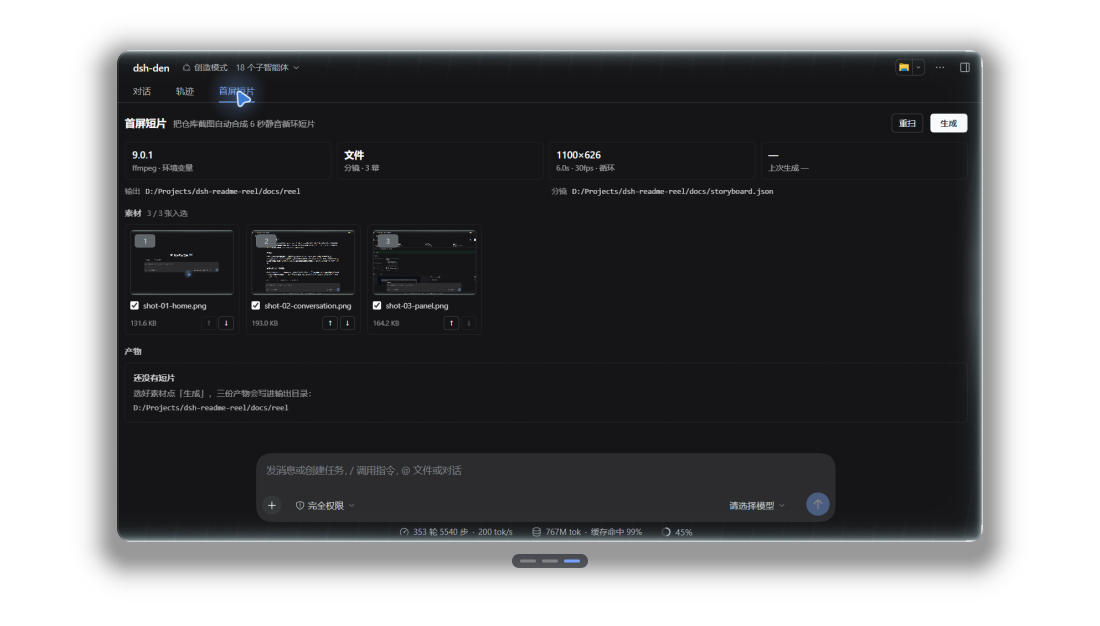
面板在对话视图里,叫「首屏短片」:
选好素材点「生成」,三件产物会在面板里直接可看,下面还有一段可直接粘进 README 的 Markdown:
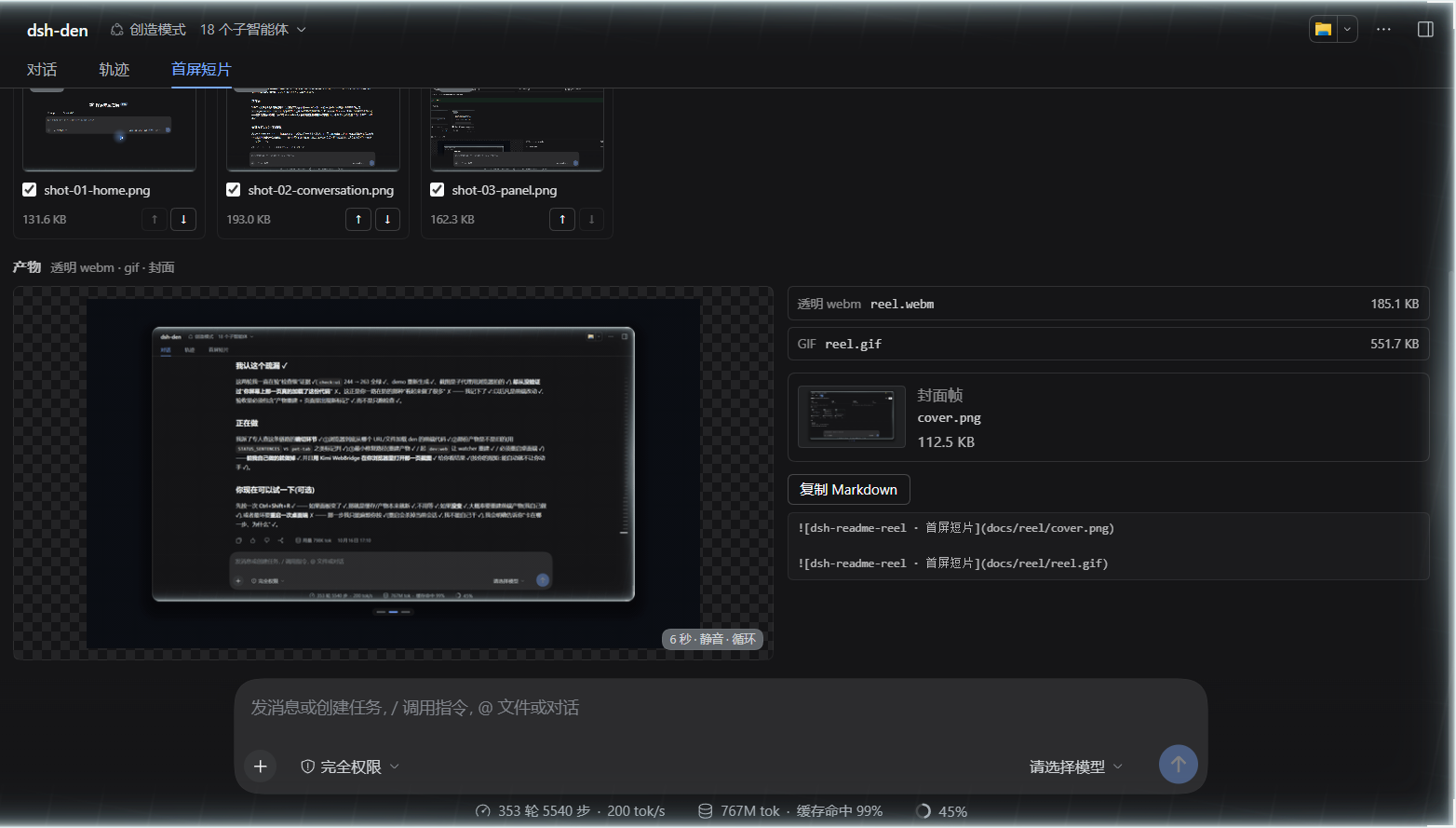
产物清单:
| 文件 | 说明 |
|---|---|
reel.webm | 1100×626、6.000s、30fps、VP9 保留 alpha(yuva420p)、无音轨、循环播放 |
reel.gif | 同一时间轴,alpha 压平到深色垫底、640 宽、20fps、无限循环 |
cover.png | 停留最长那一幕的首帧(原始像素,不重编码),给不支持动图的地方 |
reel.json | 清单:每幕停留、时间轴、三个产物的尺寸与 sha256、ffmpeg 版本、耗时 |
docs/reel/reel.json 就是这次交付的实际清单——包括三个文件的 sha256,方便核对产物有没有被改过。
六秒是算出来的,不是凑出来的
「6 秒循环」听起来像文案,实际是一组硬约束:
- 时长精确:每幕停留是整数毫秒,
Σ停留 + 转场数 × 转场时长 === durationMs,由水位分配(distributeHolds)保证。写 6000 就得到 6000,不会出现 5.94s 的「约等于」。 - 首尾同帧:
loop: true时,最后一幕用一整段转场回到第一幕,这段转场在durationMs处正好结束。t=0 与 t=duration 是同一帧,<video loop>和 GIF 的重播点看不出来。 - 不靠「差不多」:
test/storyboard.test.mjs直接钉住「每幕至少一帧、停留之和精确、转场区间不重叠、边界钳制」;test/encode.test.mjs用真实 ffmpeg 探测 webm 的yuva420p与 6.00s 时长、gif 的帧数与总时长。
没有 ffmpeg 的机器上,编码相关的 16 个用例会 skip 而不是失败——node --test 在两种环境下都是绿的。
安装
装到 DSH 的某个 profile(插件市场条目的安装方式):
dsh plugin --profile <你的 profile> add github:dingchenhui0618-arch/dsh-readme-reel
也可以从本地路径装(改代码时用这个):
dsh plugin --profile <你的 profile> add D:\Projects\dsh-readme-reel
装好后重启 DSH,对话视图里多一个「首屏短片」Tab。桌面端在应用里装插件,profile 由应用自己管理,不用手敲上面的命令。
插件挂在 DSH 的 webServer 服务上,所以 profile 里要有 Web GUI(dsh-web-app 那一套):桌面端和常规 Web profile 自带;纯 CLI 手建的空 profile 里它会停在 pending (waiting for service: webServer),那是 DSH 的依赖语义,不是装失败了。
还没发布到 npm,所以上面只有 GitHub 与本地路径两种装法;仓库里的 lib/ 是入库的构建产物,装的时候不编译、不跑构建脚本。
只想用命令行(不进 DSH)也可以:
git clone https://github.com/dingchenhui0618-arch/dsh-readme-reel D:\Projects\dsh-readme-reel
node D:\Projects\dsh-readme-reel\bin\reel.mjs --project <你的仓库>
用法
面板
- 在 DSH 里打开你要做短片的那个仓库的会话(插件默认在会话工作目录里找
docs/shots/*.png)。 - 切到「首屏短片」页签:它会显示 ffmpeg 是否可用、分镜来自文件还是自动、画幅/时长/fps,以及扫描到的截图。
- 勾选素材、用 ↑/↓ 调顺序(顺序就是播放顺序),点「生成」。产物写入
<项目>/docs/reel/。 - 点「复制 Markdown」拿到直接可粘的
+。
命令行
# 1) 自动模式:把 docs/shots/ 里的 PNG 按文件名排序,平均分配到 6 秒
node bin/reel.mjs --project .

# 2) 分镜模式:完全由 storyboard.json 决定(推荐,可进版本库)
node bin/reel.mjs docs/storyboard.json

# 3) 只挑几张、临时出一版预览
node bin/reel.mjs --sources docs/shots/a.png,docs/shots/b.png --duration 2000 --width 960 --height 600
常用参数(完整列表见 node bin/reel.mjs --help):
| 参数 | 默认 | 作用 |
|---|---|---|
--project <dir> | 自动向上发现 | 项目根;默认从它找 docs/shots、docs/reel、docs/storyboard.json |
--out <dir> | <project>/docs/reel | 产物目录 |
--shots <dir> | <project>/docs/shots | 自动模式的素材目录 |
--sources a,b,c | — | 覆盖 storyboard,按给定顺序只用这几张 |
--duration / --fps / --width / --height | 6000 / 30 / 960 / 600 | 时间轴与画布 |
--gif-width / --gif-fps / --matte | 640 / 20 / #0b0e14 | gif 的宽度、帧率、垫底色 |
--crf <n> | 34 | VP9 质量(越大越小越糊) |
--ffmpeg <path> | 环境变量或 PATH | 指定 ffmpeg |
--keep-frames | 关 | 保留中间 PNG 帧,排错用 |
--json | 关 | 只输出 manifest JSON,方便 CI |
--ffmpeg-check | — | 只探测 ffmpeg 并打印路径/版本/来源 |
退出码:0 成功,1 生成失败,2 参数错误。
storyboard.json
{
  "version": 1,
  "title": "dsh-readme-reel · 首屏短片",
  "durationMs": 6000,
  "fps": 30,
  "size": { "width": 1100, "height": 626 },
  "loop": true,
  "layout": "plain",
  "transition": "fade",
  "transitionMs": 360,
  "scenes": [
    { "src": "docs/shots/shot-01-home.png", "hold": 1500 },
    { "src": "docs/shots/shot-02-conversation.png", "hold": 1500 },
    { "src": "docs/shots/shot-03-panel.png", "hold": 2600 }
  ]
}
字段与限制:
| 字段 | 取值 | 说明 |
|---|---|---|
durationMs | 1000–20000 | 总时长,默认 6000 |
fps | 10–60 | 帧率,默认 30 |
size | 320–1920 × 200–1200(自动取偶数) | 画布尺寸,默认 960×600 |
loop | true/false | 是否把最后一幕转场回第一幕(默认开) |
layout | window / plain | window 画一圈窗框,plain 只留圆角卡片;每幕可用 scenes[].layout 覆盖 |
transition | fade / slide-left / cut | 转场方式,默认 fade |
transitionMs | 80–1200 | 单段转场时长,且 transitionMs × 幕数 < durationMs |
scenes[].hold | 100–20000 | 相对权重不是绝对毫秒:省略时按 1000 均分,实际停留由水位分配算 |
scenes[].focus | {x,y,w,h},0–1 | 从大截图里框一块重点区域做卡片,其余裁掉 |
theme | accent/chrome/content/border/shadow | #rrggbb;只在 window 布局里可见 |
大于 durationMs - 转场 的停留也会被自动压回来,所以先写个大概权重、再调 durationMs 是安全的。
它怎么工作
截图 PNG ──► storyboard 归一化 ──► 逐幕排版(圆角卡片 / SDF 圆角 / 柔和阴影 / 可选窗框)
                                        │
                                        ▼
                        时间轴采样 t=0..duration 每 1/fps 秒 → RGBA 帧(直通道 alpha)
                                        │
                                        ▼
              ffmpeg:  VP9  yuva420p  /  matte+gif palette  /  cover = 原始帧字节复制
                                        │
                                        ▼
                       reel.webm  reel.gif  cover.png  reel.json
- PNG 编解码是自己写的(
src/png.js,只依赖node:zlib):五种行过滤、调色板 + tRNS、灰度都支持,不需要sharp/canvas。 - 合成器(
src/raster.js/src/compose.js)做直通道 RGBA 混色、SDF 圆角矩形、柔化阴影、盒式降采样、预乘 alpha 交叉淡入、圆角遮罩、进度条胶囊。 - 帧默认不落盘:写进临时目录、编码完即删(
--keep-frames才留下)。 - gif 把 alpha 压平到
--matte(默认#0b0e14)再走一套palettegen/paletteuse,避免 GIF 的 1-bit 透明度啃掉抗锯齿边缘;垫底色和画布边缘同色,所以看起来是「透明」的。 - ffmpeg 走
DSH_README_REEL_FFMPEG→ PATH 的顺序发现,不打包二进制;找不到时明确报错并告诉你怎么装,不假装成功。
边界(它不做什么)
- 不渲染文字。没有字体依赖,也就没有标题/字幕;信息只能来自截图本身。这是刻意的取舍,不是没做完。
- 只吃 PNG。不吃视频、不吃 JPEG、不录屏——素材必须已经是静态截图。
- gif 只有 8-bit 调色板。深色渐变可能有轻微 banding(已用 bayer 抖动);要真 alpha 用 webm。
- 没有时间轴编辑器。改顺序、改停留靠面板的 ↑/↓ 与
storyboard.json,没有拖拽轨道。 - 不是截图工具。截图怎么来是使用者的事;面板只负责把已有截图变成短片。
- 面板只在 DSH Web 端实测截图(
docs/*.png都是真实 Web UI 渲染)。桌面端用的是同一套 client,但没有为本仓库截过图。
参考了谁,和它差在哪
工程骨架(零依赖构建、cordis.patch.yml、host/client 两半、README/测试的目录结构、卸载即注销的纪律)参考了同作者的 dsh-warden(MIT)。这是「按已验证的接入形状搭新房子」,不是 fork:
| dsh-warden | dsh-readme-reel | |
|---|---|---|
| 干的事 | 工具调用前的对抗式审查门 | 截图 → 6 秒循环短片 |
| 产物 | 判定流 + JSONL 审计 | webm / gif / cover + manifest |
| 核心代码 | 风险分类、审查模型调用、降级策略 | PNG 编解码、SDF 排版合成、水位分配时间轴、ffmpeg 编码 |
| 与 ffmpeg 的关系 | 无关 | 唯一外部依赖,运行时发现,找不到就 fail-fast |
没有复制 warden 的业务逻辑;共享的只有 harness 的接入形状(apply(ctx)、inject: ['webServer']、ctx.effect 注销、client 的 __ModuleLoader__ 包装)与工程约定(零运行时依赖、测试先行、构建产物入库)。
开发
node scripts/build.mjs    # 零依赖构建:复制 src/*.js、包装 client、产出 lib/
node --test               # 110 个测试
node scripts/audit.mjs    # 推送前三查:密钥 / .gitignore / 无关文件
测试分布:PNG 编解码 7、storyboard 时间轴 10、栅格合成 12、画面合成 9、编码 14、client 面板 20、reel 管线 10、host 12、CLI 9、审计脚本 7。
- 有 ffmpeg:
110 pass(编码用例用真实 ffmpeg 探测yuva420p、时长、帧数、gif 全不透明)。 - 没有 ffmpeg:
94 pass / 16 skip,仍然0 fail。
lib/ 是构建产物,改 src/ 之后必须重新 build 再提交。
仓库里的东西
docs/shots/      三张真实 DSH Web UI 截图(裁到内容区,尺寸一致)
docs/reel/       用它们生成的 webm / gif / cover / manifest
docs/panel*.png  面板的真实渲染截图
docs/storyboard.json  这份 README 短片的分镜
docs/CONTRACT.md 管线、编码器、HTTP、client 之间的内部契约
src/             管线(reel/compose/storyboard/raster/png/encode/host/client/cli)
test/            node --test,全部零依赖
scripts/         build.mjs(构建)、audit.mjs(推送前三查)
License
MIT
Comments
Loading…
Similar plugins
by Ssrs-Pro-Max
DeepSeek Harness plugin: shows oversized images to the model at readable resolution by tiling them before admission.
★ 0
MIT
JavaScript
Oct 10, 2026
dsh plugin --profile web add dsh-image-tilerby q253595422
DeepSeek Harness plugin: image + video generation studio with an infinite canvas. Fork of dickpy/dsh-imagegen with a complete video pipeline and clip stitching.
★ 40
↓ 700/wk
Apache-2.0
TypeScript
Oct 20, 2026
dsh plugin --profile web add @q253595422/dsh-imagegen-videoby algerkong
Image preview for DSH (DeepSeek Harness) web sessions: read_image results render as a thumbnail, click for full size in the built-in lightbox.
★ 5
JavaScript
Oct 18, 2026
dsh plugin --profile web add @alger-ai/dsh-image-previewby 123cdxcc
A DeepSeek Harness plugin that lets DeepSeek see screenshots and local images via MindSee. DeepSeek Harness 插件:通过 MindSee 把截图和本地图片转成文字,让 DeepSeek 能看图作答。
★ 0
MIT
TypeScript
Aug 17, 2026
dsh plugin --profile web add dsh-mindseeby joao-paulo-santos
Markdown view: a safe markdown-to-React renderer for DSH client plugins — GitHub-subset markdown, shared stylesheet, no HTML injection.
★ 0
MIT
JavaScript
Aug 31, 2026
dsh plugin --profile web add dsh-md-viewby weike-zhang
Turn any SVG logo into a motion video inside DeepSeek Harness. dsh plugin: animate_svg tool renders a transparent 30fps assembly animation and synthesizes an MP4.
★ 0
Apache-2.0
TypeScript
Aug 16, 2026
dsh plugin --profile web add dsh-svg-motion