
dsh-prompt-optimizer
IdentifiedRewrites the message you type into the DSH composer into a precise prompt before the model ever sees it, with one cheap side call on the session's own route. The rewritten text is what gets logged and
Prompt Optimizer (提示词优化)
A DSH plugin that rewrites what you type into the composer into a precise prompt before the model sees it, using one cheap side call on the session's own route.
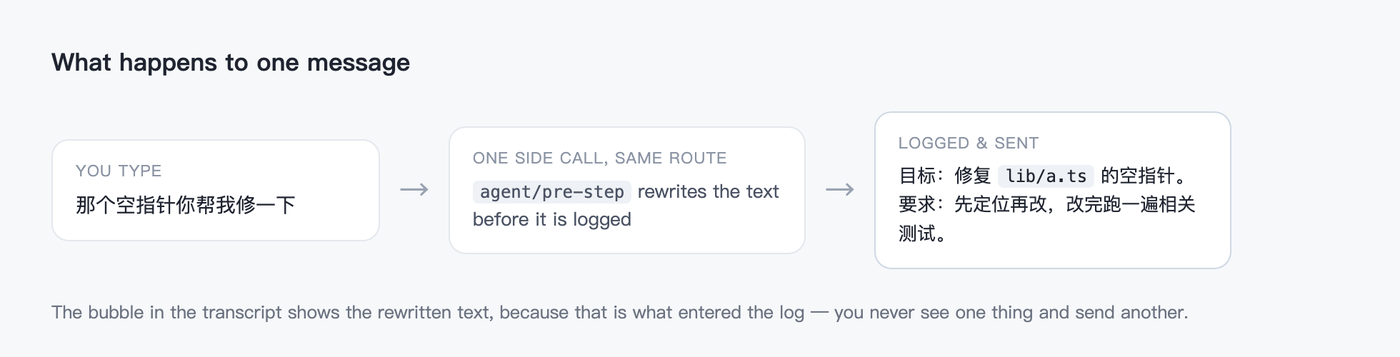
The rewritten text is what enters the durable log, so the chat bubble and the model always agree: you never see one thing and send another.
Install
dsh plugin --profile <profile> add dsh-prompt-optimizer
Or install the prebuilt tarball from the
latest release
through the app's plugin manager. No build step, no allowBuilds approval.
Turning it on
The switch is the whale in the composer's tool row
(conversation.input.right), between the model selector and Send.
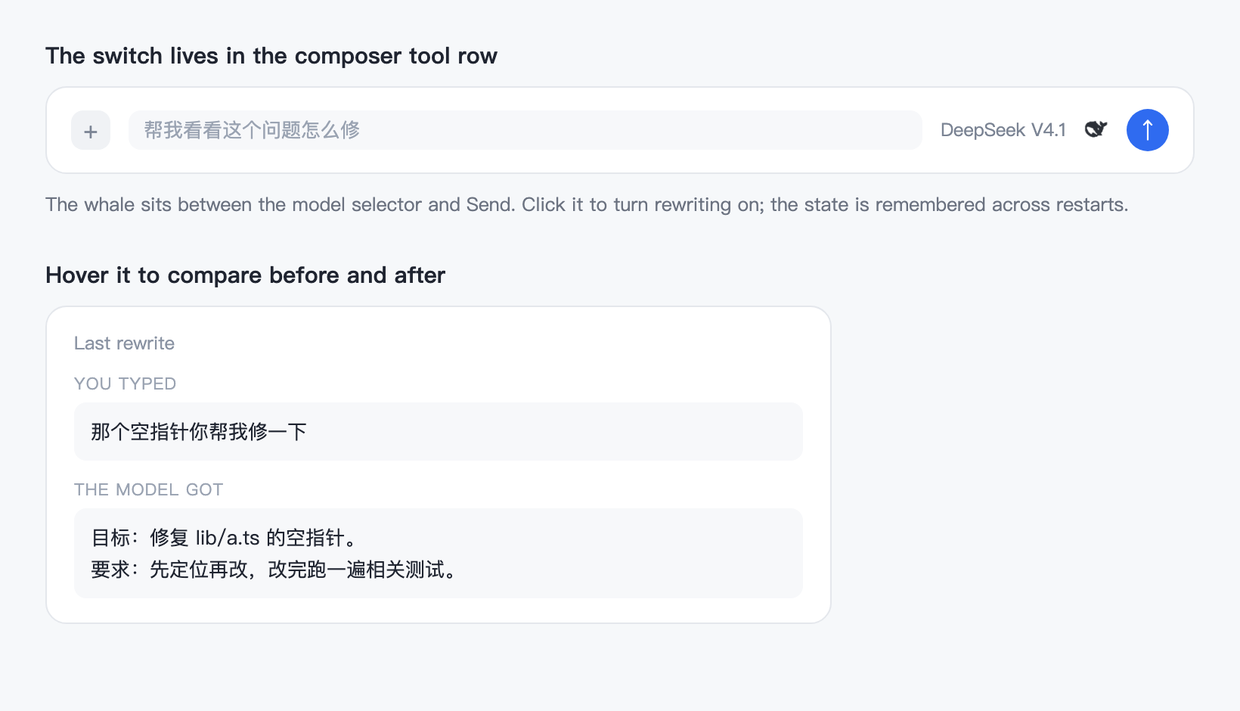
Click it to toggle; the state lives in ~/.dsh/prompt-optimizer/state.json and
survives a restart. Hover it to read the last before/after pair for the current
conversation.
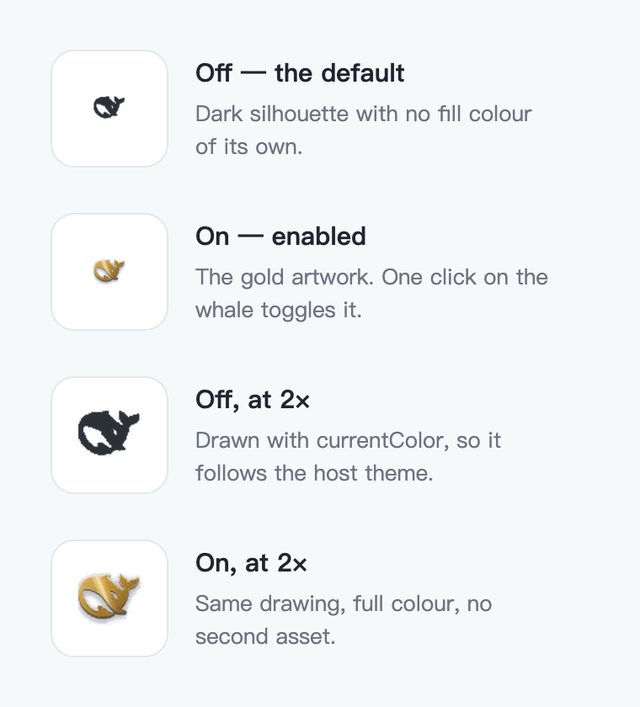
Two states
| state | rendering |
|---|---|
| off (default) | a dark silhouette used as a CSS mask over currentColor, so it carries no fill colour of its own and follows the host theme |
| on | the full-colour gold artwork |
Both states are inlined into client.js as data URIs. The chip is a 16px
control that must paint on the first frame, and a round trip per state would
flash an empty button. assets/ keeps the source PNGs the constants are
generated from.
What it does
While it is on, every message you send that looks like prose gets one non-streaming call that turns it into a structured prompt: goal first, then the constraints and acceptance criteria already implied by what you typed. Concrete details — paths, names, numbers, error text — are preserved, chit-chat is dropped, and the original language is kept.
What it never touches
- Slash commands (
/compact, …), messages shorter thanminChars, messages longer thanmaxInputChars, and image-only messages. - A message it already rewrote inside the same turn (identified by message id).
- Anything when the side call fails: a provider error, a timeout, or an empty
rewrite sends the text exactly as you typed it, and the failure is logged as a
warning (
dsh-prompt-optimizer: rewrite failed; …).
Where it hooks
agent/pre-step — the one waterfall that decides which messages enter a step.
agent/request is deliberately not used (the loop refuses message changes
there), and a request-side hook would rewrite a message already in the durable
log, so the transcript would disagree with the model.
The listener spreads the incoming decision ({ ...decision, messages }), so
fields such as startsRequestSeries and notices added by later listeners
survive.
Configuration
cordis.patch.yml in this bundle is the only config surface:
- insert:
    - id: prompt-optimizer
      name: dsh-prompt-optimizer
      config:
        enabled: false
The switch in the composer writes the state file, which wins over this row;
enabled here is just the initial posture. The rest of the knobs live in the
state file and can be edited by hand:
| field | default | meaning |
|---|---|---|
enabled | false | the switch |
provider / model | "" | pin the rewrite route; empty = the session's own route |
minChars | 8 | shorter messages are sent untouched |
maxInputChars | 6000 | longer messages are sent untouched |
maxOutputTokens | 1200 | cap for the rewrite call |
timeoutMs | 12000 | deadline for the rewrite call |
history | 20 | how many rewrites the hover panel can read back |
HTTP surface
GET /prompt-optimizer/state[?sessionId=…] → { ok, enabled, minChars, route, last }
POST /prompt-optimizer/state with { "enabled": true } → { ok, enabled }
Both are served by the client half's toggle. There is no remote RPC: the route is tiny and does not need one.
Display
- Title / description:
locale/en.json,locale/zh.json(meta.title,meta.description). - Icon:
icon.png(256×256, the gold whale on a dark tile), exported as./icon.
License
MIT
Versions
| Latest version | Published | Size |
|---|---|---|
| 0.1.0 | — | — |
Comments
Loading…
Similar plugins
One-click prompt polisher for the DSH composer: a ✨ button next to the message box opens a side-chat where an agent refines your rough draft over multiple turns, then you copy the result back. Replays
★ 0
dsh plugin --profile web add narrative-prompt-polishMessage recall for DeepSeek Harness (dsh): cut the conversation back to before a message you already sent, and put its text back in the composer.
★ 0
MIT
TypeScript
dsh plugin --profile web add @jochenyang/dsh-rewind-pluginOne-click prompt refinement for the DSH composer: the ✦ button next to Send rewrites the draft into an agent-ready prompt in Standard or Light mode, with Revert and Retry; asks follow-up questions thr
★ 0
dsh plugin --profile web add dsh-smart-promptby MochiNek0
Predicts your next message after each completed turn and shows it as ghost text in the composer: press → to accept, or keep typing and finish it word by word with Ctrl+→, Esc to dismiss. The predictio
★ 1
MIT
TypeScript
Oct 22, 2026
dsh plugin --profile web add dsh-ghost-promptby latte03
Select text in the dsh web conversation to attach it as an annotation to your next message. The source text keeps a dashed highlight with an ordinal badge in place, and the composer summary lists, edi
★ 3
MIT
TypeScript
Nov 3, 2026
dsh plugin --profile web add dsh-select-quoteby WuJiaoJue
In-session scheduled messages on top of the dsh-schedule engine: an input-bar timer panel with smart time slots, a pending-send dock with per-item cancel and inline edit, a /later command that sends w
★ 2
↓ 396/wk
MIT
JavaScript
Sep 23, 2026
dsh plugin --profile web add dsh-later