

archgraph
Manifest valid★ 4An architecture-graph driven framework for Agentic Engineering.
ArchGraph
An architecture-graph driven framework for Agentic Engineering.
What is this?
ArchGraph builds a unified language that puts harness design and target product design into one model — so you get a single view to work and observe, and real control over your agents.
It doubles as a long-term memory for coding agents: an ArchiMate 3.2 intent graph exposed through a single read/write MCP interface. Writes are deduplicated, so the graph stays clean and semantic recall stays precise. See the home page for the full capability set.
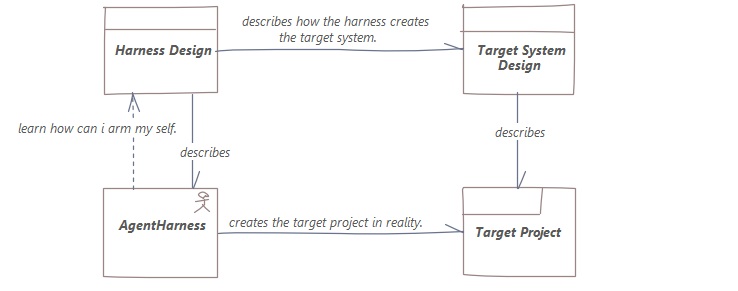
Architecture
The global architecture (Layered Viewpoint) shows how the human, the coding agent, ARGO MCP, the intent architecture graph, ArchiMate 3.2, and Enterprise Architect relate in graph-driven agentic engineering:
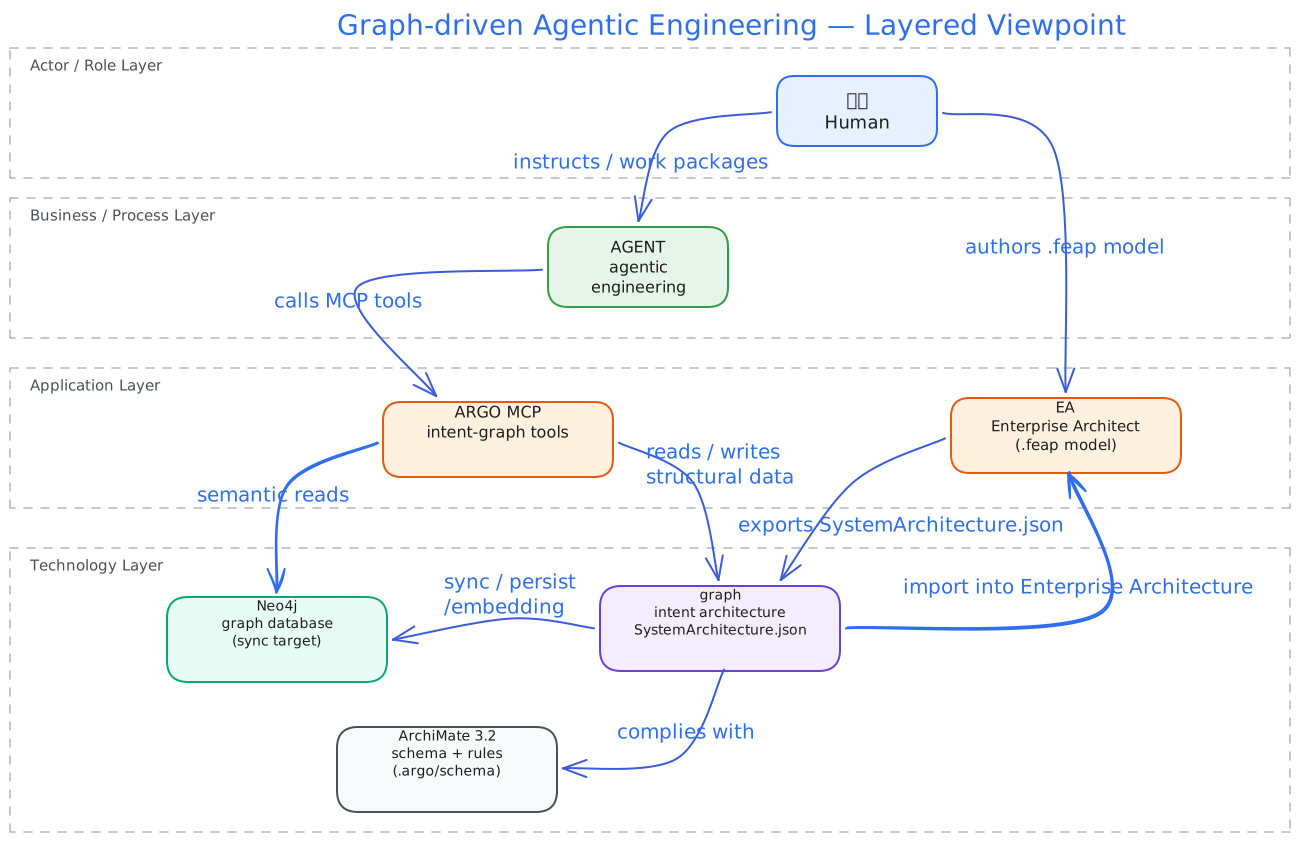
Editable source: docs/diagrams/global-architecture.excalidraw
Supported Harnesses
ArchGraph deploys the ARGO toolchain to all major coding-agent environments:
| Harness | MCP Server | Skills | Rules / Instructions | Agents | Wakeup Gate |
|---|---|---|---|---|---|
| GitHub Copilot | ✓ | ✓ | ✓ | ✓ | — |
| Cursor | ✓ | ✓ | ✓ | ✓ | — |
| OpenCode | ✓ | ✓ | ✓ | ✓ | ✓ |
| DeepSeek Harness | ✓ | ✓ | ✓ | ✓ | ✓ |
| OpenClaw | ✓ | ✓ | ✓ | — | ✓ |
A single argo-deploy registers the argo MCP server and installs all artifacts into each harness
automatically.
Install
npm install -g archgraph-argo
argo-deploy
Done — the ARGO toolchain, skills, and rules are deployed, and the argo MCP server is registered automatically in GitHub Copilot, Cursor, OpenCode, DeepSeek Harness (dsh), and OpenClaw.
Prerequisites and configuration
Everything works out of the box except semantic (Graph RAG) queries, which need:
- Neo4j graph database — stores the structural projection of your architecture graph. During
argo-deployyou configureARGO_NEO4J_DATABASE_URL,ARGO_NEO4J_DATABASE_USERNAME, andARGO_NEO4J_DATABASE_PASSWORDin~/.argo/.env. - Embedding / vector engine — powers semantic Graph RAG retrieval. Configure
ARGO_EMBEDDING_BASE_URL,ARGO_EMBEDDING_MODEL,ARGO_EMBEDDING_PROVIDER,ARGO_EMBEDDING_MODEL_VERSION,ARGO_EMBEDDING_DIMENSIONS, plus the API keyQWEN_KEY. It points at any OpenAI-compatible embedding endpoint — a cloud provider, or a self-hosted server for offline / intranet / private deployments viaARGO_EMBEDDING_PROFILE=openai-compatible(see the self-hosted embedding guide).
Where do the values come from? The Neo4j credentials come from the Neo4j instance you own or
provision (URI, username, password). The embedding configuration and QWEN_KEY come from your
embedding provider's dashboard — for example Alibaba DashScope — or from a self-hosted
OpenAI-compatible server. argo-deploy walks you through the prompt (existing non-empty values in
~/.argo/.env are kept); you can also edit the file afterwards and re-run.
How to use
Step 0 — initialize the workspace. In a fresh project, ask your coding agent to run argo init
(the initializeWorkspace MCP call). It creates a starter design/KG/SystemArchitecture.json when
missing, performs the first JSON → Neo4j sync, initializes the semantic (Graph RAG) lifecycle, and
verifies the architecture. From then on, the intent graph is the source of truth for the project.
After installing, open your project and start a coding agent. It will:
- locate the architecture element behind the task before changing anything,
- arm itself with that element's Skills and Rules,
- work test-first (GIVEN-WHEN-THEN), and trace every commit back to the graph,
- reuse an existing element, relationship, or view instead of creating a duplicate — the write path deduplicates by identity and flags a semantically near element of the same type.
The intent architecture graph — modelled in ArchiMate 3.2 — is the single source of truth.
Community
ArchGraph runs on open co-building. Join the community hub to share, browse and reuse architecture subgraphs across projects, and follow the governance & contribution guides:
- Community site — https://argo.derekworkspacev5.com/archgraph/ (subgraph library, docs, blog)
- graph-wiki repository — https://github.com/derekhu0002/graph-wiki (graph-asset home: contribute a subgraph from your project, or pull one back to reuse)
License
Compatibility
Versions
| Latest version | Published | Size |
|---|---|---|
| 0.13.2 | — | — |
| 0.13.3 | — | — |
| 0.13.4 | — | — |
| 0.13.5 | — | — |
| 0.13.6 | — | — |
| 0.13.7 | — | — |
| 0.13.8 | — | — |
| 0.13.9 | — | — |
| 0.14.0 | — | — |
| 0.15.0 | — | — |
| 0.15.1 | — | — |
| 0.15.2 | — | — |
| 0.15.3 | — | — |
| 0.16.0 | — | — |
| 0.16.1 | — | — |
| 0.16.2 | — | — |
| 0.17.0 | — | — |
| 0.17.1 | — | — |
| 0.18.0 | — | — |
| 0.13.1 | — | — |
Comments
Loading…
Similar plugins
by JohnXu22786
Code knowledge graph plugin for agent harnesses (dsh): indexes symbols, call sites and imports into SQLite, answers call/dependency questions via CLI or stdio MCP tool server
★ 3
↓ 48/wk
MIT
Python
Oct 24, 2026
dsh plugin --profile web add dsh-codegraphby datit309
Engineering workflow system for AI coding agents — mandatory planning, TDD, verification, review, and intelligent codebase graph analysis.
★ 23
↓ 6/wk
MIT
JavaScript
Oct 28, 2026
dsh plugin --profile web add supergraphby GanyuanRan
Make AI coding agents architecture-aware: baseline-first, evidence-verified, drift-checked, and safe across long tasks.
★ 1.4k
↓ 35/wk
MIT
Python
Oct 25, 2026
dsh plugin --profile agent add aegisby tt-a1i
Agent skill for beautiful, verifiable architecture, workflow, sequence, data-flow, and lifecycle diagrams—self-contained HTML with motion and crisp export.
★ 91k
↓ 9.6k/wk
MIT
JavaScript
Oct 28, 2026
dsh plugin --profile agent add @tt-a1i/archify-dshby tinqiao-oss
A portable memory protocol for AI agents — load it as standing rules; a curation discipline + reference spec + optional cap hook.
★ 195
↓ 202/wk
MIT
Python
Sep 24, 2026
dsh plugin --profile agent add dsh-engramoryby MrMaii
把 Agent 从对话框搬到一张图上——连线即执行 / Orchestrate AI agents by drawing lines
★ 4
Apache-2.0
JavaScript
Aug 18, 2026
dsh plugin --profile web add knotline-dsh