
dsh-chrome-attach
IdentifiedAttaches the current Chrome tab to a DSH draft: one pick screenshots the page (falling back to a macOS window shot) and writes its title and URL into the composer as one line.
dsh-chrome-attach
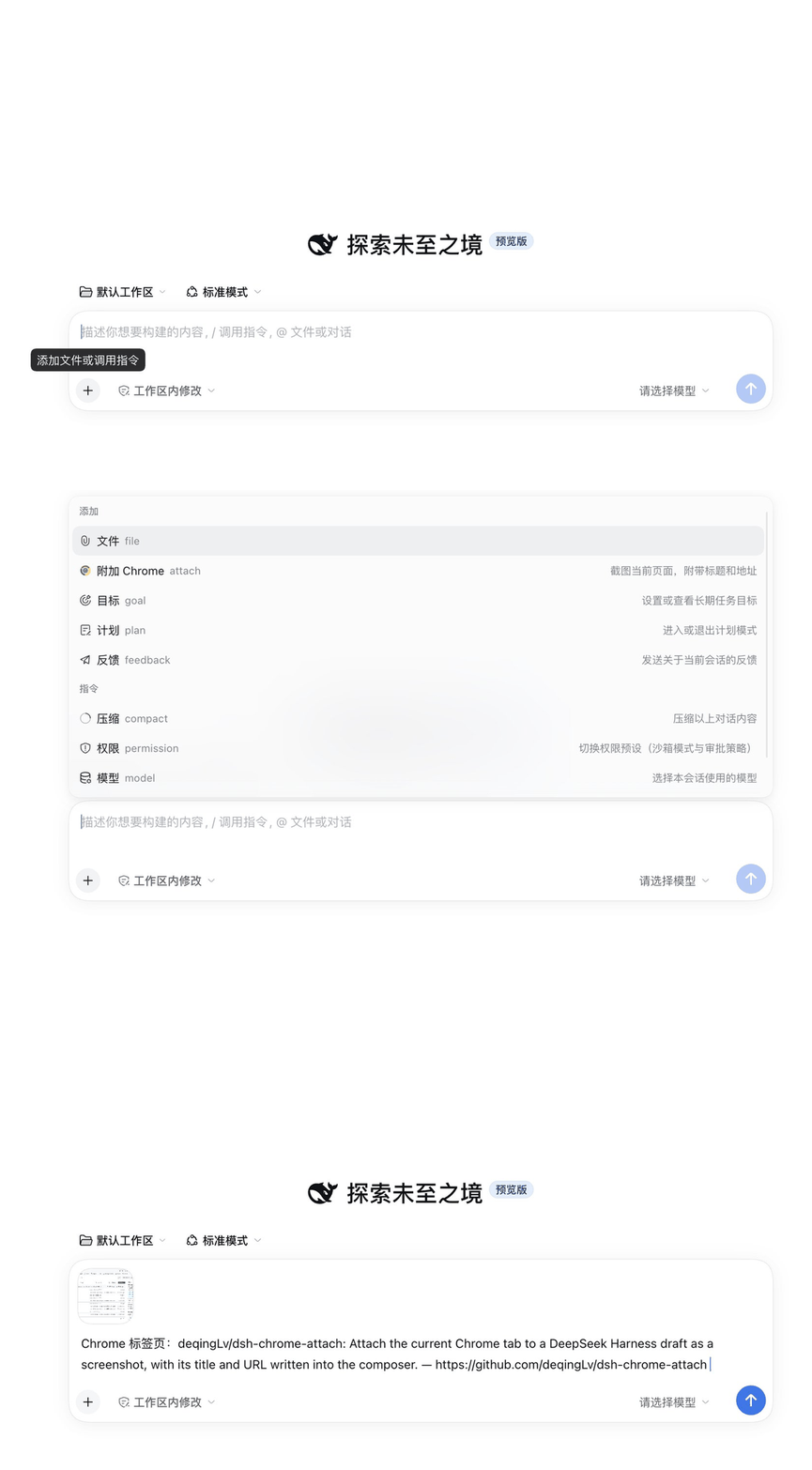
Attach the current Chrome tab to your conversation. One pick in the composer screenshots the page you are looking at, drops it into the draft as an image attachment, and types the tab's title and URL on a line next to it — the same move as ChatGPT's + → attach browser page, except the model also learns which page it is looking at. Everything waits in the draft; nothing is sent until you press Enter.
简体中文 · a DeepSeek Harness plugin


The plugin tries three capture tiers in order and uses the first one that works. No bridge, no extension and no Chrome flags are required — only the image quality differs:
| Tier | What the image contains | Needs | Notes |
|---|---|---|---|
bridge | tab content only | dsh-chrome-bridge + the DSH Bridge extension | best: no focus stealing, no prompt, supports full-page |
cdp | tab content only | Chrome's own Remote debugging switch | one approval, keeps your normal profile |
window | the whole Chrome window (including tab strip and address bar) | macOS + Screen Recording permission | no extension; briefly raises Chrome to the front |
The default chain is bridge → cdp → window; the first tier that succeeds wins. Every response names its source, and a window shot is labelled "window shot, browser UI included".
Install
Needs a DSH build that ships commandUi and the session-slot inputActions prop (that is what writes the page line). On older builds the screenshot still attaches; only the line is skipped, and the toast says so.
From npm
dsh plugin --profile desktop add dsh-chrome-attach # "web" for the web profile
Then refresh the window (Cmd+R) or restart DSH — new bundles are not hot-loaded.
From a release tarball
- Download
dsh-chrome-attach-<version>.tgzfrom Releases. - In DSH open Plugins → Add plugin and paste the tarball's absolute path.
- Refresh the window (
Cmd+R) or restart DSH — new bundles are not hot-loaded.
From source
git clone https://github.com/deqingLv/dsh-chrome-attach.git
Add the plugin by its absolute directory path. It installs as a link:, so edits to the code take effect after a restart:
/Users/you/WorkSpace/Github/dsh-chrome-attach
Use
The + menu in the composer gains one row, right below Add files in the Add section:
[Chrome mark] Attach Chrome · Screenshot the page, plus its title and URL
Clicking it screenshots the active tab (or degrades to the window), puts the image into the current draft, writes the page line, and does not send. Keep typing. /attach works too.
An image only tells the model what the pixels look like, not which page it came from, so the row also inserts one line through the composer's own input facade:
Chrome tab: Kaboo — https://kaboo.bytedance.net/?section=team
That line and the image are one draft: it is plain text you can edit or delete, and both leave together when you press Enter. If the draft is mid-send or no editable draft is attached, only the image lands and the toast says the page line was skipped (已附上(页面地址未能写入输入框):…).
Attachment names carry the page title, e.g. DeepSeek-Harness-155812.png.
Full-page capture exists in the API (POST /api/chrome-attach/shot {"full":true}) but is not a separate menu row yet.
Capture setups
1. bridge — no permissions at all
Install dsh-chrome-bridge from the DSH plugin page and the DSH Bridge extension in Chrome, then connect once. The plugin shells out to the cb CLI (~/.dsh/bin/cb) and gets the bare tab content, without stealing focus.
2. cdp — Chrome's own Remote debugging switch
The clean-tab fallback that needs no extension and no Screen Recording. Chrome 136 changed --remote-debugging-port, but Chrome now ships a supported switch instead:
- Open
chrome://inspect/#remote-debuggingand tick Remote debugging. - Click Attach Chrome in DSH; the first connection asks once whether to allow the app — allow it.
- Chrome writes the chosen port to
<profile>/DevToolsActivePort, and the plugin reads it. Your profile, logins and extensions stay exactly as they are.
The switch is governed by the DevToolsRemoteDebuggingAllowed policy. On a managed machine where it is disabled the checkbox is greyed out — use the window tier or bridge instead.
Already launching Chrome with a debug port? The plugin also probes 9222/9223 and any port named by DSH_CHROME_DEBUG_PORT:
"/Applications/Google Chrome.app/Contents/MacOS/Google Chrome" \
  --remote-debugging-port=9222 \
  --user-data-dir="$HOME/.chrome-dsh-debug"
3. window — macOS screen recording
Nothing to install inside Chrome; DSH needs Screen Recording once:
- System Settings → Privacy & Security → Screen Recording → enable DeepSeek Harness.
- Quit and reopen DSH (macOS requires a process restart for permission changes).
- Pick Attach Chrome page from the
+menu. The shot is the whole Chrome window.
Window shots are downscaled to a 2200px long edge (about 1 MB on Retina, still readable). If another window covers Chrome, the plugin raises Chrome for the capture and switches back to DSH (roughly a second of focus switching). Google Chrome only.
How it works
browser (client/client.js)
  └─ menu row → POST /api/chrome-attach/shot {full}
        └─ host (lib/index.js → lib/capture.js)
              ├─ bridge: cb shot active --out … --json
              ├─ cdp:    /json/version → WebSocket → Page.captureScreenshot
              └─ window: Chrome AppleScript bounds → screencapture -R
        ← { dataUrl, title, url, source, degraded }
  └─ dataUrl → File → synthetic drop → DSH's image intake → draft
  └─ title + url → inputActions.insertText → same draft, one line
The host half only imports Node built-ins, so it never depends on packages the DSH profile may not resolve. The client half is the entry in the + menu; it hands the PNG to the same attachment intake a real drag-and-drop uses. The page line goes through inputActions, the façade the conversation publishes to session slots as a prop — the plugin registers one headless conversation.input.dock entry to hold on to it, so it never reaches into the session directly and inherits the façade's phase/revision guards.
Configuration
| Variable | Default | Meaning |
|---|---|---|
DSH_CHROME_ATTACH_MODE | auto | Pin one tier: bridge, cdp, window |
DSH_CHROME_DEBUG_PORT | — | Extra CDP port to probe |
DSH_CHROME_BRIDGE_CB | — | Explicit path to the cb CLI |
DSH_OSASCRIPT_BIN / DSH_SCREENCAPTURE_BIN | system paths | Overrides for testing |
Limitations
- Captures only the active tab (
bridge/cdp) or the frontmost Chrome window (window). - The page line is typed into the focused draft, so it needs an editable composer; while a message is being sent the image attaches but the line is skipped (the toast says so).
- A
windowshot's URL/title come from the same page, so they describe the frontmost tab rather than the whole window. chrome://pages and the Chrome Web Store cannot be captured throughchrome.debugger; thewindowtier is unaffected.- The
windowtier needs Screen Recording; failures point at the exact System Settings pane. - Images travel over a loopback route and are never uploaded; they end up as a normal DSH attachment.
Development
npm run check
Probe a single tier:
DSH_CHROME_ATTACH_MODE=window node -e "import('./lib/capture.js').then(m => m.capturePage())"
DSH_CHROME_DEBUG_PORT=9222 node -e "import('./lib/capture.js').then(m => m.capturePage({mode:'cdp'}))"
DSH_CHROME_BRIDGE_CB=/path/to/fake-cb node -e "import('./lib/capture.js').then(m => m.capturePage({mode:'bridge'}))"
License
Comments
Loading…
Similar plugins
Type /tabs to pick a browser tab (via chrome-devtools-mcp) and auto-fill its URL into the composer.
★ 0
dsh plugin --profile web add dsh-browser-tabsby RCYD857
Drag or paste files or pictures into the DSH Web composer as one scrolling row of chips, sent as @path references.
★ 0
MIT
JavaScript
Sep 17, 2026
dsh plugin --profile web add dsh-file-attachby zengxiaolou
Annotation browser in the DSH sidebar: a real Chrome page streamed over CDP with input forwarded, where picking an element or selecting text attaches its source location, component stack, styles and a
★ 1
MIT
JavaScript
Oct 26, 2026
dsh plugin --profile web add dsh-annotate-browserby yueyexiayu
DSH desktop plugin: drive a dedicated visible Chrome window over CDP, with screenshots the model can see
★ 0
MIT
JavaScript
Oct 17, 2026
dsh plugin --profile web add chromeby zmm863-commits
DSH Web GUI paperclip button: a 📎 button in the composer opens a file picker (drag & drop supported) and inserts file contents into the textarea.
★ 4
↓ 382/wk
MIT
TypeScript
Oct 4, 2026
dsh plugin --profile web add dsh-paperclipby WJZ-P
Adds file and folder drag-and-drop attachments to the Web UI, with composer cards, persistent history, and workspace-backed paths.
★ 6
↓ 166/wk
MIT
JavaScript
Aug 19, 2026
dsh plugin --profile web add dsh-attachment