

deltabox-lite
Discovered★ 13Lightweight, agent-native sandboxing with diff, commit and abort


Lightweight, agent-native sandboxing with diff · commit · abort.
Give agents a confined workspace with explicit diff, commit, and abort semantics.






deltabox-lite is a standalone sandbox runtime for AI coding agents. Agents keep full execution freedom inside a confined filesystem view, and every change they make can be reviewed, committed, or aborted - per task or per tool call. Linux defaults to a commit-biased FUSE view; macOS uses native APFS clones and FSEvents. Private modes keep changes hidden from the host until commit.
Think of it as Git for agent sessions: less ceremony, more control, and no anxiety about binary or large files.
Demo
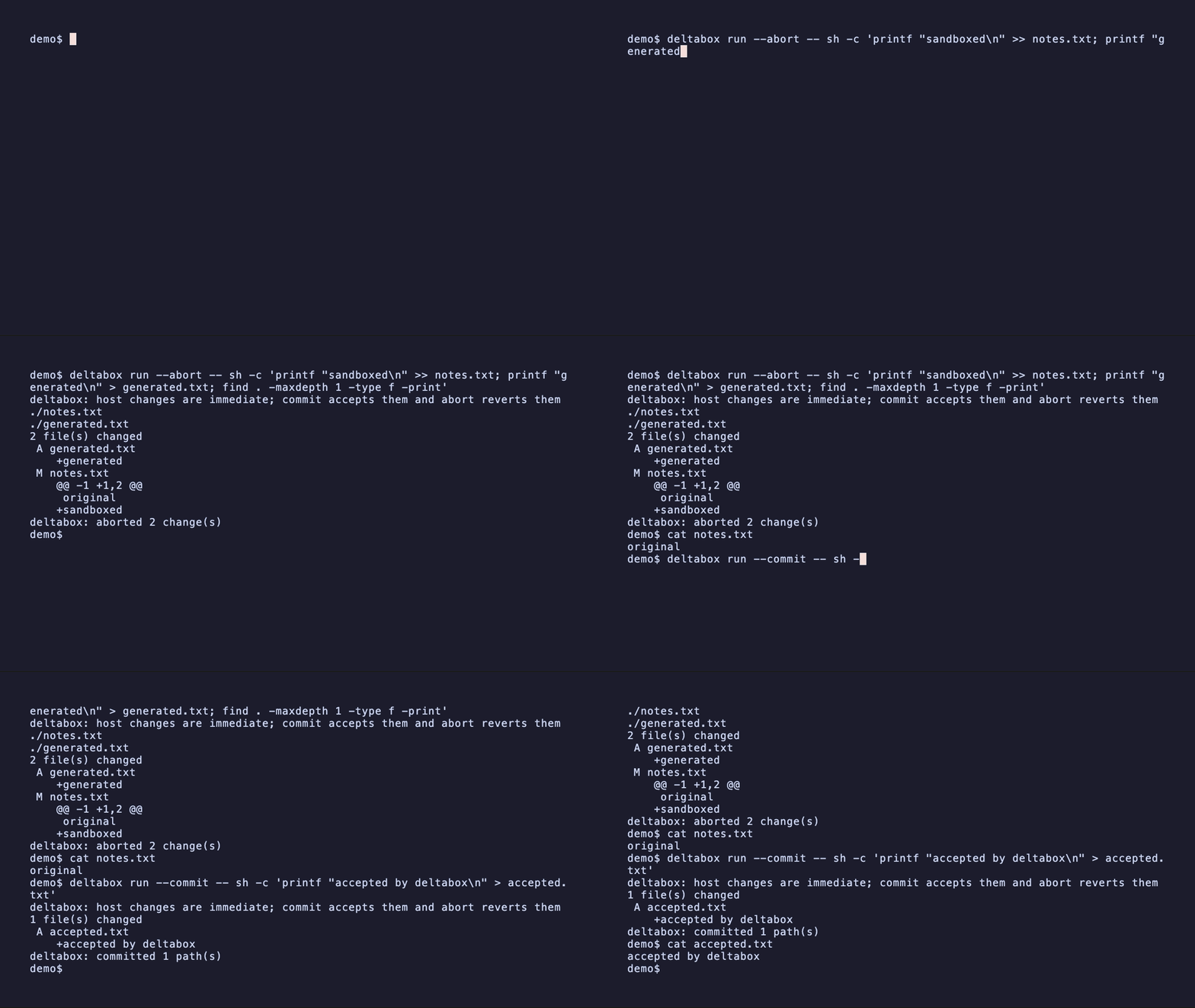
Run a command, inspect its change set, and choose whether to keep or discard it:
Highlights
- Native isolation, not a container - Linux composes Sandlock/Landlock/ seccomp with DeltaFS FUSE; macOS uses Seatbelt plus APFS clones and FSEvents.
- Service-free durable sessions - Linux starts a session-scoped filesystem helper and macOS starts a session-scoped event helper automatically. Durable files remain authoritative across independent CLI processes; no global daemon or manual service startup is required.
- Three filesystem modes -
cbcow-throughmakes changes visible immediately and makes commit an O(1) acceptance operation.cbcow-privateruns the same DeltaFS engine over a private reflink/copy tree and publishes only touched paths at commit.copy-privateremains the compatibility fallback. - Diff / commit / abort - unified text diffs, binary and large-file markers, and a linear checkpoint chain. Abort restores the selected checkpoint; commit accepts the current state.
- Review-scope savepoints — task and tool adapters choose the correct abort target; normal commit and abort do not require a user-created checkpoint.
- Agent adapters — optional JSON-RPC over stdio for Pi and other integrations; see the adapter protocol.
- Policy-first — filesystem read/write rules, secret-path denial, network allow/audit, deny-all and allowlist modes, scrubbed child environments, and bounded writes/storage.
Install
Let AI agents install
Copy this prompt into an AI coding agent with terminal access:
Install DeltaBox Lite by following the instructions at
https://raw.githubusercontent.com/delta-box/deltabox-lite/main/install-prompt.txt
Detect my environment, install the appropriate runtime and any DSH or Pi
integration I use, and verify the installation with the disposable smoke test.
The plain-text installation prompt covers environment checks, integration setup, and verification. You can also paste its contents directly into your agent.
Manual Install
Run the following on Mac or Linux to install deltabox-lite CLI:
curl -fsSL https://raw.githubusercontent.com/delta-box/deltabox-lite/main/scripts/install.sh | sh
The prebuilt binaries ship for macOS (arm64, x64) and Linux (x64, arm64) can be found on GitHub release.
deltabox-lite CLI can also be installed via the following package managers:
# Install using npm
npm install --global deltabox-lite
# Install using Homebrew
brew install delta-box/tap/deltabox
Build from source
cargo build --release
export PATH="$PWD/target/release:$PATH"
Plugin
DSH (DeepSeek Harness)
With DeepSeek Harness installed, add the plugin to your Web profile:
dsh plugin --profile web add dsh-deltabox
For Desktop, open Plugins → Add plugin, enter dsh-deltabox, and install
it. Alternatively, use Desktop's bundled CLI:
dsh plugin --profile desktop add dsh-deltabox
DSH plugin guide for configuration and review controls.
Pi
Install Pi if needed, then add the extension:
npm install --global @earendil-works/pi-coding-agent
pi install npm:pi-deltabox
Start a new Pi session in
your project and run /sandbox-status to verify that the extension is active.
Use /sandbox-review, /sandbox-commit, and /sandbox-abort to review, keep,
or discard changes. See the
Pi extension guide for
configuration, including explicit command isolation settings.
Both integrations use FUSE on Linux for CB-CoW (/dev/fuse and fusermount3
or fusermount) and APFS/FSEvents on macOS.
Quick start
For a first transaction, create a project with one ordinary file and discard a command's changes. No package manifest or policy file is needed:
demo=$(mktemp -d)
cd "$demo"
printf 'original\n' > notes.txt

deltabox run --abort -- sh -c '
  printf "sandboxed\n" >> notes.txt
  printf "generated\n" > generated.txt
  find . -maxdepth 1 -type f -print
'

cat notes.txt
test ! -e generated.txt
The command runs inside the sandbox view, prints the diff, and then aborts. The
original notes.txt remains unchanged and generated.txt is removed.
To keep a result, use the same one-command interface with --commit:
deltabox run --commit -- sh -c 'printf "accepted by deltabox\n" > accepted.txt'
cat accepted.txt
run creates and cleans up a temporary transaction. Scripts and agent
integrations should select --commit or --abort explicitly; the child exit
status is preserved after that decision.
For multiple independent commands, start a persistent session. Commands run from
the project directory can omit --project; use it only when invoking Deltabox
from another directory:
cd /abs/path/my-project
session_id=$(deltabox session start .)
deltabox exec "$session_id" -- sh -c 'printf "step one\n" > step-one.txt'
deltabox exec "$session_id" -- sh -c 'printf "step two\n" > step-two.txt'
deltabox diff "$session_id"
deltabox commit "$session_id"
deltabox session stop "$session_id"
Session records live in <project>/.deltabox by default, so each project stays
self-contained. Set DELTABOX_STATE_DIR=/path/to/state to relocate session
records and engine state to an arbitrary path instead.
Shell command syntax
deltabox exec and deltabox run execute the argv after -- directly. Commands
that do not require shell parsing can be passed as ordinary arguments:
deltabox exec "$session_id" -- git status --short
deltabox exec "$session_id" -- curl -fL -o source.tar.gz https://example.com/source.tar.gz
Redirection, pipes, variable expansion, globbing, and command lists require an explicit shell. Keep the complete script inside quotes so the outer host shell cannot perform the filesystem operation before Deltabox starts:
deltabox exec "$session_id" -- sh -c 'printf "%s\n" hello > hello.txt'
deltabox run --abort -- sh -c 'printf "%s\n" trial > trial.txt'
deltabox exec "$session_id" -- sh -c 'find . -type f | sort > files.txt'
deltabox exec "$session_id" -- sh -c 'command-that-may-be-quiet >/dev/null 2>&1'
This form is wrong because the host shell handles > and creates hello.txt
outside the sandbox transaction:
deltabox exec "$session_id" -- echo hello > hello.txt
Quoting the whole command without sh -c is also wrong: Deltabox would treat
the complete string as an executable filename. Sandboxed commands do not receive
a terminal on stdin, so use non-interactive flags for tools such as Git.
Choosing a filesystem mode
Linux and macOS request cbcow-through by default and visibly fall back to
copy-private if the native provider is unavailable. Select the mode
explicitly when a workflow requires it:
deltabox session start /abs/path/my-project --fs-mode copy-private
deltabox session start /abs/path/my-project --fs-mode cbcow-private --require-fs-mode
deltabox session start /abs/path/my-project --fs-mode cbcow-through --require-fs-mode
deltabox session start /abs/path/my-project --fs-mode cbcow-through --durable
deltabox session start /abs/path/my-project --fs-mode cbcow-through --durable --group-commit-ms 2
Fast mode is the default and recovers helper/process failures. --durable
adds ordered storage barriers; success from commit means changed files,
affected directories, and the acceptance marker are synchronized.
--group-commit-ms lets concurrent mutations share an APPLIED journal
barrier while preserving that per-operation success boundary.
Strict mode requires cbcow-through or cbcow-private; startup fails instead
of falling back to copy-private when the requested provider is unavailable.
On macOS, fast cbcow-through also assumes Deltabox is the exclusive project
writer. Fast exec defers FSEvents accounting to the next state operation;
strict mode closes a sentinel boundary before each result, detects external
writes, and refuses an unsafe abort. Use cbcow-private when host isolation is
required before commit.
How it works
flowchart LR
    A[CLI or agent adapter] --> C[Session coordinator]
    C --> X[Lazy session command helper]
    X --> Y[Short-lived confined child]
    C --> T[Linux cbcow-through]
    T --> H[Session-scoped DeltaFS helper]
    H --> P[(Host-visible LIVE tree)]
    C --> V[Linux cbcow-private]
    V --> F[Session-scoped DeltaFS helper]
    F --> L[(Private LIVE tree)]
    L -->|touched-path commit| P
    C --> M[macOS native APFS plus FSEvents]
    M --> E[Session-scoped event helper]
    E --> P
    E --> L
    C --> R[copy-private fallback]
    R --> S[(Private working tree)]
    S -->|commit| P
On Linux with FUSE available, session start launches a helper that mounts the
host project through the commit-biased state engine. Writes update the host
tree through DeltaFS after recording rollback data; commit accepts the current
state and abort replays undo records. cbcow-private preserves the same fast
per-command path while keeping its LIVE tree hidden from the host until a
conflict-checked commit. In copy-private, each command updates a durable
private working tree and commit publishes it to the project.
On macOS, the same modes use APFS-cloned state and a restartable FSEvents helper
instead of a mount. The helper only keeps the event stream warm; persisted
cursors and indexes remain authoritative.
The first CB-CoW exec also launches a restartable command helper. Later CLI
operations reuse its warm Sandlock worker on Linux or Seatbelt profile/proxy on
macOS without making that helper authoritative session state. Durable files,
not a long-running process, remain the source of session truth. See session
semantics.
Policy
session start --policy policy.toml accepts filesystem, network, and resource
limits. The default agent policy uses the allow_audit network mode, denies
common secret paths, passes only a small environment allowlist to commands,
caps one direct write at 16 MiB, and caps pending added/modified file content at
1 GiB. Network policy can instead deny all access or allow only explicit
host-and-port targets:
[network]
mode = "allowlist"
allow = ["registry.npmjs.org:443", "127.0.0.1:3000"]

[limits]
max_write_bytes = 16777216
max_storage_bytes = 1073741824
See policy reference for the full schema and enforcement semantics, and macOS compatibility for path mapping and tool support.
The policy is the session's standing breadth. A single command can request a
wider execution profile — workspace-write (default) or read-write — so a
session.exec call can reach the host filesystem without changing the session:
deltabox exec "$SESSION" --project /abs/path/my-project \
  --execution-profile read-write -- sh -c 'sudo apt-get install -y ripgrep'
Workspace changes stay visible to diff, commit, and abort under either profile.
Linux FUSE and private-workspace modes deny direct access to the backing project;
macOS cbcow-through writes the real project and tracks those changes with
APFS/FSEvents. Engine state and helper endpoints stay denied in both cases.
Host writes outside the workspace cannot be rolled back.
Performance
Measured on x86-server (Linux 6.18, ext4, release build). Each row reports 50
no-op commands after five warmups. Deltabox uses independent CLI processes over
one cbcow-through session.
| Runner | 10 files p50 / p95 | 200 files p50 / p95 | 1000 files p50 / p95 |
|---|---|---|---|
cbcow-through | 13.7 / 15.5 ms | 14.3 / 15.4 ms | 13.2 / 14.7 ms |
| raw Sandlock | 8.1 / 9.4 ms | 8.2 / 9.0 ms | 8.1 / 8.9 ms |
| plain shell | 1.3 / 1.7 ms | 1.2 / 1.6 ms | 1.2 / 1.5 ms |
The no-op path does not scan or copy the project per command. Empty DeltaFS checkpoint and commit operations remain below 1 ms in the scaling benchmark.
The delta-driven path can outperform repeated Sandlock copy-up work when a workload makes many small changes.
| Microbenchmark | cbcow-through p50 / p95 | raw Sandlock p50 / p95 | Faster path |
|---|---|---|---|
| One 4 KiB write in a 256 MiB existing file | 46.4 / 47.3 ms | 166.0 / 187.7 ms | cbcow-through |
| 16 commands, one 4 KiB write per 32 MiB file, one final commit | 509.0 / 509.6 ms | 4809.5 / 5761.2 ms | cbcow-through |
Raw Sandlock has no durable cross-command session, so the second row commits each one-shot command independently.
On macOS, the native provider materializes its APFS accepted base once at
session start. Fast commands do not clone or scan the project per invocation;
status, diff, checkpoint, commit, and abort close the FSEvents reconciliation
boundary. Private mode additionally materializes a private APFS LIVE tree and
therefore trades more startup and command-path work for pre-commit host
isolation.
Project layout
crates/deltabox-core— sessions, checkpoints, diff/commit/abort, policy, journal, platform backends.crates/deltabox-cli— thedeltaboxcommand-line binary.crates/deltabox-node- thedeltaboxNode-API bindings.deltafs-fuse— the standalone commit-biased state engine, FUSE adapter, helper, and local control protocol.plugin- dsh and pi pluginnpm- npm packagedocs/policy.md— policy schema and enforcement boundaries.docs/macos.md— macOS backend behavior and compatibility matrix.
Citation
If you find deltabox-lite useful, please cite the original paper of DeltaBox (which is based on microVM) or this github repo:
@misc{dong2026deltaboxscalingstatefulai,
      title={DeltaBox: Scaling Stateful AI Agents with Millisecond-Level Sandbox Checkpoint/Rollback},
      author={Yunpeng Dong and Jingkai He and Shiqi Liu and Yuze Hou and Dong Du and Zhonghu Xu and Si Yu and Baochuan Yang and Yubin Xia and Haibo Chen},
      year={2026},
      eprint={2605.22781},
      archivePrefix={arXiv},
      primaryClass={cs.OS},
      url={https://arxiv.org/abs/2605.22781},
}
License
Apache-2.0.
Acknowledgments
This project utilizes excellent work of existing sandbox projects like sandlock.
⭐ Star this repo if you find deltabox-lite helpful!
Comments
Loading…
Similar plugins
by Sutera-Diffusus
DSH sandbox tester: process-isolated testing ground for DeepSeek Harness
★ 5
↓ 6/wk
MIT
JavaScript
Aug 16, 2026
dsh plugin --profile web add dsh-sandboxby MoonlitDropOfBlood
An independent approval subagent judges every sandbox escalation, with a configurable model and an audit log.
★ 3
↓ 1.4k/wk
MIT
JavaScript
Sep 30, 2026
dsh plugin --profile web add @duke-dsh-plugins/dsh-agent-approvalby jiezeng2004-design
Lightweight requirement alignment for DeepSeek Harness — align important decisions before execution without a full spec workflow.
★ 8
↓ 363/wk
MIT
TypeScript
Aug 22, 2026
dsh plugin --profile web add dsh-requirements-alignmentby huohua-dev
A lightweight compaction policy plugin for DeepSeek Harness: capped output reservation, useful-range selection, and no-progress retry guards.
★ 0
MIT
JavaScript
Oct 3, 2026
dsh plugin --profile web add dsh-compaction-policyby andrepontesmelo
The DSH productivity suite: plugins + agent skills for the DeepSeek Harness, installable in one command.
★ 0
MIT
JavaScript
Sep 11, 2026
dsh plugin --profile web add @andrepontesmelo/dsh-suiteby TsFreddie
LLM-free lossless* compaction engine for DeepSeek Harness
★ 9
↓ 336/wk
MIT
JavaScript
Aug 24, 2026
dsh plugin --profile web add dsh-compaction-instant