

dsh-tab-groups
Manifest validEdge/Chrome extension that auto-groups every DeepSeek Harness (DSH) Web GUI tab, plus the DSH plugin that mirrors it to a fixed path, detects it inside the GUI and drives it. One package, two faces.
dsh-tab-groups
把浏览器里所有指向 DeepSeek Harness(DSH)Web GUI 的标签页自动收进同一个标签组。
你在 DSH 里同时开着好几个会话——侧栏每一行本身就是链接,中键一点就是一个新标签页——标签栏很快就乱了。
这个扩展会在 DSH 标签页出现的瞬间把它们归进一个名叫 DSH 的组,新开一个自动进去一个,
全部关掉后空组被浏览器自动清掉。本仓库是一个包、两张脸:浏览器扩展那一半做全部归组动作,
DSH 插件那一半负责把扩展镜像到固定路径、在 GUI 里检测它、引导安装并直接驱动它。
中文
▲ DSH GUI 里的插件界面:默认收起成一颗状态点,点一下展开成面板——开关、组名、颜色、实时计数、立即归组
为什么需要它
- 会话一多,标签栏就废了。
dsh-session-url让侧栏每一行都是真链接(中键 / Cmd+点击直接开新标签), 于是"一个会话一个标签页"成了日常,而浏览器原生的标签组要一个个手动拖。 - 这件事 DSH 插件自己做不到。 浏览器半区插件是 GUI 页面里的普通网页 JS,整棵 SDK 里没有任何
浏览器扩展 API(
chrome.tabs/chrome.tabGroups/chrome.runtime都不存在), 宿主插件跑在 Node 里更碰不到浏览器。标签栏只对浏览器扩展开放, 所以"自动归组"这件事唯一的实现形态就是扩展。 - 可扩展又不该多装一个东西。 所以本仓库把两张脸放进同一个目录:装 DSH 插件时, 扩展那半边也被镜像到一个固定路径,并立刻在 GUI 里告诉你该怎么加载它、装没装好。
特性
- 打开即归组:DSH 标签页一出现就进组,后开的自动跟上,全关后空组被浏览器自动清掉。
- 可选的专属窗口:打开后,所有 DSH 标签页会被收进同一个窗口,且那个窗口里只有 DSH 标签页; 你自己的普通标签页一个都不会被搬走。
- 识别靠标题锚点
DeepSeek Harness:一条规则同时覆盖随机--port、localhostvs127.0.0.1、 局域网地址、以及 cloudflared 隧道域名(端口规则永远追不上后者)。前缀匹配刻意收紧, 另一个恰好叫DeepSeek Harness Docs的站点不会被误伤。 - 一个包两张脸:同一目录既是浏览器扩展(
manifest.json+src/),又是 DSH 插件 (lib/+cordis.patch.yml);浏览器忽略插件文件,DSH 忽略扩展文件。 - 扩展 ID 钉死:manifest 里钉了公钥
key,ID 恒为pnncehmieeobfabnbdepbldiknndjbhl, 目录挪到哪都不变——这是两张脸能互相寻址的前提。 - GUI 里直接管:右下角芯片默认收起成一颗状态点(几乎不占地方),点开能看实时计数、 立即归组、改组名与颜色;扩展没装时它自己展开成三步引导。「隐藏」只在本次页面加载内有效, 刷新即回来——芯片是这个插件唯一的界面,不能做成"藏了就再也找不回来"。
- 纯本地:三个权限(
tabs/tabGroups/storage)、没有任何 host 权限、不注入内容脚本、 不发网络请求、不采集数据。 - 零依赖零构建:扩展直接加载即用,插件直接挂载即用。
截图
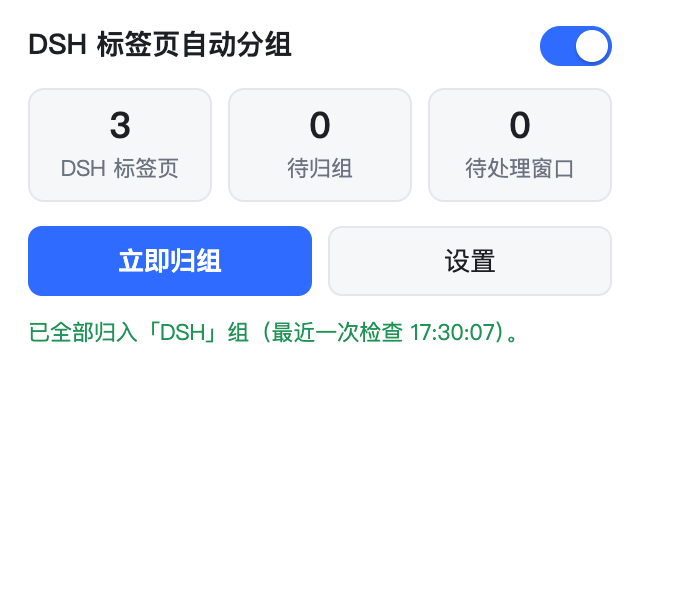
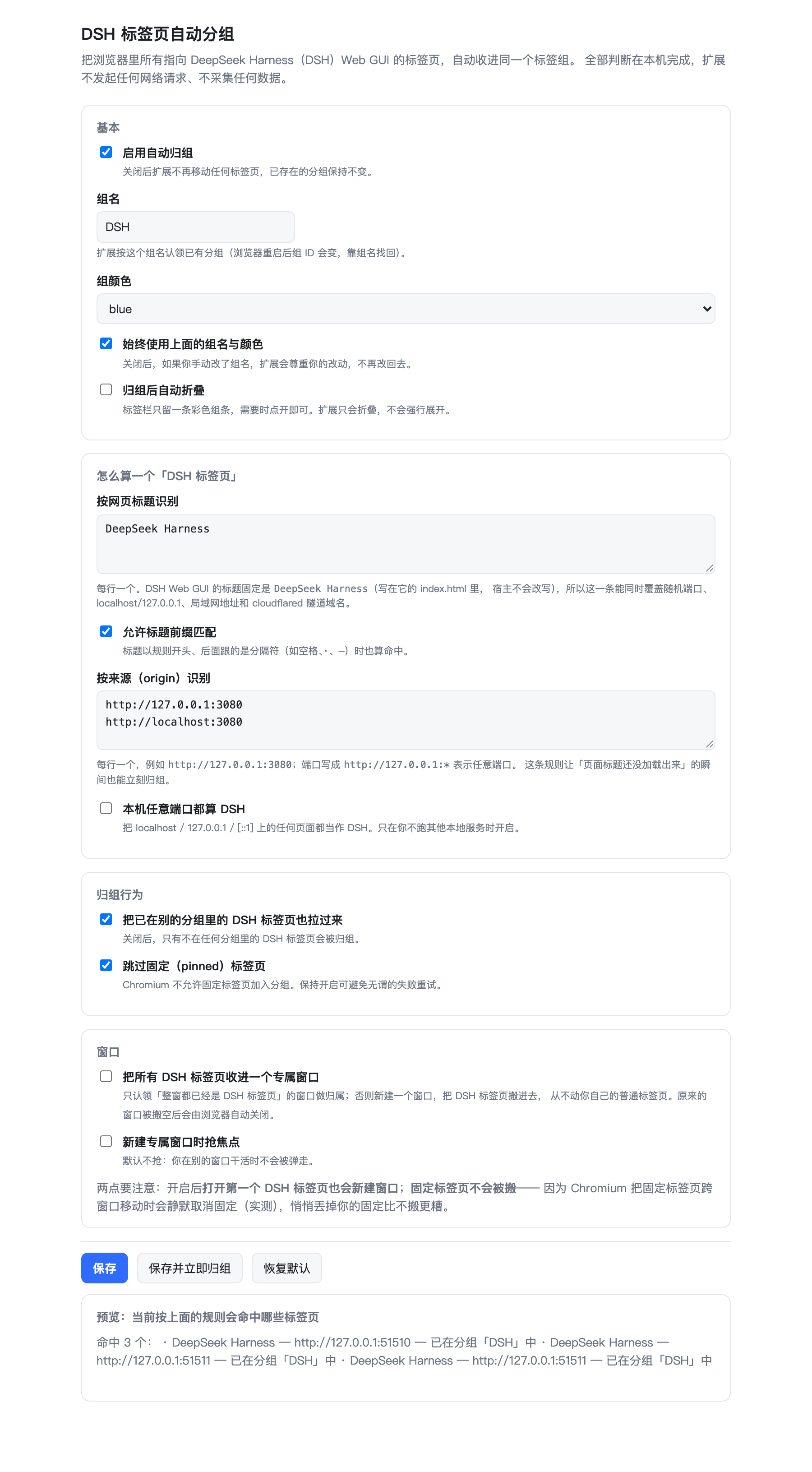
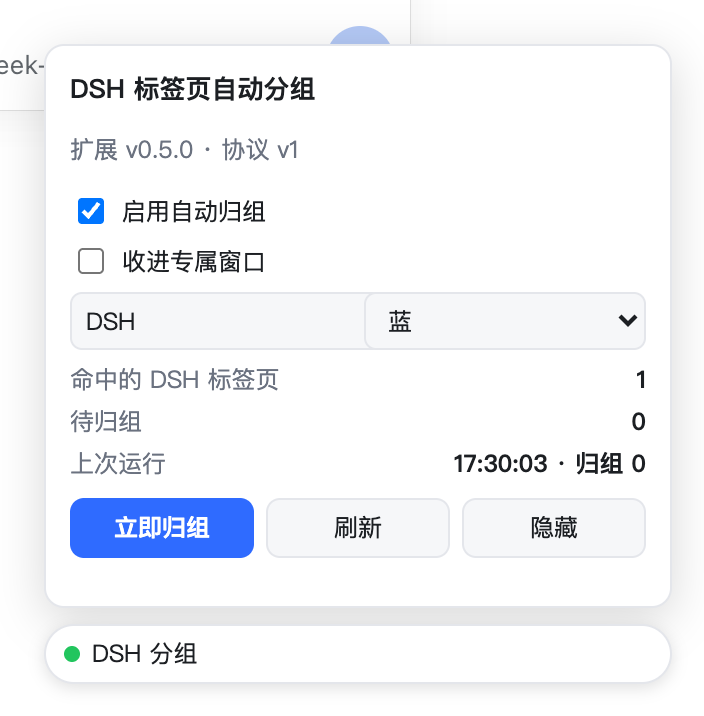
▲ 左:扩展弹窗(开关 / 统计 / 立即归组)。右:设置页,底部实时列出"按当前规则命中哪些标签页、它们现在在哪个组里"
浏览器自己的标签栏属于浏览器内核 UI,任何页面级 API 都截不到,所以这里没有"标签栏截图"—— 与其画一张示意图,不如不放。
安装
分两步。第二步只有一次点击,且只需做一次。
第一步:装 DSH 插件
cd <你的 dsh-tab-groups 目录>
dsh plugin --profile web add link:$PWD
宿主半区随后会把扩展镜像到 $DSH_HOME/dsh-tab-groups-extension(默认 ~/.dsh/dsh-tab-groups-extension),
并在日志里打印这个路径。刷新 GUI 后右下角出现「DSH 分组」芯片。
从 npm 装也一样(dsh plugin --profile web add dsh-tab-groups),镜像路径固定,不依赖包安装在哪。
第二步:把镜像目录加载进浏览器
- 地址栏打开
edge://extensions(Chrome 是chrome://extensions),打开左下角开发人员模式 - 点加载解压缩的扩展,选择
~/.dsh/dsh-tab-groups-extension(Finder 里按Cmd+Shift+G可以粘贴这个路径) - 回到 DSH 页面,芯片会在几秒内自己变绿(也可以点「重新检测」)
一行命令直接打开那个页面:
open -a "Microsoft Edge" "edge://extensions/"
只想用扩展
不要 DSH 插件也行:直接对本仓库目录做「加载解压缩的扩展」即可, 插件那半边不影响扩展的任何行为。
使用
- 什么都不用做:打开 DSH 标签页它就会进组。
- 弹窗(点浏览器工具栏的扩展图标):看统计、一键「立即归组」、进设置页。
- 设置页:组名、组颜色、是否自动折叠、识别规则(标题 / 来源)、是否从别的分组拉过来、 是否跳过固定标签页、以及窗口模式;底部有实时预览。
- 专属窗口:设置页「窗口」分区,或 DSH 芯片面板上的「收进专属窗口」开关(两处都是同一个配置)。默认关闭。
- DSH 里的芯片:默认一颗状态点(绿=已连接),点开即面板;「隐藏」可整个收掉(刷新恢复)。
- 从 DSH 页面驱动扩展(高级):页面侧协议为
ping/status/reconcile/set-config, 详见工作原理。
工作原理
1. 怎么判断"一个标签页是 DSH"
识别锚点是网页标题 DeepSeek Harness。三个证据,都是查证的:
@deepseek-ai/dsh-web-frontend/dist/index.html里<title>写死为DeepSeek Harness;- 整个前端 bundle 里没有任何
document.title赋值,运行期不会变; - 宿主 webserver 只向 index.html 注入
window.__DSH_BOOT__,不重写<title>(dsh-host-webserver/lib/index.js里连title这个词都不出现)。
前缀匹配只在"后续第一个字符不是字母数字"时才算命中,所以
DeepSeek Harness · 会话标题、DeepSeek Harness — 登录 命中,DeepSeek Harness Docs 不命中。
另有按 origin 的规则(默认 http://127.0.0.1:3080、http://localhost:3080),
负责"标题还没加载出来的那一瞬间"就立刻归组。
2. 一个包,两张脸
| 脸 | 跑在哪 | 负责 |
|---|---|---|
浏览器扩展 manifest.json + src/ + icons/ | Edge / Chrome 等 Chromium 浏览器 | 全部标签组行为 |
DSH 插件 lib/ + cordis.patch.yml | DSH 宿主 + Web GUI 页面 | 镜像扩展、检测它、引导安装、驱动它 |
宿主半区(lib/index.js)在插件激活时把扩展那半边复制到 $DSH_HOME/dsh-tab-groups-extension:
幂等(带版本戳,同版本不重复复制)、窄删除(只替换已知的那几个条目,绝不动目录里别的东西)。
浏览器半区(lib/client.js)是一颗自带的 shadow-DOM 芯片,不依赖任何官方 slot 或服务形状——
因为"扩展没装"这个状态正是它存在的理由,它必须在那时也能工作。
3. 两张脸怎么互相找到
扩展 manifest 里声明了 externally_connectable:
"matches": ["http://127.0.0.1/*", "http://localhost/*", "https://*.dsh-market.com/*"]
Chromium 只向匹配的页面注入 chrome.runtime。于是:
- 页面看得到
chrome.runtime.sendMessage→ 扩展在; - 看不到 → 扩展没装或没启用,芯片显示引导。
不需要探测扩展 URL、不需要改 manifest、不需要额外权限。协议如下(src/protocol.js,纯逻辑、有单测):
| 消息 | 返回 |
|---|---|
{type:'ping'} | {ok, installed, protocol, id, version} |
{type:'status'} | 开关、组名、颜色、命中数、待归组数、窗口数、上次运行结果 |
{type:'reconcile'} | 立即归组,返回 {moved, groups, matched, errors} |
{type:'set-config', config} | 逐键白名单校验后写入并立即重新归组 |
它故意什么都不暴露:状态里只有计数,没有任何标签页地址、标题或 ID。
4. 专属窗口模式(默认关闭)
打开后,所有 DSH 标签页会被收进同一个窗口,而这个窗口里只有 DSH 标签页。规则:
- 只认领"整窗都已经是 DSH 标签页"的窗口当归属。你的窗口里只要还有普通标签页,它就永远不会被选中—— 把你自己开的标签页搬走,比这件事本身要粗暴得多。没有这样的窗口时,就新建一个。
- 新建窗口时用
tabId播种(把第一个 DSH 标签页直接作为新窗口的初始标签页),而不是裸建一个空窗口: 裸建会留下一个多余的about:blank标签页(实测),端到端里有专门断言盯着"前后 about:blank 数量不变"。 - 固定标签页不参与。实测:
chrome.tabs.move跨窗口移动固定标签页会成功但静默取消固定—— 悄悄丢掉用户的固定比不搬更糟,所以固定标签页原地不动。 - 原窗口被搬空后由浏览器自动关闭(实测),不会留下空壳窗口;扩展也会把记住的窗口 ID 一起丢掉, 下次重新挑或重建。
- 不改焦点:新建窗口默认
focused: false,你在别的窗口干活时不会被弹走(想抢焦点可以在设置里打开)。 - 移动必然丢分组(标签组是窗口内的概念),所以窗口归并先于归组执行:搬完再在新窗口里归一次, 顺序反了就得归两遍。
已知限制
-
macOS 上装不了"静默"扩展。 唯一能静默装扩展的机制是企业策略
ExtensionInstallForcelist,而微软官方文档明确写着:On macOS instances, apps and extensions from outside the Microsoft Edge Add-ons website can only be force installed if the instance is managed via MDM, or joined to a domain via MCX. — Microsoft Edge 策略文档
而且它不只是"文档这么写":本机实测
Enrolled via DEP: No、MDM enrollment: No、无任何受管策略文件, 所以即使去配策略,非商店扩展在 macOS 上也不会被强制安装。 「加载解压缩的扩展」那一次点击是省不掉的;想彻底免掉只能上架 Edge 加载项商店。 -
externally_connectable只能按 host 匹配、不能按端口,因此本机上任何网页(任意 localhost 端口) 都能连上这个扩展。作为补偿,配置写入走逐键白名单校验(未知键直接拒绝、类型不对直接报错), 状态响应里只有计数。一个恶意本地页面最多能改组名/颜色/开关或触发一次归组。 -
改了组名又重启浏览器会另建一个新组:扩展把"自己拥有的组 ID"记在
chrome.storage.session, 浏览器重启后组 ID 失效,只能按组名找回。想避免就保持组名不变,或把"始终使用配置的组名"打开。 -
不劫持别人的分组:只认领组名匹配或自己记录过的组;你手动建好、里面恰有一个 DSH 标签页的组 不会被改名(那个标签页会被拉出来,除非关掉"从别的分组拉过来")。
-
专属窗口模式的代价:开启后,你打开的第一个 DSH 标签页也会被搬进一个新窗口(因为"整窗只有 DSH 标签页" 这个条件一开始不成立);固定标签页会留在原来的窗口里(原因见上)。默认关闭,就是为了让你自己权衡。
-
开发者模式提示:每次启动 Edge 可能提示"停用开发人员模式扩展",这是浏览器正常提示,选择保留即可。
-
Safari 用不了这个方案。 本机实测(macOS 26.7.1 + Safari 27.0): Safari 扩展 API 没有
tabGroups,连tabs.Tab.groupId都不存在;AppleScript 词典 (/Applications/Safari.app/Contents/Resources/Safari.sdef,8710 字节全文)里只有一个tab类, 属性仅source/URL/index/text/visible/name,没有tab group类/元素/属性/命令。 唯一的一手能力是快捷指令:Safari 自带Create Tab Group/Move Tabs to Tab Group/Search Tabs这几个 App Intent,可用/usr/bin/shortcuts run "<名称>"无点击触发——但 macOS 没有"标签页被打开"触发器, 所以做不到事件驱动。如果你只是想"别让 DSH 标签混进普通标签",把 GUI 加成 Safari Web App (添加到程序坞)或给它独立 Profile 比任何脚本都稳。
验证
npm test                    # 60 项纯逻辑单测(node --test,无需浏览器)
npm run id                  # 复查扩展 ID:manifest 的 key、插件常量、client 内联值三者是否一致

# 真实浏览器端到端:加载扩展、开标签页,从扩展自己的 service worker 里读
# chrome.tabGroups 状态做断言(不是 mock)
DSH_E2E_URL="http://127.0.0.1:3080/?token=..." \
E2E_CHANNEL=msedge \
PLAYWRIGHT_PATH="/path/to/node_modules/playwright" \
node tools/e2e.mjs

# 插件能不能在真实 DSH 宿主里挂载?(隔离 DSH_HOME,不碰你的 profile 与 ~/.dsh)
DSH_BIN=/path/to/dsh PLAYWRIGHT_PATH="/path/to/node_modules/playwright" npm run test:mount

# 重新生成 README 截图(真机截图,非示意图)
npm run screenshots
三层验证,每层都在本机跑过:
| 通道 | 断言数 | 结果 |
|---|---|---|
| 纯逻辑单测(识别 / 分组决策 / 窗口归并决策 / 协议与信任边界 / 两张脸一致性 / 宿主镜像) | 74 | 74/74 |
| 真浏览器端到端(Chromium 与 Microsoft Edge 154.0.4258.53,含真实 DSH GUI 会话) | 53 | 53/53 |
插件挂载(隔离 DSH_HOME → 真宿主 → 真浏览器打开该实例 GUI) | 9 | 9/9 |
端到端覆盖:自动建组、组名与颜色、后开的 DSH 标签页自动入组、DeepSeek Harness Docs 不被误伤、
普通网页不被归组、固定标签页被正确放过、弹窗与设置页改配置后真实标签组跟着变、
重复触发幂等、关标签页后组自动清除、清除后再开能重建;
专属窗口(在设置页打开开关 → 分散在两个窗口的 3 个 DSH 标签页聚进同一个窗口、该窗口里只有 DSH 标签页、
你自己的普通标签页一个都没被搬走、专属窗口里的分组也建好了、前后 about:blank 数量不变、关掉开关后恢复);
页面 → 扩展的协议全线(含非法配置被拒绝);
以及真实 DSH GUI 里的芯片(零注入由宿主投递、默认收起、点开显示计数、「隐藏」生效、刷新后回来、
点「立即归组」标签组真的恢复)。
挂载通道的第三段尤其能说明问题:用一个只含核心 web bundles + 本插件的临时 profile 起真实实例,
宿主半区必须真的写出镜像,真实宿主必须把插件的浏览器半区投递给真浏览器(全程不做任何注入),
芯片必须连上扩展且页面无 JS 报错。这三条通道都不往你的 profile 或 ~/.dsh 里装任何东西。
兼容性
| 项 | 值 |
|---|---|
| DSH | >=0.2.0-rc.2 |
| 浏览器 | Edge / Chrome / Brave / Arc / Vivaldi 等 Chromium 内核(需 MV3 + 标签组 API,Chrome 89+) |
| Safari / Firefox | 不支持(Safari 无标签组 API;Firefox 需另写扩展) |
| Node(仅工具与测试) | >=22 |
| 依赖 | 运行时零依赖;扩展零构建 |
License
MIT
English
Automatically collect every browser tab showing the DeepSeek Harness (DSH) Web GUI into one tab group.
You keep several DSH conversations open at once — every sidebar row is a real link, so a middle click is a
new tab — and the tab strip is a mess within minutes. This extension files those tabs into one group named
DSH the moment they appear, follows along as you open more, and lets the browser remove the group when the
last one closes. The repository is one package with two faces: the browser extension performs every
grouping action, and the DSH plugin mirrors it to a fixed path, detects it inside the GUI, guides
installation and drives it.
Why you need it
- A few conversations and the tab strip is unusable.
dsh-session-urlturns every sidebar row into a real link (middle click / Cmd+click opens a new tab), so "one conversation, one tab" becomes the norm — while native tab groups still have to be built by hand. - A DSH plugin cannot do this. A browser-half plugin is plain page JavaScript, and the SDK contains no
browser-extension API at all (
chrome.tabs,chrome.tabGroups,chrome.runtime— none of them). A host plugin runs in Node and cannot reach the browser either. The tab strip is only reachable from an extension, so an extension is the only shape this feature can take. - It should not feel like installing two things. Both faces live in one directory: installing the DSH plugin also mirrors the extension to a fixed path and tells you, in the GUI, what to load and whether it worked.
Features
- Grouped on sight: a DSH tab joins the group the moment it appears, later ones follow, and the browser removes the empty group when the last one closes.
- An optional dedicated window: turn it on and every DSH tab is consolidated into one window that holds nothing but DSH tabs — not one of your own tabs is moved.
- Recognised by the title anchor
DeepSeek Harness: one rule covers a random--port,localhostvs127.0.0.1, LAN binds and cloudflared tunnel hostnames (which no port rule can ever match). Prefix matching is deliberately strict, so an unrelated site titledDeepSeek Harness Docsis not caught. - One package, two faces: the same directory is a browser extension (
manifest.json+src/) and a DSH plugin (lib/+cordis.patch.yml). The browser ignores the plugin files, DSH ignores the extension. - A pinned extension id: the manifest carries a public
key, so the id is alwayspnncehmieeobfabnbdepbldiknndjbhlwherever the folder lives — the precondition for the two faces to address each other. - Managed from inside the GUI: the corner chip defaults to a single status dot (barely there); click it for live counts, "group now", and group name/colour. When the extension is missing the chip opens itself with a three-step guide. "Hide" lasts only for the current page load and a reload brings it back — the chip is this plugin's only surface, so a sticky hide would be a trap.
- Local only: three permissions (
tabs/tabGroups/storage), no host permissions, no content scripts, no network requests, no telemetry. - Zero dependencies, zero build: load the extension and it runs; mount the plugin and it runs.
Screenshots
▲ Left: the extension popup (switch / counts / group now). Right: the options page, whose footer lists live which tabs the current rules match and which group each is in
The browser's own tab strip is browser chrome that no page-level API can capture, so there is no tab-strip screenshot here — a diagram would be a fake, and not shipping one is better than shipping that.
Install
Two steps. The second is a single click, and only once.
1. Install the DSH plugin
cd <your dsh-tab-groups directory>
dsh plugin --profile web add link:$PWD
The host half then mirrors the extension to $DSH_HOME/dsh-tab-groups-extension (by default
~/.dsh/dsh-tab-groups-extension) and logs that path. Refresh the GUI and a "DSH 分组" chip appears in the
corner.
From npm it is the same (dsh plugin --profile web add dsh-tab-groups); the mirror path is fixed and does
not depend on where the package was installed.
2. Load the mirrored directory into the browser
- Open
edge://extensions(chrome://extensionsin Chrome) and turn on Developer mode - Click Load unpacked and pick
~/.dsh/dsh-tab-groups-extension(pressCmd+Shift+Gin Finder to paste that path) - Come back to the DSH page: the chip turns green within seconds (there is also a "re-check" button)
One command to open that page:
open -a "Microsoft Edge" "edge://extensions/"
Extension only
The DSH plugin is optional: point "Load unpacked" straight at this repository directory and the extension behaves exactly the same.
Usage
- Do nothing: open a DSH tab and it joins the group.
- Popup (click the extension icon): counts, a "group now" button, and a link to the options page.
- Options page: group name, colour, auto-collapse, matching rules (title / origin), whether to pull tabs out of other groups, whether to skip pinned tabs, and the window mode — with a live preview at the bottom.
- Dedicated window: the options page's Window card, or the "收进专属窗口" switch on the chip inside the DSH GUI (both write the same setting). Off by default.
- The chip inside DSH: a status dot by default (green = connected); click for the panel, and "hide" to make it disappear until the next page load.
- Driving the extension from the DSH page (advanced): the page-side protocol is
ping/status/reconcile/set-config; see How it works.
How it works
1. How a tab is recognised as DSH
The anchor is the page title DeepSeek Harness, and that choice is verified rather than guessed:
<title>is hard-coded toDeepSeek Harnessin@deepseek-ai/dsh-web-frontend/dist/index.html;- the whole frontend bundle contains no
document.titleassignment, so it cannot change at runtime; - the host webserver only injects
window.__DSH_BOOT__into index.html and never rewrites<title>(dsh-host-webserver/lib/index.jsdoes not contain the wordtitleat all).
Prefix matching only fires when what follows is not a word character, so DeepSeek Harness · session and
DeepSeek Harness — sign-in match while DeepSeek Harness Docs does not. Configured origins (default
http://127.0.0.1:3080, http://localhost:3080) are the fallback for the instant before a title loads.
2. One package, two faces
| Face | Runs in | Owns |
|---|---|---|
browser extension — manifest.json + src/ + icons/ | Edge / Chrome and other Chromium browsers | all tab-group behaviour |
DSH plugin — lib/ + cordis.patch.yml | the DSH host and the Web GUI page | mirroring the extension, detecting it, guiding install, driving it |
The host half (lib/index.js) copies the extension face to $DSH_HOME/dsh-tab-groups-extension when the
plugin activates: idempotent (a version stamp means a same-version run copies nothing) and narrow (only the
known face entries are replaced, never anything else in that directory). The browser half (lib/client.js)
is a self-contained shadow-DOM chip that depends on no official slot or service shape — because "the
extension is missing" is precisely the state it exists to explain.
3. How the two faces find each other
The extension declares externally_connectable:
"matches": ["http://127.0.0.1/*", "http://localhost/*", "https://*.dsh-market.com/*"]
Chromium injects chrome.runtime only into matching pages. So:
- the page can see
chrome.runtime.sendMessage→ the extension is installed; - it cannot → the extension is missing or disabled, and the chip shows the guide.
No probing of extension URLs, no manifest hacks, no extra permissions. The protocol (src/protocol.js,
pure logic, unit-tested):
| Message | Returns |
|---|---|
{type:'ping'} | {ok, installed, protocol, id, version} |
{type:'status'} | switch, group name, colour, matched count, pending count, window count, last run |
{type:'reconcile'} | group now, returning {moved, groups, matched, errors} |
{type:'set-config', config} | validate key by key, write, then re-group |
It deliberately exposes nothing else: status carries counts only — no tab URL, title or id.
4. Dedicated window mode (off by default)
Enabled, every DSH tab is consolidated into one window that holds nothing but DSH tabs. The rules:
- Only a window that is already all-DSH is adopted. As long as a window of yours still holds an ordinary tab it can never become home — moving your own tabs somewhere would be far more invasive than what was asked for — so a new window is built instead.
- The new window is seeded via
tabId(one of the DSH tabs becomes its initial tab) rather than created bare: a barewindows.create()leaves a strayabout:blanktab behind (verified), and an end-to-end assertion watches that the blank-tab count never changes. - Pinned tabs never participate. Verified: a cross-window
chrome.tabs.movesucceeds but silently unpins the tab — quietly dropping someone's pin is worse than leaving the tab alone. - A window emptied by the moves is closed by the browser (verified), so no hollow window is left; the extension forgets the remembered window id with it.
- Focus is untouched: the new window is created with
focused: false, so you are not yanked out of what you were doing (opt in to stealing focus in the settings). - A move necessarily drops group membership (groups are per-window), so window consolidation runs before grouping: move first, group once in the new window. The other order would group twice.
Known limitations
-
No silent extension install on macOS. The only mechanism that installs an extension silently is the enterprise policy
ExtensionInstallForcelist, and Microsoft's own documentation is explicit:On macOS instances, apps and extensions from outside the Microsoft Edge Add-ons website can only be force installed if the instance is managed via MDM, or joined to a domain via MCX. — Microsoft Edge policy documentation
It is not merely what the documentation says either: this machine reports
Enrolled via DEP: No,MDM enrollment: Noand has no managed preference files at all, so configuring the policy would not force-install a non-store extension on macOS. The one "Load unpacked" click therefore stays; removing it entirely means publishing to the Edge Add-ons store. -
externally_connectablematches by host and cannot match by port, so any page on this machine (any loopback port) can reach the extension. In compensation, config writes are validated key by key (unknown keys are rejected, wrong types are reported) and status exposes counts only. The worst a hostile local page can do is rename/recolour the group, flip the switch, or trigger one reconcile. -
Renaming the group and then restarting the browser creates a second group: the extension remembers the group ids it owns in
chrome.storage.session, and after a restart it can only re-find the group by name. Keep the name, or leave "always use the configured name and colour" on. -
Foreign groups are not hijacked: only a name match or a remembered id is claimed, so a group you built by hand that happens to contain a DSH tab is not renamed (the tab is pulled out unless you turn "pull from other groups" off).
-
What the dedicated window costs: once it is on, even the first DSH tab you open is moved into a new window (the "all-DSH window" condition cannot hold yet), and pinned tabs stay behind in their old window (see above). It is off by default precisely so that you get to weigh that.
-
Developer-mode notice: Edge may offer to disable developer-mode extensions at startup. That is normal browser behaviour; choose to keep it.
-
Safari cannot do this. Measured on this machine (macOS 26.7.1 + Safari 27.0): Safari's extension API has no
tabGroups, not eventabs.Tab.groupId, and Safari's AppleScript dictionary (/Applications/Safari.app/Contents/Resources/Safari.sdef, 8710 bytes, read in full) has a singletabclass withsource/URL/index/text/visible/nameand notab groupclass, element, property or command. The one first-party route is Shortcuts — Safari shipsCreate Tab Group/Move Tabs to Tab Group/Search TabsApp Intents, drivable headlessly with/usr/bin/shortcuts run "<name>"— but macOS has no "tab opened" trigger, so it cannot be event-driven. If the goal is simply keeping DSH tabs away from the rest, making the GUI a Safari Web App (Add to Dock) or giving it its own Profile is more robust than any scripting.
Verification
npm test                    # 60 pure-logic unit tests (node --test, no browser)
npm run id                  # check that the manifest key, the plugin constant and the inlined client literal agree

# real-browser end to end: load the extension, open tabs, and read chrome.tabGroups
# from the extension's own service worker — the browser's state, not a mock
DSH_E2E_URL="http://127.0.0.1:3080/?token=..." \
E2E_CHANNEL=msedge \
PLAYWRIGHT_PATH="/path/to/node_modules/playwright" \
node tools/e2e.mjs

# does the plugin actually mount in a real DSH host? (throwaway DSH_HOME; your profile and ~/.dsh untouched)
DSH_BIN=/path/to/dsh PLAYWRIGHT_PATH="/path/to/node_modules/playwright" npm run test:mount

# regenerate the README screenshots (real captures, not mockups)
npm run screenshots
Three lanes, all run on this machine:
| Lane | Assertions | Result |
|---|---|---|
| pure-logic unit tests (matching / grouping plan / window-consolidation plan / protocol and its trust boundary / two-face consistency / host mirroring) | 74 | 74/74 |
| real-browser end to end (Chromium and Microsoft Edge 154.0.4258.53, including a live DSH GUI session) | 53 | 53/53 |
plugin mount (throwaway DSH_HOME → real host → real browser opening that instance's GUI) | 9 | 9/9 |
The end-to-end lane covers: automatic grouping, group name and colour, later DSH tabs joining by themselves,
DeepSeek Harness Docs not being caught, ordinary pages left alone, pinned tabs correctly skipped, changing
config in the popup or options page actually renaming/recolouring the browser group, repeated runs being
idempotent, the empty group disappearing when the last tab closes and being rebuilt afterwards, the
dedicated window (switching it on from the options page consolidates three DSH tabs spread over two
windows into one all-DSH window, not one ordinary tab is moved, the group is rebuilt inside it, the
about:blank count is unchanged, and turning it off restores the previous behaviour), the whole
page → extension protocol (including rejecting invalid config), and the chip inside a real DSH GUI
(delivered by the host with zero injection, collapsed by default, expanding to show counts, "hide" working,
returning after a reload, and its "group now" button really restoring the browser group).
The third lane is the load-bearing one: a throwaway profile containing only the core web bundles plus this
package boots a real instance, the host half must really write the mirror, the real host must deliver the
plugin's browser half to a real browser (no injection anywhere), and the chip must connect to the extension
with no JavaScript error on the page. None of these lanes install anything into your profile or ~/.dsh.
Compatibility
| Item | Value |
|---|---|
| DSH | >=0.2.0-rc.2 |
| Browsers | Edge / Chrome / Brave / Arc / Vivaldi and other Chromium browsers (MV3 + tab groups, Chrome 89+) |
| Safari / Firefox | not supported (Safari has no tab-group API; Firefox needs a differently written extension) |
| Node (tools and tests only) | >=22 |
| Dependencies | none at runtime; no build step for the extension |
License
MIT
Comments
Loading…
From the same category
by awesome-dsh-plugin
A curated list of plugins for DeepSeek Harness (dsh) · DeepSeek Harness 插件精选列表
★ 18.3k
CC0-1.0
Python
Oct 10, 2026
by 0xsline
DeepSeek Harness (DSH) ecosystem: curated plugins, tools, and infrastructure from dsh-external/hub and the public dsh-plugin topic.
★ 1.2k
CC0-1.0
Python
Oct 10, 2026
by pax-beehive
Open-source CLI, schemas, resolver, and DSH agent tools for DSH Plugin Hub
★ 450
MIT
TypeScript
Oct 6, 2026
by xiajiajun516
DeepSeek Harness (DSH) backup & restore plugin — export, import, migrate and sync your complete DSH configuration, plugins, MCP servers, skills and workspace. One-click migration to another machine.
★ 176
MIT
TypeScript
Oct 8, 2026
dsh plugin --profile web add dsh-config-managerby yjh051108
推荐组件(非必须):DeepSeek Harness 运行时注入器;已随 dsh-routing-suite 单仓库化保留,本仓库继续维护/发布。
★ 164
TypeScript
Sep 18, 2026
dsh plugin --profile web add @dsh-external/dsh-super-injectorby jigjoy-ai
A CLI that turns a goal into a pull request - and a sandbox for testing concurrent AI coding agents on the Mozaik runtime.
★ 124
MIT
TypeScript
Oct 2, 2026