

dsh-free-search
Manifest valid★ 694Free web search provider for DeepSeek Harness - DuckDuckGo backend, no API key needed
dsh-free-search
DeepSeek Harness free search plugin — no API key required, zero cost, switchable multi-engine. A plugin that adds a multi-engine search provider to DeepSeek Harness (dsh), registered into the ctx.web seam. The built-in web_search tool automatically selects the engine; supports switching engines from the web settings page, configuring API keys, one-click testing of all engines, and a popup command to switch engines.
中文
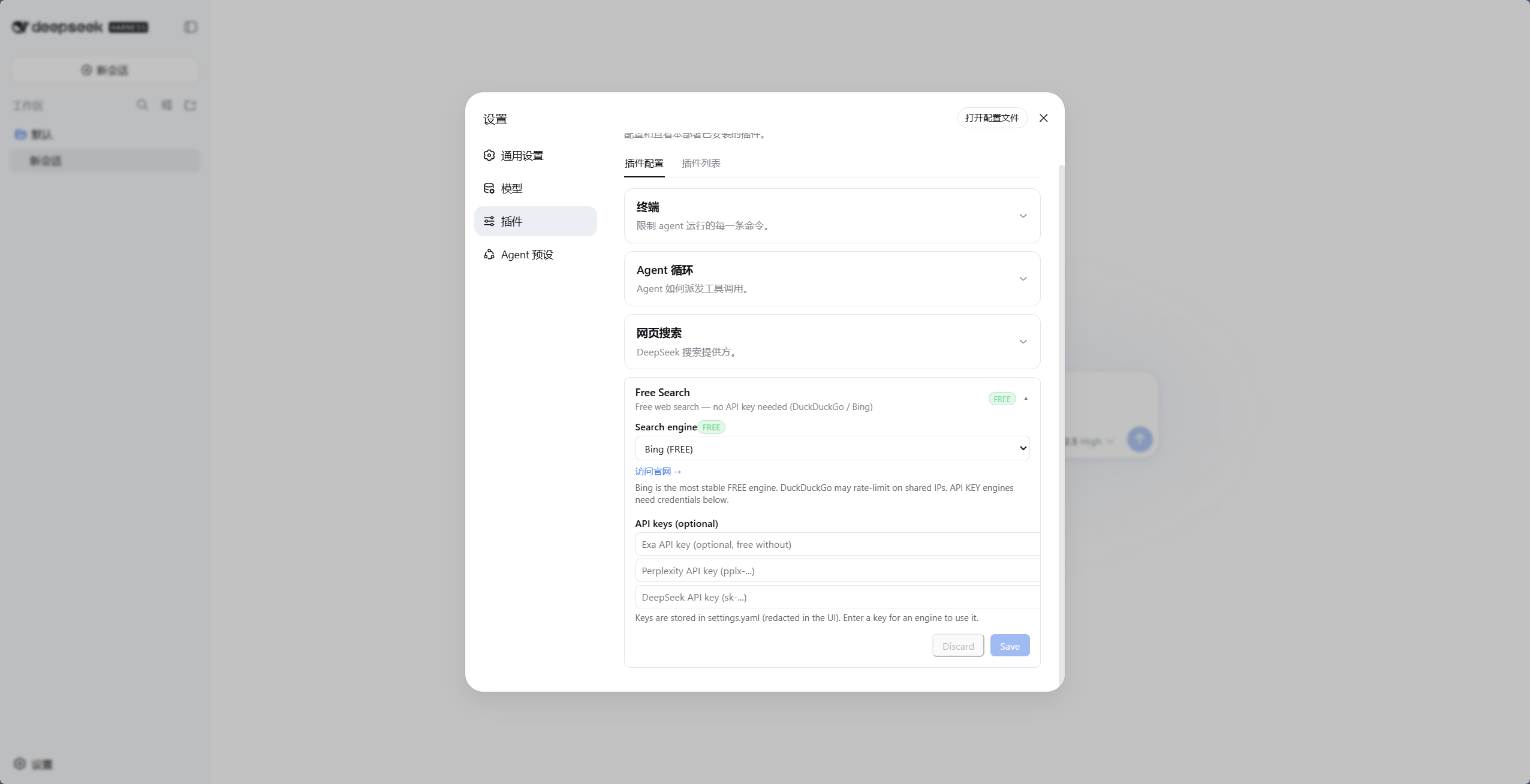
▲ 免费引擎(以Bing为例)
Why You Need It
dsh's default search provider relies on the official DeepSeek API key (DEEPSEEK_API_KEY). If you:
- Do not have (or prefer not to use) an official DeepSeek key,
- Use a gateway like opencode-go (whose OpenAI-compatible endpoint does not support the
web_searchtool),
…the built-in search will fail; the agent will tell you it can't go online.
This plugin provides multiple free engines with automatic fallback, completely eliminating the dependency on DeepSeek's official key.
Features
- Zero cost — multiple free engines, no key required, no registration
- Multiple engines to choose from: DuckDuckGo (html/lite), Bing, SearXNG (meta-search, supports custom instances), AnySearch, Exa, Tavily, Keenable, Firecrawl, Parallel, Perplexity, DeepSeek official
- Web settings page — engine switching + API key configuration (keys shown masked as "configured" in the UI) + Chinese/English toggle
- Popup switch command — type
/free-search-enginein the chat box, a popup engine picker appears, click to switch (equivalent to settings page + save) - Engine testing — the
free_search_testtool lets the agent test all engines with one click; the settings page also has a "Test engine" button (tests the current engine directly, without going through the fallback chain; paid engines without a key report an explicit error) - Unified engine fallback — any engine failure (paid/free, missing key/401/rate limit/network) automatically cycles through the next engine: preferred engine → other engines (exa/tavily/keenable/firecrawl are tried even without a key, because they have built-in keyless free quota) → remaining free engines; search never fails outright; the results are annotated at the top with the engine that actually served them (e.g.
Note: perplexity unavailable or failed, using exa.) - Time filtering — the
advanced_searchtool supportstimeRange: fixed tiers, custom relative values, and absolute dates (see the logic notes below) - System prompt injection — the agent knows which engine is currently in use and which ones require keys
- Version number + update check — the settings card shows the current version (v0.4.17); a "Check update" button queries the npm registry to compare against the latest release, showing a prompt with a one-click jump when a new version is available
- Result caching — identical queries (including engine/time filter parameters) hit the cache within 5 minutes (LRU 50 entries), protecting free engines from rate limiting and saving paid quota; the duration can be freely configured from 0-5 minutes in the settings page (0 disables)
- Free badges — free engines carry a green
FREEbadge in the settings page; paid engines carry an orangeAPI KEYbadge - Webpage fetching (web_fetch) — lets the agent fetch webpage content (official
dsh-web-fetch-httpprovider, pure JS, zero extra dependencies) - Platform search (platform_search) — search GitHub / V2EX / Bilibili / Reddit / Hacker News / Stack Overflow / Wikipedia / npm (public APIs, zero dependencies)
- Clean integration — implements the official
WebSearchProviderseam interface, coexisting with official plugins
If this plugin has been helpful, feel free to give the repo a ⭐ (GitHub) — stars are the biggest motivation for the developer to keep maintaining it. Thank you for your support!
Supported Engines
| id | Engine | Cost | Description |
|---|---|---|---|
ddg | DuckDuckGo HTML | Free | Occasional rate limits (anti-bot); recovers automatically |
ddg-lite | DuckDuckGo Lite | Free | Lightweight version, same as above |
bing | Bing | Free | Default engine, most stable, optimized for Chinese (zh-CN) |
anysearch | AnySearch AI | Free | AI search, no key required (anonymous quota) |
searxng | SearXNG Meta Search | Free | Multi-instance automatic failover, supports custom instances |
exa | Exa | Free | Usable without a key (MCP anonymous), configure a key for higher quota |
tavily | Tavily | Free | Usable without a key (keyless anonymous), configure a key for higher quota |
keenable | Keenable | Free | Usable without a key (MCP anonymous), configure a key for higher quota |
firecrawl | Firecrawl | Free | Usable without a key (official keyless anonymous quota), configure a key for higher limits |
parallel | Parallel | Paid | Requires PARALLEL_API_KEY (free tier available at platform.parallel.ai) |
perplexity | Perplexity | Paid | Requires PERPLEXITY_API_KEY |
deepseek-official | DeepSeek Official | Paid | Requires DEEPSEEK_API_KEY |
- Default engine is
bing(free and most stable), ready to use out of the box after installation. - Automatic fallback: any engine failure (free rate limit/anti-bot, paid missing key/401/network) automatically cycles through the next engine — first trying other paid engines with configured keys, then free engines (Bing/AnySearch etc.), and the results include a fallback note — search will not fail outright due to engine issues.
- Settings page includes official website links: free engines show "Visit website →", paid engines show "Get API Key →" (opens in a new tab):
- Exa: https://dashboard.exa.ai/api-keys
- Tavily: https://app.tavily.com/home
- Keenable: https://keenable.ai/login
- Parallel: https://platform.parallel.ai
- Perplexity: https://www.perplexity.ai/settings/api
- DeepSeek: https://platform.deepseek.com/api_keys
Why Don't Free Engines Need a Key?
- AnySearch: its
v1/searchREST endpoint provides anonymous public search quota, no registration or API key required. The quota is rate-limited (fine for everyday searching), but as one of the free engines with mutual fallback, the experience stays stable. - Exa: the public MCP endpoint (
mcp.exa.ai/mcp) supports anonymous calls, works without a key; configuringEXA_API_KEYgrants a higher quota. - Tavily: uses keyless anonymous quota via the
x-tavily-access-mode: keylessheader, works without a key; configuringTAVILY_API_KEYswitches to the account tier, with higher quota and more stable result quality. - Keenable: without a key, calls its public MCP endpoint (
api.keenable.ai/mcp) anonymously; configuringKEENABLE_API_KEYswitches to the REST API (api.keenable.ai/v1/search), with higher quota and organization-scoped rate limits. - Firecrawl: its
/v2/searchendpoint does not require a key (explicitly stated in the official docs, with anonymous rate limits); configuringFIRECRAWL_API_KEYraises the limits. Supportstbstime filtering (qdr:h/d/w/m/yand custom date ranges).
Installation
git clone https://github.com/DDDMUC/dsh-free-search.git
dsh plugin --profile web add /path/to/dsh-free-search
Then restart:
dsh web
Sister Plugin: dsh-preset-workbench (Preset Workbench)
A sister plugin by the same author: visually create/edit Agent presets in the settings page — sectioned prompts, 15 capability toggles, built-in "Whale Girl / Liangshen Mode" templates, no hand-written YAML needed. Use them together: free-search solves "AI web search", preset-workbench solves "AI persona & capability orchestration" — both pure free, ready to use out of the box.
- Repo: https://github.com/DDDMUC/dsh-preset-workbench
- Install:
dsh plugin --profile web add github:DDDMUC/dsh-preset-workbench - Usage: Settings → Preset Workbench
If you find preset-workbench useful too, a ⭐ on its repo is always welcome. 🙏
Dependency Note
The plugin uses peerDependencies for @deepseek-ai/dsh-settings and @deepseek-ai/dsh-tools. This is intentional: the DSH runtime must use a single instance from the installation tree. Install the plugin via dsh plugin --profile <profile> add ...; do not copy DSH core packages into a profile's local node_modules — duplicate copies will break the tool scheduler.
Usage
Web Settings (Recommended)
After installation, open the Settings → Plugins → Configurable tab → Free Search card (official settings page):
- Search engine: dropdown to switch engines; changes take effect upon saving
- API keys: enter keys for Exa / Tavily / Keenable / Firecrawl / Parallel / Perplexity / DeepSeek (password fields; displayed as "configured" once saved)
- Recommended: store paid engine keys in the harness credential center
~/.dsh/.credentials.yaml(e.g.DEEPSEEK_API_KEY: sk-..., consistent with the official LLM provider, one place for all keys). Plugin resolution priority: credential center > settings page > environment variable; keys entered in the settings page are only for legacy compatibility.
- Recommended: store paid engine keys in the harness credential center
- Test engine: tests the current engine's availability directly (no fallback chain; paid engines without a key report an explicit error)
- Use Bing default: switches the current search engine back to the stable free Bing;
Discardonly cancels unsaved edits - Platform search: check to enable GitHub / V2EX / Bilibili platform search (the
platform_searchtool filters accordingly) - EN / 中文: toggle interface language (default Chinese)
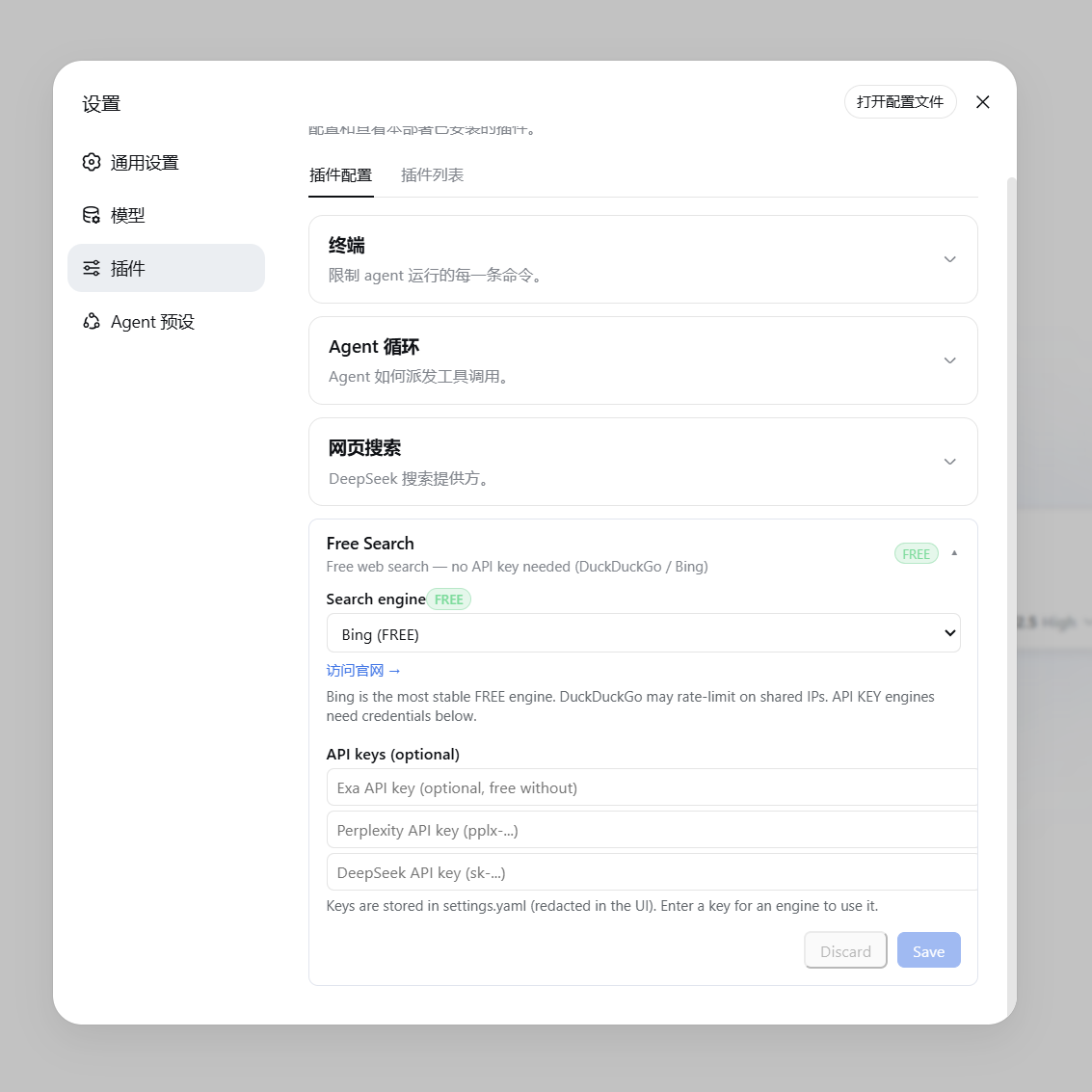
▲ 免费引擎(显示绿色 FREE 徽章与官网链接) |
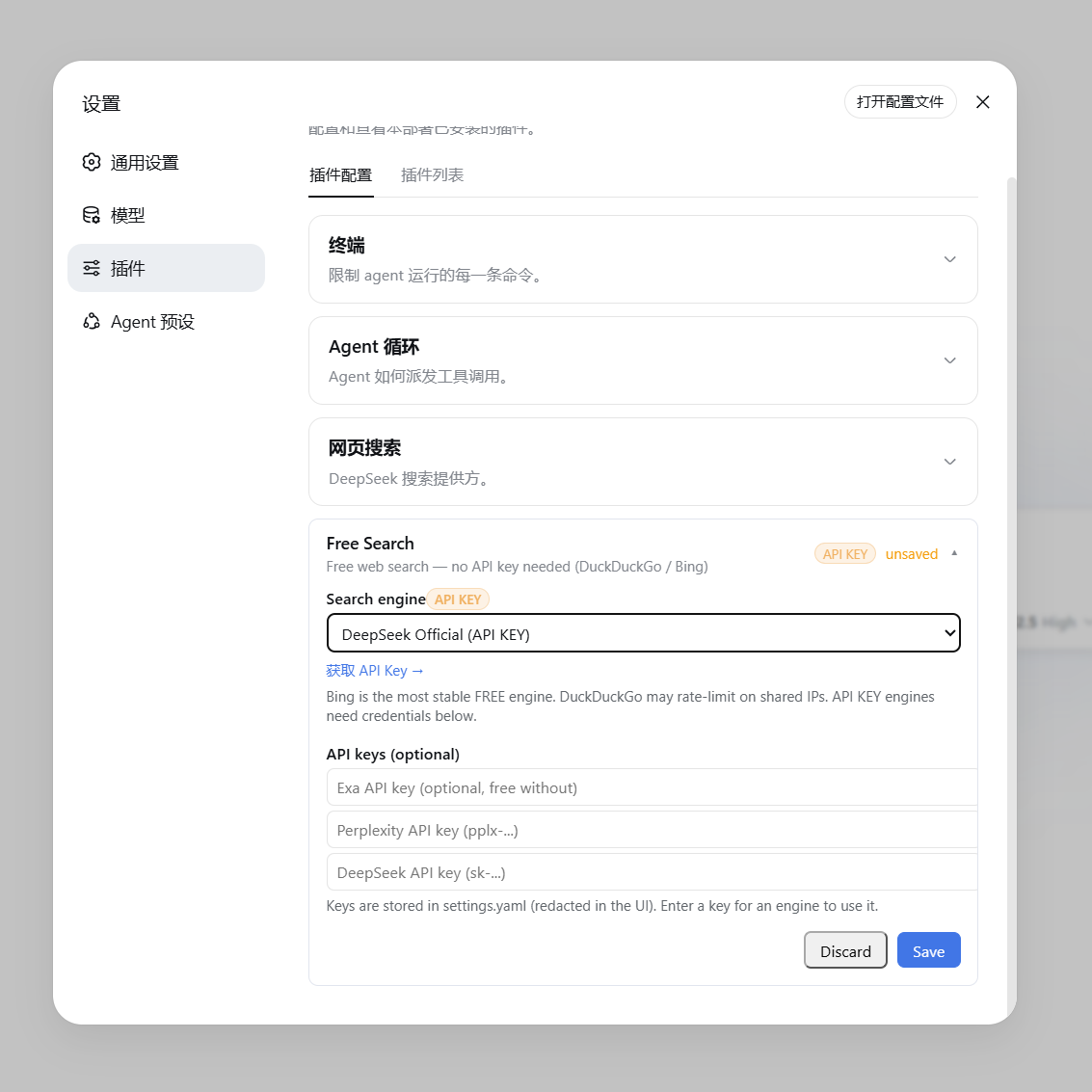
▲ 付费/API Key 引擎(显示橙色 API KEY 徽章与获取链接) |
Switching Engines from the Chat (/free-search-engine)
You don't need to open the settings page to switch engines: type /free-search-engine in the chat box, and an engine picker window pops up (same interaction as /model for selecting a model). Click to switch; the current engine is marked. Equivalent to switching + saving in the settings page, and the interface language follows the settings page (Chinese/English).
The command only changes the preferred engine; search still uses web_search + the unified fallback chain: if the preferred engine fails it auto-switches to others, never failing. The system prompt syncs.
Configuration File
Configuration is stored in ~/.dsh/settings.yaml:
free-search:
  provider: bing              # ddg / ddg-lite / bing / searxng / anysearch / exa / tavily / keenable / firecrawl / parallel / perplexity / deepseek-official
  lang: zh                    # 设置页界面语言(zh / en)
  bingMarket: zh-CN           # Bing 市场
  region: cn-zh               # DuckDuckGo 区域(可选)
  searxngInstances:           # 自定义 SearXNG 实例(可选)
    - https://your-instance.example
  exaApiKey: ...              # 或通过设置页填写
  tavilyApiKey: ...           # 或通过设置页填写
  keenableApiKey: ...         # 或通过设置页填写
  firecrawlApiKey: ...        # 或通过设置页填写
  parallelApiKey: ...         # 或通过设置页填写
  perplexityApiKey: ...
  deepseekApiKey: ...
Letting the Agent Test All Engines
Tell the agent "test all search engines", and it will call the free_search_test tool, testing each one sequentially and reporting:
Search engine test:
- ddg: FAIL - DuckDuckGo is rate-limited right now (anti-bot challenge, usually temporary) - Bing works
- bing: OK (2 results, e.g. "DeepSeek Harness developer preview...")
- exa: FAIL - EXA_API_KEY not configured
Time Filtering (advanced_search)
Ask the agent to search "news from the last week", "releases this month", "messages from the last 3 days", or "updates since July", and it will call the advanced_search tool with a timeRange parameter. This tool also goes through the unified fallback chain and can explicitly specify an engine; it returns the same structure as web_search.
timeRange supports three forms:
| Form | Example | Meaning |
|---|---|---|
| Fixed tier | day / week / month / year | = 1 / 7 / 30 / 365 days respectively |
| Custom relative value | 12h, 3d, 2mo, 1y | last 12 hours / 3 days / 2 months / 1 year |
| Absolute date | 2026-07-01 | results published on or after that date (inclusive) |
How each engine handles timeRange:
| Engine | Parameter | Precision | Notes |
|---|---|---|---|
| Exa | startPublishedDate | ✅ exact | Custom day values converted to ISO date (N days ago); absolute dates passed through as-is |
| Keenable | published_after | ✅ exact | Relative values passed through as-is (12h/3d/2mo/1y); absolute dates passed through as-is |
| Tavily | time_range | ⚠️ approximate | Only accepts fixed tiers; custom day values auto-mapped to the nearest tier |
| Firecrawl | tbs | ⚠️ approximate | Fixed tiers map to qdr:d/w/m/y; absolute dates use cdr:1,cd_min:M/D/YYYY (exact) |
| Parallel | source_policy.after_date | ✅ exact | Custom day values converted to ISO date (N days ago); absolute dates passed through as-is |
| SearXNG | time_range | ⚠️ approximate | Same as above |
| DuckDuckGo / Lite | df | ⚠️ approximate | Same as above |
| Bing / AnySearch | — | ❌ ignored | No corresponding parameter |
"Nearest tier" mapping rules: ≤2 天 → day, ≤14 天 → week, ≤90 天 → month, otherwise year. For example, 3d is handled as day on Tavily, and 2mo as month.
Engine chain priority: when searching with a timeRange, engines that support time filtering (tavily / exa / keenable / firecrawl / parallel / searxng / ddg / ddg-lite) are moved to the front of the engine chain, ensuring the filter actually takes effect — even if the preferred engine is bing (which does not support filtering), filtering-capable engines are tried first.
Example dialogue: "Search for news about DSH from the last 3 days" → the agent calls advanced_search with timeRange: "3d".
Fetching Webpage Content (web_fetch)
After finding URLs via search, you can have the agent read the full webpage content (e.g. "open the first link and check the content"). The web_fetch tool is enabled (official dsh-web-fetch-http provider):
- Automatically follows redirects, decodes body content (HTML to text)
- Supports timeout and size limits
- ⚠️ Note:
web_fetchhas no SSRF protection; the agent can theoretically access internal network addresses — use with caution
Platform Search (platform_search)
Have the agent search specific platforms, e.g. "search deepseek harness on GitHub", "check what relevant videos are on Bilibili", "discussions about dsh on V2EX". The platform_search tool supports:
| Platform | Purpose |
|---|---|
github | GitHub repository search (API, free, no key needed) |
v2ex | V2EX hot / related topics |
bilibili | Bilibili video/content search (public API) |
reddit | Reddit post/discussion search (public JSON API; may be blocked by Reddit anti-bot in some network environments) |
hn | Hacker News tech community discussions (Algolia official API) |
stackoverflow | Stack Overflow tech Q&A (Stack Exchange official public API) |
wikipedia | Wikipedia entries (uses zh.wikipedia.org in Chinese context; switches to en.wikipedia.org when lang: en) |
npm | npm package search (registry official API) |
All public APIs, zero external deps, no key needed, ready to use.
Local Engine Switcher Tools (tools/)
The tools/ directory includes a small local switcher utility (zero dependencies):
启动搜索引擎切换器.cmd(Windows) — double-click to start a local Node service (http://127.0.0.1:4789) and automatically open the browser selection pageswitch-engine.html— the selection page: shows the current engine, click to select a new engine, one-click write to configserver.mjs— the local service, responsible for reading/writing~/.dsh/profiles/web/cordis.patch.ymlswitch-engine.ps1— headless command-line version:powershell -File tools/switch-engine.ps1 -Engine bing
Restart dsh web after switching to apply the changes.
The settings card is mounted on the
settings.plugin.itemslot of the official settings page (bundled with dsh); config reading/writing goes through the plugin's own bridge, does not depend on dsh-web-ui, so the plugin can be used standalone.
Proxy Notes (Users in China)
Engines like DuckDuckGo may require a proxy to access, while Node.js fetch does not use system proxies by default. You need to set the following for the dsh process (Node 24+):
export NODE_USE_ENV_PROXY=1
export HTTPS_PROXY=http://127.0.0.1:7897   # 你的代理地址
export HTTP_PROXY=http://127.0.0.1:7897
Windows users: the desktop shortcut already has this configuration built in (set NODE_USE_ENV_PROXY=1&& set HTTPS_PROXY=...).
How It Works
lib/index.js: host side. ImplementsWebSearchProvider(id/available()/search()), unified engine routing + automatic fallback (paid engines preferred, free as fallback); parsestimeRange(fixed tier/relative value/absolute date) and passes it through to each engine; registers thefree-searchsettings namespace; provides the/api/dsh-free-search-settingsread/write bridge +raw-searchdebug endpoint; registersfree_search_test,platform_search,advanced_searchtools; dynamically injects the engine list into the system prompt (auto-refreshes on settings change).lib/client.js: browser side. React settings card (engine selection + key input + connectivity test + Chinese/English toggle), mounted on thesettings.plugin.itemslot of the official settings page; registers the/free-search-enginepopup switch command (commandUipopupSelect, same mechanism as/model).cordis.patch.yml: plugin loader configuration.
English
▲ Free engine (using Bing as an example)
Why You Need It
dsh's default search provider relies on the official DeepSeek API key (DEEPSEEK_API_KEY). If you:
- Do not have (or prefer not to use) an official DeepSeek key,
- Use a gateway like opencode-go (whose OpenAI-compatible endpoint does not support the
web_searchtool),
...then the built-in search will inevitably fail, and the agent will tell you "I cannot access the internet."
This plugin provides multiple free search engines with automatic fallback, completely freeing you from relying on DeepSeek's official key.
Features
- Zero Cost — Multiple free engines with no API key or registration required
- Multi-Engine Support — DuckDuckGo (HTML / Lite), Bing, AnySearch AI, SearXNG (meta-search with custom instances), Exa, Tavily, Keenable, Firecrawl, Parallel, Perplexity, and DeepSeek Official
- Web Settings UI — Engine switching, API key configuration (keys masked as "configured" in the UI), and a Chinese/English toggle
- Popup Switch Command — Type
/free-search-enginein the chat: a picker opens with all engines; click one to switch (equivalent to the settings page + save) - Engine Testing —
free_search_testfor the agent to check all engines in one call; the settings UI also has a "Test engine" button that tests the selected engine directly (no fallback chain; paid engines without a key report an explicit error) - Unified Engine Fallback — Any engine failure (paid or free, missing key, 401, rate limit, network error) automatically tries the next engine: the configured engine first, then other engines (exa/tavily/keenable/firecrawl are tried even without a key because they have built-in keyless quota), then the remaining free engines (Bing/AnySearch etc.) — with a note attached to the results naming the engine that actually served them (e.g.
Note: perplexity unavailable or failed, using exa.). Search never fails outright. - Time Filtering — The
advanced_searchtool supportstimeRange: fixed tiers, custom relative values, or an absolute date (details below) - System Prompt Injection — The agent is aware of the currently active engine and which engines require API keys
- Version + Update Check — The settings card shows the current version (v0.4.17), and a "Check update" button queries the npm registry to compare against the latest release, prompting a one-click jump when a newer version exists
- Result Caching — Identical queries (same engine / time-filter args) hit an LRU cache (50 entries) for up to 5 minutes, protecting free engines from rate-limiting and saving paid quota; the TTL is configurable from 0-5 minutes in the settings UI (0 disables caching)
- Visual Badges — Free engines feature a green
FREEbadge, while paid engines show an orangeAPI KEYbadge in the settings UI - Webpage Fetching (
web_fetch) — Allows the agent to read full webpage contents (officialdsh-web-fetch-httpprovider, pure JS, zero extra dependencies) - Platform Search (
platform_search) — Search GitHub / V2EX / Bilibili / Reddit / Hacker News / Stack Overflow / Wikipedia / npm (public APIs, zero extra dependencies) - Clean Integration — Implements the official
WebSearchProviderseam interface, coexisting seamlessly with official plugins
If this plugin has been helpful, a ⭐ on GitHub would mean a lot — it's the biggest motivation for the developer to keep maintaining it. Thank you!
Supported Engines
| id | Engine | Cost | Description |
|---|---|---|---|
ddg | DuckDuckGo HTML | Free | Occasional rate limits (anti-bot challenges); recovers automatically |
ddg-lite | DuckDuckGo Lite | Free | Lightweight version; same rate-limit behavior as above |
bing | Bing | Free | Default engine, most stable, optimized for Chinese (zh-CN) |
anysearch | AnySearch AI | Free | AI search, no key needed (anonymous quota) |
searxng | SearXNG Meta Search | Free | Multi-instance automatic failover; supports custom instances |
exa | Exa | Free | Usable without a key (anonymous MCP); configure a key for higher quota |
tavily | Tavily | Free | Usable without a key (keyless anonymous); configure a key for higher quota |
keenable | Keenable | Free | Usable without a key (anonymous MCP); configure a key for higher quota |
firecrawl | Firecrawl | Free | Usable without a key (official keyless anonymous quota); configure a key for higher limits |
parallel | Parallel | Paid | Requires PARALLEL_API_KEY (free tier available at platform.parallel.ai) |
perplexity | Perplexity | Paid | Requires PERPLEXITY_API_KEY |
deepseek-official | DeepSeek Official | Paid | Requires DEEPSEEK_API_KEY |
- Default engine is
bing(free and most stable), ready to use out of the box after installation. - Auto-failover: any engine failure (rate-limited free engine, or missing/invalid paid key, network error) automatically tries the next engine — the configured engine first, then other engines (exa/tavily/keenable/firecrawl are tried even without a key because they have built-in keyless quota), then the remaining free engines (Bing/AnySearch etc.) — with a note attached to the results naming the engine that actually served them (e.g.
Note: perplexity unavailable or failed, using exa.). Search never fails outright because of engine issues. - Official Links in Settings: Free engines display "Visit Website →", while paid engines display "Get API Key →" (opens in a new tab):
- Exa: https://dashboard.exa.ai/api-keys
- Tavily: https://app.tavily.com/home
- Keenable: https://keenable.ai/login
- Parallel: https://platform.parallel.ai
- Perplexity: https://www.perplexity.ai/settings/api
- DeepSeek: https://platform.deepseek.com/api_keys
Why are some engines free?
- AnySearch: its
v1/searchREST endpoint provides anonymous public search quota without registration or an API key. Quota is rate-limited (fine for daily queries), but as one of the free engines with mutual fallback it stays reliable. - Exa: its public MCP endpoint (
mcp.exa.ai/mcp) supports anonymous requests, so it works without a key; configuringEXA_API_KEYgrants a higher usage quota. - Tavily: offers keyless anonymous quota via the
x-tavily-access-mode: keylessheader — it works without a key; configuringTAVILY_API_KEYswitches to the account tier for higher quota and more stable results. - Keenable: without a key it is called via its public MCP endpoint (
api.keenable.ai/mcp); configuringKEENABLE_API_KEYswitches to the REST API (api.keenable.ai/v1/search) for higher quota and organization-scoped rate limits. - Firecrawl: its
/v2/searchendpoint works without a key out of the box (the official docs state "No API key needed to get started", with anonymous rate limits); configuringFIRECRAWL_API_KEYraises the limits. Supportstbstime filtering (qdr:h/d/w/m/yand custom date ranges).
Installation
git clone https://github.com/DDDMUC/dsh-free-search.git
dsh plugin --profile web add /path/to/dsh-free-search
Then restart:
dsh web
Sister Plugin: dsh-preset-workbench
A sister plugin by the same author: a visual workbench for creating/editing agent presets right inside Settings — sectioned prompts, 15 capability toggles, and built-in "Whale Girl / Liangshen Mode" templates, no YAML needed. Pair them up: free-search gives your AI web search, preset-workbench shapes its persona & capabilities — both free and zero-config.
- Repo: https://github.com/DDDMUC/dsh-preset-workbench
- Install:
dsh plugin --profile web add github:DDDMUC/dsh-preset-workbench - Usage: Settings → Preset Workbench
If preset-workbench is useful to you too, a ⭐ on its repo is always welcome. 🙏
Dependency Note
This plugin intentionally specifies @deepseek-ai/dsh-settings and @deepseek-ai/dsh-tools as peerDependencies: the DSH runtime must use a single instance from the installation tree. Always install the plugin using dsh plugin --profile <profile> add .... Do not copy DSH core packages into a profile-local node_modules, as duplicate copies can break the tool scheduler.
Usage
Web Settings (Recommended)
After installation, navigate to Settings → Plugins → Configurable tab → Free Search card (the official settings page):
- Search engine: Select an engine from the dropdown; changes take effect immediately upon saving.
- API keys: Enter keys for Exa / Tavily / Keenable / Firecrawl / Parallel / Perplexity / DeepSeek (password fields; displayed as "configured" once saved).
- Recommended: store paid-engine keys in the harness credential center
~/.dsh/.credentials.yaml(e.g.DEEPSEEK_API_KEY: sk-..., same as the official LLM providers — one place for all keys). Resolution order: credentials center > settings page > environment variable; the settings-page fields remain for backward compatibility.
- Recommended: store paid-engine keys in the harness credential center
- Test engine: Tests the selected engine directly (no fallback chain; paid engines without a key report an explicit error).
- Use Bing default: stage a switch back to the stable free Bing engine;
Discardonly cancels unsaved edits - Platform search: check platforms (GitHub / V2EX / Bilibili / Reddit / HN / Stack Overflow / Wikipedia / npm) to enable them for the
platform_searchtool (disabled platforms are skipped). - EN / 中文: toggle the interface language (default Chinese).
|
▲ Free Engine (shows green FREE badge and official website link) |
▲ Paid / API Key Engine (shows orange API KEY badge and link to get an API key) |
Switching Engines from the Chat (/free-search-engine)
You can also switch the engine right from the chat — no need to open the settings page. Type /free-search-engine: a picker opens with all engines (the same interaction as /model for selecting a model). Click one to switch; the current engine is marked. Equivalent to switching and saving in the settings page, and the language follows the settings page (Chinese/English).
The command only changes the preferred engine; search still goes through web_search + the unified fallback chain — even if the preferred engine fails, it automatically switches to others, never failing outright. The system prompt refreshes accordingly.
Configuration File
Configuration is stored in ~/.dsh/settings.yaml:
free-search:
  provider: bing              # ddg / ddg-lite / bing / searxng / anysearch / exa / tavily / keenable / firecrawl / parallel / perplexity / deepseek-official
  lang: zh                    # settings UI language (zh / en)
  bingMarket: zh-CN           # Bing market
  region: cn-zh               # DuckDuckGo region (optional)
  searxngInstances:           # Custom SearXNG instances (optional)
    - https://your-instance.example
  exaApiKey: ...              # Or configure via the web settings UI
  tavilyApiKey: ...           # Or configure via the web settings UI
  keenableApiKey: ...         # Or configure via the web settings UI
  firecrawlApiKey: ...        # Or configure via the web settings UI
  parallelApiKey: ...         # Or configure via the web settings UI
  perplexityApiKey: ...
  deepseekApiKey: ...
Asking the Agent to Test All Engines
Tell the agent "Test all search engines", and it will call the free_search_test tool to check each engine sequentially and report back:
Search engine test:
- ddg: FAIL - DuckDuckGo is rate-limited right now (anti-bot challenge, usually temporary) - Bing works
- bing: OK (2 results, e.g. "DeepSeek Harness developer preview...")
- exa: FAIL - EXA_API_KEY not configured
Time Filtering (advanced_search)
Ask the agent for "news from the last week", "releases this month", "updates from the last 3 days", or "posts since July", and it will call the advanced_search tool with a timeRange parameter. It uses the same unified fallback chain, can force a specific engine, and returns the same shape as web_search.
The timeRange parameter accepts three forms:
| Form | Example | Meaning |
|---|---|---|
| Fixed tier | day / week / month / year | = 1 / 7 / 30 / 365 days |
| Custom relative | 12h, 3d, 2mo, 1y | last 12 hours / 3 days / 2 months / 1 year |
| Absolute date | 2026-07-01 | results published on or after that date |
How each engine handles timeRange:
| Engine | Parameter | Precise? | Notes |
|---|---|---|---|
| Exa | startPublishedDate | ✅ precise | custom days become an ISO date (N days ago); absolute dates pass through |
| Keenable | published_after | ✅ precise | relative values (12h/3d/2mo/1y) and absolute dates pass through |
| Tavily | time_range | ⚠️ approximate | only fixed tiers; custom days map to the nearest tier |
| Firecrawl | tbs | ⚠️ approximate | fixed tiers map to qdr:d/w/m/y; absolute dates use cdr:1,cd_min:M/D/YYYY (precise) |
| Parallel | source_policy.after_date | ✅ precise | custom days become an ISO date (N days ago); absolute dates pass through |
| SearXNG | time_range | ⚠️ approximate | same as above |
| DuckDuckGo / Lite | df | ⚠️ approximate | same as above |
| Bing / AnySearch | — | ❌ ignored | no corresponding parameter |
Nearest-tier mapping rule: ≤2 days → day, ≤14 days → week, ≤90 days → month, otherwise year. For example, 3d becomes day on Tavily, and 2mo becomes month.
Engine-chain priority: when a timeRange is present, engines that support time filtering (tavily / exa / keenable / firecrawl / parallel / searxng / ddg / ddg-lite) are moved to the front of the fallback chain, so the filter actually takes effect — even if the preferred engine is bing (which does not support filtering), a filtering-capable engine is tried first.
Example: "Find DSH news from the last 3 days" → agent calls advanced_search with timeRange: "3d".
Fetch Webpage Content (web_fetch)
After searching, the agent can read full webpage content (e.g., "Open the first link and summarize it"). The web_fetch tool is enabled by default (official dsh-web-fetch-http provider):
- Automatically follows redirects and decodes HTML to plain text.
- Supports timeout and response size limits.
- ⚠️ Note:
web_fetchdoes not have SSRF protection; the agent could theoretically access internal network addresses. Use as needed.
Platform Search (platform_search)
Ask the agent to search specific platforms (e.g., "Search GitHub for deepseek harness", "Find related videos on Bilibili", or "Discussions about dsh on V2EX"). The platform_search tool supports:
| Platform | Purpose |
|---|---|
github | GitHub repository search (public API, free, no key required) |
v2ex | V2EX hot / relevant topics |
bilibili | Bilibili video / content search (public API) |
reddit | Reddit posts / discussions (public JSON API; may be blocked by Reddit anti-bot in some network environments) |
hn | Hacker News tech community discussions (official Algolia API) |
stackoverflow | Stack Overflow Q&A (official public Stack Exchange API) |
wikipedia | Wikipedia articles (zh.wikipedia.org for Chinese; switches to en.wikipedia.org when lang: en) |
npm | npm package search (registry official API) |
All platform searches rely on public endpoints with zero external dependencies and no API keys — they work out of the box.
Local Engine Switcher (tools/)
The tools/ directory includes a lightweight, zero-dependency switcher:
启动搜索引擎切换器.cmd(Windows) — Double-click to launch a local Node server (http://127.0.0.1:4789) and automatically open the engine selector page in your browser.switch-engine.html— The selector UI: displays current engine status and allows one-click switching.server.mjs— The local backend service responsible for reading/writing~/.dsh/profiles/web/cordis.patch.yml.switch-engine.ps1— Headless PowerShell script:powershell -File tools/switch-engine.ps1 -Engine bing.
Restart dsh web after switching to apply changes.
The settings card mounts into the official
settings.plugin.itemslot (built into DSH), and configuration reads/writes go through the plugin's own bridge. Nodsh-web-uidependency — the plugin can be used standalone.
Proxy Note (for Users in Mainland China)
Engines like DuckDuckGo may require a proxy. Since Node.js fetch does not use the system proxy by default, set the following environment variables for the dsh process (Node 24+):
export NODE_USE_ENV_PROXY=1
export HTTPS_PROXY=http://127.0.0.1:7897   # Your proxy address
export HTTP_PROXY=http://127.0.0.1:7897
Windows users: The desktop shortcut already includes this configuration (set NODE_USE_ENV_PROXY=1&& set HTTPS_PROXY=...).
How It Works
lib/index.js: Host side. ImplementsWebSearchProvider(id/available()/search()), unified engine routing + auto-fallback (paid engines first, free as fallback); parsestimeRange(fixed tiers / relative values / absolute dates) and forwards it to each engine; registers thefree-searchsettings namespace; provides the/api/dsh-free-search-settingsread/write bridge +raw-searchdebug endpoint; registers thefree_search_test,platform_search, andadvanced_searchtools; dynamically injects the engine list into system prompts (auto-refreshes on settings change).lib/client.js: Browser side. React configuration card (engine select, key inputs, connectivity test, and Chinese/English toggle), mounted into the officialsettings.plugin.itemslot; registers the/free-search-enginepopup switch command (commandUipopupSelect, the same mechanism as/model).cordis.patch.yml: Plugin loader configuration.
License
MIT
safeSearch 安全搜索过滤
- 全新配置项
safeSearch:off(引擎默认,不加参数)/moderate/strict - 作用于 Bing(adlt)、DuckDuckGo HTML(adlt)、DuckDuckGo Lite(adlt)
- 默认
off:不额外过滤,保持引擎自身默认行为;需要时在「设置 > 插件 > Free Search」切换
Compatibility
Versions
| Latest version | Published | Size |
|---|---|---|
| 0.3.0 | — | — |
| 0.4.0 | — | — |
| 0.4.1 | — | — |
| 0.4.2 | — | — |
| 0.4.3 | — | — |
| 0.4.4 | — | — |
| 0.4.5 | — | — |
| 0.4.6 | — | — |
| 0.4.7 | — | — |
| 0.4.8 | — | — |
| 0.4.9 | — | — |
| 0.4.10 | — | — |
| 0.4.11 | — | — |
| 0.4.12 | — | — |
| 0.4.13 | — | — |
| 0.4.14 | — | — |
| 0.4.15 | — | — |
| 0.4.16 | — | — |
| 0.4.17 | — | — |
| 0.2.0 | — | — |
Comments
Loading…
Similar plugins
by korosu
Keyless DuckDuckGo HTML-scrape web_search provider for the DeepSeek Harness (ctx.web seam): no API key, no extra model turn, one command to install.
★ 0
MIT
TypeScript
Oct 13, 2026
dsh plugin --profile web add dsh-web-search-ddgby BharathBillawa
DuckDuckGo web search and URL fetch tools for DeepSeek Harness, no API key required. Provides web_search (via ddgs) and web_fetch (via trafilatura) as a drop-in bundle
★ 0
JavaScript
Aug 22, 2026
dsh plugin --profile web add dsh-tool-ddgsby abcdream-Lary
DeepSeek Harness (DSH) 的多提供商网页搜索和页面获取插件:AnySearch、Bing、DuckDuckGo、Tavily、Exa
★ 2
MIT
JavaScript
Aug 22, 2026
dsh plugin --profile web add dshsearch-multiby Gaozx1
DSH 插件:用 Bing / DuckDuckGo / Mojeek / Google / Brave 多引擎混合替代默认网络搜索,带可视化设置页
★ 0
MIT
JavaScript
Oct 19, 2026
dsh plugin --profile web add dsh-web-search-engineby ChrisDeadman
Brave Search API-backed web search provider for [DeepSeek Harness](https://github.com/deepseek-ai/deepseek-harness) (`dsh`)
★ 0
MIT
JavaScript
Sep 4, 2026
dsh plugin --profile web add @deads-inc/dsh-web-search-braveby keenableai
Keenable web search and page fetch for DeepSeek Harness, no API key needed
★ 0
MIT
JavaScript
Oct 3, 2026
dsh plugin --profile web add @keenable/dsh-keenable