

dsh-delete-turn
Manifest valid★ 3Per-message delete for DeepSeek Harness: remove a user message, one reply step, or a whole assistant reply from the derived model context via the official surface-replace contract, and hide it from the visible transcript without rewriting the append-only log.
dsh-delete-turn
DeepSeek Harness 消息删除插件 —— 把一条消息从模型上下文里真正拿掉,同时从当前转录里隐藏它。 助手回复挂在官方 conversation.chat.assistant-actions 槽位;用户消息、注入上下文、工具调用卡与过程行由 DOM 增强补上入口。确认后经官方 surface-replace 契约追加替换事件:模型后续看到的历史里不再有这条内容,而原始会话日志一个字节都不改写。
中文

▲ 悬停消息行时出现的删除按钮(复制按钮右侧)
为什么需要它
DSH 的会话日志是 append-only 的:说错话、发错提示词、模型答偏了,这些内容会一直留在模型上下文里,污染后续每一轮。官方只提供了「压缩」(/compact)这种整段摘要机制,没有单条消息级别的删除。
这个插件把删除放回消息本身:
- 用户消息 → 删这一条;
- 思考卡 / 工具调用卡 → 删这一步(该步的
assistant/message与它请求的tool/result一起走,工具配对永不悬空); - 助手回复(官方操作条)→ 删这条回复连同它的思考、工具调用与注入上下文(你的提问保留);
- 注入上下文行、失败回合行 → 同样有删除入口。
特性
- 模型上下文级删除 —— 追加一条官方
surfaceOp: { op: 'replace', startSeq, endSeq }替换事件,被遮蔽的内容不再进入deriveMessages();与宿主/compact同一套官方契约 - 转录级隐藏 —— 客户端按
data-chat-flow-*锚点与官方useChat快照定位行,删除后折叠退场;刷新、重启 DSH、换标签页后依旧隐藏 - 日志即台账 —— 隐藏依据直接从日志里的替换事件重建(替换事件的消息 source 标记为本插件),不依赖 localStorage、不需要预检,也不会和其它插件(如压缩)的替换混淆
- 原生视觉 —— 复用官方 primitives 的 Modal / Button 与主题 token,明暗主题自动适配;图标与全部文案为原创
- 中英双语 —— 弹窗、提示、错误原因随系统语言即时切换
- 安全边界 —— 只接受回环地址且 Host 为本机的请求;目标必须是当前 surface 节点、不能碰系统提示词头、回合进行中拒绝、已被删除的目标拒绝并给出机器原因码
截图
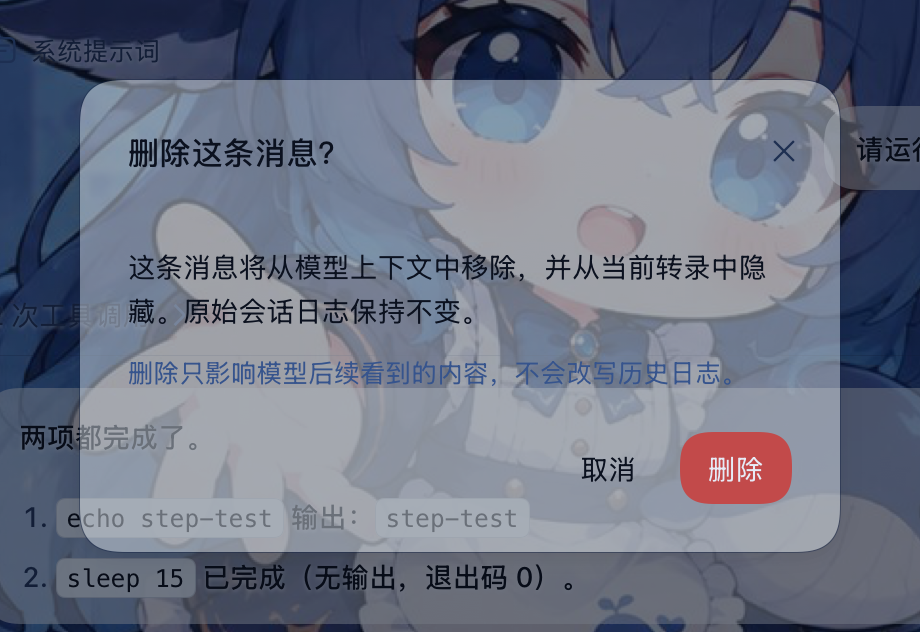
▲ 删除前确认:说明影响范围,原始日志不改写
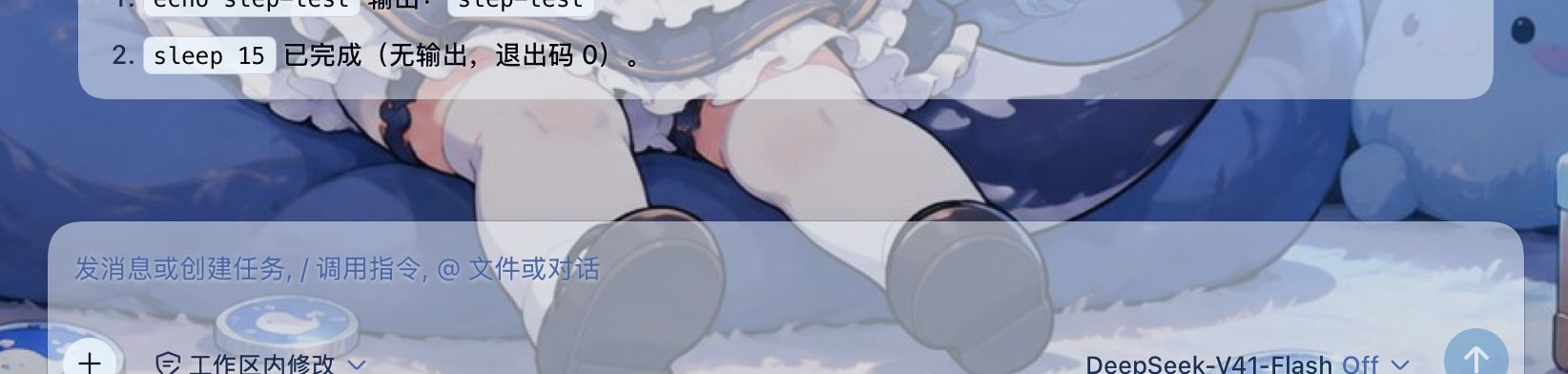
▲ 删除后:该行从转录中消失,后续内容自然上移
安装
# npm 安装(web profile)
dsh plugin --profile web add dsh-delete-turn

# 本地工作区(开发)
dsh plugin --profile web add link:/path/to/dsh-delete-turn
安装后需要完全重启 DSH 进程(宿主侧插件树只在启动时读取)。浏览器端 bundle 由宿主按请求动态 serve,重启后硬刷新页面即可生效。核实是否加载:
dsh --profile web --dump-config # 应出现 "# == dsh-delete-turn" 段落
使用
- 悬停任意消息行,点击行尾的垃圾桶按钮;助手回复的按钮在官方操作条(复制 / 分叉旁边)。
- 确认弹窗会说明这次删除的影响范围,点「删除」。
- 目标行折叠退场;模型上下文在下一轮请求重建时不再包含它。
工作原理
UI(官方槽按钮 / DOM 增强按钮)
  → 确认弹窗
  → POST /dsh-delete-turn/delete { sessionId, mode, seq? / messageId? / turn? }
宿主:
  sessionQuery.readSession() 读完整日志(live 优先)
  自实现 surface fold → 当前 surface 节点 + 历史替换遮蔽集
  校验(当前节点 / 区间干净 / 回合已闭合 / 不碰系统头)
  session.append('user/message', 短标记占位, {
    surfaceOp: { op: 'replace', startSeq, endSeq },
    sourceEventSeqs: [被遮蔽的全部 seq],
  })
  等待官方 session/flush 持久化检查点
  → 返回 { hidden: [{ seq, mode }] }
客户端:
  useChat 快照把 data-chat-flow-key 映射到节点,按 hidden 集合折叠行
  GET /dsh-delete-turn/state 在每次打开会话时重建 hidden 集合
设计要点:
- 为什么占位是短标记而不是空内容:官方格式校验把
system/message钉在「打开中的 step」上(不能用于回合外的删除),而assistant/message禁止携带sourceEventSeqs(无法声明被遮蔽节点)。压缩检查点用的正是user/message替换;占位必须带一小段文本([deleted]),因为严格网关会拒绝空内容的 user 消息(user message must have content),而标记文本不会重放被删除的内容。 - 为什么不读 React fiber / CSS 哈希类名:行定位只用官方
data-chat-flow-*锚点与官方useChat标准 hook,宿主 UI 重构不会静默失效。 - 为什么刷新后仍然隐藏:隐藏台账不是浏览器本地状态,而是日志里替换事件的可重放推导;宿主
/state路由在每次打开会话时重建它。
已知限制
- append-only 语义下没有「反删除」:被遮蔽的内容无法真正恢复,删除不可撤销(原始日志仍在,可用官方工具自行重建会话)。
- 回合进行中不允许删除;请等回复结束后操作。
- 系统提示词头(surface 节点 0)不可删除。
- 助手操作条的删除范围是整条回复;要只删某一步,请用思考卡 / 工具卡上的按钮。
- 已经被官方压缩(
/compact)移出模型上下文的内容不再显示删除入口:它已经不在上下文里,转录用意保留;入口只在内容仍可删时才出现。 - 宿主侧插件树仅在 DSH 启动时加载:安装、更新插件后必须完全重启 DSH。
兼容性
- 实测 DSH
0.1.6-alpha.2(web profile,Safari / WebKit 与 Chromium 内核均验证)。 - 宿主半区零运行时依赖,全部服务经 cordis ctx 解析;缺少
sessionQuery时回退到 live 会话快照。 - 不修改 DSH 官方源码,不写任何私有事件类型。
License
MIT
English
▲ The delete action appears when a message row is hovered
Why
A DSH session log is append-only: a wrong prompt or a bad answer stays in the model context and pollutes every later turn. The only official tool is whole-range compaction (/compact); there is no per-message delete.
This plugin puts deletion back on the message itself:
- user message → remove that one message;
- reasoning card / tool card → remove that step (the step's
assistant/messageand thetool/resultit requested leave together, so tool pairs never dangle); - assistant reply (official action strip) → remove the whole reply attempt with its reasoning, tool calls and injected context (your prompt stays);
- injected-context rows and failed-turn rows get an entry too.
Features
- Context-level delete — appends the official
surfaceOp: { op: 'replace', startSeq, endSeq }intent; shadowed content no longer reachesderiveMessages(). Same contract as/compact. - Transcript-level hide — rows are located through official
data-chat-flow-*anchors and the officialuseChatsnapshot, then collapse out. The hide survives a reload, a DSH restart and other tabs. - The log is the ledger — hidden seqs are re-derived from the replacement events themselves (their message source is marked with this plugin), so there is no localStorage sidecar, no preflight, and no confusion with compaction replacements.
- Native look — official primitives (Modal / Button) and theme tokens; icon and all copy are original.
- Bilingual — zh/en dictionaries follow the active locale.
- Safety boundary — loopback-only routes; targets must be current surface nodes, the system-prompt head is protected, a running turn is refused, and already-deleted targets fail with a machine code.
Screenshots
▲ Confirmation states the exact scope; the log is never rewritten
▲ After deletion the row is gone from the transcript
Install
# npm (web profile)
dsh plugin --profile web add dsh-delete-turn

# local workspace (development)
dsh plugin --profile web add link:/path/to/dsh-delete-turn
Then fully restart the DSH process (the host plugin tree is read at startup only). The browser bundle is served dynamically, so a hard refresh after the restart is enough. Verify:
dsh --profile web --dump-config # expect a "# == dsh-delete-turn" section
Usage
- Hover a message row and click the trash action at its end; the assistant action sits in the official action strip next to copy/branch.
- The dialog states the exact scope; click Delete.
- The row collapses away; the model context stops containing it when the next request is rebuilt.
How it works
UI (official slot action / DOM-enhanced action)
  → confirmation dialog
  → POST /dsh-delete-turn/delete { sessionId, mode, seq? / messageId? / turn? }
Host:
  sessionQuery.readSession() reads the complete log (live-preferred)
  local surface fold → current surface nodes + historical shadowed seqs
  validate (current node / clean window / closed turn / protected head)
  session.append('user/message', short marker placeholder, {
    surfaceOp: { op: 'replace', startSeq, endSeq },
    sourceEventSeqs: [every shadowed seq],
  })
  await the official session/flush durability checkpoint
  → { hidden: [{ seq, mode }] }
Browser:
  useChat snapshot maps data-chat-flow-key to nodes; hidden seqs collapse rows
  GET /dsh-delete-turn/state rebuilds the hidden set on every session open
Design notes:
- Why the placeholder is a short marker, not empty content: the official format validation pins
system/messageto an open step (unusable for an out-of-band delete) and forbidssourceEventSeqsonassistant/message(so it cannot cite shadowed nodes). Compaction checkpoints useuser/messagereplacements; the placeholder must carry a short text ([deleted]) because strict gateways reject a user message with no content (user message must have content), and the marker never replays what was removed. - Why no React fiber or CSS-module hashing: rows are addressed through official
data-chat-flow-*anchors and the officialuseChatstandard hook, so a host UI refactor cannot silently detach the actions. - Why a reload stays hidden: the ledger is not browser state; it is a replay of the replacement events in the log, rebuilt by the host
/stateroute.
Known limitations
- Append-only semantics offer no un-delete: shadowed content cannot truly be restored, and deletion is irreversible (the original log survives; official tooling can rebuild a session from it).
- A running turn cannot be deleted; wait for it to settle.
- The system-prompt head (surface node 0) is protected.
- The assistant action strip deletes the whole reply attempt; use the reasoning/tool card to remove a single step.
- Content already removed from the model context by official compaction (
/compact) no longer offers a delete action: it is not in the context any more and the transcript keeps it on purpose. - The host plugin tree loads at DSH startup only: fully restart DSH after installing or updating the plugin.
Compatibility
- Verified against DSH
0.1.6-alpha.2(web profile; WebKit and Chromium engines). - The host half has zero runtime dependencies and resolves every service through the cordis context; it falls back to the live session snapshot when
sessionQueryis absent. - No DSH source is modified and no private event type is written.
License
MIT
Versions
| Latest version | Published | Size |
|---|---|---|
| 0.1.0 | — | — |
| 0.1.1 | — | — |
| 0.1.9 | — | — |
| 0.1.10 | — | — |
| 0.1.2 | — | — |
| 0.1.3 | — | — |
| 0.1.4 | — | — |
| 0.1.8 | — | — |
| 0.1.5 | — | — |
| 0.1.7 | — | — |
| 0.1.11 | — | — |
Comments
Loading…
Similar plugins
by viplocco
DeepSeek Harness 消息级删除插件,用于避免用户误发或错误的助手消息污染会话上下文。
★ 3
↓ 65/wk
MIT
JavaScript
Sep 9, 2026
dsh plugin --profile web add dsh-delete-messageby hg1048596-pixel
DeepSeek Harness (DSH) 插件:在模型读取前撤回已发送的文字消息,支持单条与全部撤回。A DeepSeek Harness plugin that recalls sent-but-unread text messages before the model reads them — one-by-one or all at once.
★ 51
MIT
JavaScript
Aug 19, 2026
dsh plugin --profile web add dsh-recall-unreadby Yaya716
Persistent user-message tools for DeepSeek Harness Web: hover actions on user bubbles in the chat flow (copy, and edit-and-resend as a new message).
★ 0
JavaScript
Aug 15, 2026
dsh plugin --profile web add @local/dsh-msg-toolsby cindyguyuehu123
Web-chat style message actions for DeepSeek Harness: edit your prompt, regenerate answers, and flip versions with a deepseek.com-style <i/N> pager. Deepseek网页版/app聊天体验插件
★ 8
MIT
TypeScript
Aug 16, 2026
dsh plugin --profile web add dsh-webchatlikeby DDDMUC
DSH 会话可读导出:把 DeepSeek Harness 会话导出成可读的 Markdown / HTML / 纯文本 / ZIP 文字稿(思考块、工具调用与结果、代码块、图片、时间戳、标题与用量)
★ 3
↓ 72/wk
MIT
JavaScript
Oct 7, 2026
dsh plugin --profile web add dsh-chat-exportby miaomiao636
Codex-style message navigator for the DeepSeek Harness Web UI: a tick per user message along the conversation edge, hover or click to preview and smooth-jump to the message, with full history auto-loa
★ 2
↓ 67/wk
MIT
TypeScript
Sep 1, 2026
dsh plugin --profile web add dsh-codex-message-navigator