
dsh-ref-autofill
Manifest validReference-image picker for the DSH web composer: browse face, costume and pose libraries, then insert high-resolution images and a generated prompt into the current draft in one click.
dsh-ref-autofill
DeepSeek Harness 的参考图一键填充插件。
在 dsh web 里浏览中文 AI 参考图库(脸 / 服装 / 姿势,含多角度与深度图),选中后把高清参考图 + 提示词一键填入对话框,由你自己决定什么时候发送。
这是原油猴脚本 dsh-ref-autofill.user.js 的 DSH 插件版:UI、数据层和 DSH 站点适配逻辑原样保留,只是去掉油猴运行时依赖,改由 dsh plugin 安装、由 DSH 客户端加载。
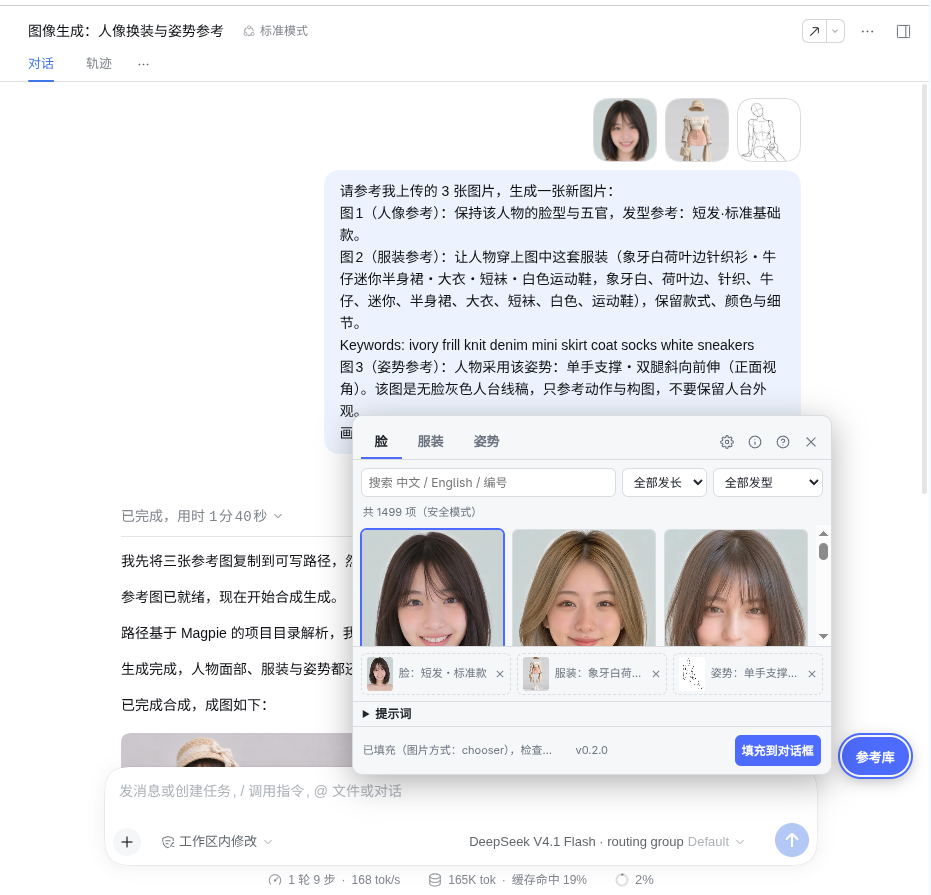
功能
- 三个参考库:脸(1499 项)/ 服装(3224 项)/ 姿势(153 项,安全模式开启时的数量)
- 搜索与两层筛选:中文 / English / 编号全文检索,按发长·发型、大类·分类、体系·动作分类过滤
- 姿势多视角:正面 / 俯视 / 仰视 / 侧面 / 斜侧;3D 白模 与 深度图(ControlNet Depth)切换
- 自动生成提示词:按所选参考图拼出「图1 人像参考 / 图2 服装参考 / 图3 姿势参考」,可换风格预设、加补充描述、自由改写、一键复制
- 本地图片:托盘里每个未选槽位可上传本地图片,与图库混搭
- 一键填充:高清原图写入 DSH 输入框的附件区 + 提示词写入编辑器;重复填充自动去重
- 友好细节:安全模式、参考图数量上限、面板可拖动/缩放/吸附、跟随 DSH 明暗主题、
Alt+Shift+R呼出
安装
从 GitHub 安装:
dsh plugin --profile web add github:dddaniel1/dsh-ref-autofill
dsh web
或在本地开发时:
dsh plugin --profile web add /path/to/dsh-ref-autofill
页面右下角出现「参考库」按钮,点击展开面板;Alt+Shift+R 亦可。
不需要安装任何用户脚本管理器,也不再需要 @match / @connect 声明:
插件只在 DSH 客户端里运行,网络请求走浏览器 fetch(三个数据源都返回
Access-Control-Allow-Origin: *)。
使用
- 在「脸 / 服装 / 姿势」里点卡片选参考图(姿势可切角度/深度图)。
- 需要时上传本地图片填空槽位。
- 检查提示词,按需换风格或补充描述。
- 点「填充到对话框」,核对输入框里的图片与文字,再自己点发送。
插件结构
dsh-ref-autofill/
  lib/index.js        Host 半边:空插件,让 bundle 进插件树
  lib/client.js       浏览器半边:原油猴脚本 + ModuleLoader 包装
  cordis.patch.yml    bundle patch
  test/e2e.js         在真实 DSH 页面里跑的自检(控制台调用 runE2E())
浏览器半边由 package.json 的 dsh.client 声明,DSH web 客户端启动时加载。
存储从 GM_getValue 换成 localStorage(脚本原本就带这个降级),键名不变。
数据来源与授权
参考库数据来自开源项目 anhao/ai-pose-gallery-zh:
- 姿势库、人像脸库、写实/动漫穿搭:ギア @giaaibusi
- 中国历代服饰:Shisei(shiseicostume.com,CC0)
- 二次元服装:たき AI @taki_auto · CharaDB
插件运行时按需从公开 CDN 读取数据与图片,不打包、不转储、不再分发任何图片。 人像脸库与中国历代服饰为 CC0;姿势库、其余服装库图片禁止二次分发。
参考产品形态来自 Greasyfork 上的《AI 生图参考图一键填充》(作者 yjiace,MIT); 本插件是面向 DeepSeek Harness 的独立重写与插件化移植。
License
MIT
Versions
| Latest version | Published | Size |
|---|---|---|
| 1.0.0 | — | — |
Comments
Loading…
Similar plugins
by liujia-io
Paperclip image-picker button for the DeepSeek Harness web composer - pick reference images via the system file dialog and feed them into the official attachment pipeline.
★ 0
MIT
JavaScript
Sep 5, 2026
dsh plugin --profile web add dsh-image-pickerby qwerty-k-de
DSH Web composer toolbar picture button: pick images via the OS file dialog - no drag-and-drop needed.
★ 0
↓ 58/wk
MIT
JavaScript
Sep 1, 2026
dsh plugin --profile web add dsh-attach-pickerby Yaya716
Persistent "Add image" button in the composer tool row for DeepSeek Harness Web: opens the system file picker (image/*, multi-select) and routes selected images through the official draft attachment p
★ 0
JavaScript
Aug 23, 2026
dsh plugin --profile web add @local/dsh-add-image-buttonby Crosery
Drag or paste files into the Web composer with one image-and-file preview rail; native PNG/JPEG/WebP/GIF keep the image attachment path, while other files reuse a matching local path or stream to Host
★ 1
MIT
TypeScript
Sep 26, 2026
dsh plugin --profile web add @crosery/dsh-dropby mei0769
Generate a persona appearance image from hair, outfit, accessory and expression text, then save it to a local gallery. Works with any OpenAI-compatible images API and also reports the composed prompt
★ 0
MIT
JavaScript
Nov 9, 2026
dsh plugin --profile web add dsh-appearanceby JackEngineer
One-click DSH screenshot: capture the DeepSeek Harness window (or the whole desktop) and drop the PNG straight into the composer draft
★ 0
MIT
JavaScript
Oct 17, 2026
dsh plugin --profile web add dsh-quick-screenshot