
dsh-cursor-dev
Manifest validRun the Cursor CLI as a DSH child coding agent: per-task model choice, conversation continuity across restarts, live progress and real diffs, plus a Cursor usage/quota dashboard.
dsh-cursor-dev
让 DSH 中支持工具调用的父模型,把任务交给本机 Cursor CLI 执行,再接收结果、审查修改并继续工作。
父模型与 Cursor 使用的模型分别选择:例如父模型用 DeepSeek,Cursor 用 Auto;也可以让其他已接入 DSH 的模型派发同样的任务。
中文
工作方式
flowchart LR
    U[用户] --> P[DSH 父模型]
    P -->|任务、参考文件、验收标准| T[cursor_code]
    T -->|ACP| C[本机 Cursor CLI]
    C --> W[工作区文件与命令]
    C -->|执行报告| T
    T -->|答复、步骤、文件变更| P
    P -->|审查后的结果| U
- 父模型理解需求、拆解任务、调用工具、审查结果。它的模型供应商和 API 配置由 DSH 管理。
- Cursor CLI使用自己的登录账号和可用模型执行任务,包括读取文件、修改代码、运行命令。
- 插件启动或恢复 Cursor 会话,传入任务,记录执行过程,并把报告返回原来的父代理。Cursor 的执行过程还会镜像到可点击的 DSH 子会话。
父模型不必是 Cursor 提供的模型。前提是它已接入 DSH、支持工具调用,并且当前会话允许使用插件的工具。这里的模型兼容性指 DSH 内的父模型;其他聊天应用需要另行接入,这个包没有提供通用 MCP 服务。
安装
完整步骤、升级说明和排错见 安装与首次使用。
-
安装当前版 Cursor CLI,运行
agent login,再用agent status --format json检查登录。 -
在 DSH 插件管理中安装本插件。公开仓库的安装来源为:
git+https://github.com/Dclef/dsh-cursor-dev.git已配置 DSH 命令行的用户也可以在所用 profile 下执行:
dsh plugin add "git+https://github.com/Dclef/dsh-cursor-dev.git" -
按 DSH 提示完成加载;涉及后台代码更新时重启 DSH,然后刷新页面。在 Cursor 面板中选择模型并保存。
-
明确告诉父模型使用
cursor_code,或者用下面的斜杠命令派发第一个任务。
版本说明(2026-10-14 核对): 0.9.1 已推送到公开仓库的 main,其中包含本文描述的原生子智能体接入、面板模型锁定、父级专属的 maxChildDepth 递归限制和安装指南。npm 公共源尚未发布 dsh-cursor-dev,所以按包名安装会返回 404;插件市场(dshmarket)的收录仍在审核,合并前市场里搜不到本插件。要跟进后续改动请用 Git 来源;.tgz 是某一刻的固定快照。详见安装来源与版本。
运行要求:DSH 包声明最低版本 >=0.2.0-rc.1;Node.js ^22.19.0 || >=24.0.0;已登录且可访问服务的 Cursor CLI。原生子智能体功能需要 DSH 的 subagents、agents 服务,后台任务还需要对应任务服务,建议使用当前 DSH 桌面版。CLI 安装方法见 Cursor 官方文档。
三个入口
| 入口 | 用途 | 结果如何回来 |
|---|---|---|
cursor_code | 父模型派发完整任务,控制目录、模式、模型、会话与报告 | 工具结果回到调用它的父模型,包含答复、步骤和检测到的文件变更 |
/cursor-subagent 任务内容 | 用户直接派发一次任务;可选前缀 -m 模型 | 完成或失败后,插件把摘要交给原父代理继续处理 |
cursor_subagent | 当前源码新增的 DSH 原生一次性子智能体工具,可后台运行 | 使用 DSH 标准结果及后台任务机制;完整过程可在镜像子会话中查看 |
例如,在一个空测试工作区发送:
/cursor-subagent 创建 cursor-cli-check.txt,内容为 cursor-cli-ok,然后读取它确认内容。只修改这个文件,最后汇报结果。
或者直接对父模型说:
请使用 cursor_code 修复这个问题。先让 Cursor 读取相关文件,完成后检查返回的修改和测试结果,再向我汇报。
安装工具后,是否自动调用仍由父模型和会话指令决定。希望默认委派开发任务时,可以把下面的内容加入父代理的自定义指令:
涉及代码实现、重构、修复或批量修改时,优先使用 cursor_code。
在 task 中说明完整目标,在 contextFiles 中列出需要先读的文件,
在 acceptance 中写清约束与验收要求。使用面板默认模型,除非用户要求切换。
收到结果后检查文件变更和验证记录;必要时继续派发修正。
同一任务使用相同 sessionLabel,并以 continueSession:true 续聊。
不同任务或项目使用不同 sessionLabel。没有修改需求的问题可直接回答。
给父模型的调用示例
第一次调用 cursor_code:
{
  "task": "修复登录表单的空密码校验,沿用项目现有交互风格。",
  "contextFiles": ["src/login.ts", "test/login.test.ts"],
  "acceptance": "不改变公开接口;补充有意义的回归用例并运行相关测试。",
  "sessionLabel": "login-validation",
  "mode": "agent"
}
收到结果后,仍由同一个父代理调用:
{
  "task": "继续处理刚才的任务:检查纯空格密码的边界情况,必要时修正并验证。",
  "sessionLabel": "login-validation",
  "continueSession": true
}
示例中的文件路径需要换成实际项目路径。Cursor 接收任务文本、参考文件提示和其已有的 Cursor 会话历史,不会自动读取整段父对话,所以父模型应把必要背景写进任务。
| 参数 | 说明 |
|---|---|
task | 必填;完整任务目标 |
contextFiles / acceptance | 参考文件列表、约束与验收标准 |
workspaceRoot | 可选绝对路径;默认使用当前 DSH 会话工作区 |
model | 可选 Cursor 模型;省略时使用面板选择及配置回退;面板锁定可覆盖此参数 |
mode | agent 执行修改,plan 只读规划,ask 只读问答 |
sessionLabel | 同一父会话中的任务标签,默认 default;不同任务建议分开命名 |
continueSession | 复用当前会话执行后续任务;进程已退出时尝试从 Cursor 存储恢复 |
resetSession | 清除该标签的插件映射并重新开始;不删除 Cursor 自己的历史文件 |
report | summary(默认)或 detailed |
timeoutSeconds | 默认 1800 秒,最大 7200 秒 |
结果包括成功状态、答复、会话标识、实际模型、执行步骤、预览和检测到的文件变更。当前源码还返回 modelSource 与 requestedModel,帮助判断模型选择来自面板锁定、调用参数还是默认配置。文件扫描有范围和数量限制,报告不代替父代理对实际工作区的最终检查。
模型选择与会话
- 父模型和 Cursor 模型独立配置。可用的 Cursor 模型由该账号的实时列表决定。
- 默认未锁定时,优先级为:调用的
model→ 面板保存的模型 → 插件model配置 → CLI 默认值。 - 当前源码增加了“锁定面板模型”:保存后,面板选择优先于调用参数。选 Auto 并锁定,可防止父模型显式传入其他模型覆盖它。
auto和default[]表示同一个 Auto 选择。 - 保存的默认值与正在运行的模型分别显示;新选择在后续运行时应用,不会中途切换已经开始的任务。
- 会话按 父代理 ID +
sessionLabel记录。换一个父会话或标签,不会自动接上另一份会话。 - 改模型可能新起 CLI 进程,并尝试重载已保存的 Cursor 对话。
continueSession:false不应被当作清空历史的开关;需要全新上下文时使用新标签或resetSession:true。 - 重启后的续聊依赖 Cursor 历史及插件映射仍存在;加载失败时会记录原因并回退到新会话。可检查报告中的
reloaded。 - Cursor 的模型选择是 CLI 全局状态,插件串行执行 Cursor 任务。不同标签隔离会话上下文,但不会自动隔离共用工作区的文件。
原生子智能体支持范围
当前源码注册 DSH 后端 cursor。有对应服务时,cursor_code 接入 DSH 的运行开始、结束与取消机制;bundle 同时配置标准工具 cursor_subagent,不修改已有通用 subagent 工具的默认后端。
执行仍由外部 Cursor CLI 完成,DSH 中的子会话负责展示过程。标准入口支持一次性前台或后台任务,后台任务可通过 DSH 的 job_output / job_kill 查看或取消。
目前支持 cursor_code 的显式续聊;尚不支持通过 send_message 向 Cursor 投递持久消息,也没有把 Cursor 接成 Agent Teams 常驻队友。精简 profile 缺少原生子智能体服务时,cursor_code 可以使用原有执行路径;镜像、面板和命令分别依赖对应的宿主服务。
面板、配置和数据
从 DSH 的 Cursor 插件入口打开面板,也可以访问当前 DSH 地址下的 /plugins/dsh-cursor-dev/。例如,DSH 运行在 http://127.0.0.1:19387 时,面板地址为 http://127.0.0.1:19387/plugins/dsh-cursor-dev/;其他用户应使用自己的地址和端口。
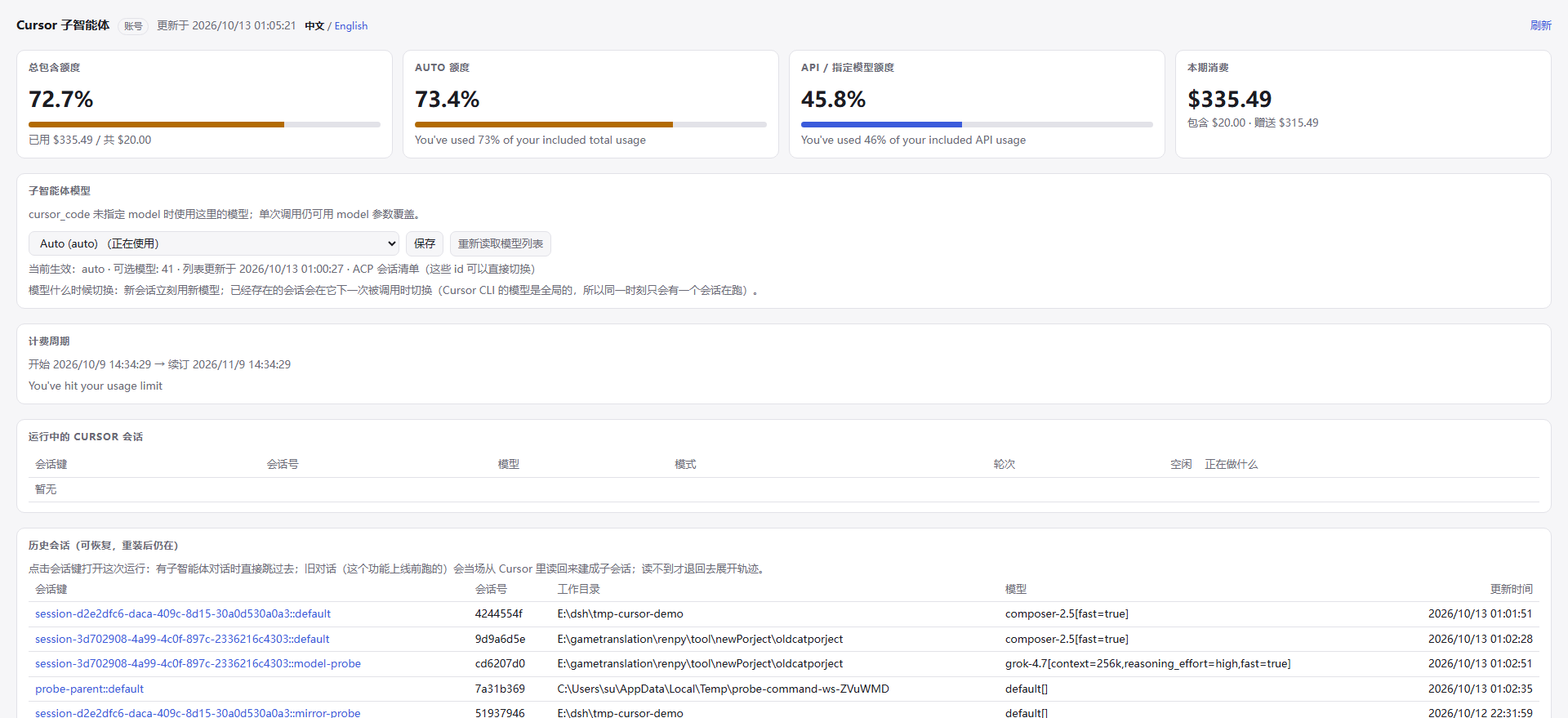
面板包含安装/登录状态、账号额度、模型和模式设置、活动与历史会话。点击会话可查看镜像记录。新版本页面可能与上面的截图不同。
| 插件配置 | 默认值 | 用途 |
|---|---|---|
model | 空字符串 | 面板未设置时的 Cursor 模型 |
maxLiveSessions | 3 | 最多保留的 CLI 进程数,任务仍然串行 |
sessionIdleMinutes | 15 | 空闲进程回收时间 |
maxScanFiles | 20000 | 工作区变更扫描的文件数量上限 |
toolName | cursor_code | 编码工具的注册名 |
usageUi | true | 是否挂载状态、额度和面板 HTTP 路由 |
usageBaseUrl | https://api2.cursor.sh | Cursor 额度 API 地址 |
maxChildDepth | 1 | Cursor 子会话允许达到的深度上限,调用方深度必须小于该值 |
插件自动探测 CLI 的 PATH 和已知安装目录。当前实现不支持通过配置中的 command 覆盖探测结果,安装排错以指南为准。
maxChildDepth 限制的是谁能启动 Cursor 子会话:深度为 0 的顶层智能体是正常调用方,深度 1 的子智能体再调用就会被拒绝(默认上限 1,即只允许父智能体创建子智能体)。拒绝发生在创建任何进程或子会话之前,cursor_code 立即返回 sessionKey: "depth-refused",cursor_subagent 抛出同类错误,错误信息里带有当前深度和上限。宿主本身对 subagent / subagent_fork 的深度限制(面板「子智能体 → 运行限制 → 最大递归深度」)仍然生效;cursor provider 声明 depthLimit: false,无法接收数值型 maxDepth,所以这道限制由本插件自己执行。把 maxChildDepth 设为 0 可以完全禁止子会话,设为 2 或更大则允许更深一层。镜像历史(面板里的记录)不受此限制,仍可正常打开查看。
插件设置与会话映射优先写入环境变量 DSH_CURSOR_DEV_DATA 指定的目录;否则使用 %LOCALAPPDATA%/dsh-cursor-dev;没有该环境变量时使用 DSH 提供的 baseDir 下的 .data(再无 baseDir 时回退到进程当前目录)。Cursor 登录和原始会话由 Cursor 自己保存。面板写操作包含同源检查,HTTP 可访问范围由 DSH 的监听配置决定。
开发与验证
npm install
node --test --test-force-exit --test-skip-pattern="the child agent really edits a file|a bad model is rejected|the real Cursor account returns live quota data" "test/**/*.test.mjs"
完整测试命令为 npm test,其中三个真实 CLI/账号测试需要 Cursor 登录和网络,执行任务会使用该账号额度。当前实现已通过 185 项离线测试,并完成两轮真实 Auto 调用、文件修改和上下文续接验证。打包使用 npm pack 或 pnpm pack,发布前按分发检查核对安装包和版本。
English
Use Cursor CLI as an execution agent for a tool-capable parent model in DSH. Results return to the same parent for review and follow-up. The parent model and Cursor's model are configured independently. A DeepSeek parent can delegate to Cursor Auto, for example; the parent does not need to be a model offered by Cursor.
Install and try it
See the installation guide for detailed setup and troubleshooting.
-
Install the current Cursor CLI, run
agent login, and checkagent status --format json. -
Install the plugin through DSH's plugin manager using
git+https://github.com/Dclef/dsh-cursor-dev.git. With the DSH CLI configured for your intended profile, use:dsh plugin add "git+https://github.com/Dclef/dsh-cursor-dev.git" -
Restart DSH when backend changes require it, then refresh the page. Open the Cursor panel under
/plugins/dsh-cursor-dev/, select a model and save it. -
Ask the parent to use
cursor_code, or send/cursor-subagentfollowed by a complete task. The command dispatches directly and hands a completion or failure summary back to the original parent.
As checked on 2026-10-14, version 0.9.1 is pushed to main on the public repository and carries the native-provider and model-lock work documented here plus the parent-only maxChildDepth recursion cap, together with the install guide. The package is not published to the public npm registry, so a bare package-name installation returns 404, and the dsh-market listing is still under review. Use the Git source to follow later changes; a .tgz is a fixed snapshot.
Requirements: DSH metadata declares >=0.2.0-rc.1; Node.js ^22.19.0 || >=24.0.0; an authenticated Cursor CLI account with service access. Native dispatch additionally needs DSH's subagents and agents services, and background runs need the host's job services. A current DSH desktop installation is recommended.
Parent-to-child contract
cursor_codetakes a completetask, optionalcontextFilesandacceptance, an absoluteworkspaceRoot, and optional model, mode, session and report settings. It returns the final reply, steps and detected file changes to its caller.- The child receives the delegated task and its own Cursor history, not the whole parent conversation. Include the context it needs.
- Use the same
sessionLabelandcontinueSession: truefor follow-ups from the same parent. Use a new label orresetSession: trueto start without the previous mapping.continueSession: falsealone does not guarantee an empty persistent history. - A model change may start another CLI process and reload the saved Cursor conversation. Recovery depends on the saved records still being available; load failure falls back to a new session.
- Cursor runs are serialized because its model selection is global. Labels isolate conversation context, not files in a shared workspace.
- The parent must support tool calling and have the tool enabled. Installing this plugin does not force every parent to delegate automatically. Other chat applications require a separate integration; this package is not a general MCP server.
The default model order is call argument → saved panel choice → plugin configuration → CLI default. In the current source, locking the panel choice overrides a per-call model argument. Auto and default[] are the same choice. The returned modelSource and requestedModel explain the selection.
Native execution and limits
The current source registers a native DSH provider named cursor and a standard one-shot tool named cursor_subagent. Rich cursor_code calls also use the native lifecycle when those host services exist. The existing generic subagent backend remains configured as before.
Cursor executes externally; a real DSH child session mirrors the transcript for inspection. Standard background runs use DSH's job result and cancellation tools. Persistent mailbox continuation through send_message, and Cursor as a resident Agent Teams teammate, are not implemented. Use cursor_code with continueSession for explicit follow-ups.
The parent remains responsible for reviewing the actual changes and verification evidence. File reports have scan limits and are not a substitute for final workspace checks. Cursor model availability and usage depend on the Cursor account; the parent model uses its separate DSH provider configuration.
maxChildDepth (default 1) caps who may start a Cursor child session. A top-level agent at depth 0 is the intended caller; a subagent at depth 1 that calls cursor_code or cursor_subagent is refused before any process, child session, or reset is created — cursor_code returns sessionKey: "depth-refused" and the error names both the current depth and the cap. This exists because the cursor provider declares depthLimit: false and cannot accept a numeric maxDepth from the host's tool-subagent, so the plugin enforces the limit itself. Set it to 0 to forbid Cursor children entirely, or higher to allow deeper nesting. The host's own delegation limit for subagent / subagent_fork (panel → Subagents → Run limits → maximum recursion depth) still applies independently. Opening a mirrored child conversation in the panel is a read-only record and is not affected.
License
Comments
Loading…