

dsh-agent-foreman
IdentifiedParent-agent dispatch with review: split a task into work orders, hand each to a contractor you picked (its own provider, model, and reasoning effort), then pass or fail every delivery — failed ones a
Foreman · dsh-agent-foreman
Parent agent dispatches, sub-agents do the work, the parent reviews. No preset roles, no scripted phases: you decide who works and with which model.
Chinese docs: README.zh.md
The problem
DSH's built-in Agent Team lets you give each teammate a name and a prompt — but not a model. Real work is mixed: some of it needs an expensive model, some of it is a two-line edit. Inheriting the parent's model for every pair of hands is both slow and expensive.
Foreman splits it in two:
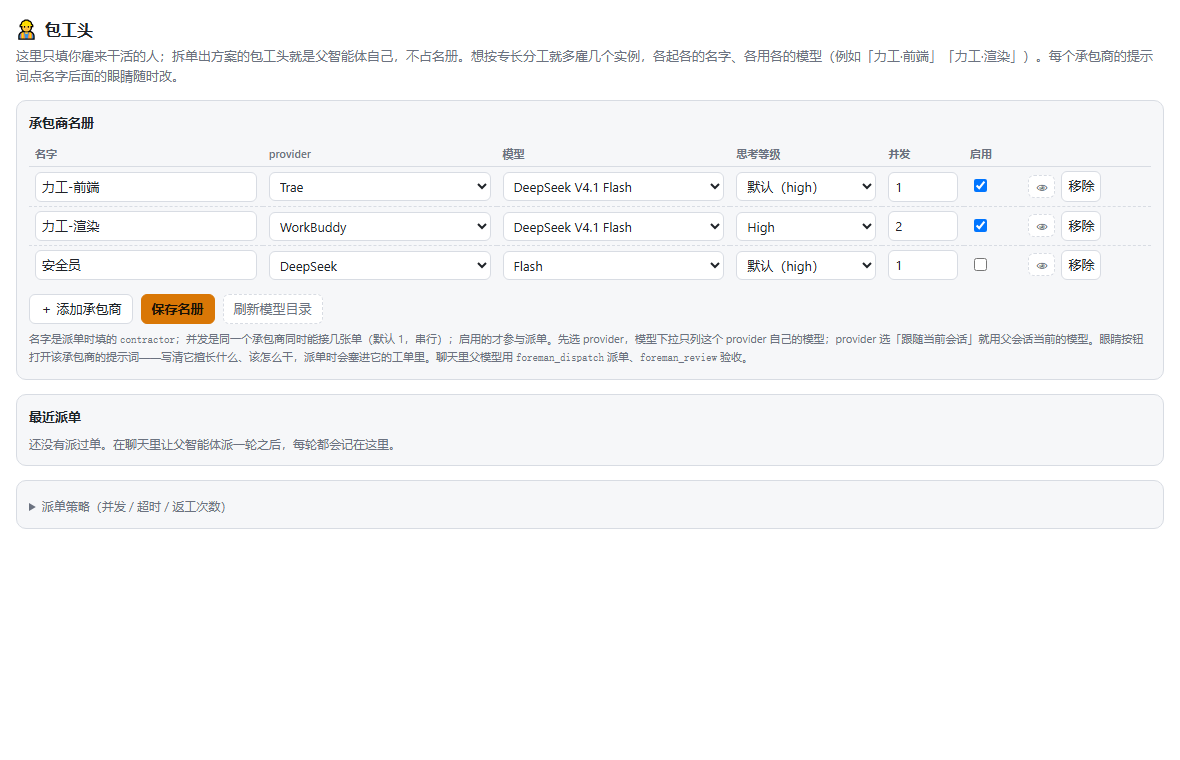
- Contractors — the crew you define in the settings page, named by trade like a real construction site: 力工 (laborer — does the business work) and, optionally, 安全员 (safety officer — reviews and rejects). The foreman itself is the parent agent: it splits the work and signs off, and is never in the roster. Want specialties? Hire several instances (力工 · frontend, 力工 · render), each with its own model and its own prompt (the 👁 button next to the name), and its own concurrency cap: default 1, so one instance never works two orders at once; set it to 2 and it can. That prompt is prepended to every order the contractor receives. The minimal setup is a single 力工.
- Orders — the work the parent agent splits out. Each order carries a task and acceptance criteria, and may name a contractor or rotate automatically.
The parent only splits work and reviews results. Everything in between happens in isolated child sessions, and the products come back as one shared board.
Install
dsh plugin add E:/path/to/dsh-agent-foreman
Manual (dev) install:
- Copy the whole directory to
<profile>/node_modules/dsh-agent-foreman - Add
"dsh-agent-foreman"todsh.profile.bundlesin<profile>/package.json - Restart DSH
Then open Settings → 包工头 and add contractors.
Usage
Type /foreman (registered at runtime through ctx.skills.register()) followed by the work:
/foreman extract GraphBlocked into shared logic; add regression tests. Semicolons or newlines
split orders. The skill body walks the parent through roster → split → one dispatch → review, so no
standing system prompt is needed.
| Tool | Purpose |
|---|---|
foreman_roster | List contractors with route, prompt length, concurrency cap, and the current policy |
foreman_dispatch | Dispatch a batch of orders, wait for all of them, return the board |
foreman_review | Pass / fail each order; a failed one is re-dispatched with feedback |
foreman_status | Re-read a board; omit runId for the latest one in this session |
Where members show up
There is no custom in-chat panel any more: in team mode a contractor is a real Agent
Teams member, so the native Agent Teams button in the session header lists them and
shows each one's model. The settings page keeps the full roster editor.
Roster notes:
- A contractor is a name, an optional prompt, a provider, a model, an effort level and a concurrency cap. Leave the provider on "follow the current session" and the child simply runs on whatever model the parent session is using.
- To use a different model: pick the provider first — the model dropdown is derived from it and only lists that provider's models (providers with no models never show up).
- Settings page collapses policy behind "派单策略"; the roster table keeps name / provider / model / effort / concurrency / enabled, and 👁 opens that contractor's prompt editor.
Dispatch notes:
orders[].taskmust be self-contained — the child cannot see the parent's context.orders[].contractorrotates through the roster when omitted; unknown names fail loudly.orders[].dependsOnonly references orders in the same batch; dependents run serially after.waitSecondscaps the whole batch; unfinished orders are aborted rather than silently reported done.concurrencydefaults to 4, capped at 8.
Policy
| Field | Default | Meaning |
|---|---|---|
concurrency | 4 | Contractors working at once (1–8); the per-instance cap lives in the roster |
timeoutSeconds | 900 | Wall-clock cap per order |
maxRework | 1 | How many times an order may be sent back |
maxDepth | 1 | Whether a child may dispatch further children |
provider | spawn | Which subagents provider to use (spawn / fork / cursor) |
Data
- Windows:
%LOCALAPPDATA%/dsh-agent-foreman/ - Elsewhere:
<baseDir>/data/dsh-agent-foreman/
roster.json (contractors + policy), runs.jsonl (one line per dispatch round).
A corrupt roster never blocks startup — it is treated as empty and logged.
Security
- Every HTTP route accepts same-origin, loopback requests only; cross-site calls get 403.
- The roster stores provider/model/effort names — never credentials.
- Contractors run in their own child sessions and inherit DSH's effective sandbox.
Development
node --test test/*.test.mjs # 26 cases: tools, engine, routes, CSRF, ledger
test/harness.test.mjs runs the real host half against a fake host, so no DSH instance is needed.
Compared to
| Agent Team (built-in) | swarm-orchestrator | Foreman | |
|---|---|---|---|
| Per-member model | no | no | yes |
| Preset roles | fixed | 4 fixed roles | none — you define |
| Shared board | yes | yes | yes |
| Rework loop | no | limited | yes, with feedback |
| Settings page | yes | no | yes, roster + live model catalog |
Team mode (experimental)
Off by default. Tick 团队模式 under Settings → 包工头 → 派单策略 and each
contractor becomes a real member of the host's agent team: the plugin spawns
it with agentTeams.spawnTeammate, switches its session model with
sessions.selectModel, sends the work order as a team message, then reads the
delivery back from the member's session events.
Members therefore show up in the team area and can change model in their own
session. Every step depends on host team services, so any failure falls back to
the plain activation path and the board's teamMode field says which one ran.
Known trade-offs:
- Member names must be ASCII (
lower-kebab-case), so Chinese contractor names all becomeworker,worker-2, … — the Chinese name and model live in the member description, which the team area shows. - A member's first turn runs on the parent's model (the model can only be switched after the session exists — hence the one-line handshake).
- Switching is bounded by the host's per-subagent model allow-list; values outside
it are refused and the board shows
model switch: failed · reason. - Members stay in the team after the round.
License
MIT
Comments
Loading…
Similar plugins
Captain-led multi-agent teams that split a goal into tasks and dispatch them along an execution chain to members running in their own sub-sessions, each with its own model.
★ 1
↓ 316/wk
MIT
TypeScript
dsh plugin --profile web add dsh-eteamsby gezi-wen
Ships a skill about handing work to subagents instead of doing it inline - which tasks are worth fanning out, how many to run at once, how to send them in parallel, and how to check what they returned
★ 0
MIT
Sep 20, 2026
dsh plugin --profile web add dsh-subagent-delegationDevFlow multi-agent workflow orchestration plugin for DeepSeek Harness
★ 0
dsh plugin --profile web add @xiaoxie-ide/dsh-devflowReusable subagent definitions managed from a Settings page and dispatched through a single delegate_agent tool; ships with a built-in read-only Explorer preset and a nested-delegation policy toggle.
★ 0
dsh plugin --profile web add dsh-custom-subagentsby Funny1Potato
DSH agent presets whose leader does no work itself: non-management tool calls are denied at the harness boundary and every task goes to a subagent (a second preset deliberately picks weaker models for harder tasks).
★ 7
↓ 119/wk
MIT
JavaScript
Oct 23, 2026
dsh plugin --profile web add dsh-outsourcing-expertDeepSeek Harness plugin: on task send, pick a different model for subagents and an independent reviewer that validates each subagent's work before it reaches the main agent
★ 0
MIT
TypeScript
dsh plugin --profile web add dsh-orquestrator