

dsh-appearance-glass
DiscoveredDSH 外觀外掛:介面透明度(四個分區獨立可調)+ 內建壁紙顏色。純 alpha,沒有模糊與玻璃特效。
dsh-appearance-glass
Interface transparency for the DSH web UI, plus a built-in wallpaper. Plain alpha only — no blur, no saturation, no glass effects (modes and liquid glass were removed in 1.1).

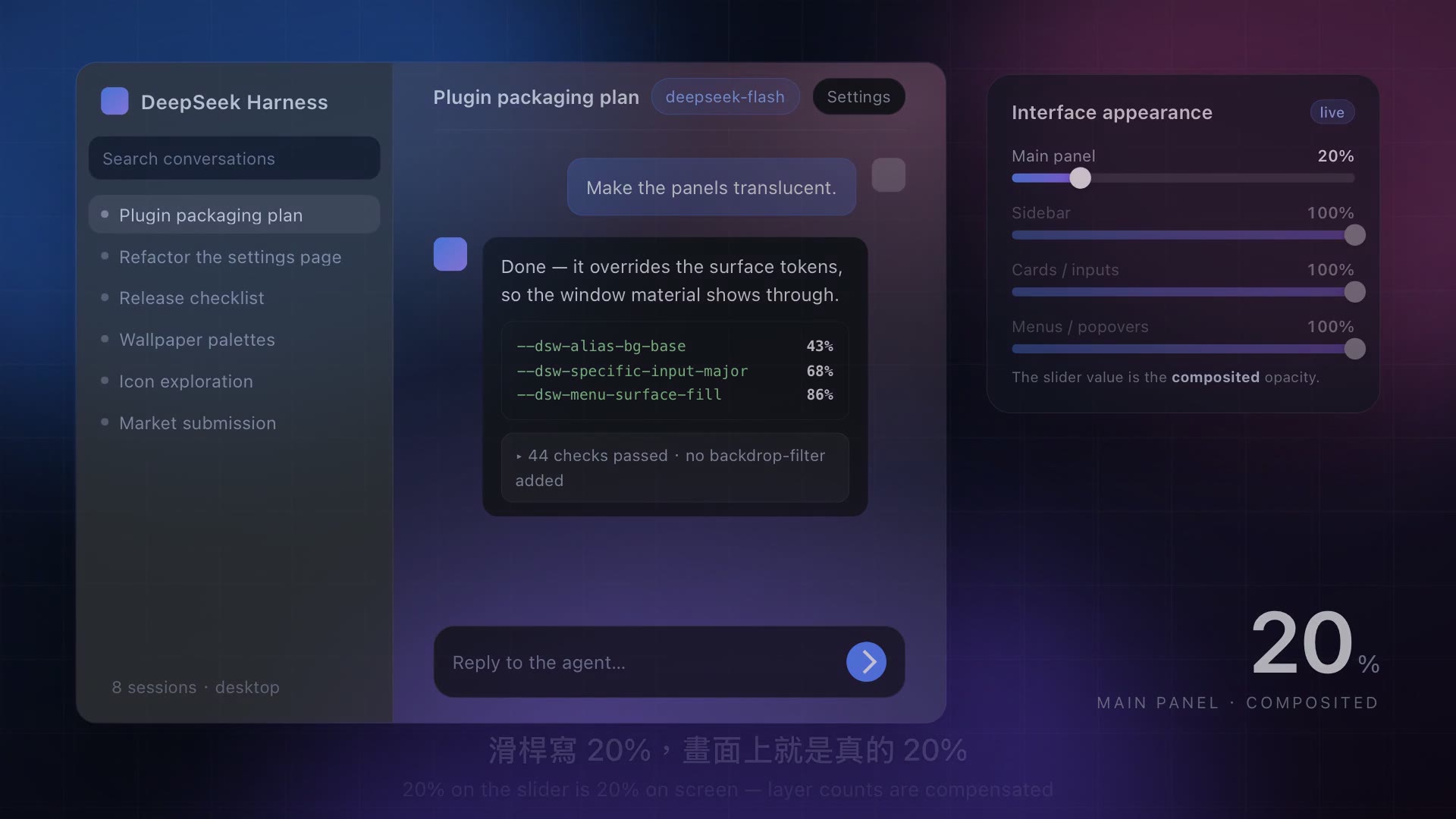
▶ Two-minute promo: English narration (中文旁白 ・ silent)
| Where it lives | Settings → Interface appearance (its own settings.section page, right after General and before Models) |
| Same panel elsewhere | Settings → Plugins → dsh-appearance-glass (plugins.bundle.config) |
| Stored in | the profile's cordis.patch.yml (config:), applied instantly — no restart |
| Does not touch | any DSH source file; uninstalling removes every effect |
What you get
- Four independent opacity sliders — main panel / sidebar / cards & inputs / menus & popovers. The value is the composited result: 20% really looks like 20% (see the math below).
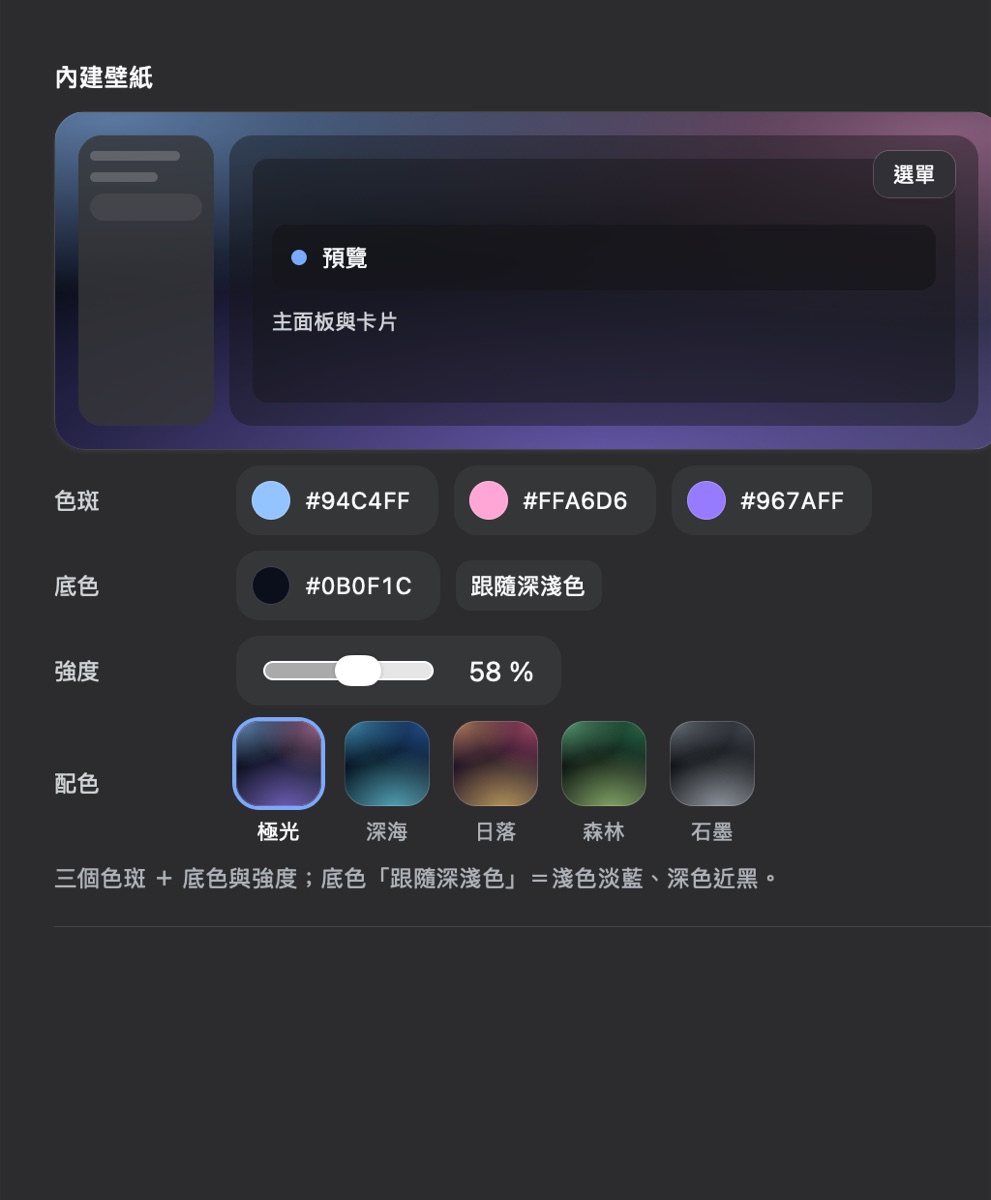
- Built-in wallpaper — three colour blobs, a base colour, a strength, five palettes, and a live preview whose mock surfaces use the real tokens with the real layer count.
- A kill switch — turn “Enabled” off to compare instantly; nothing is uninstalled.
Install
dsh plugin --profile web add dsh-appearance-glass          # from npm
dsh plugin --profile web add github:david0304git/dsh-appearance-glass   # from GitHub
Requirements: dsh >= 0.2.0 (engines.dsh); tested on 0.2.1-rc.2.
The only peer dependency is @deepseek-ai/schemastery (provided by the host, marked optional).
Finding it in a plugin market
- Official Discover:
plugin_marketreads the index URLs you add (DSH ships none). Two that work:https://cdn.jsdelivr.net/npm/dsh-plugin-catalog/index.json— the awesome-dsh-plugin list as a format-1 indexhttps://awesome-dsh-plugin.com/index.json
- dsh-market (
dshmarket): only installs from the awesome-dsh-plugin list, so this plugin has to be listed there first.
Settings page
- Header — title,
customised in this profilebadge, write status, Enabled (officialSwitch), Reset to defaults - Interface opacity — four sliders (main panel / sidebar / cards & inputs / menus & popovers) plus a Sync button that copies the main-panel value to the other three
- See-through backdrop — Auto / Built-in wallpaper / Pure transparent
- Built-in wallpaper — live preview, then four aligned rows: blobs (three colour pills), base (colour pill + follow light/dark), strength (slider pill), palette (five 44 px gradient cards; the one in effect gets a focus ring)
Parameters
| Field | Range | Default | Meaning |
|---|---|---|---|
enabled | boolean | true | Master switch; false leaves every token alone |
opacityBase | 0–100 % | 68 | Main panel (the conversation background is painted twice — see below) |
opacitySidebar | 0–100 % | 68 | Sidebar and its selection states (the shell adds a 40% tint on top) |
opacitySurface | 0–100 % | 68 | Cards, inputs, message bubbles, code blocks |
opacityOverlay | 0–100 % | 72 | Menus, tooltips, toasts, popovers |
backdrop | auto / wallpaper / none | auto | auto uses the native window material on desktop and the wallpaper elsewhere |
wallpaperA/B/C | #rrggbb or auto | auto | The three blobs; auto follows light/dark |
wallpaperBase | #rrggbb or auto | auto | Base colour; auto = #e9f0ff light / #0b0f1c dark |
wallpaperStrength | 10–100 | 58 | Blob strength (the 2nd and 3rd are automatically weaker) |
Why the slider value is the composited opacity
The same token is often painted more than once: on macOS the shell's .centerCol and the conversation root
both draw --dsw-alias-bg-base. Setting that token to 68% would show 1-(1-0.68)² = 89.8% — which is why
“turn it all the way down” used to look barely transparent.
The plugin therefore solves for the per-layer value (a = 1-(1-target)^(1/depth)):
| Region | Real layers | Slider 20% writes | Composited |
|---|---|---|---|
| Main panel | 2 | 11% | 20.0% |
| Sidebar | ~1.4 | 13% | ~20% |
| Cards / inputs | 1 | 20% | 20.0% |
| Menus / popovers | 1 | 20% | 20.0% |
The per-token deltas shrink with the target too, so low values are not pulled back up.
Why macOS gets real see-through
The DSH desktop window is created with vibrancy: 'sidebar' and backgroundColor: '#00000000', and the shipped CSS
makes html/body transparent on html[data-platform=darwin]. The desktop material is always there — it is simply
covered by opaque panels. Swapping those surface tokens for translucent colours lets it through; this is not a
CSS imitation.
The system material's own blur cannot be turned off: it is an Electron main-process window property, and no renderer IPC exposes it (
DESKTOP_IPConly hasnativeThemeSetfor light/dark andwindowsAppearancefor Windows title bars). For a completely unblurred result, open DSH in a browser.
Implementation notes
- Everything is a theme token override (
ctx.theme.overrideTokens); official components consume--dsw-*, so no hashed class name is involved. - Only the wallpaper touches
<html>(background-image). The plugin never addsbackdrop-filterto a container — that would create a containing block forposition: fixeddescendants, and DSH menus render in place with CSS anchor positioning. - The UI is built from official shapes (selector pill 36 px,
--dsw-radius-md,--dsw-alias-bg-module-platform), the officialMenuandSwitchprimitives, with native<select>/ text-button fallbacks. - Fail-open everywhere: without theme/slots/locale/configForms nothing is registered and nothing changes.
Tests
npm test # node test/run.mjs — host 7 + client 33 + tokens 4
test/tokens.test.mjs reads the installed DSH app.asar, extracts the official token table and checks every
token this plugin overrides — a DSH upgrade that renames a token fails the suite immediately.
(Verified against DSH 0.2.1-rc.2, 403 official tokens.)
Troubleshooting
| Symptom | Cause / fix |
|---|---|
| A control is greyed out | That field is not served by the host yet — usually a host-half change without a DSH restart. The header says so |
| Nothing changes | Check the “Enabled” switch, then whether the backdrop is none |
| No desktop visible (macOS) | Layer compensation is handled; make sure DSH is the desktop app, not a browser tab (browsers have no window material, only the wallpaper) |
Old mode / blur / saturate keys in the config | Leftovers from 1.0; harmless, delete them if you like |
Icon and sidebar glyph
icon.svg is declared through package.json's icon (the official contract: a relative path, SVG/PNG/JPEG/WebP,
≤256 KiB; the host inlines it as a data: URL and shows it at 48×48).
The settings sidebar glyph is hard-coded in the shell (navIcon(id): only account / models / agent-presets /
plugins / archived-sessions have their own glyph, everything else falls back to the gear), and
settings.section has no icon field. This plugin therefore uses a minimal DOM patch that replaces the glyph in
its own row only: it locates the row by its label in all three languages, saves the original innerHTML,
restores it on dispose, observes only body.childList (the settings panel is a portal subtree), and does nothing
at all if the structure does not match.
Publishing
| Step | Command |
|---|---|
| Check the tarball | npm pack --dry-run |
| Publish | npm login && npm publish --access public (runs the tests via prepublishOnly) |
| GitHub release | gh release create v1.1.x dist/dsh-appearance-glass.tgz |
| Market listing | PR adding data/plugins/david0304git__dsh-appearance-glass.yml to awesome-dsh-plugin |
The submission file lives at submit/awesome-dsh-plugin.yml; the repository declares dsh.bundle, so
dsh plugin add installs it. No prepare / postinstall script exists, so a source install needs no build approval.
License
MIT
Comments
Loading…
Similar plugins
by gh-gongjin
DSH (DeepSeek Harness) 外观插件:8 张内置配色皮肤走宿主官方主题通道,brand slot 换侧栏/首屏标志与名称行(内置六枚或用户自己的图片)。零第三方依赖,不写宿主文件、不注入全局 CSS。
★ 0
MIT
JavaScript
Oct 6, 2026
dsh plugin --profile web add dsh-plugin-appearance 5
5No screenshots
DSH 浏览器皮肤插件:开场动画、自定义壁纸、面板透明度,设置即时生效。
★ 0
MIT
TypeScript
dsh plugin --profile web add dsh-plugin-shell-skinby jinzhengen964-cmyk
DSH web 背景皮肤插件:将 DSH 界面背景替换为本地图片(半屏居中覆盖对话区域,AI 输出卡片不透明)
★ 0
MIT
JavaScript
Aug 20, 2026
dsh plugin --profile web add dsh-bg-skinby theroi
DSH 个性化插件:自定义背景 + 半透明玻璃 + 主题色
★ 0
MIT
JavaScript
Oct 15, 2026
dsh plugin --profile web add dsh-bg-panelby Vim0x3c
DeepSeek Harness 外观定制插件:八套内置主题 + 自定义壁纸(透明度/模糊),Host 设置持久化 | Appearance plugin for dsh web
★ 4
TypeScript
Aug 20, 2026
dsh plugin --profile web add dsh-skin-appearanceby retmon2333
DeepSeek Harness(DSH)背景壁纸更换(单图 / 文件夹轮播)模式,可调透明、模糊、遮罩与樱花/雪花特效,侧栏与输入框也能透出壁纸
★ 0
MIT
TypeScript
Sep 4, 2026
dsh plugin --profile web add dsh-background