
dsh-agent-teams-dashboard
Manifest validAdds a Teams sidebar dashboard that lists every Agent Teams chat with its roster and task roadmap, token spend in USD and RUB, work and online time, and an archive of older teams. Requires the Agent T
dsh-agent-teams-dashboard
A DSH Web plugin that adds a Teams section («Команды») to the sidebar and a dashboard for every AgentTeams chat: active runs and teams finished in the last three days, token spend with time-range controls, cost in USD and RUB, total and union work time, team cards with the orca roster and task roadmap, and an archive for older teams.
The plugin has two halves: a host half (index.js + lib/host/) that reads DSH
and AgentTeams state read-only and serves two loopback JSON routes, and a
browser half (lib/client.js) that renders the panel inside the DSH shell. The
panel never talks to the outside world: it calls its own same-origin route.
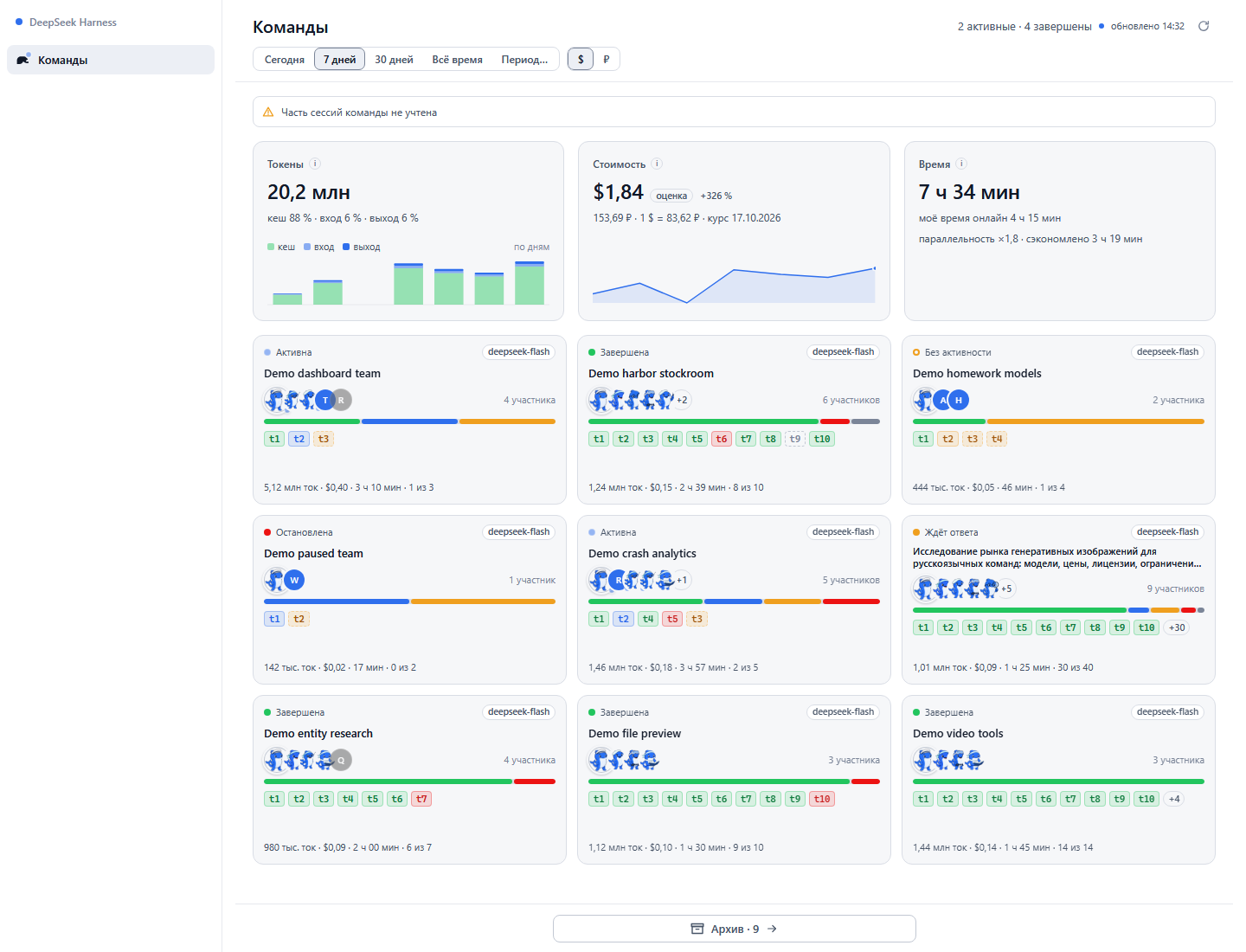
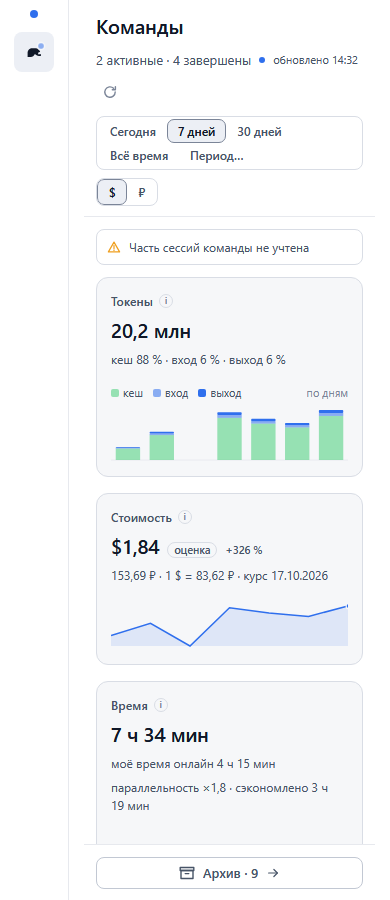
Both screenshots come from the offline preview harness with synthetic demo data; no owner data is used anywhere in this repository.
Features
- Sidebar section «Команды» (panel id
agent-teams-dashboard, order 10) with a live dot while a team is working. - Ranges: Today, 7 days (default), 30 days, All time and a custom period picker.
- Three hero cards: tokens (cache / input / output, stacked by day), cost (USD primary, RUB always visible, CBR rate with date and stale/override markers) and time (total work time plus the merged "online" time).
- Team grid: title that shrinks 13 → 12 → 11 px and clamps to two lines, a coloured status dot with a word (active, waiting, halted, stalled, completed, unknown), captain and member orca artwork with a monogram fallback, a dependency-ordered task roadmap with a segmented progress bar, and a one-line metrics footer.
- Archive view with search by title and sorting by end date, title or spend; older teams are also reachable from the sticky bottom button.
- Clicking a card or an archive row opens the team chat (the captain session) through the shell navigation; a missing session shows a toast instead of navigating.
- Skeleton, empty, range-empty, error, stale and partial states; one broken
team.jsonnever blanks the dashboard — it becomes a warning strip while the rest stays visible. - Dark and light themes driven by DSH tokens, keyboard focus, a polite live region, reduced motion, and RU/EN dictionaries.
Install
Requirements: DSH Web with client-plugin support (dsh.engines.dsh >= 0.2.0-rc.2)
and, for the data itself, the AgentTeams plugin (@nanmicoder/dsh-agent-teams).
Install from git (recommended)
dsh plugin --profile <profile> add --save-exact git+https://github.com/dadgrand/dsh-agent-teams-dashboard.git#v0.1.0
Replace <profile> with your DSH profile name (for the Desktop app the default
profile is usually desktop). Restart the host when the command finishes; the
loader mounts the plugin's cordis.patch.yml row automatically.
Install from the Desktop plugin manager
Open Settings → Plugins, choose "Install from Git URL" and paste:
git+https://github.com/dadgrand/dsh-agent-teams-dashboard.git#v0.1.0
Confirm the install and restart the host. The plugin appears in the sidebar as «Команды».
Install manually into a profile
Add the dependency to <DSH_HOME>/profiles/<profile>/package.json:
{
  "dependencies": {
    "dsh-agent-teams-dashboard": "git+https://github.com/dadgrand/dsh-agent-teams-dashboard.git#v0.1.0"
  }
}
and the package name to dsh.profile.bundles in the same file:
{
  "dsh": {
    "profile": {
      "bundles": ["...", "dsh-agent-teams-dashboard"]
    }
  }
}
Then install and restart:
cd <DSH_HOME>/profiles/<profile>
pnpm install
<DSH_HOME> defaults to %USERPROFILE%\\.dsh on Windows and ~/.dsh on
macOS/Linux.
Configuration
Every setting is optional; without a config block the plugin mounts with the
defaults below. Override them in your profile's cordis.patch.yml:
- id: teams-dashboard
  name: 'dsh-agent-teams-dashboard'
  config:
    archiveDays: 5
    fxEnabled: true
| Key | Default | Allowed | Meaning |
|---|---|---|---|
stateDir | .agent-teams | non-empty string | AgentTeams state directory inside each workspace. |
timeZone | empty | IANA zone | Zone used for day keys; empty means the host zone. |
defaultRange | today | today, 7d, 30d, all, custom | Range used when a request carries none (the panel always sends its own; its default is 7 days). |
defaultCurrency | usd | usd, rub | Headline currency when a request carries none. |
archiveDays | 3 | integer 1…365 | Days without activity before a live team moves to the archive (the panel requests 3). |
idleGapMs | 300000 | integer 1000…86400000 | Gap between events that closes an activity interval. |
activeWindowMs | 120000 | integer 1000…86400000 | Window in which a member counts as working. |
snapshotTtlMs | 15000 | integer 0…3600000 | Snapshot cache lifetime. |
concurrency | 8 | integer 1…32 | Parallel file reads while building a snapshot. |
maxLogBytes | 67108864 | integer 65536…1073741824 | Logs larger than this are read from the tail. |
fxEnabled | true | boolean | Allow CBR rate fetches; false uses the last cache or the baked rate. |
fxTtlMs | 86400000 | integer 60000…2592000000 | Exchange-rate cache lifetime (24 h). |
fxFirstWaitMs | 3500 | integer 0…60000 | How long the first request waits for a rate before using the fallback. |
usdRub | unset | positive number | Manual RUB-per-USD rate; wins over any fetched value. |
cnyRub | unset | positive number | Manual RUB-per-CNY rate; wins over any fetched value. |
The rates can also be supplied through the environment variables
DSH_TEAMS_DASHBOARD_USD_RUB and DSH_TEAMS_DASHBOARD_CNY_RUB; a manual rate
marks the snapshot as an override.
Privacy
The plugin is read-only over your DSH home and workspaces:
<DSH_HOME>/storages/workspace.json— the workspace and session registry;<DSH_HOME>/storages/session_projcache/sessions/*.json— session projections (title, token buckets, daily cost, last activity);<DSH_HOME>/sessions/<project>/<session>/session.v4.jsonl.zstd— session logs (activity intervals and the fallback time source);<workspace>/.agent-teams/<team>/team.jsonand<workspace>/.agent-teams/archive/<team>/team.json— roster, tasks, status flags.
It never reads message content, never reads the AgentTeams mailboxes
(inbox/*.jsonl is out of scope), sends no telemetry and writes exactly one
file: the exchange-rate cache at
<DSH_HOME>/cache/dsh-teams-dashboard/fx.json. That file is safe to delete.
The only outbound requests are the two CBR endpoints:
https://www.cbr.ru/scripts/XML_daily.asp(primary);https://www.cbr-xml-daily.ru/daily_json.js(fallback).
Disable them with fxEnabled: false; the plugin then uses the last cached rate
or the baked rate and marks the snapshot as stale. Both panel routes answer only
on loopback (127.0.0.1 / ::1): a remote caller gets 403 forbidden: loopback-only. Nothing is sent anywhere else.
The public repository and its fixtures/screenshots contain synthetic demo data
only. scripts/check-public.mjs enforces this before every release.
Compatibility
- DSH Web
>= 0.2.0-rc.2with client-plugin support (thedsh.clientbundle entry andsidebar.panellist/mainslots). - Node.js 24 or newer for the test suite, the checks and the offline preview harness; the plugin itself has no runtime dependencies.
- AgentTeams (
@nanmicoder/dsh-agent-teams) is optional to mount but required for data: without it the dashboard is empty, and the whale artwork falls back to monogram badges. - Windows, macOS and Linux. Windows paths are handled with
path.join/resolveand the same long-path encoding DSH uses.
Troubleshooting
The «Команды» row does not appear. Check that the plugin is in
dsh.profile.bundles, that the git spec resolved (look for install errors in
the plugin manager), that the host was restarted, and that the row id
teams-dashboard is present in the loader output.
The panel opens but shows no teams. The AgentTeams plugin may be missing, or
the active workspace has no .agent-teams directory yet. Create a team with
/agent-teams in a chat. Teams are only found under registered workspaces.
A remote browser gets 403. The routes are fenced to loopback by design. Use the dashboard on the same machine as the host.
Rubles show «—» or a stale rate. The CBR request failed and no cache exists
(or you disabled FX). Set usdRub/cnyRub manually or keep the host online.
Avatars are monograms. The installed AgentTeams plugin was not found at
/plugins/dsh-agent-teams/assets/; this is the designed fallback.
The first load takes a few seconds. A cold snapshot reads 18 team records, session caches and logs; later requests hit a 15-second snapshot cache. Warm requests are milliseconds.
Checks fail locally. Run them from the repository root with Node 24:
node --test, node scripts/check-package.mjs, check-bundle,
check-preview and check-public. The preview and screenshot scripts need the
vendored assets that ship in preview/vendor/.
Limitations
- Tokens and cost are day-grained: DSH's
contextActivityonly stores daily buckets, so "Today" is one bar and sub-day cost is not available. - Cost is an estimate from the published DeepSeek CNY prices and the dated CBR rate, not a provider invoice. Unknown provider/models count tokens but leave cost empty ("—", never 0).
- RUB depends on the exchange rate; offline with no cache the baked rate is used and marked stale.
- The routes are loopback-only; a remote Web UI receives 403.
- Teams are discovered only under registered workspace paths; a stray
.agent-teamsdirectory is counted, not rendered. - Removed members stay in history and attribution but never count as live.
- Long archives are not virtualised;
content-visibility: autois the only mitigation. - Artwork comes from the installed AgentTeams plugin; missing images degrade to monograms.
- The preview harness mounts the real bundle in a mock shell; it does not exercise the real shell's navigation service, focus ring or slot geometry.
Development
node --test                                   # unit and smoke tests
node scripts/check-package.mjs                # manifest, exports, patch row, README
node scripts/check-bundle.mjs                 # browser bundle and dictionaries
node scripts/check-preview.mjs                # offline fixtures and harness wiring
node scripts/check-public.mjs                 # public-release privacy gate
The offline harness in preview/ loads the real lib/client.js through a
window.__ModuleLoader__ stub, with vendored React 18.3.1 UMD and synthetic
fixtures. Open preview/index.html directly, or run
node scripts/screenshot-preview.mjs for headless captures of
preview/screenshot-desktop.png (1440×900) and preview/screenshot-mobile.png
(390×844). The public copies in docs/screenshots/ are taken from the same
synthetic fixture.
License
MIT — see LICENSE. Copyright (c) 2026 dadgrand.
The whale artwork shown on team cards comes from
@nanmicoder/dsh-agent-teams
(MIT, Copyright (c) 2026 程序员阿江 (Relakkes)) and is loaded from the installed
AgentTeams plugin at runtime; the copies under preview/vendor/agent-teams/ are
used by the offline harness only. React 18.3.1 UMD (MIT, Copyright (c) Facebook,
Inc. and its affiliates) is vendored for the preview harness and is not part of
the plugin itself. See preview/vendor/README.md for versions and SHA-256
digests.
Comments
Loading…
Similar plugins
by MoYu-CN
Chat room for DSH agents: shared room timeline, member roster, and task dispatch across agent sessions.
★ 0
MIT
JavaScript
Oct 13, 2026
dsh plugin --profile web add dsh-team-chatby yueyexiayu
DSH desktop plugin: staged team plans, continuable members, dependency tasks, and a collaboration board.
★ 0
JavaScript
Sep 27, 2026
dsh plugin --profile web add subagentsby huxint
Agent teams for DeepSeek Harness: named long-lived teammates over ctx.subagents, a shared task list, a member-to-member mailbox, virtual workspaces, and a live team room in the conversation view
★ 13
MIT
TypeScript
Sep 28, 2026
dsh plugin --profile web add dsh-teamby shengsheng90
Native local Taskboard plugin for DeepSeek Harness. SQLite-backed projects, Agent claim/review, and a native Web UI — no iframe, no second chat runtime.
★ 338
↓ 211/wk
Apache-2.0
TypeScript
Oct 19, 2026
dsh plugin --profile web add @shengsheng/dsh-taskboardGroup-chat multi-agent orchestration console for DSH: autonomous decision-making, task dispatch, verification and iterative optimization for long tasks; bundles its own backend, installs with `dsh plu
★ 0
dsh plugin --profile web add dsh-agent-hubby PerryLink
Persistent, cross-session multi-agent team rooms for DeepSeek Harness — members, a message bus, a shared task board, and a shared timeline that survive restarts.
★ 3
↓ 470/wk
Apache-2.0
JavaScript
Oct 7, 2026
dsh plugin --profile web add dsh-team-rooms