

dsh-fast-term
Manifest validLow-latency terminal for the DeepSeek Harness right sidebar: dedicated PTY websocket, persistent sessions, copy/paste, zh/en.
dsh-fast-term
DSH(DeepSeek Harness)右侧边栏里的终端:专用 PTY WebSocket,直连、无帧确认,目标是把「按键 → 回显」的峰值延迟压到最低。
它刻意做成自带终端的替代品:入口叫「新建终端」、占用同一个右栏标签槽位、接管 `Ctrl + ``,并配合一行 profile 补丁隐藏自带终端的按钮与 UI。
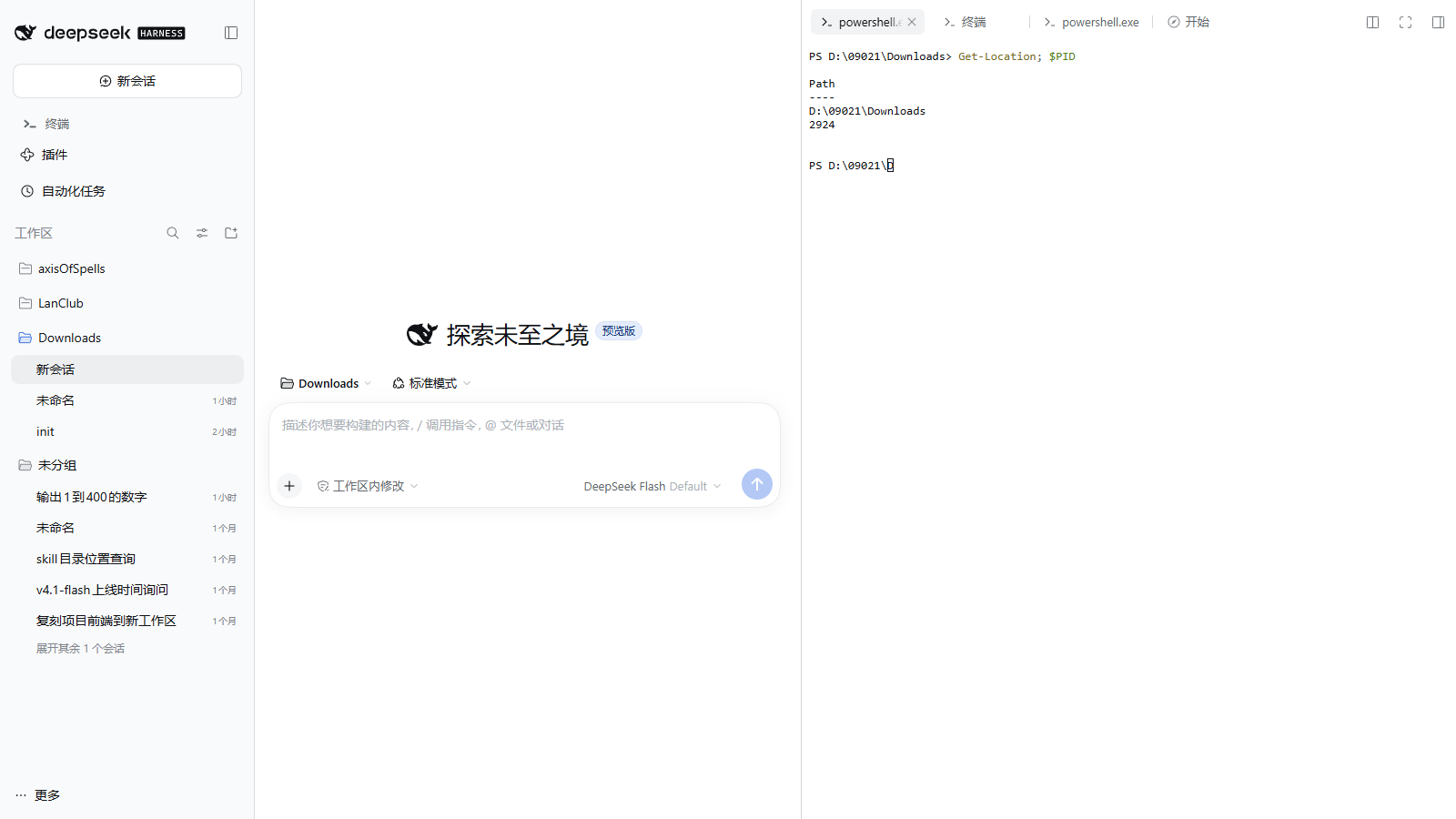

右侧边栏 → 新建终端(或 Ctrl + `)
为什么
DSH 自带终端的输出要先经过网关 mux(所有 Typert Remote 流共用一条物理 WebSocket),每一帧还要等浏览器 ack;宿主同时把同样的输出再喂给一份 headless xterm,用于重连快照。空闲时这套开销只有十几毫秒,但一旦主线程被聊天流 / Markdown 渲染占住,帧就会排队,按键回显能拖到秒级。
dsh-fast-term 把 PTY 输出直接推到一条专用 WebSocket,不排队、不等 ack、宿主也不做 headless 镜像;xterm 在会话标签里直接渲染。
同一台 Windows 机器、隔离的 web profile、Playwright 驱动、按 WebSocket 帧时间戳计时:
| 场景 | DSH 自带终端 | dsh-fast-term |
|---|---|---|
| 冷启动到出提示符 | 3.1–3.2 s | ~0.12 s(复用已存在的 PTY) |
| 空闲按键回显 | 11.7–12.9 ms | 9.9–14.7 ms |
| 主线程 75% 合成负载下 | 43–46 ms | 4.8–35.7 ms |
| 2.99 MB 输出洪水中 | 12.8 s | 2.9 s |
数字来自隔离 profile 的对照实验;真实使用时如果聊天记录很大,渲染线程仍然会拖慢任何 web 终端——这是浏览器单线程的代价,不是传输层的。
功能
- 会话级右侧栏标签,位置与自带终端一致(
sidebar.right.pane.tab槽位) Ctrl + \`` 新建终端(快捷键 idfastterm.new`;隐藏自带终端后不会有冲突)- 入口卡片与自带终端同款:图标、标题、描述、`Ctrl + `` 提示,带 shell 下拉菜单(PowerShell / cmd / 可发现的其它 shell),选择会被记住
- 标签标题显示实际 shell(
powershell.exe、cmd.exe…),双击可重命名,名字保存在宿主端(刷新页面、切换标签都不丢) - 终端配色跟随 DSH 主题(浅色 / 深色 / 跟随系统),字体与字号读主题令牌,和自带终端一致
- 中英双语(跟随 DSH 语言设置)
- 每个标签一个独立 PTY;标签切换、页面刷新后自动重连并回放快照,PTY 不随标签卸载退出(
keepMounted) - 新标签的工作目录 = 会话工作目录(读
workingDirectory投影) - 关闭标签会结束对应 PTY(
sidebarRight.registerCloseHandler+POST /api/dsh-fast-term/close) - Windows 默认 PowerShell:pwsh → Windows PowerShell → ComSpec 依次回退,可用
DSH_FAST_TERM_SHELL覆盖 - 过滤 xterm 的 Device Attributes 应答,避免 PowerShell 把
[?1;2c当输入回显 - 外部输入开关:默认只读,只有终端界面本身可以输入;点终端右上角的「只读」胶囊才会允许其它进程(含 Agent)通过 WebSocket 写入,可另配命令白名单
- 复制粘贴:选中后
Ctrl+C或Ctrl+Shift+C复制(没有选中时Ctrl+C仍是 SIGINT),Ctrl+V粘贴;Ctrl+Shift+V走浏览器原生粘贴;右键菜单提供复制 / 粘贴 / 全选,复制成功会在底部提示字数
安装
dsh plugin --profile desktop add dsh-fast-term
也可以在「设置 → 插件市场」里搜索 dsh-fast-term。本地开发时直接装目录:
dsh plugin --profile desktop add "file:D:/Projects/dsh-fast-term"
安装或更新后需要重启 DSH 宿主(右侧栏的客户端半在刷新页面后生效)。注意 file: 依赖在 pnpm 里是拷贝而不是软链,改了 lib/ 之后要重新 add 一次(或手动把 lib/index.js、lib/client.js 覆盖到 profile 的 node_modules/dsh-fast-term/lib/)。
替代自带终端
想让「新建终端」按钮和终端 UI 完全由本插件接管,在 profile 的补丁层里关掉自带终端 UI(C:\Users\<你>\.dsh\profiles\desktop\cordis.patch.yml):
- id: ui-sidebar-terminal
  name: "@deepseek-ai/dsh-client-ui-sidebar-terminal"
  disabled: true
重启后:右栏「开始」页只剩「工作区文件」和「新建终端」,Ctrl + \`` 打开的是本插件;关掉的是自带终端的**界面**,终端服务(webTerminals/dsh-api-terminal-controller`)仍在,其它插件的终端不受影响。
不想替代、想并存也可以——删掉这三行即可,两个终端会各占一张卡片(自带终端仍显示为 New terminal)。
使用
- 打开右侧边栏
- 点「新建终端」,或直接按 `Ctrl + ``;点标题旁的箭头可以选择 shell
- 直接输入命令即可;双击标签标题可以重命名;关闭标签 = 结束该 PTY
- 终端右上角的胶囊显示当前输入权限:
只读表示只有这个界面能输入;点一下变成可输入,其它程序或 Agent 才能通过 WebSocket 向该 PTY 写入;再点一下恢复只读 - 鼠标选中文本后
Ctrl+C(或Ctrl+Shift+C)复制、Ctrl+V粘贴;也可以右键打开菜单(复制 / 粘贴 / 全选)。没有选中时Ctrl+C照常发送 SIGINT
只读接口与输入开关
宿主进程提供三个只读 HTTP 接口,供脚本或 Agent 查看终端状态(仅回环 + Origin 校验):
| 接口 | 说明 |
|---|---|
GET /api/dsh-fast-term/list | 列出终端:id / title / shell / pid / exited |
GET /api/dsh-fast-term/buffer?id=<id>&tail=8000&plain=1 | 返回该终端输出缓冲的尾部;省略 id 取最近一个;plain=0 返回带 ANSI 转义的原始 PTY 流 |
GET /api/dsh-fast-term/screen?id=<id>&cols=120&rows=40 | 用缓冲区重放一帧可见画面,返回按行拆好的文本(text);省略 cols/rows 用该终端最近一次尺寸 |
输入开关保存在 ~/.dsh/fast-term.json,也可通过接口读写:
| 接口 | 说明 |
|---|---|
GET /api/dsh-fast-term/config | 读取 {allowExternalInput, allowedCommands} |
POST /api/dsh-fast-term/config | 改开关,例如 {"allowExternalInput":true,"allowedCommands":["echo","git status"]} |
allowExternalInput 为 false(默认)时,只有终端界面自己的连接(attach 时声明 writer: "ui")可以输入;其它 WebSocket 客户端发来的 input 会被拒绝并收到 {"type":"denied","reason":"read-only"}。打开后,allowedCommands 非空则按整行前缀匹配(大小写不敏感,回车才提交):不在白名单里的行被丢弃并返回 {"type":"denied","reason":"command-not-allowed","detail":"<行>"};留空表示不限制。
plain=1(默认)会去掉转义序列并统一换行为 \n,适合直接阅读;它不是终端模拟器,不会还原光标移动,所以 PSReadLine 之类的逐键重绘会留下重复片段。要看光标定位重画的全屏 TUI(btop、vim、tmux 状态栏),用 screen:宿主用 @xterm/headless 把缓冲重放成 120×40 的屏幕,再按行输出纯文本,得到的就是用户此刻看到的画面。
curl "http://127.0.0.1:PORT/api/dsh-fast-term/list"
curl "http://127.0.0.1:PORT/api/dsh-fast-term/buffer?id=<id>&tail=4000"
curl "http://127.0.0.1:PORT/api/dsh-fast-term/screen?id=<id>&cols=120&rows=40"
重放只读取缓冲区,不会向 PTY 写入任何内容;若缓冲已超过 4 MiB、最旧输出被丢弃,重放结果可能缺少早期状态(响应里的 truncated 会标记这一点)。
安全
- 页面与宿主不同源时(桌面版页面是
dsh-app://app)从__DSH_TRANSPORT__.streamBaseUrl解析宿主地址,只连接回环地址;Web 端仍用当前页面地址 - WebSocket 与只读路由只接受 loopback(
127.0.0.1/::1/::ffff:127.0.0.1),并校验 Origin 的 host 与请求 host 一致;本机进程仍可直接读取(其本就能 attach 该 PTY) - 终端进程以当前用户身份、无沙箱运行(与系统终端一致),不要在不可信页面同源环境里暴露该端口
已知限制
- Windows 优先支持;POSIX 走
$SHELL -l - 重连快照上限 4 MiB,超出后丢弃最旧输出
- 依赖 DSH 的
sidebarRightTabs与sidebar.right.pane.tab槽位(在 0.2.1-rc.2 上验证) - 重命名保存在宿主进程内存里:DSH 宿主重启后会回到 shell 名
- 复制 / 粘贴默认走
navigator.clipboard;若运行环境拒绝剪贴板权限,复制会提示失败(检查权限后重试),粘贴可用Ctrl+Shift+V的原生通道 - 自带终端的「缺失 / 重连 / 只读」状态条还没有逐像素复刻,当前只用终端内的一行文字提示退出与错误
- 替代自带终端依赖
ui-sidebar-terminal这个 bundle id;DSH 升级改名时补丁会失效(终端本身仍可用)
开发
npm install
node build.mjs          # src/client.js → lib/client.js;src/host.js → lib/index.js(内联 @xterm/headless)
node --check lib/index.js
dsh plugin --profile web add "file:D:/path/to/dsh-fast-term"
src/host.js→lib/index.js(宿主半):ctx.subprocess.spawnTerminal起 PTY,webServer.registerUpgrade挂/api/dsh-fast-term/ws,按sessionId/tabId维护常驻会话与回放缓冲;GET /screen用打包进来的@xterm/headless重放画面src/client.js→lib/client.js(浏览器半):xterm.js + FitAddon,注册右侧栏标签与三个槽位;打包时用window.__ModuleLoader__.load包装,react外置
English
dsh-fast-term is an in-layout terminal for DSH's right sidebar, built as a drop-in replacement for the built-in terminal. It spawns a real PTY through DSH's subprocess service and streams raw output over a dedicated WebSocket (/api/dsh-fast-term/ws), bypassing the shared Typert gateway mux and frame acknowledgements. Sessions persist across tab switches and page reloads (keepMounted + replay buffer), closing a tab terminates its PTY, and new tabs start in the session working directory.
The UI mirrors the built-in terminal: the same guide card with a shell picker (the choice is remembered), tab titles showing the actual shell with double-click rename persisted on the host, colors and fonts taken from the DSH theme (light, dark, or system), and zh/en localization. It takes over Ctrl + \`` and, with a one-entry profile patch disabling ui-sidebar-terminal`, hides the built-in terminal's button and UI entirely.
Text can be copied out of the terminal: select and press Ctrl+C or Ctrl+Shift+C (plain Ctrl+C without a selection still sends SIGINT), paste with Ctrl+V, or use the right-click menu for copy, paste and select-all. Ctrl+Shift+V keeps the browser's native paste path; a short toast reports how many characters were copied.
Measured on Windows: cold prompt 0.12 s vs 3.1 s native, flood-echo 2.9 s vs 12.8 s native.
Read-only endpoints let scripts (or an agent) inspect terminals: /list, /buffer (raw or stripped tail), and /screen, which replays the buffer through a bundled headless terminal and returns the visible 120×40 frame as text — enough to read full-screen TUIs such as btop or vim without touching the PTY.
License
MIT
Comments
Loading…
Similar plugins
by emircanerkul
Workspace-aware web terminal plugin for the DeepSeek Harness (dsh). Runs a streaming PTY terminal at /terminal and embeds a split-pane terminal dock powered by xterm.js.
★ 0
MIT
JavaScript
Sep 20, 2026
dsh plugin --profile web add dsh-terminalby Aeroscis
Temporary task mode for DeepSeek Harness (dsh) — one-click disposable working dir + session, no long-lived workspace bound.
★ 0
MIT
JavaScript
Oct 1, 2026
dsh plugin --profile web add @aeroscis/dsh-temptaskby EasyTZ
终端面板:在当前工作区敲命令、看实时输出,多标签页、Tab 补全、Ctrl+C 中断。Terminal panel for DeepSeek Harness: run commands with streaming output, tabs, completion.
★ 0
MIT
JavaScript
Sep 5, 2026
dsh plugin --profile web add @easytz/dsh-terminal-panelby hoshinoick811
MobaXterm-style SSH/SFTP tool plugin for DeepSeek Harness (DSH): saved connection profiles, persistent multiplexed sessions, remote command execution, SFTP file transfer, and a web GUI console with fi
★ 4
MIT
JavaScript
Sep 6, 2026
dsh plugin --profile web add dsh-tool-sshby siberiah2o
Bottom multi-tab terminal panel (node-pty + xterm.js) pinned to the viewport bottom, always below the input box.
★ 7
↓ 204/wk
MIT
JavaScript
Aug 19, 2026
dsh plugin --profile web add dsh-plugin-terminalby orriduck
A small, session-aware terminal UI for DeepSeek Harness
★ 3
↓ 370/wk
MIT
TypeScript
Aug 13, 2026
dsh plugin --profile web add dsh-tui