

dsh-xizai-pet
Manifest validCui Zai Desktop Pet Character Pack, compatible with DeepSeek Harness and dsh-pet
喜仔桌宠 for DeepSeek Harness
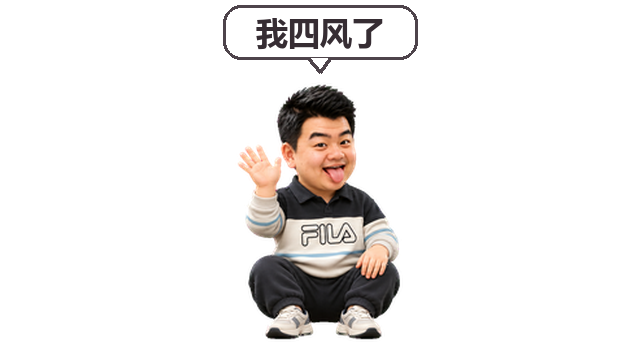
喜仔是一个 dsh-pet 角色包:平时会等待、挥手,并随机左右漫游。点击喜仔时,它会挥手并显示“我四风了”。这句话是动画气泡,不会发送到聊天框。
安装
本角色包需要先安装并启用 dsh-pet 0.4.7 或兼容版本。在 DeepSeek Harness 的插件管理中先安装 dsh-pet,再安装 dsh-xizai-pet。使用命令行:
dsh plugin --profile desktop add dsh-pet
dsh plugin --profile desktop add dsh-xizai-pet
完全退出并重启 DeepSeek Harness。喜仔默认出现在桌面右下角。如果首次启动后未出现,请再重启一次,并在 dsh-pet 的桌宠配置中检查喜仔是否启用。浏览器版请把上面的 desktop 换成 web,并在桌宠配置中将喜仔的显示位置设为 web 或 both。
也可以从 GitHub 安装:dsh plugin --profile desktop add github:csl1002/dsh-xizai-pet。
动画采用带透明通道的 VP9 WebM;Safari 和 WebKit 环境需要另行提供兼容格式的素材。
配置与卸载
插件首次启动时,把素材和默认配置复制到 $DSH_HOME/dsh-pet/pet/(默认 ~/.dsh/dsh-pet/pet/),不会覆盖已有文件。你可以在 dsh-pet 设置中调整喜仔的位置、大小及显示方式。
从 1.0.0 升级时,插件会为仍使用原始固定动画配置的用户启用漫游,并备份原配置;自定义过移动配置的用户可在配置中自行调整。dsh-pet 会镜像朝右的动画,因此朝右时点击气泡里的文字也会被镜像。
卸载本插件后,角色包文件会保留。若还想移除喜仔,请手动删除该目录下的 xizai-pet-config.json 和 xizai-pet-animation 目录,然后重启 DSH。
开发
需要 Node.js 22.12 或更高版本。运行 node --test tests/*.test.js 检查安装和配置保留行为。
许可
MIT,见 LICENSE。本项目使用 dsh-pet 提供宠物显示能力。
Comments
Loading…
Similar plugins
by xiaoshihou514
DeepSeek Harness:鲸鱼娘桌宠!
★ 65
↓ 507/wk
MIT
JavaScript
Aug 21, 2026
dsh plugin --profile web add dsh-desktop-petby miku00039-01
🐋 DSH 桌宠:DeepSeek Harness 的 Windows 桌面宠物,一键启动/停止/监测服务,双击唤起 GUI,零依赖单文件 exe
★ 3
↓ 209/wk
MIT
C#
Oct 1, 2026
dsh plugin --profile web add @miku00039-01/dsh-whale-petby s17179XTY
dsh-BigfishPet — DeepSeek Harness 桌宠插件
★ 3
MIT
JavaScript
Aug 19, 2026
dsh plugin --profile web add bigfish-petby dzy1571315598
Fritia 桌宠 — DeepSeek Harness (DSH) 桌宠插件:右下角待机/走路/抓取/情绪/余额面板
★ 0
MIT
JavaScript
Oct 12, 2026
dsh plugin --profile web add @local/dsh-fritia-petby cpt-kenvie
Emotion Ball pet dock for the DeepSeek Harness Web composer
★ 3
↓ 125/wk
NOASSERTION
JavaScript
Nov 2, 2026
dsh plugin --profile web add dsh-emotion-petby c-ling
DeepSeek Harness 桌面电子宠物插件:跟随 agent 状态变换心情的内置/自定义/Codex 精灵图伙伴。
★ 4
↓ 53/wk
MIT
JavaScript
Oct 22, 2026
dsh plugin --profile web add dsh-plugin-pet