

dsh-occlick
Identified★ 4OpenCode notification sounds for DeepSeek Harness: separate pickers for turn finished, permission requested, and turn error.
dsh-occlick
Plays OpenCode notification sounds in DeepSeek Harness — one clip when a turn finishes, one when the agent asks for permission, and one when a turn fails, each with its own picker from the whole OpenCode sound library.




OpenCode ships a small library of notification clips for its desktop app. This plugin brings that library to DSH and plays one when a turn finishes, when the agent asks for permission, and when a turn fails, so you can look away while a long task runs and hear when the agent needs you.
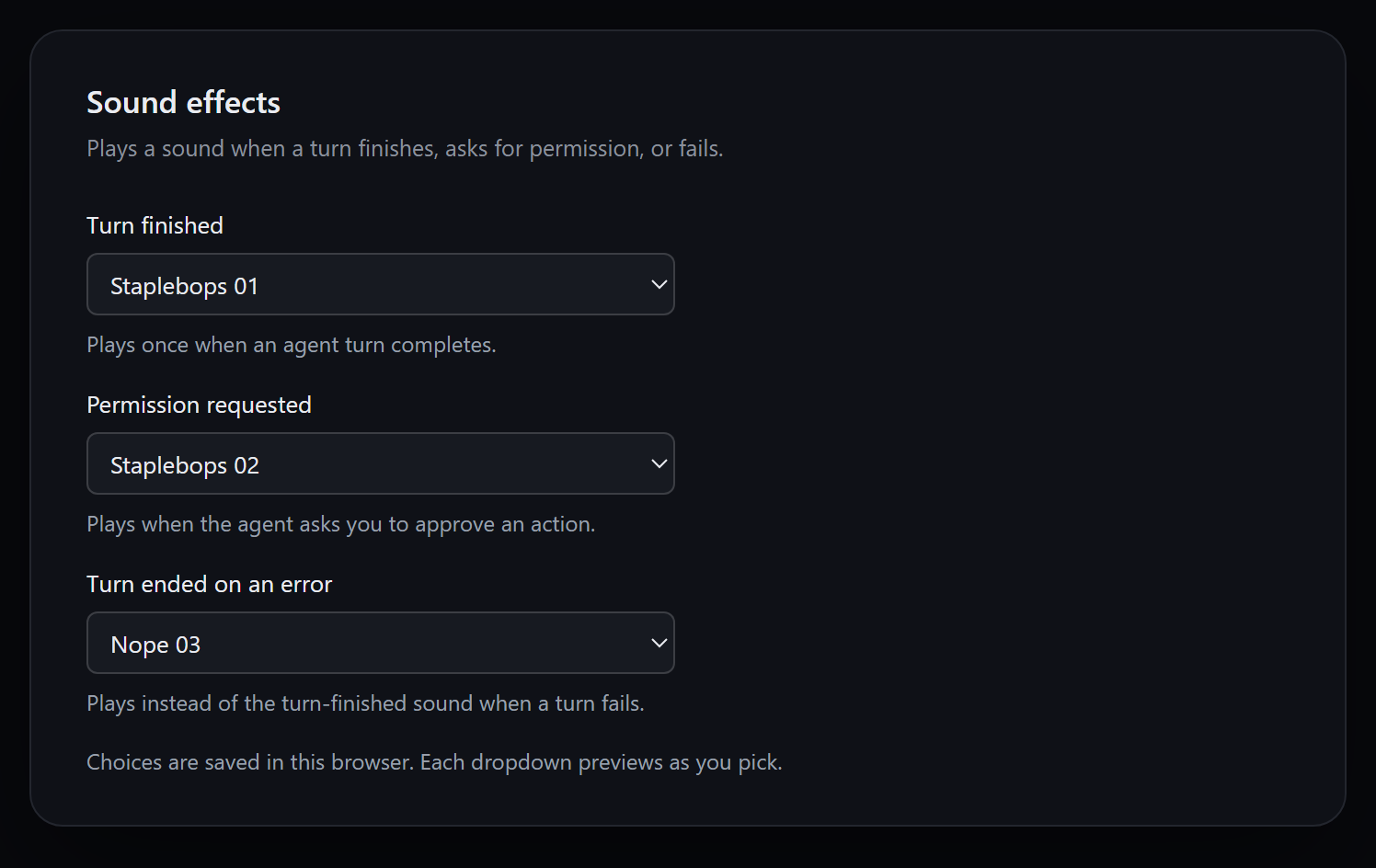
Settings → Sound effects: one picker per event, all 45 OpenCode clips, plus Off (silent). Choosing a clip auditions it immediately.
What it does
| Event | Source | Behaviour |
|---|---|---|
| Turn finished | Session running: true → false | Plays the turn clip once |
| Permission requested | approval/request | Plays the permission clip, then passes the request to the approval UI |
| Turn ended on an error | api-session/error | Plays the error clip; the following turn end stays silent |
| User stops the turn | Stop button or Esc Esc | Silent; a stopped turn did not finish |
| Flicker at boot or reconnect | true → false within ~250 ms | Silent |
| A run already going at page load | running: true on the first snapshot | Sounds only after ~2 s of observed running |
| Repeated idle refresh | false → false | Silent |
| Subagent Session | origin: subagent | Silent |
| Mounted over an idle list | — | Silent (no history replay) |
- Three channels, three pickers: turn finished, permission requested, and turn ended on an error each choose their own clip.
- One click per event: sounds follow the event, not every step, tool call, or streamed token. A failed turn plays the error clip instead of the turn-finished clip, never both.
- 45 sounds each: everything OpenCode ships — Alert, Bip-bop, Nope, Staplebops, and Yup — with an instant preview as you choose.
- Configured in DSH: the same pickers appear on Settings → Sound effects and on the plugin's own row under Plugins, so they follow the normal enable/disable and uninstall flow.
- Quiet where it should be: subagent turns stay silent, a stopped turn stays silent, a burst of approval requests plays once, and opening or reloading the harness cannot replay an old turn end.
Because DSH publishes running state per Session, a turn that ends while you are looking elsewhere still makes the sound. An error is remembered per Session for 15 seconds, so the failed turn does not also play the turn-finished clip. Approval requests are coalesced within 1.5 seconds, so a burst sounds once.
Install
Requires DSH 0.2.0 or later and the Web client (the desktop app, or dsh web). The plugin is a Cordis client bundle; it needs a page to render settings into and an audio output.
From the Plugins page
-
Open Plugins → Add plugin.
-
Paste the repository address:
https://github.com/contraliz/dsh-occlick -
Click Install, then Enable now.
-
Open Settings → Sound effects and pick a clip.
From the command line
Copy the line for the profile that matches how you run DSH:
# DSH desktop app
dsh plugin --profile desktop add github:contraliz/dsh-occlick
# dsh web
dsh plugin --profile web add github:contraliz/dsh-occlick
Restart DSH after a command-line install: bundle entries are composed at startup. To uninstall, use the same command with remove dsh-occlick.
From a checkout
git clone https://github.com/contraliz/dsh-occlick
cd dsh-occlick
dsh plugin --profile web add .
Choose the sounds
Open Settings → Sound effects, or Plugins → dsh-occlick → Configure. Both show the same three selectors, each listing every clip and labelled the way OpenCode labels them.
Every channel also offers Off (silent), so one event can be muted while the others keep sounding.
The defaults are the clips OpenCode's own desktop app uses for the same events:
| Channel | Default | OpenCode equivalent |
|---|---|---|
| Turn finished | staplebops-01 | Agent complete |
| Permission requested | staplebops-02 | Permission required |
| Turn ended on an error | nope-03 | Error |
Choosing a sound saves it and plays it immediately, so you can audition without waiting for an event.
| Family | Count | Library names |
|---|---|---|
| Alert | 10 | alert-01 … alert-10 |
| Bip-bop | 10 | bip-bop-01 … bip-bop-10 |
| Nope | 12 | nope-01 … nope-12 |
| Staplebops | 7 | staplebops-01 … staplebops-07 |
| Yup | 6 | yup-01 … yup-06 |
The choices are stored in the browser under dsh-occlick.turn, dsh-occlick.permission, and dsh-occlick.error, so they are per browser rather than per profile. A turn sound saved by version 0.2.x (dsh-occlick.sound) is carried over. Clearing site data restores the defaults.
Category
Integrations & Connections — the plugin turns DSH's existing turn, approval, and error signals into a local notification channel. It connects no external service, adds no model, tool, or skill, and changes no conversation content.
Suggested tags: notifications, sound, audio, accessibility, opencode.
Permissions and risk
dsh-occlick is a client-side Cordis bundle with an empty host half. It requests no DSH permission, no tool, no shell command, no filesystem path, and no credential.
| Surface | What the plugin does |
|---|---|
| Client services | Reads sessions.list (the running bit) and registers three slot entries (settings.section, plugins.row.config, and a pass-through conversation.composer selector) plus its locale dictionary |
| Remote events | Observes approval/request (then calls the next handler, so the approval UI still wins) and api-session/error |
| Browser storage | Reads and writes only the dsh-occlick.* keys listed above |
| Network | None at runtime — the clips are embedded in the bundle and no request is made |
| Audio | Plays one reused HTMLAudioElement from local data: URIs |
| Files, shell, MCP, subagents | None |
- Autoplay, silently: browsers want a user gesture before audio, so the first pointer press or key press pre-warms that element with a zero-length silent clip. The warm-up is muted and never audible; clicking around the window cannot play a sound on its own.
- Your stop is not a finish: stopping a turn with the composer's stop button, or with the
EscEscshortcut, keeps the turn-finished sound quiet. - Nothing leaves the machine: no analytics, no telemetry, no remote logging.
Compatibility
| Requirement | Notes |
|---|---|
| DSH 0.2.0+ | Uses client slots, sessions.list, remote.$on, and ctx.locale; the package declares engines.dsh |
| Web client | Desktop app or dsh web. Headless/TUI profiles have no settings page and no audio output, so the plugin is inert there |
| Chromium/Electron WebView | Needs HTMLAudioElement, localStorage, and CSS custom properties |
| Node.js 22+ | Development only (build and tests); the installed plugin does not run Node |
| Browser storage enabled | Choices fall back to defaults when storage is blocked |
Tested on the DSH desktop app 0.2.1 on Windows 11. If the pickers do not appear on another DSH version, the client slot API changed; please open an issue with the DSH version.
Troubleshooting
- No sound before the first click: the browser blocks audio until the window has received a gesture. Click or type once; later turn ends play normally, and the click itself is silent.
- One channel is quiet: check that its picker is not set to Off (silent).
- Everything is quiet: check the system/browser volume and that DSH's window is not muted in the OS mixer.
- The old sound played when you clicked: versions ≤
0.4.0had an audible warm-up; update to0.4.1or later. - Choices reset: clearing site data or using a different browser removes the saved keys.
Details
- Bundle, not a patch: the package ships
cordis.patch.yml, so DSH lists it under Plugins with its row and a Configure page rather than as a loose Loader row. - Audio, not notifications: the plugin plays a clip through one reused
HTMLAudioElement. It opens no system notification, registers no service, and adds no toolbar button. - One sound per event: falling edges are guarded per Session, the error marker suppresses the turn sound for that turn, and stop events suppress the turn sound entirely.
- No host work:
lib/index.jsexports an emptyapply, so the server half loads nothing and keeps no state.
Development
npm run fetch:sounds   # download the OpenCode clips into assets/audio (needs network)
npm run build          # regenerate lib/client.js from src/client.js + assets/audio
npm test               # offline checks for the generated bundle
lib/client.js is generated and committed, because DSH serves exactly one script per plugin row: every clip is embedded in it as a data URI. Edit src/client.js and rebuild; do not edit lib/client.js.
The source layout:
| Path | Role |
|---|---|
src/client.js | Browser half: event detection, playback, and the settings pickers |
lib/client.js | Generated browser bundle (committed so the package loads as installed) |
lib/index.js | Host half: an empty apply that gives the Loader a row |
assets/audio | The OpenCode clips, as downloaded |
scripts/build.mjs | Embeds assets/audio into lib/client.js |
scripts/fetch-sounds.mjs | Maintainer tool that refreshes assets/audio from OpenCode |
test/client.test.mjs | Offline checks for the generated bundle |
Credits
The sound library comes from the OpenCode desktop app (packages/ui/src/assets/audio) and is MIT-licensed. See THIRD_PARTY_NOTICES.md.
License
MIT. See LICENSE.
Comments
Loading…
Similar plugins
by joyboy-yy
Sound notifications for DeepSeek Harness when tasks finish or user choices require attention, with volume controls and persistent settings.
★ 0
MIT
JavaScript
Aug 19, 2026
dsh plugin --profile web add dsh-plugin-sound-notifyby hifengzy
Sound notifications for DeepSeek Harness (DSH): play a sound when a task completes, fails, or waits for approval — with per-category switches.
★ 0
MIT
JavaScript
Oct 24, 2026
dsh plugin --profile web add dsh-sound-notifyby xxxxxxxyu
DSH (DeepSeek Harness) web plugin: plays a sound when the agent finishes replying (turn/end). Sound, volume and on/off configurable in Settings.
★ 3
↓ 64/wk
MIT
TypeScript
Aug 14, 2026
dsh plugin --profile web add dsh-notify-soundby Su-1003
DeepSeek Harness 提示音 + 弹窗提醒插件
★ 3
↓ 25/wk
MIT
JavaScript
Oct 17, 2026
dsh plugin --profile web add dsh-notify-soundby Cloudto1
DSH 审批提示音插件:宿主申请权限时响一声,音色、音量、开关在「设置 → 通知提醒」里调。
★ 0
MIT
JavaScript
Oct 9, 2026
dsh plugin --profile web add dsh-approval-chimeby BillCx330
DeepSeek Harness的提醒插件
★ 27
↓ 943/wk
MIT
JavaScript
Oct 27, 2026
dsh plugin --profile web add dsh-plugin-notify-sounds