

anime-find
Manifest valid★ 171DeepSeek Harness Anime Search Plugin: multi-source anime search within the conversation, cards display Bangumi ratings and details, supports copying magnet links.
anime-find



DeepSeek Harness anime search plugin. Search for anime in a conversation, view results as clickable cards, and inspect release groups, magnet links, and torrent files in the details panel.
Features
- Aggregates Mikan, AniBT, and AnimeGarden
- Displays anime covers, titles, ratings, formats, and resource counts in the conversation flow
- Detects the current new-season quarter based on the Asia/Shanghai time zone
- Supports follow-up queries such as "more" and "different batch" with paginated results
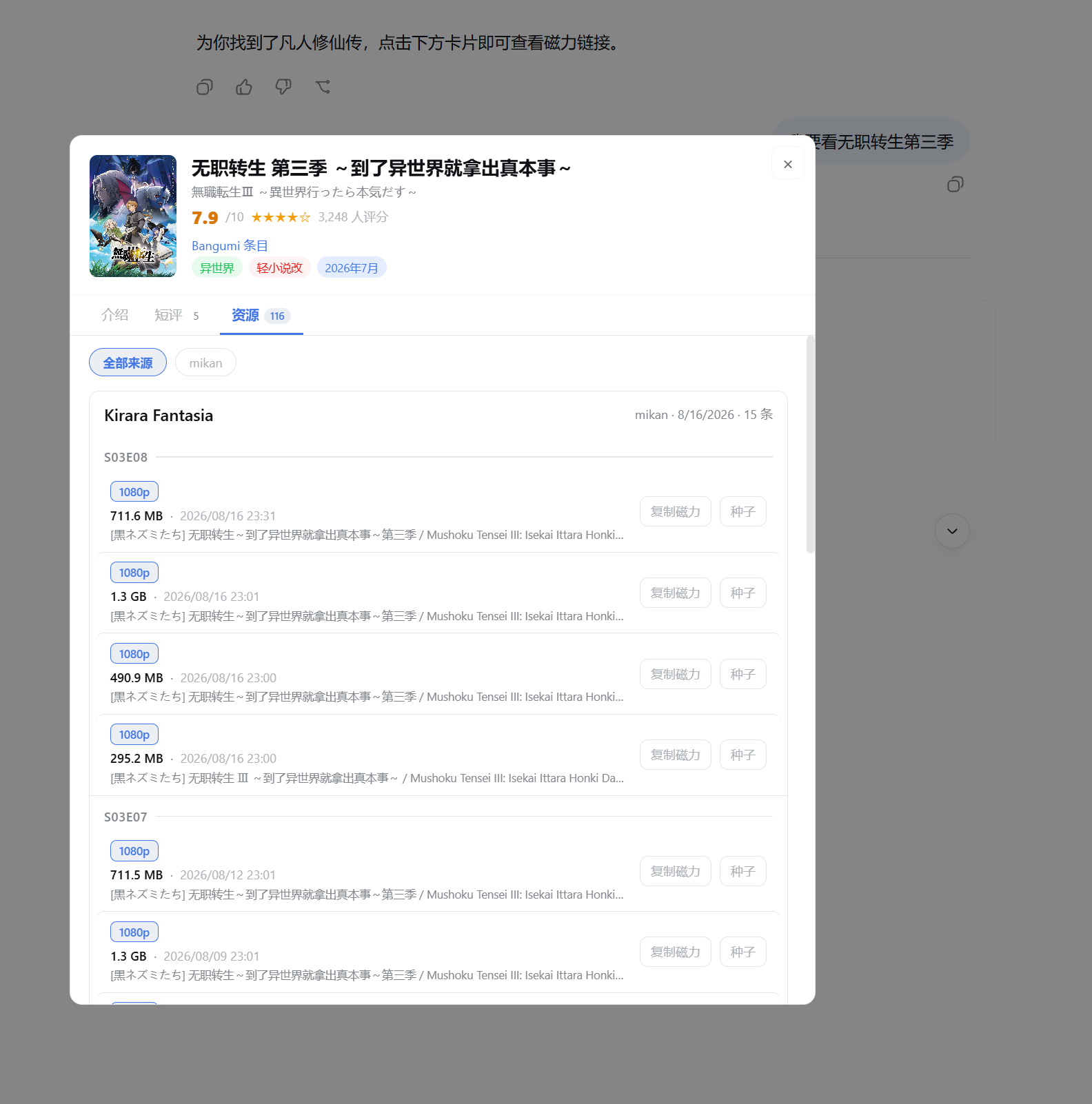
- Click a card to browse resources by release group and episode, and view the Bangumi synopsis, rating, and short reviews
- Supports copying magnet links and opening
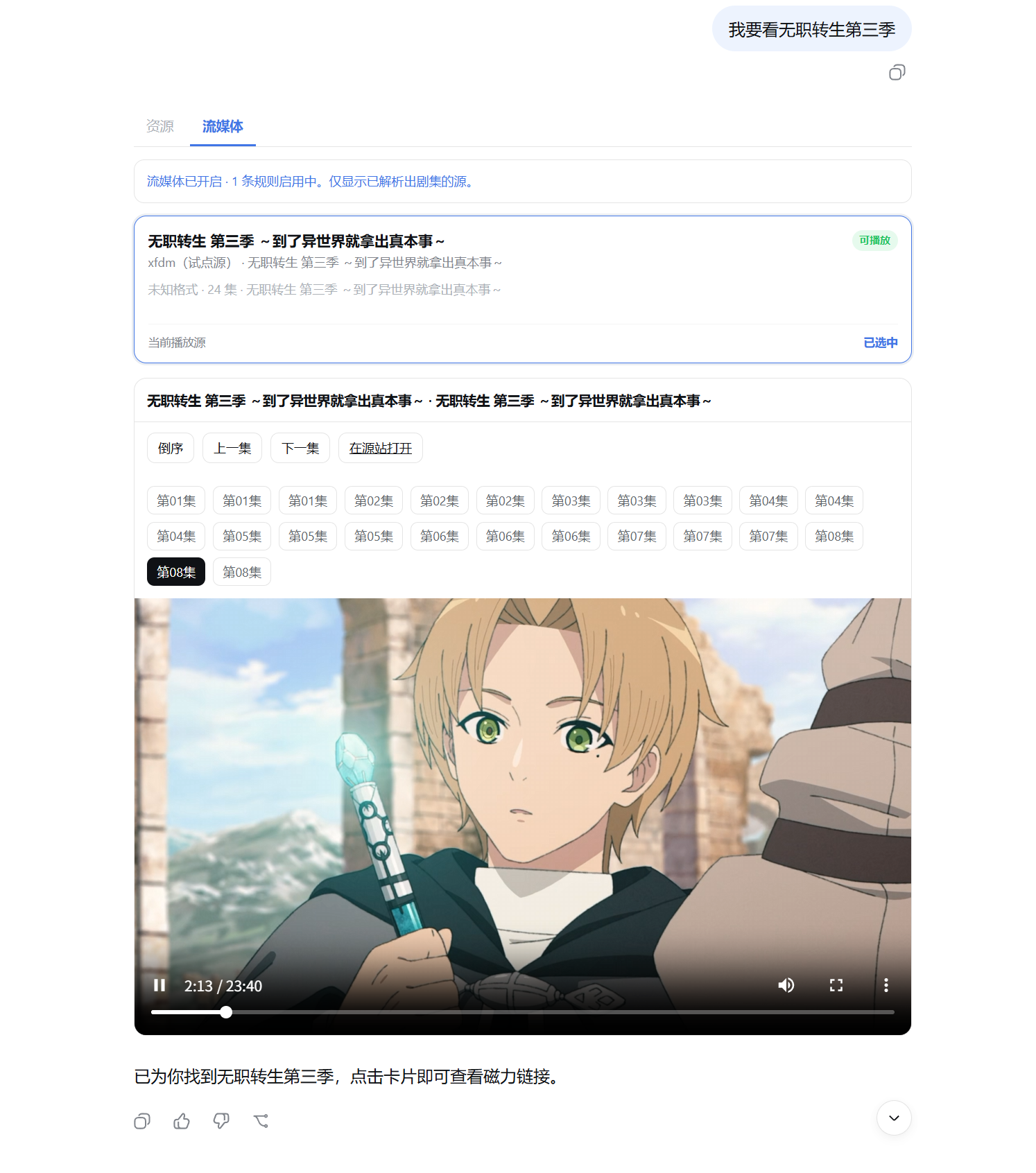
.torrentfiles - Optional streaming tab: shows playable sources resolved by user rules for search results, with episode selection and playback on the same page
- In the Harness plugin settings, enable sources, adjust result counts, and set site addresses
- View the current version in the plugin settings and manually check for official GitHub releases
Requirements
- Node.js 22 or later
- DeepSeek Harness Web
Installation
Install from npm:
dsh plugin --profile web add @cocofhu/anime-find
Local dev:
dsh plugin --profile web add /absolute/path/to/anime-find
After installing, restart dsh web and force-refresh the browser page. Do not install using github:cocofhu/anime-find, git+https://github.com/cocofhu/anime-find.git, or the unprefixed anime-find: lib/ is not committed to the repo, so a git source would trigger prepare, and pnpm blocks that script. The old package name has been migrated to @cocofhu/anime-find.
The plugin hub may default to the GitHub git source. Please use the npm command above instead. A missing peer @deepseek-ai/... or react warning during installation is expected (these packages are provided by the Harness host); it's fine as long as the command exits successfully.
Usage
You can simply ask the Agent:
Find Mushoku Tensei, check for magnets
Any good anime lately
Any more?
The plugin provides the Agent with the anime_find_search tool. After a search completes, clickable cards appear in the conversation; click a card to view release groups and download resources.
Resource Details
Browse episodes by group, copy magnets, open torrents:
Streaming Playback
Switch to streaming in details; pick an episode to play:
Config
Open Settings → Plugins → Plugin Settings → Anime Search:
- Search sources: Mikan is enabled by default; AniBT and AnimeGarden are optional
- Result limit: number of cards returned per batch
- Site addresses: service URLs for each source; replace with mirrors as needed
Changes take effect immediately after saving. User configuration is stored in the anime-find: section of $DSH_HOME/settings.yaml in the Harness user directory (written atomically by the dsh settings service). Version and installation source are read-only information and are not written to that section.
When upgrading from an older version, if $DSH_HOME/anime-find.json still exists and the yaml has no user section yet, the plugin will import the json into anime-find: and rename the original file to anime-find.json.bak; if the yaml already contains user configuration, the import is skipped and only the rename happens — the json is no longer read afterward.
Streaming Playback
Streaming is enabled by default, with one built-in pilot rule (xfdm) that can be resolved statically. Open Settings → Plugins → Plugin Settings → Anime Search
to toggle the master switch off, start/stop, or replace the rule JSON. Rules must be statically resolvable CSS or a restricted XPath subset, and must include at least
name, baseURL, searchURL, searchList, searchName, searchResult, chapterRoads
and chapterResult. {{keyword}} or {{query}} is replaced with the search keyword.
Playback URLs support two retrieval methods: playURL can either be a selector pointing to src/href, or be written as
script:player_aaaa.url to read from the inline script object on the playback page (commonly used on MacCMS sites, automatically handling URL encoding or base64 based on the sibling
encrypt field).
When media is hosted on a CDN outside the site, explicitly declare those domains using mediaHosts; only declared domains will
be resolved and proxied. Private, loopback, and link-local addresses are always rejected.
mediaHeaders applies to media requests only; empty value omits the header. Different CDNs may have opposite requirements (some need Referer, others error on it), so dotted keys are treated as domains, and headers under them apply only to that domain and subdomains:
{
  "mediaHosts": ["cdn-a.example", "cdn-b.example"],
  "mediaHeaders": { "cdn-b.example": { "referer": "" } }
}
The streaming tab only shows sources with resolved episodes; if an episode can't play, switch sources or open the site. Media requests are only proxied to enabled rule domains and their mediaHosts (HLS playlists have segment links rewritten); no open proxy. Dynamic rules needing Kazumi WebView interception are not supported; community rule repos are not auto-synced. Restricted XPath supports common //tag hierarchies, indices, attribute and attribute-contains predicates; scripts, functions, and text predicates are not supported. The plugin hosts no content — only access content you have rights to and follow source site terms.
You can also set default sources via cordis.patch.yml:
- id: anime-find
  config:
    sources: [mikan]
Data & Networking
Enabling a source sends search/detail requests to that site. Covers are proxied via the plugin service; config stays local, never in the repo.
When the detail card has a Bangumi subject ID, the Host requests Bangumi entry info using the plugin-configured User-Agent and timeout settings; the synopsis, rating, and basic info come from the public v0 API. Short reviews are proxied by the Host from Bangumi's non-public p1 API, with up to 5 shown. This API may change or become unavailable; in that case the short-review tab is hidden automatically without affecting synopsis or resource browsing; HTML-scraping fallbacks are not used in this release.
Bangumi synopses and reviews load only after clicking the detail card; they are not included in the tool payload sent to the model.
Respect source sites' terms of use; only download content you have the right to access.
Version & Updates
In the "Version & Updates" section of Settings → Plugins → Plugin Settings → Anime Search, you can manually check for the latest official release on GitHub. Opening the settings page does not automatically check for updates, nor does it use pre-release or draft releases.
When a new version is found, the official commands below remain displayed for reference. Click "Update" and confirm — the plugin will run the command under the current profile, start a new dsh web (possibly on a different port), then navigate to the new address:
dsh plugin --profile web update @cocofhu/anime-find
When currently installed via a local link: or file:, the page still shows the version comparison but disables automatic updates to
avoid overwriting the development environment. If the repo has no official release yet, the check result will display "No available release; cannot determine whether an update exists."
Development
pnpm install --frozen-lockfile
pnpm typecheck
pnpm test
pnpm build
Source code lives in src/; build output goes to lib/. lib/ is not committed to version control; it is generated by the prepare script during install or publish.
Harness + MiniMax China-Site Acceptance
When deploying a local plugin with an isolated DSH_HOME, you need to register a model provider for Harness first; otherwise the Web first-launch cannot create a session, and anime_find_search and ToolView cannot be triggered. Keys are passed only via environment variables — do not write them to the repository or settings.yaml:
export MINIMAX_KEY_CN='...'
export DSH_HOME="$(mktemp -d)"

mkdir -p "$DSH_HOME"
cat >"$DSH_HOME/settings.yaml" <<'EOF'
llm-pi-ai:
  providers:
    minimax-cn:
      apiKeyEnv: MINIMAX_KEY_CN
      api: openai-completions
      baseURL: https://api.minimaxi.com/v1
      models:
        - id: MiniMax-M3
EOF

npx @deepseek-ai/dsh web
Then, in Settings → Models, select minimax-cn / MiniMax-M3, and install the local plugin from another terminal:
DSH_HOME="$DSH_HOME" npx @deepseek-ai/dsh plugin --profile web add /absolute/path/to/anime-find
In a new session, request an anime search and check the "Streaming" tab, source cards, episode picker, and player path. This is for acceptance only; streaming rules and third-party site authorizations are on the tester.
Troubleshooting
- Page stuck on "Loading plugins": confirm
pnpm buildsucceeded, then restartdsh weband force-refresh ERR_PNPM_GIT_DEP_PREPARE_NOT_ALLOWED: the plugin hub or manual installation used the git source. Usedsh plugin --profile web add @cocofhu/anime-findinstead; do not usegit+https://…,github:cocofhu/anime-find, or the old package nameanime-find- Plugin hub reports missing peer / installation failed:
cordis,dsh-*,react, anddsh-client-*are provided by the Web host; profiles do not auto-install peers. Run the npm install command in a terminal; an exit code of 0 means you can restart and use it. If the hub still shows failure, attach~/.dsh/profiles/web/hub.logto the issue — this is usually the hub treating pnpm warnings as failures - Loader reports
requires options.idorrequires options.key:settings.plugin.itemis a list slot (needsid) in some Harness versions, and a keyed slot (needskey) from rc7 onward. The client must register bothidandkey; the Host dispatches the settings card only after registering theanime-findnamespace viainstallSettingsSection - Anime search cards not appearing: start a new conversation and confirm
anime_find_searchhas been loaded - Few results for the current season: raise the result limit, or enable AniBT / AnimeGarden in settings
- Source request failed: check your network and the corresponding site address; a single source's failure does not prevent other sources from returning results
Contributing
Please read CONTRIBUTING.md before submitting an Issue or Pull Request. Security issues should be reported privately following SECURITY.md.
License
Compatibility
Versions
| Latest version | Published | Size |
|---|---|---|
| 0.1.10 | — | — |
| 0.1.9 | — | — |
| 0.1.11 | — | — |
| 0.1.12 | — | — |
Comments
Loading…
Similar plugins
by a2042798096-debug
DeepSeek 搜索:DeepSeek Harness 多引擎网页搜索、正文抓取与深度资料收集插件
★ 0
MIT
JavaScript
Oct 19, 2026
dsh plugin --profile web add dsh-deepseek-searchby TheCrazyLab
DeepSeek Harness 插件:让 agent 读/抓/解析知乎(回答·专栏·搜索)
★ 0
MIT
TypeScript
Aug 16, 2026
dsh plugin --profile web add dsh-zhihuby loommii
DeepSeek Harness 轻量级搜索插件 — 不走 DeepSeek 官方 LLM 搜索,可插拔后端,零 token 成本
★ 0
NOASSERTION
JavaScript
Sep 24, 2026
dsh plugin --profile web add dsh-thin-searchby moxingovo
DeepSeek Harness plugin: Bilibili video search, metadata, and subtitle transcripts (bilibili_search / bilibili_video / bilibili_subtitles) · DeepSeek Harness 插件:B 站视频检索、元数据与字幕文稿,匿名可用,可选 SESSDATA 解锁登录字幕
★ 5
MIT
TypeScript
Sep 30, 2026
dsh plugin --profile web add dsh-plugin-bilibiliby qmy777
DeepSeek Harness 可插拔推理等级设置分节——为第三方模型逐模型配置思考力度与线格式映射,不动源码、即插即用。
★ 0
MIT
TypeScript
Aug 18, 2026
dsh plugin --profile web add dsh-ui-models-reasoningby h-k-c
DeepSeek Harness 网页搜索插件:有 Tavily key 走 Tavily,没有自动退回免费无 key 的 Bing,搜索永远可用(零配置起步)
★ 0
MIT
JavaScript
Aug 15, 2026
dsh plugin --profile web add bing-web-search