
dsh-codex-link
Manifest validDeepSeek Harness plugin: sign in with ChatGPT to use GPT models through DSH's bundled pi-ai Codex route, and see that account's quota.
description: "DeepSeek Harness 插件:用 ChatGPT 账号登录,在 DSH 里使用 GPT 模型并查看额度。" kind: "package-reference"

ChatGPT Link
包名 dsh-gpt-link · 版本 0.2.0 · DeepSeek Harness 插件
概述
安装后,可以用自己的 ChatGPT 账号(Plus、Pro 等订阅)登录,在 DSH 的模型选择器里使用 GPT 模型,并在设置页查看这个账号的额度用量。除 DSH Desktop 外不需要安装其他软件,不依赖 ChatGPT 桌面应用或 Codex 命令行。
模型、推理协议与 OAuth 登录由 DSH 自带的 @deepseek-ai/dsh-llm-pi-ai 提供。本插件为它的 openai-codex 路由补上设置页缺少的登录入口,并读取同一份登录显示额度,因此额度一定属于正在跑推理的那个账号。插件本身不注册模型提供方,也不保存令牌:令牌由 pi-ai 写入 DSH 凭据库并负责刷新。
安装后可以使用:
- 登录:设置 → ChatGPT Link → 用 ChatGPT 登录。系统浏览器会自动打开授权页,授权完成后回到 DSH 即可。浏览器没有自动返回时,可以把地址栏中的完整地址粘贴回设置页。
- 退出:设置 → ChatGPT Link → 退出登录。除删除本机登录外,还会结束 OpenAI 上的这次会话,ChatGPT「活动会话」里不会留下多余的设备。
- 模型:在模型选择器里选择 GPT 模型,依次为 GPT-6 Astra、GPT-6.1 Sol、GPT-6 Sol、GPT-6 Luna、GPT-5.6 Sol、GPT-5.6 Terra、GPT-5.6 Luna。所有模型统一提供 Low、Medium、High、Xhigh 四档推理等级,默认 Low。未登录时这些模型不会出现在选择器里,登录后自动出现。
- 额度:设置 → ChatGPT Link 显示 5 小时窗口和每周窗口的已用百分比、进度条与重置时间,用到 90% 以上会标红,额度用尽时会标出。
截图
| 未登录 | 已登录,显示额度 |
|---|---|
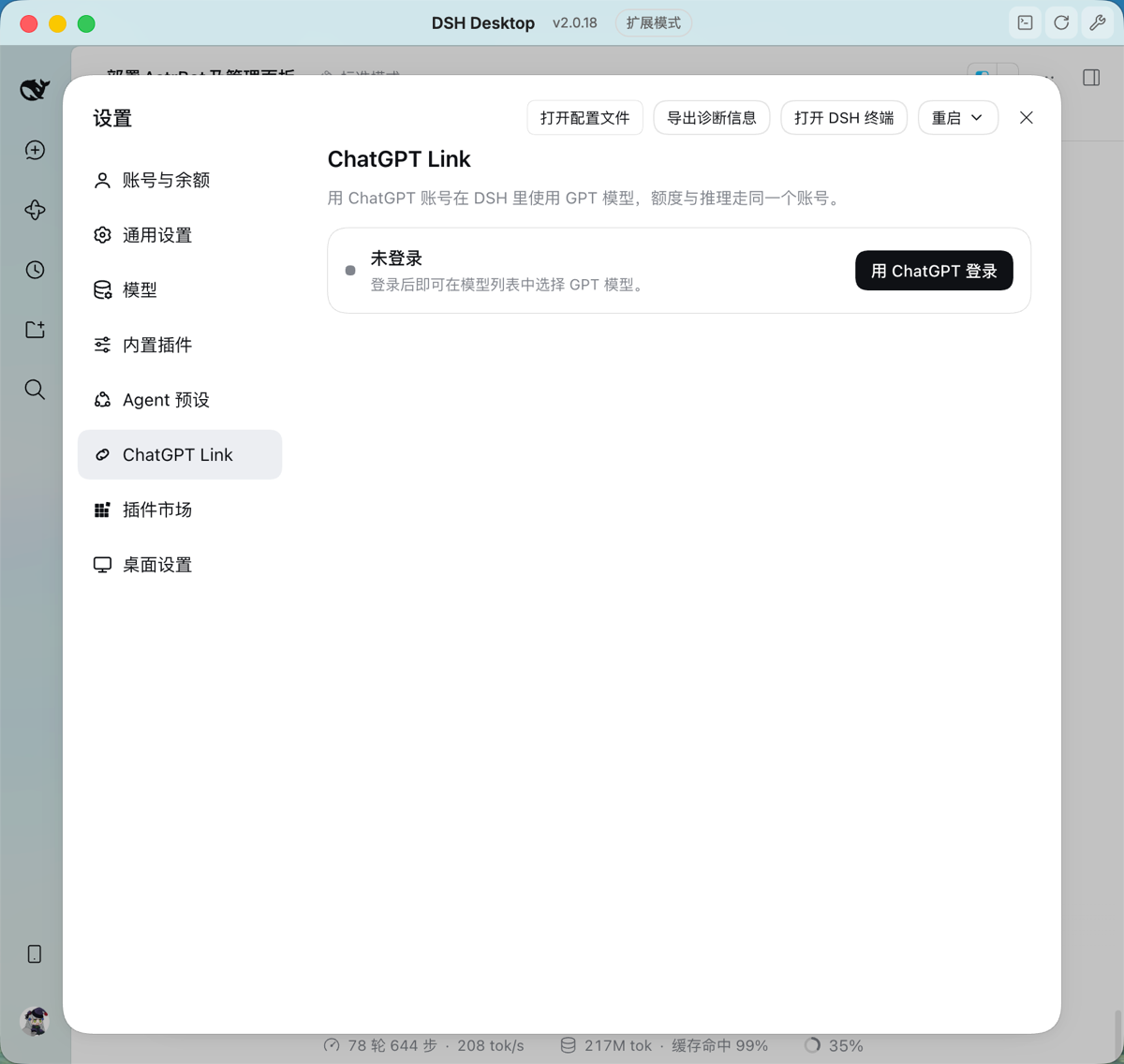 | 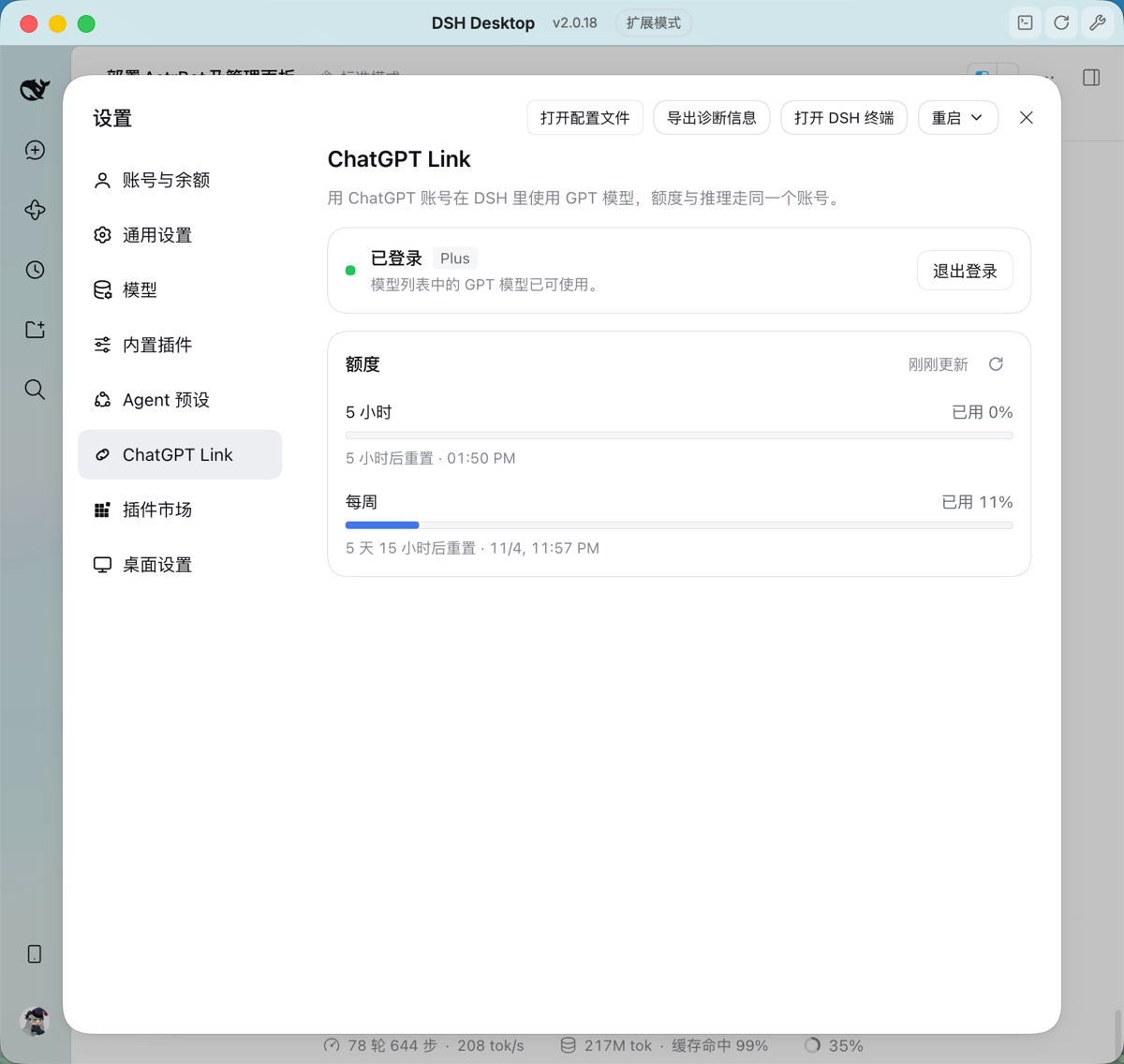 |
| 模型选择器 | 用 GPT 模型对话 |
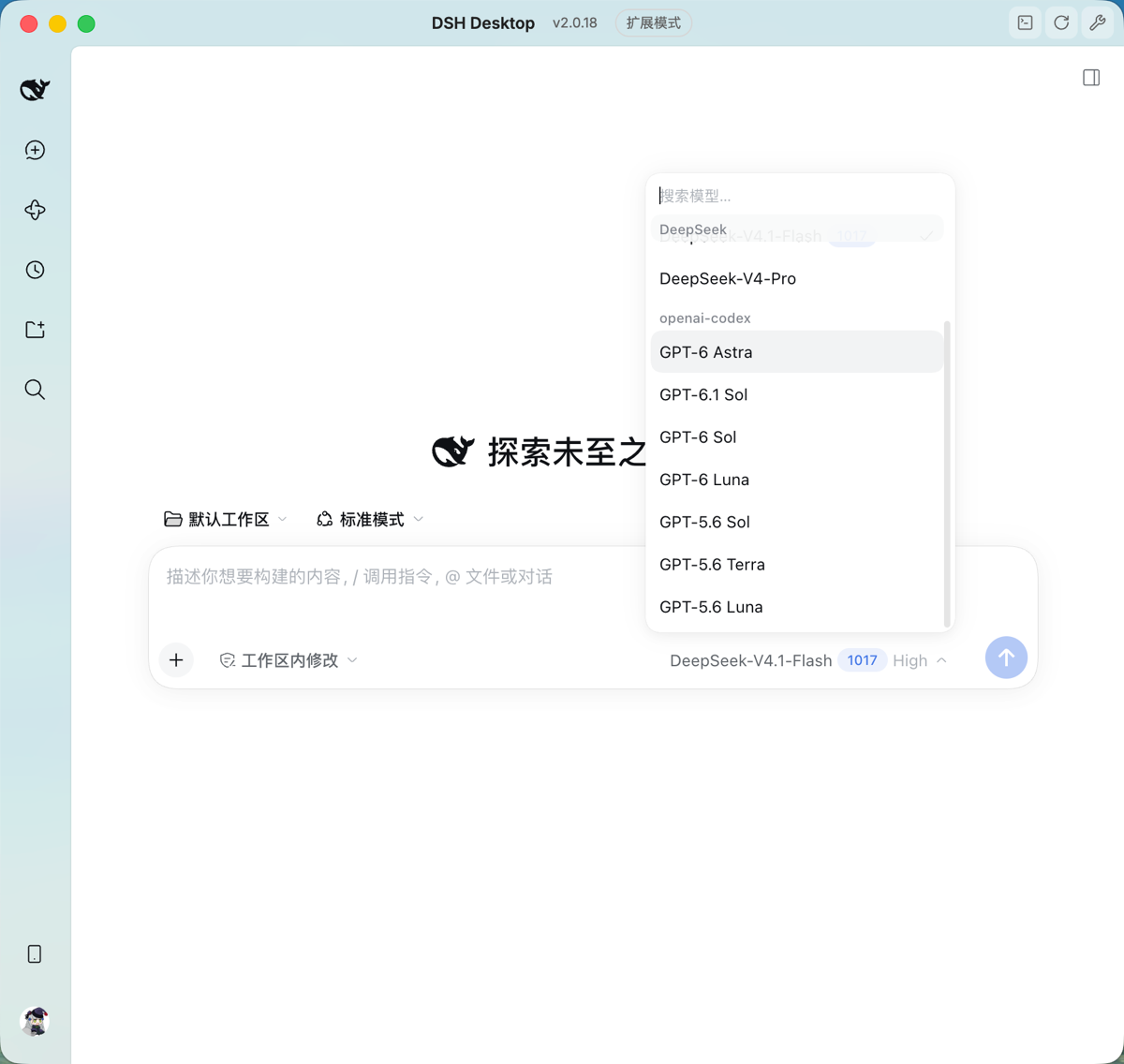 | 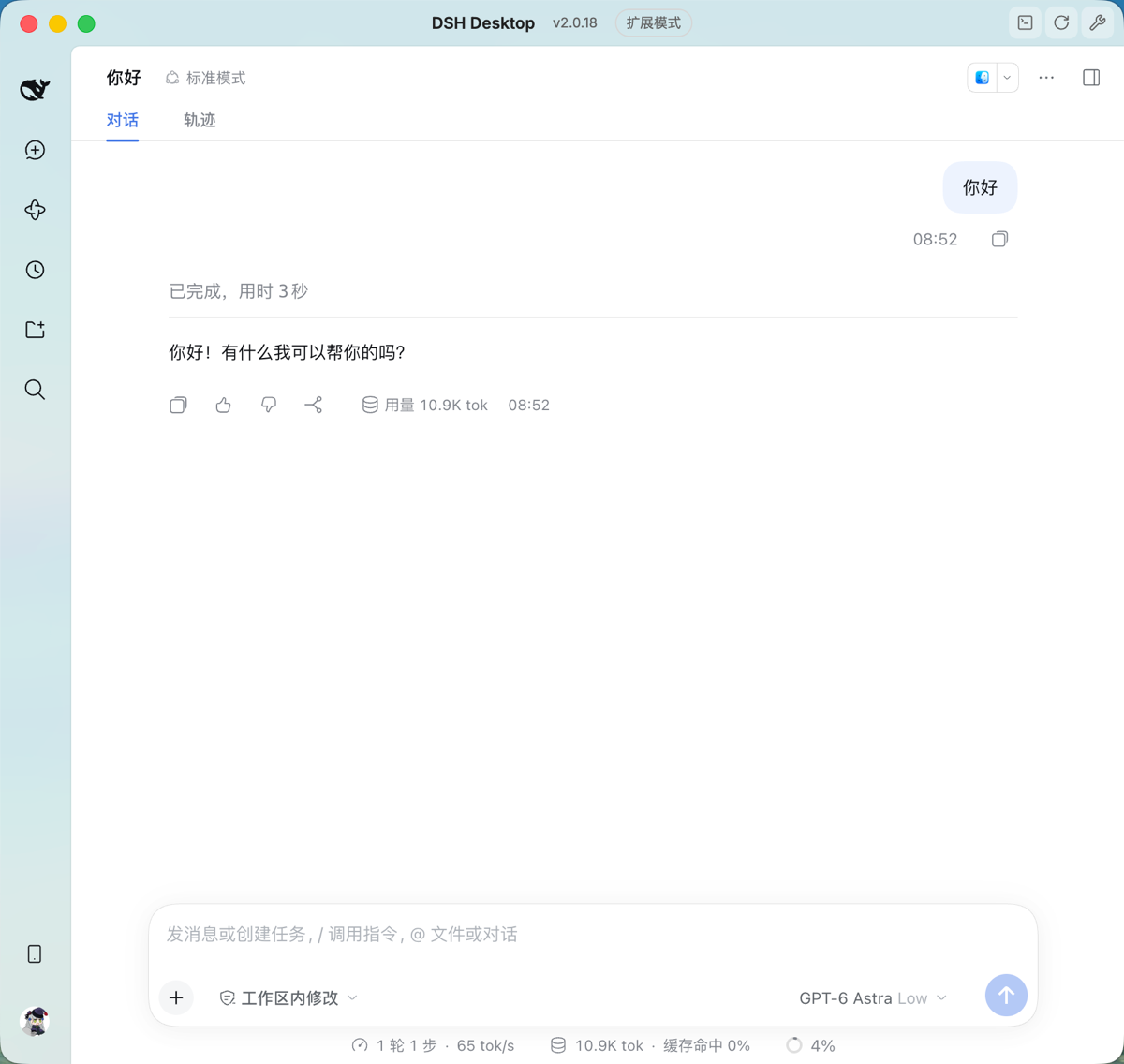 |
安装
需要 macOS 上的 DSH Desktop,内置 @deepseek-ai/dsh 版本为 >=0.2.1-rc.2 <0.3.0。
从插件市场安装
在 DSH 的插件市场搜索 dsh-gpt-link 或 ChatGPT Link,点安装,重启 DSH Desktop。
用命令安装
请使用 DSH Desktop 自带的 dsh 与 pnpm 命令,系统 PATH 上的其他版本 pnpm 可能报 ERR_PNPM_UNEXPECTED_STORE:
CLI_BIN=$(ls -dt "$HOME/Library/Application Support/DSH Desktop/cli/"*/bin | head -1)
export PATH="$CLI_BIN:$PATH"
从 npm 安装到 profile(以 Desktop 默认的 web 为例):
dsh plugin --profile web add dsh-gpt-link
重启 DSH Desktop,在设置中打开 ChatGPT Link 完成登录。
从源码安装
需要修改插件时使用:
git clone https://github.com/Clukay-Fun/dsh-gpt-link.git
cd dsh-gpt-link
pnpm install
pnpm run build
dsh plugin --profile web add "$(pwd)"
路径需为绝对路径。重启 DSH Desktop 后生效。
确认配置已生效
dsh --profile web --dump-config | grep -A 4 "openai-codex:"
输出应类似:
      openai-codex:
        reasoning: low
        models:
          - id: gpt-6-astra
            reasoningEfforts:
模型没有出现时
插件会为 llm-pi-ai 写入 providers.openai-codex 配置。如果 profile 自己的 ~/.dsh/profiles/web/cordis.patch.yml 中已有 llm-pi-ai 的 providers 设置(例如在「设置 → 模型」里改过提供方),它会整体覆盖插件的配置。删除该文件中的 llm-pi-ai 段,重启 DSH Desktop,再按上一节确认。
更新
从插件市场安装的,在市场里点更新。从 npm 安装的:
dsh plugin --profile web update dsh-gpt-link
从源码安装的,拉取并重新构建即可,无需重新添加:
git pull
pnpm install
pnpm run build
然后重启 DSH Desktop。
OpenAI 推出新模型时
模型列表写在插件的 cordis.patch.yml 里,模型的接口地址和上下文长度则来自 DSH Desktop 自带的 pi-ai 模型目录。新模型要出现在选择器里,两边都要更新:先等 DSH Desktop 更新到目录里有这个模型的版本,再等插件发布加入它的新版本,然后在插件市场点更新。
卸载
dsh plugin --profile web remove dsh-gpt-link
卸载插件不会删除 pi-ai 保存的登录。如需退出登录,请在卸载前到设置 → ChatGPT Link 点击「退出登录」。
目录结构
| 路径 | 内容 |
|---|---|
index.js | 后端入口:登录与额度接口 |
client/index.js | 设置页前端 |
src/ | 后端源码(TypeScript),构建到 lib/ |
cordis.patch.yml | openai-codex 路由、模型列表与推理等级 |
assets/icon.svg | 插件图标 |
docs/screenshots/ | README 中的截图,不随 npm 包发布 |
locale/ | 插件名称与简介的中英文 |
scripts/check-contract.mjs | 核对已安装的 pi-ai 是否仍符合插件依赖的约定 |
test/ | 测试,pnpm test 运行 |
.github/workflows/publish.yml | 推送版本标签时自动发布到 npm |
发布新版本
- 修改
package.json的版本号和 README 顶部的版本,运行pnpm run build,把lib/一并提交。 - 合并到
main后打标签并推送,例如git tag v0.2.1 && git push origin v0.2.1。 - GitHub Actions 会核对标签与版本号一致、重新构建并运行测试,然后通过 npm Trusted Publishing 发布,不需要令牌或验证码。
加入新模型时,在 cordis.patch.yml 的 models 里按选择器顺序加一行,同步更新上文「模型」一段,再在装有新版 DSH Desktop 的机器上运行 pnpm test:scripts/check-contract.mjs 会核对本机的模型目录里确实有这个 id。
Comments
Loading…
From the same category
by ccch1mneyyy
DSH 官方公众号收录的 TUI 补位插件:Claude Code 风,鲸鱼顶栏/实时状态/流式思考/双击 Esc 回滚/上下文进度+TPS。npm 一键装。 DSH official WeChat featured TUI plugin — Claude Code style: whale bar, live status, streaming thoughts, double-Esc rol
★ 6.8k
↓ 18.6k/wk
MIT
TypeScript
Nov 4, 2026
dsh plugin --profile terminal add @deepseek-harness-tui/dsh-tuiby kingcharleslzy-ai
Community-maintained dsh-purge fork with host-policy patches, prompt and rule settings, diagnostics, separate update-check and install controls, and local backup/rollback.
★ 4.4k
MIT
JavaScript
Nov 3, 2026
dsh plugin --profile web add dsh-purge-communityby bowenliang123
The best DeepSeek Harness plugin for context insight and management, with context dashboard / browser / sidebar and context command, for context statistics, composition, breakdown, evolution details,
★ 4.1k
↓ 168.8k/wk
Apache-2.0
TypeScript
Nov 4, 2026
dsh plugin --profile web add dsh-contextby strukto-ai
The World's First Virtual Terminal for AI Agents
★ 3.8k
↓ 296/wk
Apache-2.0
TypeScript
Nov 4, 2026
dsh plugin --profile agent add @struktoai/mirage-dshby mmparko
DeepSeek Harness 破甲 (mirror of YuJunZhiXue/dsh-purge) — 上游即将删库,此为本仓库全量镜像:含全部分支/73 个 tag/完整提交历史。原作者署名与二开要求见 README 署名章节。
★ 3.1k
MIT
JavaScript
Oct 13, 2026
dsh plugin --profile web add dsh-purgeby c1overzz
DSH 插件:每天替你刷一轮 B站,读字幕挑出值得的、写一份日报,值得的 @ 你
★ 1.2k
↓ 22.7k/wk
MIT
JavaScript
Nov 3, 2026
dsh plugin --profile web add dsh-bili-scroll