

dsh-acp-interactive
Identified★ 87Editor-facing ACP server for Zed and other ACP clients, composed from published DeepSeek Harness plugins. Community-maintained; not affiliated with DeepSeek.
dsh-acp-interactive


Editor-facing Agent Client Protocol server over JSON-RPC stdio. It creates dsh agents on demand and projects their live session events into ACP message, thought, tool, permission, plan, title, usage, and command updates. Zed is the first compatibility target.
The package ships both the UI transport plugin and the dsh-acp-interactive executable. The transport contains no domain logic; the executable loads the complete Cordis composition bundled in config/cordis.yml — DeepSeek and user providers, the agent spine, model-generated session titles, file and filesystem-search tools, in-process subagents, shell, permissions, persistence, human commands, and the ACP transport — so ordinary users do not need a DeepSeek Harness source checkout. This UI bridge is separate from the upstream automation-only ACP transport.
dsh-acp-interactive is an independent, community-maintained project. It is not affiliated with or endorsed by DeepSeek or Zed Industries; it composes the published @deepseek-ai/dsh-* packages behind a reviewed editor profile and does not claim to be the official DeepSeek ACP agent.
Quick start
npm install --global deepseekharness-acp-interactive
dsh-acp-interactive --setup
--setup stores DEEPSEEK_API_KEY through the Harness credential store without echoing it. Then register the installed command in Zed's settings.json (open via Ctrl+Shift+P / Cmd+Shift+P and type zed: open settings); on Windows use the absolute path printed by where.exe dsh-acp-interactive (using forward slashes / or double backslashes \\), on macOS / Linux use which dsh-acp-interactive:
{
  "agent_servers": {
    "dsh-acp-interactive": {
      "type": "custom",
      "command": "C:/Users/you/AppData/Roaming/npm/dsh-acp-interactive.cmd",
      "args": []
    }
  }
}
After saving, open Zed's Agent panel (Ctrl+? / Cmd+?) and select dsh-acp-interactive from the dropdown list at the top. Zed starts the server with the workspace as cwd; JSONL sessions live under that workspace's .sessions, while every server process owns a separate in-memory SQLite session-query index, so several editor processes can share the JSONL source of truth without contending for the derived index.
Skipping --setup is fine: a thread opened without a stored key shows a Configure DeepSeek API key action that runs the same flow (see Authentication); clients without terminal authentication receive its instructions as an agent-type method instead.
The published tarball already contains the built lib/; no build step runs at install time. Every published version corresponds to a vX.Y.Z tag and a GitHub Release whose assets include the tarball and its SHA-256 checksum, so an installation can be audited against the tagged source. Supported Zed versions and verification status are in the Zed compatibility matrix; this release uses the stable ACP v1 schema from SDK 1.4.0 as its baseline.
In Zed
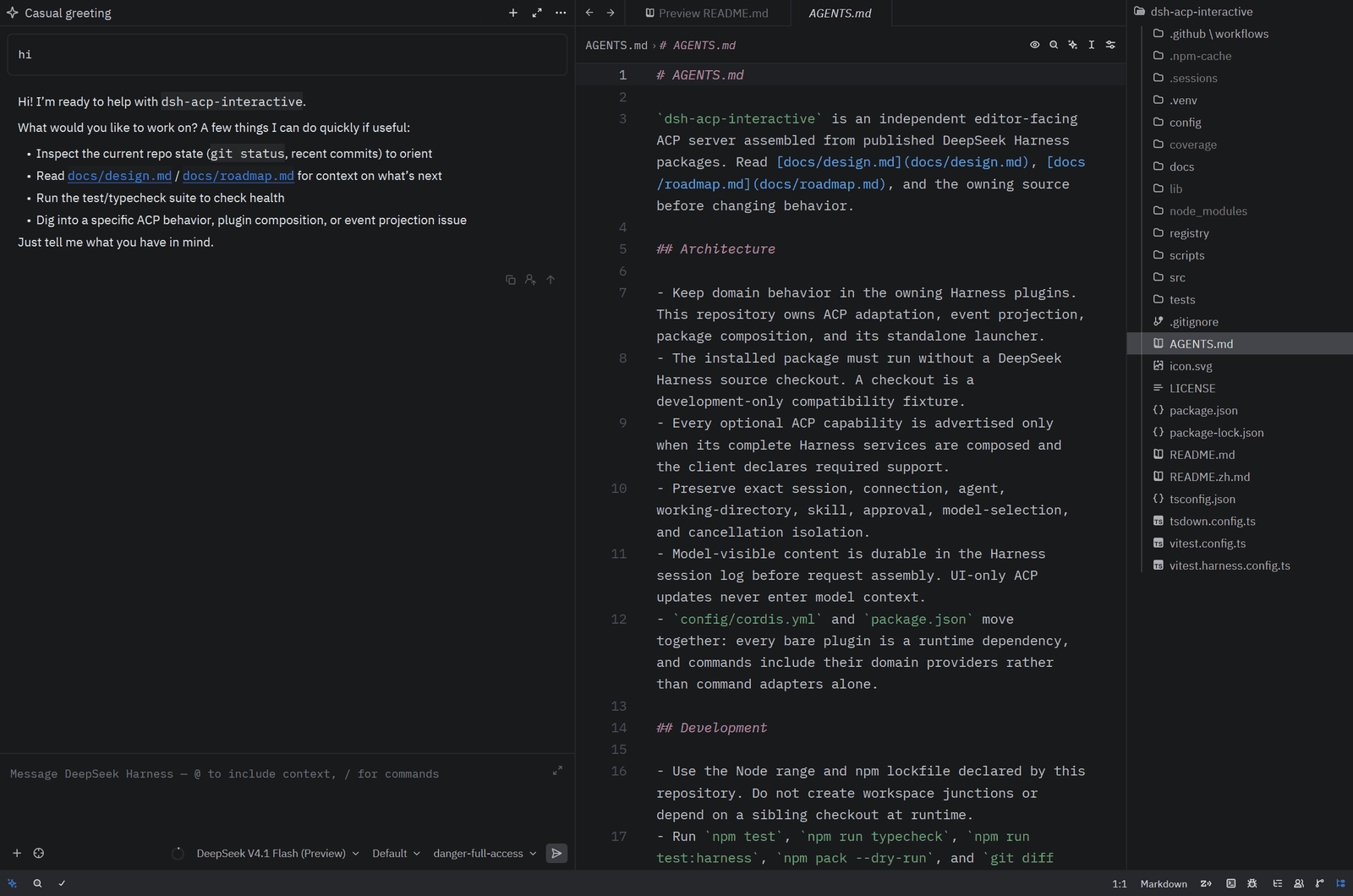
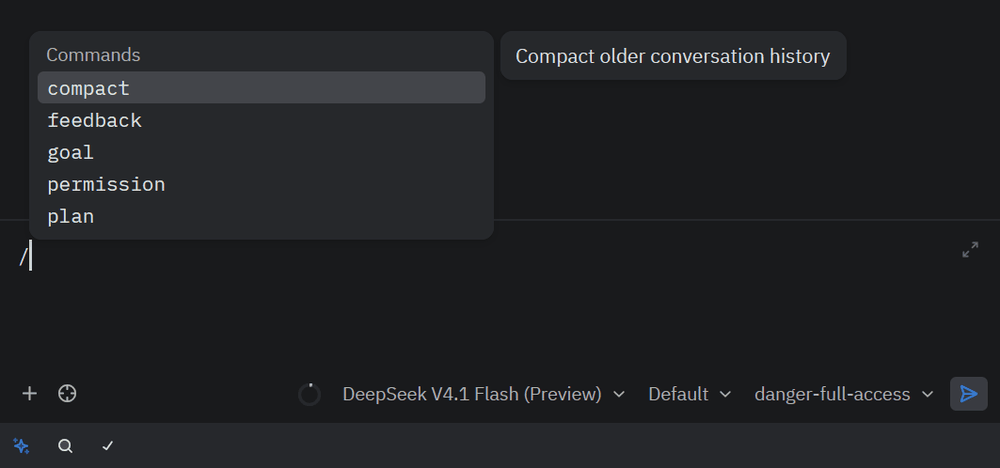
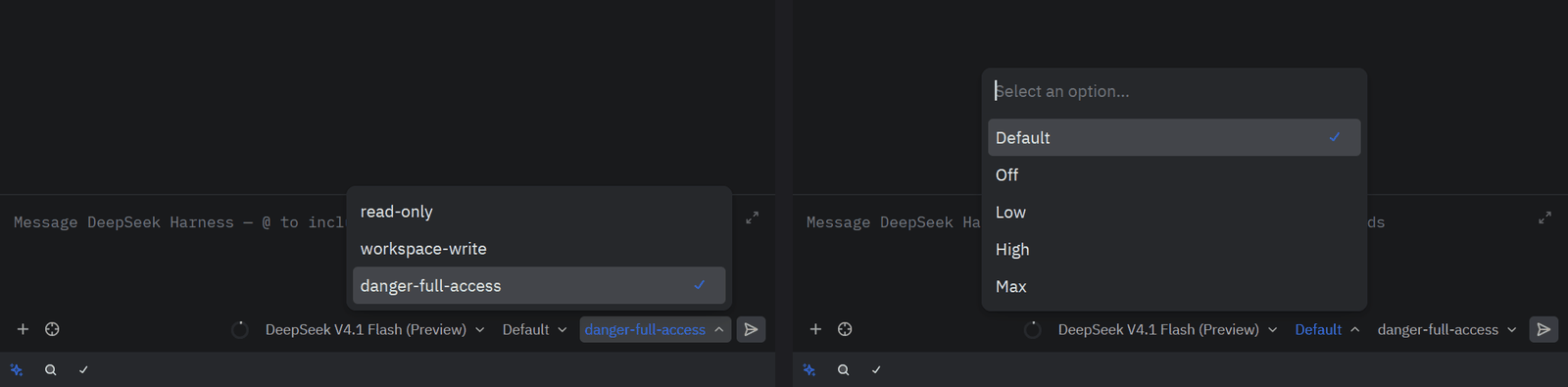
The / palette lists the human commands discovered from the composed Harness plugins; the permission and reasoning-effort selectors are ACP session configuration options backed by Harness permission presets and the selected model's advertised efforts.
Authentication
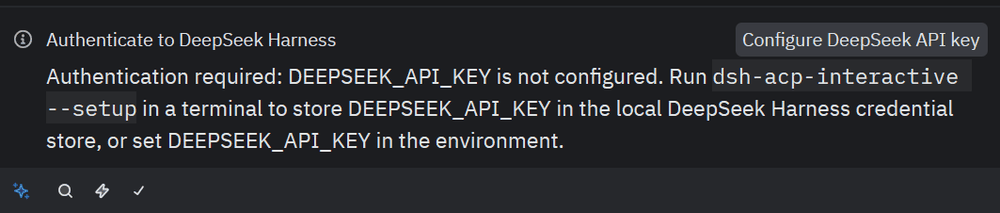
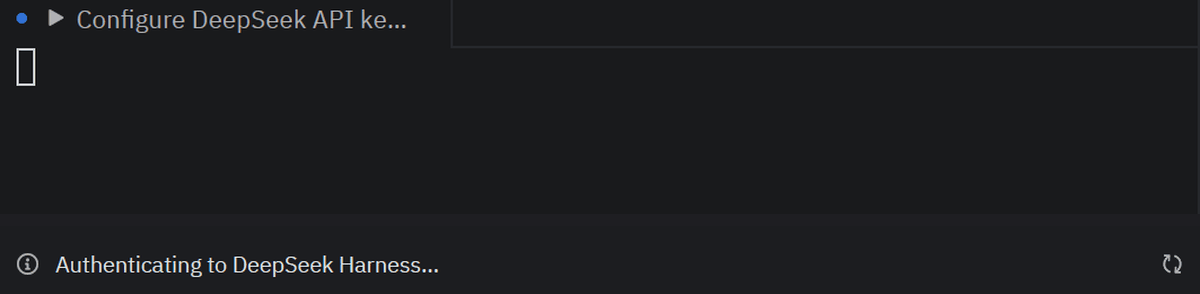
Opening a thread without a stored key answers session/new with auth_required, so Zed shows the Configure DeepSeek API key action with the agent's own instructions. Clicking it runs --setup in a Zed terminal task; when that terminal exits, Zed retries session/new with the stored key.
Permissions
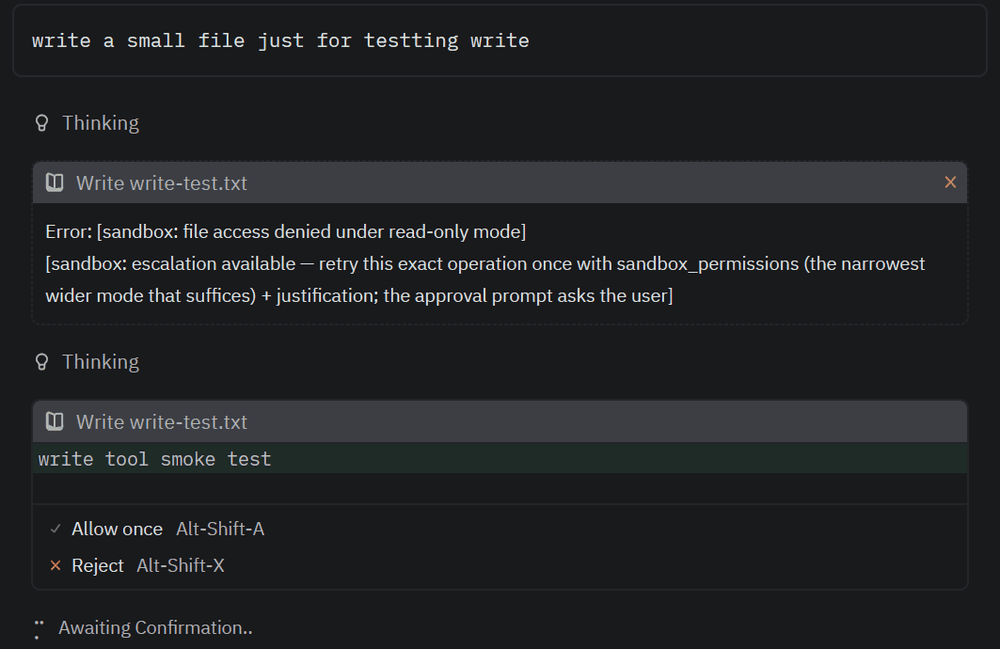
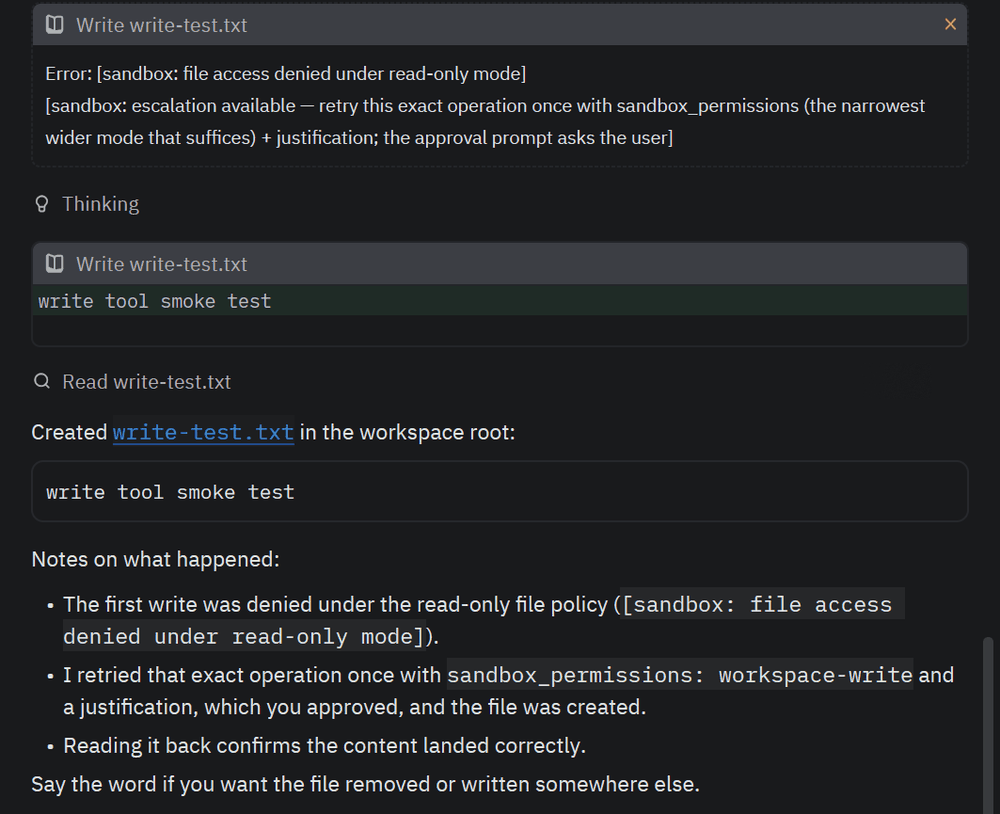
Tool calls run inside the Harness sandbox. Under the read-only preset a write is denied with the sandbox's escalation hint; the retried call arrives in Zed as an ACP permission request with Allow once / Reject, and the approved write and its read-back render as tool cards.
What's new in 1.3.0
Version 1.3.0 adds in-process subagents. The composed profile mounts the published @deepseek-ai/dsh-subagent registry with its spawn and fork backends and two delegation tools, subagent and subagent_fork: the model delegates a self-contained or conversation-seeded task and receives the child's final answer as the tool result. In Zed a delegation is one tool card — the child's own tool calls, replies, nested delegations, and settlement fold into a bounded transcript inside the card while it runs, and the parent's tool result settles it. Delegations wait in the foreground inside the parent's turn, children inherit the parent's sandbox with approval pinned to never and never raise an ACP permission request, and child sessions are not editor sessions. See the In-Process Subagents Agent Note, and the changelog for earlier releases.
Configuration
State lives in the dsh home — $DSH_HOME, or the current user's default .dsh directory — where settings.yaml holds providers and model catalogs and .credentials.yaml holds credentials. Pi Agent Desktop and Zed ACP can therefore share provider profiles, model catalogs, and credential references without copying API keys into Zed or cordis.yml; a profile's apiKeyEnv must match a key under .credentials.yaml refs, and the two remain separate processes with isolated sessions. Changes to settings.yaml refresh the provider directory through the existing settings and LLM-registry update path, and the bundled dormant llm-pi-ai mount registers every route under llm-pi-ai.providers.
At startup, Windows registers the native pwsh tool while Linux and macOS register bash; the model never receives both tool dialects. Stdout carries JSON-RPC frames only.
An explicitly configured image-capable model must declare its input modalities; without them the DeepSeek adapter treats the entry as text-only and the bridge rejects image admission before queuing the prompt:
- id: deepseek-v4-flash-vision-exp
  inputModalities: [text, image]
Custom deployments may instead consume only the transport export and mount it in a dedicated ACP stdio composition, where provider and model select the initial route for new sessions without restricting the model selector:
- id: settings
  name: '@deepseek-ai/dsh-settings-file'

- id: credentials
  name: '@deepseek-ai/dsh-credentials-local'

- id: llm-pi-ai
  name: '@deepseek-ai/dsh-llm-pi-ai'

- id: acp-interactive
  name: 'dsh-acp-interactive'
  config:
    provider: deepseek-official
    model: deepseek-v4-pro
What it implements
initialize,session/new,session/prompt,session/cancel,session/list,session/load,session/resume, andsession/close.- Streaming text and reasoning, tool cards built from each tool's own presentation intents (generic, diff, terminal), subagent delegation cards, plans, model-generated session titles, usage, and permission requests.
- Session configuration options — the provider/model route, reasoning effort, plan mode, and Harness permission presets — all switchable in a running session.
- Session-scoped MCP: stable ACP v1 stdio and Streamable HTTP servers in per-session Cordis roots, with deterministic
mcp__<server>__<tool>names. - A command catalog merging the session's
ctx.commandsview with the user-invocable skills discovered for its cwd; the bundled profile composes/permission,/plan,/compact,/goal, and/feedback. - Text, resource-link, and inline image prompts, and structured user questions through ACP form elicitation.
The full behavior — plugin contract, authentication, per-method semantics, configuration projection, tool execution, and the token and KV-cache effect of each surface — is in the behavior reference.
Known limitations
session/deleteis not advertised. The persistence Service Definition has no backend-independent deletion method; direct JSONL or SQLite manipulation in this transport would bypass persistence ownership and reconciliation.session/listreturns one complete page and omitsupdatedAt; a stable metadata cursor and cheap last-activity observation belong in the session-query capability.- Audio and embedded-resource prompt blocks fail instead of degrading silently. Tool-result image cards remain text-only even though prompt and message-history images are supported.
- Session cost is sent only after a Harness backend supplies a reliable cumulative amount and currency; the bridge does not estimate cost from token prices.
- MCP supports stable-v1 stdio and Streamable HTTP configuration only; legacy SSE and ACP-proxied transports are rejected. Additional directories remains outside this repository and belongs to the independent
dsh-additional-directoriesDSH plugin project. - Terminal output is delivered at tool completion rather than incrementally.
- Subagents run in the foreground only.
run_in_background, continuable children,send_message,interrupt_agent,list_agents, and the out-of-process ACP, Codex, and Claude Code backends are not composed. A restored session replays a delegation as its settled result card without the child transcript, and stable ACP has no child-session capability yet, so the card carries the child session id in_meta.dsh_subagentrather than a navigable child thread.
Verification and ACP Registry
- CI runs on every push and pull request on Ubuntu, macOS, and Windows with Node
22.19and24:npm ci, typecheck, build and tests, a pack dry run, andverify:packed, which installs the packed tarball outside the repository, runs--setup, and drives the real launcher throughinitialize,session/newwith a session-scoped MCP server, andsession/close. - Registry auth check stages
registry/agent.jsonandicon.svginto a fresh clone of agentclientprotocol/registry and runs that repository's ownbuild_registry.py --dry-runandverify_agents.py --auth-checkagainst the published npm package: daily, on demand (gh workflow run registry-auth.yml -f version=<x.y.z>), and dispatched by the release workflow after it publishes a version. - Release runs on
v*.*.*tags, re-verifies the tagged tree, publishes through npm trusted publishing (ordinary CI holds no publishing token), and attaches the tarball andSHA256SUMS.txtto the GitHub Release. - Registry submission: agentclientprotocol/registry#585.
npm run check:registryvalidates the entry and icon againstpackage.jsonlocally.

Development
npm install
npm test
npm run typecheck
npm run build
npm run check:profile
npm run check:registry
npm run verify:packed
The repository has no runtime dependency on a DeepSeek Harness checkout. For the official compatibility gate, set DSH_HARNESS_ROOT to a read-only official checkout or place one at the sibling ../deepseek-harness path, then run npm run test:harness: it extracts the official ACP specs from the pinned git ref recorded in config/upstream-baseline.json — not from whatever the checkout has checked out — runs the ones classified as aligned against this repository's src, records every other official spec as an explicit divergence with a reason, and fails whenever the pinned ref adds, removes, or renames a spec, so the next upstream release is reviewed rather than silently skipped. check:profile reconciles official candidate packages, human commands, required providers, and critical consumers, reporting review-required drift without rewriting the release composition. verify:packed installs the tarball outside the repository and starts the real ACP launcher. npm run test:all chains repository tests, the compatibility gate, and profile reconciliation.
See the design document for the implemented scope, the development roadmap for the recommended sequence and acceptance criteria, and the behavior reference for the ACP surface in detail.
License
Comments
Loading…
Similar plugins
by cnctem
ACP server for DeepSeek Harness — bridges Zed and other IDEs to dsh agents
★ 5
MIT
JavaScript
Aug 31, 2026
dsh plugin --profile web add dsh-acpby dushaobindoudou
Agent Client Protocol (ACP) server plugin for the DeepSeek Harness (dsh) - drive dsh agents from Zed, any ACP v1 client, or the built-in web UI over stdio / HTTP+SSE, with sessions, jobs, goals, skill
★ 10
↓ 135/wk
MIT
TypeScript
Oct 29, 2026
dsh plugin --profile web add dsh-acp-serverby openma-ai
ACP server implementation for DeepSeek harness. dsh-acp
★ 56
↓ 1.6k/wk
NOASSERTION
TypeScript
Oct 29, 2026
dsh plugin --profile web add @openma/deepseek-harness-acpby grunmin
Enhanced ACP (Agent Client Protocol) server for DeepSeek Harness (dsh) — drop-in bridge for the Zed editor: block-level streaming, usage/stat telemetry, model & reasoning-effort switching, permission
★ 7
↓ 801/wk
MIT
JavaScript
Oct 22, 2026
dsh plugin --profile web add dsh-acp-enhancedby bobleer
MCP server that lets any agent discover, install, and run DeepSeek Harness plugins (topic: dsh-plugin).
★ 3
MIT
TypeScript
Aug 13, 2026
dsh plugin --profile web add deepseek-harness-plugin-mcpby AndPuQing
Extended Agent Client Protocol server bundle for DeepSeek Harness (dsh)
★ 0
TypeScript
Oct 29, 2026
dsh plugin --profile web add dsh-acp-plus