

dsh-prompt-optimizer
Discovereddsh-prompt-optimizer提示词优化插件
Prompt Optimizer
一个 DeepSeek Harness(DSH)插件:结合当前项目的技术栈、代码结构与约定,优化你的提示词。
通过输入框图标按钮和 Agent 工具手动触发——绝不自动改写任何内容。
中文
这个插件做什么
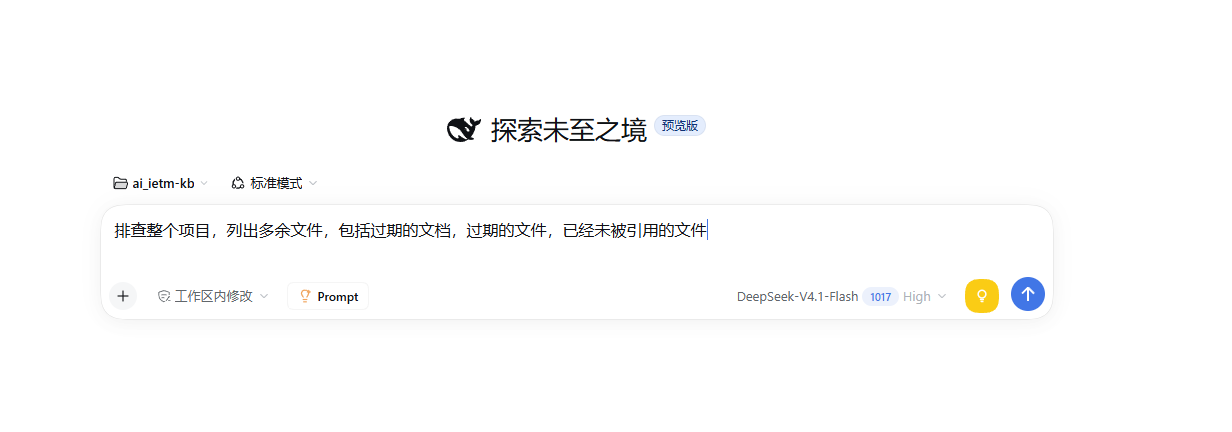
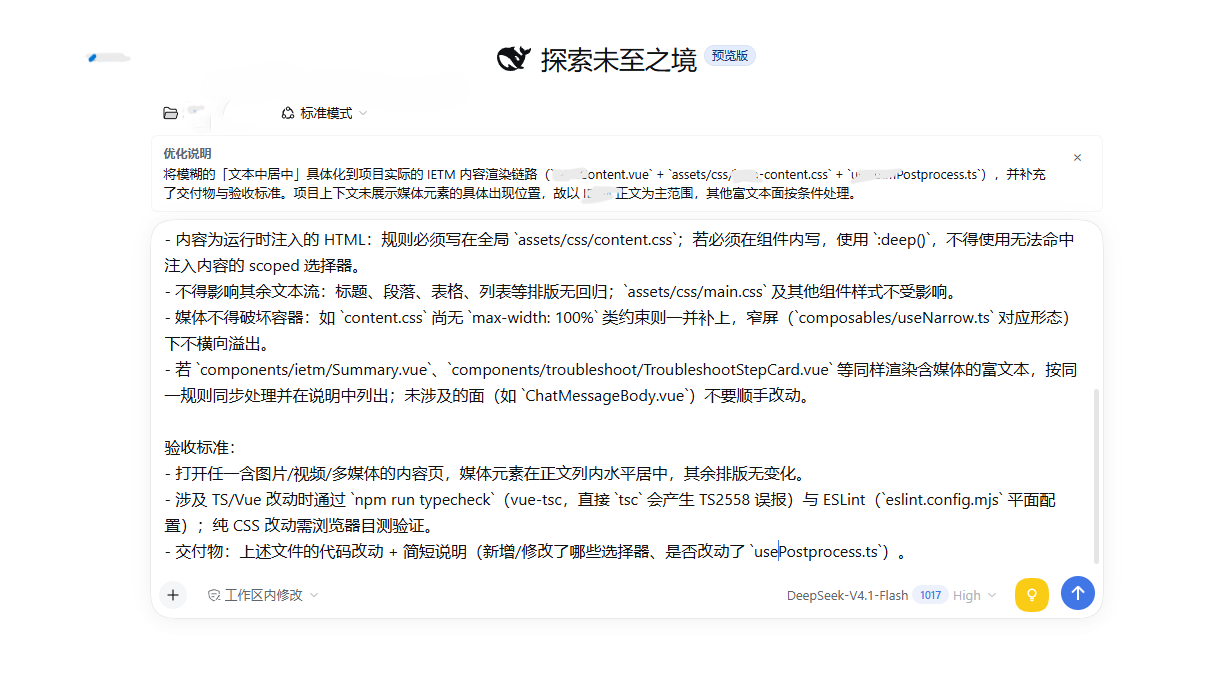
点击发送按钮旁边的灯泡图标,插件会读取你工作目录的文件结构、关键配置文件(package.json、tsconfig.json 等)和代码约定,连同你的草稿一起发给 LLM,然后把优化后的提示词写回输入框。优化说明显示在输入框上方的面板里。
截图
输入框工具栏中的优化按钮:
优化后显示在输入框上方的说明面板:
功能
| 功能 | 说明 |
|---|---|
| 图标按钮 | 位于输入框工具栏,发送按钮左侧——黄色圆形按钮,灯泡图标 |
| Agent 工具 | optimize_prompt,会话中的 Agent 可以调用 |
| 斜杠命令 | /optimize <文本>,直接使用 |
| 说明面板 | 在输入框上方显示优化说明;输入框清空后自动关闭 |
| 双语界面 | 支持中英文 |
| 主题适配 | 使用 DSH 的 CSS 变量,明暗主题通用 |
工作原理
没有后台服务,没有独立进程。插件向 DSH 的 Cordis 运行时注册回调:
| 部分 | 文件 | 运行在 | 注册内容 |
|---|---|---|---|
| Host | index.js | DSH 后端 | optimize_prompt 工具 + /optimize 斜杠命令 |
| Client | client.js | DSH 前端页面 | 输入框按钮 + 说明面板 + 多语言字典 |
点击按钮时,客户端通过 DSH 已有的远程命令通道把草稿发给后端。后端收集项目上下文(工作目录 + 代码结构 + 关键文件内容,上限约 6000 字符),通过 ctx.llm.stream() 调用 LLM,解析返回结果,把优化后的提示词和说明交回去。
项目上下文收集
后端扫描工作目录,收集:
- 技术栈标记 —
package.json、Cargo.toml、go.mod、pyproject.toml等 - 配置文档 —
README.md、CONTRIBUTING.md、.editorconfig等 - 工具链文件 —
tsconfig.json、.eslintrc、prettier.config.js等 - 源代码文件 — 在字符预算内采样,跳过
node_modules、.git、dist等目录
安装
dsh plugin add https://github.com/lucky9star6/dsh-prompt-optimizer
安装后在 DSH 的插件管理器里启用这个 bundle。
目录结构
prompt-optimizer-bundle/
├── index.js              # Host 半:工具 + 斜杠命令 + 项目上下文 + LLM 调用
├── client.js             # Client 半:图标按钮 + 说明面板 + 多语言字典
├── cordis.patch.yml      # Cordis Loader 补丁声明
├── package.json          # 包清单(含 dsh.bundle 声明)
├── icon.svg              # 插件显示图标(插件管理器用)
├── screenshots.json      # 市场截图声明
├── LICENSE               # MIT 许可证
├── README.md             # 本文件
├── assets/
│   ├── jt1.png           # 截图:工具栏按钮
│   └── jt2.png           # 截图:说明面板
├── locale/
│   ├── en.json           # 插件管理器显示元数据(英文)
│   └── zh.json           # 插件管理器显示元数据(中文)
└── test/
    ├── parse-reply.test.mjs   # 解析器测试 + 链式运行器
    ├── layout.mjs             # 布局契约检查
    └── render.mjs             # 渲染冒烟测试(无需浏览器即可捕获运行时崩溃)
English
What it does
Click the light bulb icon next to the send button. The plugin reads your workspace's file structure, key config files (package.json, tsconfig.json, etc.), and source code conventions, sends them together with your draft prompt to the LLM, and writes back an optimized version. The optimization notes appear in a panel above the input box.
Screenshots
The optimize button in the composer toolbar:
The notes panel above the input box after optimization:
Features
| Feature | Description |
|---|---|
| Icon button | Sits left of the send button in the composer toolbar — a yellow circular button with a light bulb icon |
| Agent tool | optimize_prompt is available to any agent in the session |
| Slash command | /optimize <text> for direct use |
| Notes panel | Shows above the input box with optimization rationale; auto-dismisses when you clear the draft |
| Bilingual | English and Chinese UI strings |
| Theme-aware | Uses DSH's CSS variable tokens, works in both light and dark themes |
How it works
No background service, no separate process. The plugin registers callbacks into DSH's Cordis runtime:
| Half | File | Runs in | Registers |
|---|---|---|---|
| Host | index.js | DSH backend | optimize_prompt tool + /optimize slash command |
| Client | client.js | DSH web UI | composer button + notes panel + locale dictionaries |
When you click the button, the client sends the draft to the host via DSH's existing remote-command channel. The host gathers project context (working directory + code structure + key file contents, capped at ~6000 chars), calls the LLM through ctx.llm.stream(), parses the reply, and returns the optimized prompt + notes.
Project context gathering
The host scans the working directory for:
- Stack markers —
package.json,Cargo.toml,go.mod,pyproject.toml, etc. - Config docs —
README.md,CONTRIBUTING.md,.editorconfig, etc. - Toolchain files —
tsconfig.json,.eslintrc,prettier.config.js, etc. - Source files — sampled up to a character budget, skipping
node_modules,.git,dist, etc.
Install
dsh plugin add https://github.com/lucky9star6/dsh-prompt-optimizer
Then enable the bundle in your DSH profile via the Plugin Manager.
File structure
prompt-optimizer-bundle/
├── index.js              # Host half: tool + slash command + project context + LLM call
├── client.js             # Client half: icon button + notes panel + locale dicts
├── cordis.patch.yml      # Cordis Loader patch declaration
├── package.json          # package manifest (dsh.bundle declaration)
├── icon.svg              # Plugin display icon (Plugin Manager)
├── screenshots.json      # storefront screenshot manifest
├── LICENSE               # MIT
├── README.md             # This file
├── assets/
│   ├── jt1.png           # Screenshot: toolbar button
│   └── jt2.png           # Screenshot: notes panel
├── locale/
│   ├── en.json           # Plugin Manager display metadata (English)
│   └── zh.json           # Plugin Manager display metadata (Chinese)
└── test/
    ├── parse-reply.test.mjs   # Parser tests + chained runner
    ├── layout.mjs             # Layout contract checks
    └── render.mjs             # Render smoke test (catches runtime crashes without a browser)
License / 许可证
MIT © luckystar6
Comments
Loading…
Similar plugins
by kee0012
DSH 提示词优化插件:输入框工具栏一键 ✨ 优化(直接写回可还原),风格/上下文/还原等设置收纳进 ▾ 弹出层。
★ 2
↓ 356/wk
MIT
JavaScript
Oct 13, 2026
dsh plugin --profile web add dsh-prompt-optimizerby yuloong07-star
dsh-prompt-system提示词优化系统——根据工作区,当前会话,优化提示词
★ 0
MIT
JavaScript
Sep 22, 2026
dsh plugin --profile web add dsh-prompt-systemby xiyue718
DSH 提示词优化插件:在聊天输入框一键优化未发送的提示词。 / Optimize unsent prompts in the DSH chat composer with the default model.
★ 0
TypeScript
Sep 21, 2026
dsh plugin --profile web add @dsh-external/ui-prompt-optimizerby YuChenLiao
dsh结构化提示词插件,通过表单配置的方式结构化生成提示词,提高模型的执行效率
★ 17
↓ 240/wk
NOASSERTION
JavaScript
Oct 26, 2026
dsh plugin --profile web add dsh-plugin-structured-promptby zywnb-2
提示词优化工坊 —— DSH 插件的多风格一键优化与发送前自动优化
★ 0
MIT
JavaScript
Oct 2, 2026
dsh plugin --profile web add dsh-prompt-studioby errorcode7
DeepSeekHarness的提示词管理器插件
★ 13
MIT
JavaScript
Aug 14, 2026
dsh plugin --profile web add dsh-prompt-manager