

dsh-usage-panel
Manifest validLocal-first token usage dashboard for DeepSeek Harness: totals, composition, models, trend, heatmap, and provider speed / first-token performance.
dsh-usage-panel · Token 用量看板

DeepSeek Harness 的本地优先 Token 用量看板插件:侧边栏入口 + 整页看板。所有数字都由本机会话日志实时聚合,不联网,不读取价格、账户或余额。
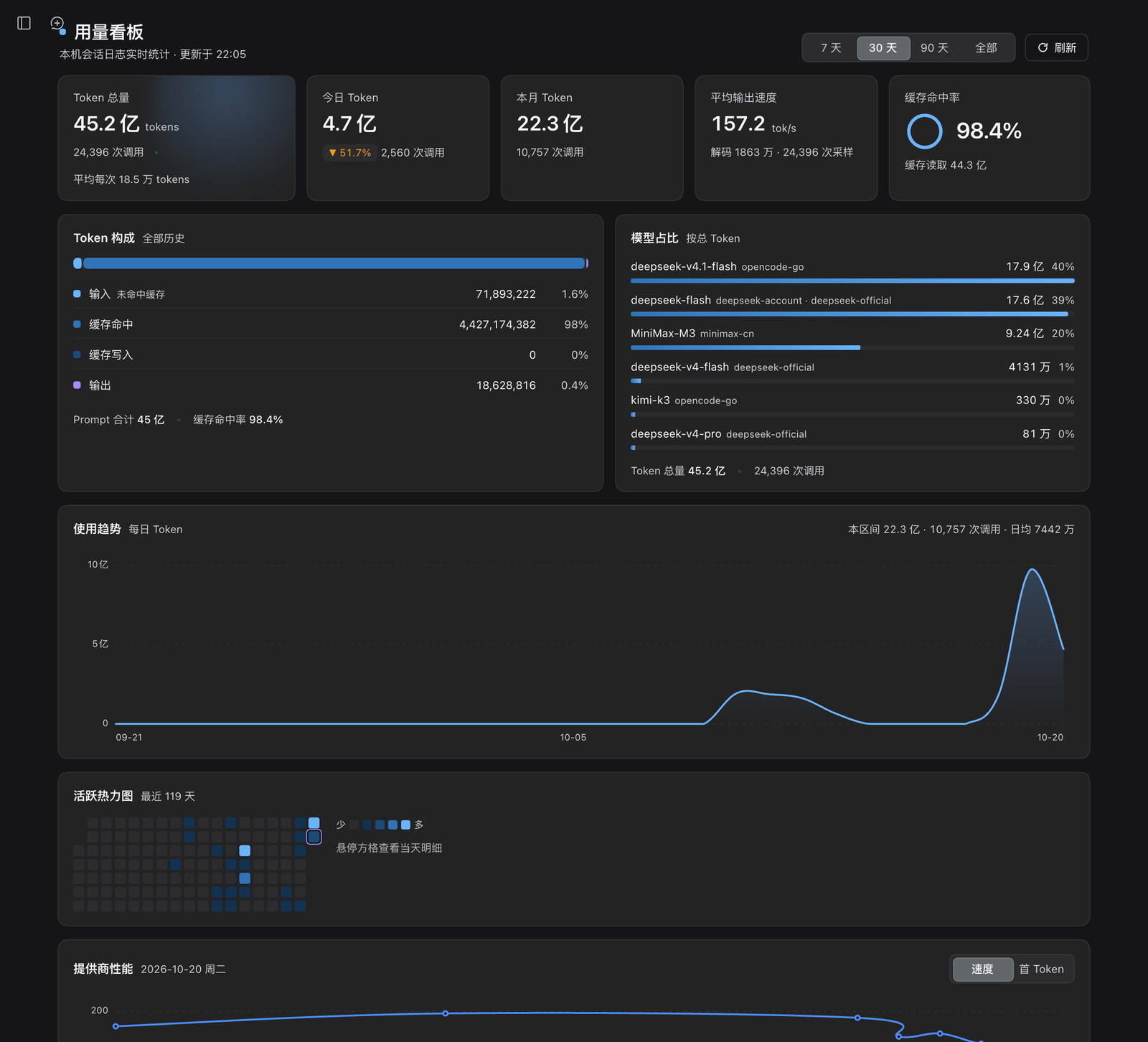
English — A local-first token-usage dashboard for DeepSeek Harness. It adds a sidebar entry beside Plugins and renders a full-page panel with lifetime / today / month totals, output speed, cache hit rate, token composition, model share, daily trend, activity heatmap, and an hourly per-provider speed / first-token performance chart. Every number is derived from local session logs: no network calls, no pricing, no account data.
功能
| 区域 | 内容 |
|---|---|
| 读数条 | Token 总量(调用次数 / 平均每次)、今日(较昨日变化)、本月、平均输出速度(tok/s)、缓存命中率(环形仪表) |
| Token 构成 | 输入(未命中缓存)/ 缓存命中 / 缓存写入 / 输出的堆叠比例条与逐项计数、占比 |
| 模型占比 | 按 Token 降序的模型份额,含 provider 标签与份额条 |
| 使用趋势 | 平滑日趋势,7 天 / 30 天 / 90 天 / 全部 四档,悬浮十字线提示、方向键逐日浏览、区间日均 |
| 活跃热力图 | 最近 119 天逐日方格;点击任意方格可切换下方性能面板的日期 |
| 提供商性能 | 选中日期按小时、按 provider 的 速度 / 首 Token 双指标折线,悬浮查看各 provider 数值,非今天时可「回到今天」 |
状态与细节:首次读取显示骨架屏;空数据、读取失败、同步失败各有独立状态;页脚展示更新时间、扫描会话数与不可读会话数。界面跟随宿主亮/暗主题,动效在 prefers-reduced-motion 下自动退化为静态。
安装
环境要求:DeepSeek Harness Desktop(Web UI profile),Node.js >= 20。仓库自带构建产物、没有 prepare 脚本,因此从 GitHub 安装不需要构建。
方式一:直接从 GitHub 安装(推荐)
使用 DSH CLI(在任意目录执行;web 换成目标 profile 名):
dsh plugin --profile web add github:chunrichi/dsh-usage-panel
或在 Harness 的插件管理页 / 交给 Agent 安装(desktop profile 推荐这条,可热应用):
plugin_manager action=install_bundle target=github:chunrichi/dsh-usage-panel
- CLI 会把剩余参数转发到
$DSH_HOME/profiles/<profile>,在 profile 目录执行pnpm add github:...;安装成功后自动把dsh-usage-panel加入该 profile 的dsh.profile.bundles,下次启动生效。 desktop是 Desktop 保留 profile:需要完全退出 Desktop 后再执行,并且要用 Desktop 自带的 CLI(macOS 路径:DeepSeek Harness.app/Contents/Resources/runtime/cli/bin/dsh);用普通 npm 安装的dsh操作 desktop profile 会被拒绝(profile "desktop" is managed exclusively by the Electron application)。在应用内安装则立即热应用、无需退出。- 切换版本:先
dsh plugin --profile web remove dsh-usage-panel,再重新add。 - 固定版本可以带 ref:
github:chunrichi/dsh-usage-panel#v1.0.0。
方式二:本地目录安装(改代码时使用)
git clone https://github.com/chunrichi/dsh-usage-panel.git
然后在 Harness 中安装本地目录(target 用绝对路径):
plugin_manager action=install_bundle target=/absolute/path/to/dsh-usage-panel
本地目录以 link: 依赖接入:修改源码后重新执行一次 install_bundle 即可让 Host 半边加载新模块,客户端改动刷新窗口生效。
安装后侧边栏面板列表会多出一个看板图标(紧邻「插件」入口)。如果界面还没变化,刷新一次窗口即可加载新的客户端模块。
安装机制(简述)
dsh plugin、插件管理页和 Agent 的安装工具背后共用 @deepseek-ai/dsh-plugin-manager 的同一套操作:
- 解析 spec:registry 包名、本地路径、
github:/git+等 git 地址、tarball 四类; - git 地址先做一次受超时限制的 GitHub 连接检查(只把网络错误判为失败,鉴权与传输交给 pnpm);
- 在 profile 目录执行 pnpm 操作,把包写进 profile 的
package.json与node_modules; - 安装后校验
engines/peerDependencies兼容性,并读取新包的dsh.bundle.patch; - 把包名写进 profile 的
dsh.profile.bundles,使它成为该 profile 的一层 patch; - 应用内安装会继续热应用 Host 行并刷新客户端 bundle;CLI 只改 profile 文件,因此下次启动生效。
本仓库根目录的 package.json 同时声明了 dsh.bundle.patch(Host 插件行)与 dsh.client(Web 客户端模块),并已提交运行时代码,所以 github: 安装即可直接使用。
入口与交互
- 侧边栏入口位于
sidebar.panellist,order: 1,紧挨「插件」入口;主面板注册在main槽的usage-panel键上。 - 点开看板后中栏整页显示;再次点击其它面板即返回原会话。
- 点击热力图格子切换「提供商性能」的日期;点击当天或「回到今天」恢复。
- 「提供商性能」支持
速度/首 Token标签切换,折线按 provider 分色,图例标注样本数。
数据口径
一次「读数」= 一条 assistant/message 事件的 data.usage(Anthropic Messages 语义):
input=usage.inputTokens:未命中缓存的输入,不包含缓存读写。cacheRead/cacheWrite=usage.cacheReadTokens/cacheWriteTokens:独立计数,不是input的子集。output=outputTokens;reasoning=reasoningTokens(含在输出内,不重复计入总量)。prompt=input + cacheRead + cacheWrite;tokens=prompt + output。cacheHitRate=cacheRead / prompt。calls= 读数条数;按服务器本地时区分日/月。- 输出速度:从每个 step 的 durable stream 取「首个 token → 落盘」解码窗口,
tps = outputTokens / 解码秒数;与 Chat 面板 detailed 模式的 tok/s 同口径。 - 首 Token:
首个 token 时间 − step/start。性能面板按「本地日期 × 小时 × provider」聚合,速度与首 Token 均取中位数,避免休眠或排队长尾拉高均值。 - 更早的日志若没有 durable stream 时间,只参与速度统计、不参与首 Token;该日可能显示「暂无性能样本」。
配置
在 bundle patch 行 config 中调整(Host 侧做防御式归一化):
| 键 | 类型 | 默认 | 范围 | 说明 |
|---|---|---|---|---|
historyDays | 整数 | 182 | 7–365 | 日趋势 / 热力图 / daily 数组的窗口天数 |
maxSessions | 整数 | 800 | 1–5000 | 最多扫描的会话数(按 createdAt 取最新),超出时页脚会标注 |
- insert:
    - id: usage-panel
      name: dsh-usage-panel
      config:
        historyDays: 182
        maxSessions: 800
实现与性能
- Host 半边(
index.js):通过sessionPersistence读取本机会话日志,逐会话按稳定 revision 增量缓存读数;整份快照按「会话签名 + 配置 + 本地日期」缓存。启动后约 4s 在后台静默预热一次;解码失败的会话进入 10 分钟退避门,不会让每次轮询都付出重试代价。 - Client 半边(
client.js):零第三方依赖;快照在模块内缓存并对 7s 后的首次打开预热;仅在看板挂载且页面可见时每 60s 静默刷新。数字用单个requestAnimationFrame直接写文本节点,动画只使用transform/opacity,图表悬浮仅在跨天时更新 state。 - 只读路由:
GET|HEAD /dsh-usage-panel/snapshot[?refresh=1][&debug=1]GET|HEAD /dsh-usage-panel/performance?date=YYYY-MM-DD- 响应
application/json; charset=utf-8、cache-control: no-store;?debug=1附带读取诊断。
- 实测(约 200 个会话 / 2.3 万次读数):热读约 25–80ms,按日性能折叠约 25ms;首次冷读 3–6s,由后台预热吸收。
兼容性与限制
- 面向 DeepSeek Harness Desktop 的 Web UI profile 开发(插件清单
dsh.client.platform = web);依赖的 Slot / Service 均为宿主公开 API,宿主大版本升级后可能需要适配。 - 只读:不修改会话日志、不产生额外数据、不发起网络请求。
- 仅统计当前
sessionPersistence可见的会话;历史日志被清理后对应数字会减少;maxSessions截断时更早会话不计入。 - 更早格式的会话日志可能无法被当前存储后端解码,会被跳过并在页脚标注,不影响其它数据。
- 不包含费用估算、余额或价格表。
开发
无需构建,仓库文件即产物;语法检查:
node --check client.js
node --input-type=module --check < index.js
Host 侧的接口契约、缓存策略与性能设计记录在 docs/CONTRACT.md。改完代码重新执行一次 install_bundle 即可让 Host 半边加载新模块;客户端改动刷新窗口生效。
许可证
MIT © 2026 chunrichi
Comments
Loading…
Similar plugins
by xie-tj
Persistent token-usage ledger and Web Usage dashboard for DeepSeek Harness.
★ 2
MIT
JavaScript
Sep 15, 2026
dsh plugin --profile web add dsh-plugin-usage-ledgerby 2327644800
Personal usage analytics & activity dashboard for the DeepSeek Harness (dsh) web GUI: token totals, session activity, GitHub-style contribution heatmap, model / reasoning-effort / tool / skill / plugin rankings, streaks and insights. Aggregates real session events through ctx.sessionPersistence; no dsh core changes, no prompt content leaves the machine.
★ 0
Apache-2.0
JavaScript
Aug 26, 2026
dsh plugin --profile web add dsh-usage-analyticsby yokesky
DeepSeek Harness (DSH) 用量统计面板 — usage statistics dashboard: GitHub-style heatmap, daily token trend, model usage donut.
★ 3
↓ 320/wk
MIT
TypeScript
Aug 15, 2026
dsh plugin --profile web add @yokesky/dsh-usage-lensby Aisland-SJL
🌊 Persistent dock & fully-customizable balance/usage panel for DeepSeek Harness — activity heatmap, dual-channel comparison, local-only & privacy-first
★ 128
MIT
JavaScript
Oct 2, 2026
dsh plugin --profile web add dsh-usageby 3361805598-gif
Local-first personal usage insights in Settings, with 1/7/30-day token heatmaps and a 30-day calendar, token composition, model mix, and skill-call status.
★ 2
MIT
TypeScript
Sep 6, 2026
dsh plugin --profile web add dsh-usage-analyticsby XEsx630
All-session token usage statistics for DeepSeek Harness
★ 0
MIT
JavaScript
Oct 20, 2026
dsh plugin --profile web add dsh-usage-stats