

dsh-notify-me
Manifest valid★ 73Desktop notifications, sounds and a tab-title marker when the agent needs your input or a reply finishes in the background.
dsh-notify-me
简体中文 | English





离开 DSH 页面也不错过任何动静。 当模型停下来需要你操作(审批 / 方案待确认 / 提问)、或你在别的软件时回复正好在后台完成,dsh-notify-me 会用系统通知 + 提示音 + 标签页标题标记提醒你——开关和通知语言都直接在 DSH 设置 → 通知提醒 里改。
为什么需要它
DSH 的两种权限模式各有代价:
| 模式 | 你付出的代价 | 代价形态 |
|---|---|---|
不开完整访问(workspace-write + ask) | 等待——agent 卡在审批上,不盯着页面就是干等 | 时间成本,随会话数增长 |
| 开完整访问(full access) | 不可逆风险——放弃的是事前拦截能力 | 风险成本,与你盯不盯无关 |
dsh-notify-me 把「监督」和「守在屏幕前」解耦:只在真的出现决策点(审批 / 方案确认 / 提问)或回复跑完时,才用系统通知把你叫回来——让你敢不开完整访问,不必靠放弃拦截能力来换效率。它不降低 full access 本身的权限风险(它不是沙箱),只是把 ask 模式的等待成本压到接近零。
🔎 想找这个插件?可以搜:
dsh-notify-me、消息提醒、可操作提醒、桌面通知、需要你操作、回复完成提醒、后台完成提醒(npm 关键词已含以上中英文词)。
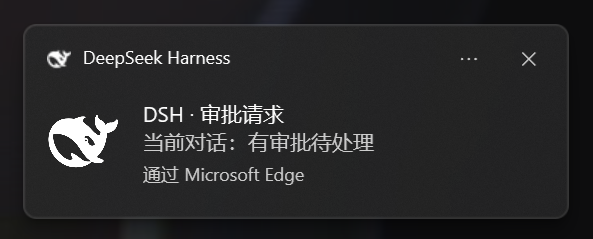
效果预览
| Windows 系统通知效果 |
|---|
 |
提醒时机
| 时机 | 提醒内容 | 默认 |
|---|---|---|
🔔 模型需要你操作 — 审批请求 / 方案待确认(plan review)/ 提问(ask_user_question) | 通知 + 提示音 + 🔔 需要你 · 标题标记 | 页面可见也提醒 |
| ✅ 回复完成 — 一轮回复跑完;后台会话完成也会报 | 通知 + 提示音 | 仅页面隐藏/后台时提醒 |
在 DSH 设置里改配置
打开 设置 → 通知提醒(首次安装后刷新一次页面即可看到),页面提供:
- 启用提醒 主开关:关闭后不再弹系统通知、不播放提示音、也不改标签页标题;
- 系统通知 / 提示音 / 音量:Toast、WebAudio 提示音与音量滑块;
- 页面打开时也提醒「需要你」(默认开)与 页面打开时也提醒「回复完成」(默认关);
- 通知语言:跟随界面 / 简体中文 / English——决定通知文字与
🔔 …标题标记使用的语言; - 测试按钮:用当前设置立即发一条「需要你」或「回复完成」测试提醒(不受上面「页面打开时也提醒」开关限制;「需要你」测试的标题标记约 6 秒后自动消失)。
需要浏览器通知权限:页面上点一下 → 允许;或地址栏锁 → 站点设置 → 通知 → 允许 → 刷新。
提醒方式
- 系统通知:Windows 通知中心 Toast(点击可把 DSH 窗口切回前台)
- 提示音:WebAudio 合成音(「需要你」与「完成」使用不同音型)
- 标签页标题标记:有待处理事项时,标题前出现
🔔 需要你 · …/🔔 Action needed · …
本插件是浏览器层实现:DSH 页面需保持打开(最小化/后台即可——那正是它监听的「离开」状态)。
安装
# DSH 官方插件命令:安装并自动挂载进 web profile
dsh plugin --profile web add dsh-notify-me
重启 dsh web 后硬刷新页面(Ctrl+Shift+R)。
兼容性 — 实测真正激活(各自独立 profile 启动:设置里出现「通知提醒」分区,即插件的 apply 确实执行)于 0.1.2-rc.1 与 0.1.5-rc.2;更早的 0.1.1-rc.2 亦验证过。逐版本声明见 package.json 的 dsh.compatibility.dshReleases。注意一个坑:若 dsh.client.inject 里列了新版运行时已不再提供的包,客户端条目会停在 pending (waiting for services: …) 而永不执行——1.1.3 在 0.1.2-rc.1 及以后正是这样失效的。
验证 — F12 控制台执行:
window.__dshNotifyMe.test("done")        // 「完成」示例
window.__dshNotifyMe.test("attention")   // 「需要你」示例
没反应?九成是:通知权限被拒绝(在页面上点一下 → 选「允许」;或地址栏锁 → 站点设置 → 通知 → 允许 → 刷新)、装完没重启 DSH、系统设置里浏览器通知被关。
控制台高级配置
设置页是第一入口;想脚本化/批量改或恢复默认时,偏好存 localStorage(dshNotifyMe.config),可用控制台实时调整:
window.__dshNotifyMe.config                       // 查看
window.__dshNotifyMe.setConfig({
  enabled: true,           // false = 关闭所有提醒(主开关)
  language: "auto",        // 'auto' 跟随界面 | 'zh' 简体中文 | 'en' English
  attentionHiddenOnly: false, // true = 页面可见时「需要你」不提醒
  doneHiddenOnly: true,       // false = 页面可见时「完成」也提醒
  toast: true,                // 系统通知开关
  sound: true,                // 提示音开关
  volume: 0.5,                // 音量 0~1
  autoFocus: true             // 点通知切回 DSH 窗口
})
window.__dshNotifyMe.resetConfig()                // 恢复默认
工作原理
浏览器半身订阅客户端 sessions 服务(与 UI 同一数据源):
- 当前会话
ConversationSnapshot:runningtrue→false = 回复完成;pending[]新增approval/plan-review/question= 模型在等你(可行时在提醒里展示提问/审批内容); - 其它已列会话摘要:出现新
pendingInteraction,或completed边沿(非选中状态下跑完)→ 后台工作提醒。
提醒核心仍然零第三方运行时依赖、完全自包含:通知文字按所选语言(跟随界面 / 中文 / English)即时解析。设置页是可选的 React 呈现层——当 DSH web profile 提供 slots / locale / react 时才注册进「设置 → 通知提醒」,缺任一能力时插件自动降级为纯提醒(无设置页),不影响功能。
已知限制
- 页面必须开着才会提醒(后台标签/最小化可以;关标签页即失效——浏览器层方案固有限制)。
- 通知经由浏览器弹出,需允许浏览器通知权限,且勿扰模式不能屏蔽它。
- 每次页面加载后第一次出声/弹通知前,需在页面上点击过一次(浏览器自动播放与权限策略)。
- 未授权通知权限时只有提示音与标题标记。
- 配置存在浏览器
localStorage:换浏览器/设备或清除站点数据后会回到默认值(设置页可一键恢复默认)。
开发自检
node --check lib\client.js
node --check lib\index.js
node smoke\smoke-test.cjs     # 离线状态机冒烟测试(含主开关与中英语言用例)
npm pack --dry-run            # 预览发布包
License
MIT — 见 LICENSE。
Compatibility
Versions
| Latest version | Published | Size |
|---|---|---|
| 1.0.0 | — | — |
| 1.1.1 | — | — |
| 1.2.0 | — | — |
| 1.2.1 | — | — |
| 1.3.0 | — | — |
| 1.3.1 | — | — |
| 1.1.3 | — | — |
| 1.1.5 | — | — |
| 1.1.2 | — | — |
| 1.1.4 | — | — |
| 1.1.0 | — | — |
| 1.1.8 | — | — |
| 1.4.0 | — | — |
| 1.5.0 | — | — |
| 1.5.1 | — | — |
| 1.5.2 | — | — |
| 1.5.3 | — | — |
| 1.6.0 | — | — |
| 1.6.1 | — | — |
| 1.14.3 | — | — |
Comments
Loading…
Similar plugins
Adds Windows desktop notifications, optional sounds, and DSH-styled in-page notifications for task events.
★ 0
↓ 643/wk
dsh plugin --profile web add @lsq64737/dsh-windows-notificationsby liujianqiao701
DSH web GUI plugin: a bottom-right reminder card when the agent is blocked waiting for your answer, plus a desktop notification and a flashing tab title when you are on another tab.
★ 0
MIT
JavaScript
Sep 24, 2026
dsh plugin --profile web add dsh-ask-notifyOS-level system notifications for the dsh web GUI: popups when a turn finishes or the agent needs your approval, answer, or plan review while the page is in the background.
★ 0
dsh plugin --profile web add @deepseek-ai/dsh-client-ui-notificationsby bitterSmilezzz
Native desktop notifications for DSH — approvals, questions, turn completion, session end and errors — with click-to-session, per-event toggles, quiet hours, a privacy switch that keeps message text o
★ 3
↓ 135/wk
MIT
TypeScript
Oct 20, 2026
dsh plugin --profile web add @bittersmilezzz/dsh-notifyby omdsh-dev
Desktop notifications for DeepSeek Harness turn completions, with per-outcome controls and include/exclude keyword rules.
★ 90
↓ 461/wk
MIT
JavaScript
Sep 1, 2026
dsh plugin --profile web add dsh-notificationby chidaic
Windows system-level notifications when the agent finishes a task or needs your input: task-done, question, approval and plan-review alerts via the browser Notification API, click-to-open the session,
★ 2
↓ 315/wk
MIT
JavaScript
Aug 22, 2026
dsh plugin --profile web add dsh-agent-notify