

dsh-toolkit
DiscoveredDeepSeek Harness Enhancement Pack — four plug-and-play mini-tools combined into one: paste-image auto-vision, one-click workspace open in Explorer/VS Code/Terminal with path copy, message history sidebar, and archived sessions panel. Install all components with a single command.
dsh-toolkit
A DeepSeek Harness enhancement pack — four plug-and-play tools in one: paste-image auto-vision, one-click workspace open plus path copy, a message-history rail, and an archived-sessions panel. One command installs everything.
国内镜像 / Mirror: also hosted on gitee.com/chill109/dsh-toolkit — Gitee is a mainland-China Git host (faster access from mainland China; use it if GitHub is slow).
| Components | vision-bridge · workspace-launcher · msgrail · archives |
| Platform | Windows / macOS / Linux (dsh web) |
| Requires | DeepSeek Harness dsh web 0.1.0-rc.6, git, node |
| License | MIT |
中文版见 README.zh.md。
Part 1 — If you are a human
This part is written for people who just want everything installed.
What the toolkit does
One install gives you four enhancements:
-
vision-bridge — paste an image, get an answer. Paste any image into the chat box and send it, even with a text-only model: the harness hands the agent the image as a local path and the agent automatically calls its available vision tool (
vision_chatfrom qwen-mm-plugins-api, or any other vision tool you configured) to describe/OCR/answer. No more "current model does not support images". -
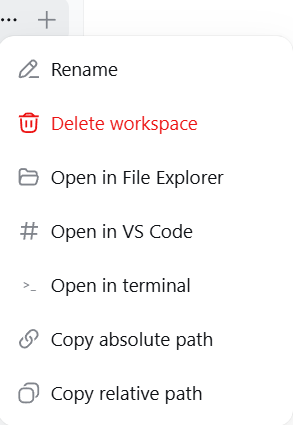
workspace-launcher — open the workspace, or copy its path. Hover a workspace in the sidebar, click "...": Open in File Explorer / Open in VS Code / Open in terminal / Copy absolute path / Copy relative path. Every action shows a result toast.
-
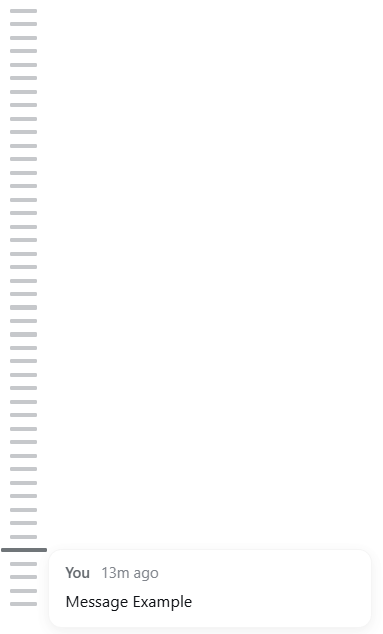
msgrail — a message-history rail. A thin vertical rail on the left of the chat, one bar per message you sent in the current conversation (all of them, loaded or not). Hover a bar for a preview, click to jump to that message.
-
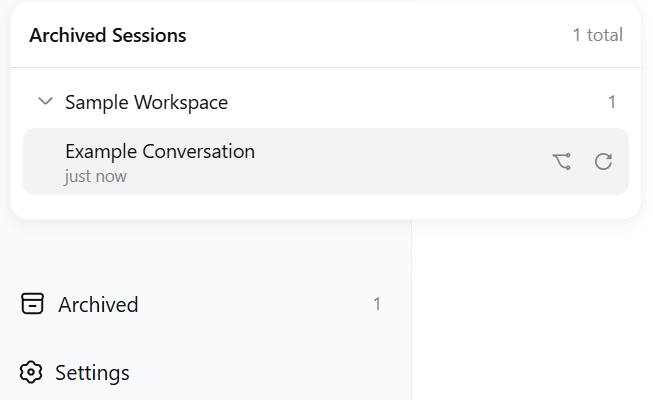
archives — archived sessions, visible again. An "Archived" seat at the sidebar foot lists archived sessions grouped by workspace; click to restore or fork.
Screenshots
Screenshots are taken from the standalone component projects; components without captures show a description only.
vision-bridge — no screenshot available yet. Paste an image into the chat box and send it (even with a text-only model): the agent automatically recognizes it through your configured vision tool and answers.
workspace-launcher — the workspace "..." menu with the five added actions:
msgrail — the message-history rail docked on the left of the chat; hover a bar for a preview, click to jump:
archives — an "Archived" seat at the sidebar foot opens the archived-sessions panel, grouped by workspace; each row shows the title and last-active time, with fork and restore actions:
Requirements
- DeepSeek Harness web UI running (
dsh web --host 127.0.0.1 --port 3080), profile layout 0.1.0-rc.6 git(applies the patches; LF-safe invocation)node(msgrail's layout patch)- vision-bridge additionally needs a vision tool — configure one yourself (e.g. register the qwen-mm-plugins-api MCP server with a working API key); any tool that takes an image path and returns text works. If you did not specify one, ask your AI to recommend a compatible option.
Manual deployment
One-command install
.\install.ps1 # Windows: installs all four components, then restarts the harness
./install.sh # macOS / Linux: installs all four components
Then hard-refresh the browser (Ctrl+F5) after the harness is back.
Installing components individually
Each component is also usable on its own — see components/<name>/ and the "For AI" part below for the exact per-component steps (patch files, plugin packages, cordis entries).
Let an AI deploy it
Copy/paste this whole paragraph into your AI assistant:
Deploy the dsh-toolkit from
https://github.com/chou109/dsh-toolkit(mainland-China mirror:https://gitee.com/chill109/dsh-toolkit) to my local DeepSeek Harness web profile.
- Windows: run
.\install.ps1in the repo root — it installs all four components (vision-bridge patches to dsh-host-apiproxy + dsh-llm-pi-ai; workspace-launcher plugin + dsh-client-ui-workspace patch; msgrail plugin + dsh-client-ui-layout patch; archives plugin), registers the cordis entries, and restarts the harness. macOS/Linux:./install.sh(restartdsh webyourself).- If the script is unavailable, follow the README "For AI" part, or install components one by one from
components/.- Note: vision-bridge itself does NOT include a vision model — configure one separately (e.g. mcp-qwen-mm-plugins-api / vision_chat); if I did not specify one, recommend a compatible option.
- After the harness restarts, verify each component: (a) paste an image and send — the agent must describe it automatically; (b) hover a workspace, open the "..." menu — the five workspace-launcher actions must work (Explorer/VS Code/terminal/copy); (c) the msgrail rail must appear on the left of a conversation with bars for my messages; (d) the "Archived" seat must appear at the sidebar foot.
Usage
- vision-bridge: paste (Ctrl+V) or drag an image into the chat box; type a question if you like; send. The agent recognizes it automatically.
- workspace-launcher: hover a workspace in the sidebar → "..." → pick an action.
- msgrail: open a conversation; the rail is docked on the left; hover a bar to preview, click to jump.
- archives: click "Archived" at the sidebar foot; click a row to restore/fork an archived session.
Uninstall
.\install.ps1 -Uninstall # Windows
./install.sh --uninstall # macOS / Linux
Then restart the harness and hard-refresh.
Part 2 — If you are an AI
This part is written for AI agents that install, debug, or extend the toolkit. It assumes you can run shell commands and read the dsh packages in node_modules.
What this is (facts)
The toolkit bundles four independent enhancements, each touching different parts of dsh:
| Component | Type | What it changes |
|---|---|---|
| vision-bridge | 2 patches | @deepseek-ai/dsh-host-apiproxy (prompt RPC: drop the MODEL_DOES_NOT_SUPPORT_IMAGES rejection) + @deepseek-ai/dsh-llm-pi-ai (stream(): project image blocks to a text placeholder carrying the attachment path + a generic instruction to use the agent's available vision tool). No client change. |
| workspace-launcher | plugin + 1 patch | Plugin package (dsh-workspace-launcher, host half exposes POST /workspace-open/open {path, app}; client half registers no UI) + @deepseek-ai/dsh-client-ui-workspace patch (adds 5 items to the workspace row "..." menu: open in explorer/vscode/terminal, copy absolute/relative path; success/failure toasts). |
| msgrail | plugin + 1 layout patch | Plugin package (dsh-msgrail, client-only message rail) + @deepseek-ai/dsh-client-ui-layout patch via components/msgrail/scripts/patch-layout.mjs (adds a shell.history grid column + slot; track width var(--dsh-history-width, 0px)). |
| archives | plugin only | Plugin package (dsh-archives) — "Archived" seat at the sidebar foot with restore/fork; host half exposes POST /archives/unarchive. |
Key design points:
- No rebuilds: dsh serves client bundles at runtime from disk (per-bundle content hashes; client-modules HMR), so patched/plugin bundles take effect on browser refresh.
- No conflicts: the four components touch disjoint areas (LLM serialization, workspace rows, app layout, sidebar foot).
- Pinned versions: patch context is exact for the 0.1.0-rc.6 packages (
dsh-host-apiproxy,dsh-llm-pi-ai,dsh-client-ui-workspace,dsh-client-ui-layout). A different version breaksgit apply— see Debugging.
Deployment (exact steps)
The unified installer does all of this; the manual equivalent:
$profiles = "$env:USERPROFILE\.dsh\profiles"          # or $env:DSH_HOME\profiles
$repo = "<this repo>"

# 1. vision-bridge
$d = "$profiles\node_modules\@deepseek-ai\dsh-host-apiproxy\lib"
git -c core.autocrlf=false apply --unsafe-paths --directory="$d" "$repo\components\vision-bridge\patches\dsh-host-apiproxy.patch"
$d = "$profiles\node_modules\@deepseek-ai\dsh-llm-pi-ai\lib"
git -c core.autocrlf=false apply --unsafe-paths --directory="$d" "$repo\components\vision-bridge\patches\dsh-llm-pi-ai.patch"

# 2. workspace-launcher: plugin + patch
Copy-Item -Recurse "$repo\components\workspace-launcher\plugin\dsh-workspace-launcher" "$profiles\node_modules\"
$d = "$profiles\node_modules\@deepseek-ai\dsh-client-ui-workspace\lib"
git -c core.autocrlf=false apply --unsafe-paths --directory="$d" "$repo\components\workspace-launcher\patches\dsh-client-ui-workspace.patch"

# 3. msgrail: plugin + layout patch
Copy-Item -Recurse "$repo\components\msgrail\plugin\dsh-msgrail" "$profiles\node_modules\"
node "$repo\components\msgrail\scripts\patch-layout.mjs"   # default target resolves via DSH_HOME/~/.dsh

# 4. archives
Copy-Item -Recurse "$repo\components\archives\plugin\dsh-archives" "$profiles\node_modules\"
Cordis registration — append to $profiles\web\cordis.patch.yml (idempotent; the installer does this automatically):
- insert:
    - id: workspace-launcher
      name: 'dsh-workspace-launcher'
- insert:
    - id: msgrail
      name: 'dsh-msgrail'
- insert:
    - id: archives
      name: 'dsh-archives'
Then restart the harness and hard-refresh the browser.
Verification
# vision-bridge patches live
Select-String "$profiles\node_modules\@deepseek-ai\dsh-host-apiproxy\lib\index.js" -Pattern 'MODEL_DOES_NOT_SUPPORT_IMAGES'   # -> no match
Select-String "$profiles\node_modules\@deepseek-ai\dsh-llm-pi-ai\lib\index.js" -Pattern 'projectImageBlocksToText'            # -> match

# workspace-launcher endpoint + patch
Invoke-RestMethod -Uri http://127.0.0.1:3080/workspace-open/open -Method Post -ContentType 'application/json' -Body '{"path":"D:\\","app":"explorer"}'   # -> {"ok":true} and Explorer opens
Select-String "$profiles\node_modules\@deepseek-ai\dsh-client-ui-workspace\lib\client.js" -Pattern 'open-explorer'           # -> match

# msgrail layout
Select-String "$profiles\node_modules\@deepseek-ai\dsh-client-ui-layout\lib\client.js" -Pattern 'shell.history'              # -> match
Browser checks: paste an image and send (auto-described); workspace "..." menu shows the 5 actions; msgrail rail appears left of a conversation; "Archived" seat at the sidebar foot.
Debugging
| Symptom | Cause | Fix |
|---|---|---|
| Installer reports success but a feature is dead | git silently skipped a patch on a non-ASCII path (exit 0, no change) | The installer re-verifies by content and fails loudly; manual: run the Select-String checks above, or move dsh to an ASCII path |
git apply fails | Installed package version ≠ 0.1.0-rc.6 | Re-diff against npm pack <pkg>@0.1.0-rc.6 of the failing component |
| "当前模型不支持图片…" still shows on send | host-apiproxy patch not loaded | Restart harness; re-apply; verify |
| Agent replies "I can't see the image" | No vision tool registered / key missing | Register a vision MCP (e.g. mcp-qwen-mm-plugins-api) in cordis.patch.yml; set the API key; restart |
| msgrail rail missing | Layout patch not applied, or plugin not registered | Re-run patch-layout.mjs; check cordis entry msgrail; hard-refresh |
| Explorer open fails with "cannot find the file" | Path with trailing separator or legacy quoting | Already fixed in the shipped host code (path normalized; raw arg passed to start); make sure the deployed dsh-workspace-launcher/lib/index.js matches the repo |
| Duplicate menu entries | Old dsh-workspace-open copy still installed alongside | Remove the old package + cordis entry, restart |
Profile node_modules reverted | It's a junction to the npx cache; a reinstall refreshed packages | Re-run the installer (idempotent) |
Operations
- Restart harness:
taskkill /F /T /PID <node dsh web pid>thennpx -y @deepseek-ai/dsh web --host 127.0.0.1 --port 3080(install.ps1does this automatically). - Uninstall:
install.ps1 -Uninstall/install.sh --uninstall(reverses patches, removes plugins + cordis entries; the msgrail layout patch needsgit apply -R-style manual restore or a package reinstall). - Idempotency: the installer skips already-patched files and existing cordis entries; running it twice is a no-op.
Extra — how it works (and why it's shaped this way)
- dsh's client-module runtime (
@deepseek-ai/dsh-client-modules): each client plugin's browser half is served fromnode_modulesat/plugins/<id>/client.js?rev=<hash>and evaluated in the browser — patching a shipped bundle or adding a plugin is a hot update, no rebuild/republish. - vision-bridge's trick: a text-only LLM cannot consume image bytes, so images become paths; the placeholder doubles as an instruction ("use whatever vision tool you have"), which keeps the agent decoupled from any specific vision vendor.
- workspace-launcher's host half resolves the workspace path per click from the client (
row.cwd), so the server never needs to track "the current workspace". - msgrail's layout patch is the only structural change: a zero-width grid column (
var(--dsh-history-width, 0px)) that costs nothing when the plugin is absent. - One installer, four owners: the unified script keeps every component's patch/plugin/cordis handling isolated and idempotent, so a failure in one component never blocks the others.
FAQ
- Q: Do the four components conflict? No — they modify disjoint parts (LLM serialization, workspace rows, app layout, sidebar foot).
- Q: Does vision-bridge send my image somewhere extra? It only changes who reads the image (your configured vision tool instead of the chat model); storage stays local.
- Q: Can I install only some components? Yes — use the per-component manual steps in Part 2, or copy the plugin + apply only the patches you want.
- Q: Why does the repo not ship a LICENSE? MIT is included; adjust the copyright line if needed.
Made for DeepSeek Harness users who like their workflows one command away.
Comments
Loading…
Similar plugins
by sky-unicorn
DeepSeek Harness(DSH)一站式增强套件,基于公开插件扩展点构建,无需修改 DSH Core。提供 Windows Launcher、桌面通知与动态桌宠、Plugin Community、MCP Server Manager、模型输入类型配置、最后一条消息编辑与重新生成,以及 Claude Code / Codex Subagents 实时控制。所有功能均可独立安装,支持全量部署、
★ 4
MIT
TypeScript
Oct 5, 2026
dsh plugin --profile web add dsh-enhanced-pluginsby STARDUSTLC666
DeepSeek Harness 容器管理插件:docker_ps/images/logs/inspect/exec/manage/health 七工具,官方 subprocess 服务、argv 无 shell 注入、exec 与破坏性 manage 默认审批、零运行时依赖。· Containers for DeepSeek Harness agents. 已验证兼容 DeepSeek Harn
★ 3
↓ 281/wk
MIT
JavaScript
Oct 5, 2026
dsh plugin --profile web add @stardustlc/dsh-dockerby Anionex
[dsh]为纯文本模型设计更强大的视觉工具箱:一行安装使用、粘贴图片直接识别、多张图片问答、截图到前端UI 还原等|DeepSeek Harness-native integration for agent-vision-toolkit: image Q&A, long-screenshot OCR, UI restoration, grounding, pixel diff, Artifacts
★ 883
↓ 3.7k/wk
MIT
TypeScript
Oct 4, 2026
dsh plugin --profile web add @anionex/dsh-vision-toolkitby beijingwahw
DeepSeek Companion — DeepSeek Harness 官方伴侣插件:对话导出/交接摘要/成本优化/全局检索 + 执行轨迹分析、Prompt 工程工作台、多模型竞技场、任务编排、安全与审计(E–J 九大模块,Cordis 插件化)。
★ 4
↓ 176/wk
MIT
TypeScript
Sep 19, 2026
dsh plugin --profile web add dsh-companionby xiaoso456
DeepSeek Harness 基础工具增强:持久 bash、结构化 read、多模式 edit、原子 write、双引擎 grep/glob、图像直读,一个插件全覆盖
★ 7
↓ 633/wk
MIT
TypeScript
Sep 29, 2026
dsh plugin --profile web add @xiaoso/dsh-tool-plusby Cheyeah
DeepSeek Harness (DSH) Web 插件:拖放文件预览 / Markdown 渲染 / 文件盒 / 智能桌面截图(全屏·区域·窗口)/ 外挂识图与识别文本入库。完整开发历史含 21 个快照标签。
★ 0
NOASSERTION
JavaScript
Aug 28, 2026
dsh plugin --profile web add dsh-drop-preview