

dsh-one-click-launcher
Manifest valid★ 2Desktop one-click launcher for DeepSeek Harness Web: generates a launch .bat and a desktop shortcut (.lnk) with a customizable icon.
dsh 一键启动器
English | 中文
一个 DeepSeek Harness 插件:在 Windows 桌面生成一键启动本地 Harness Web 服务的快捷方式。
为什么做这个
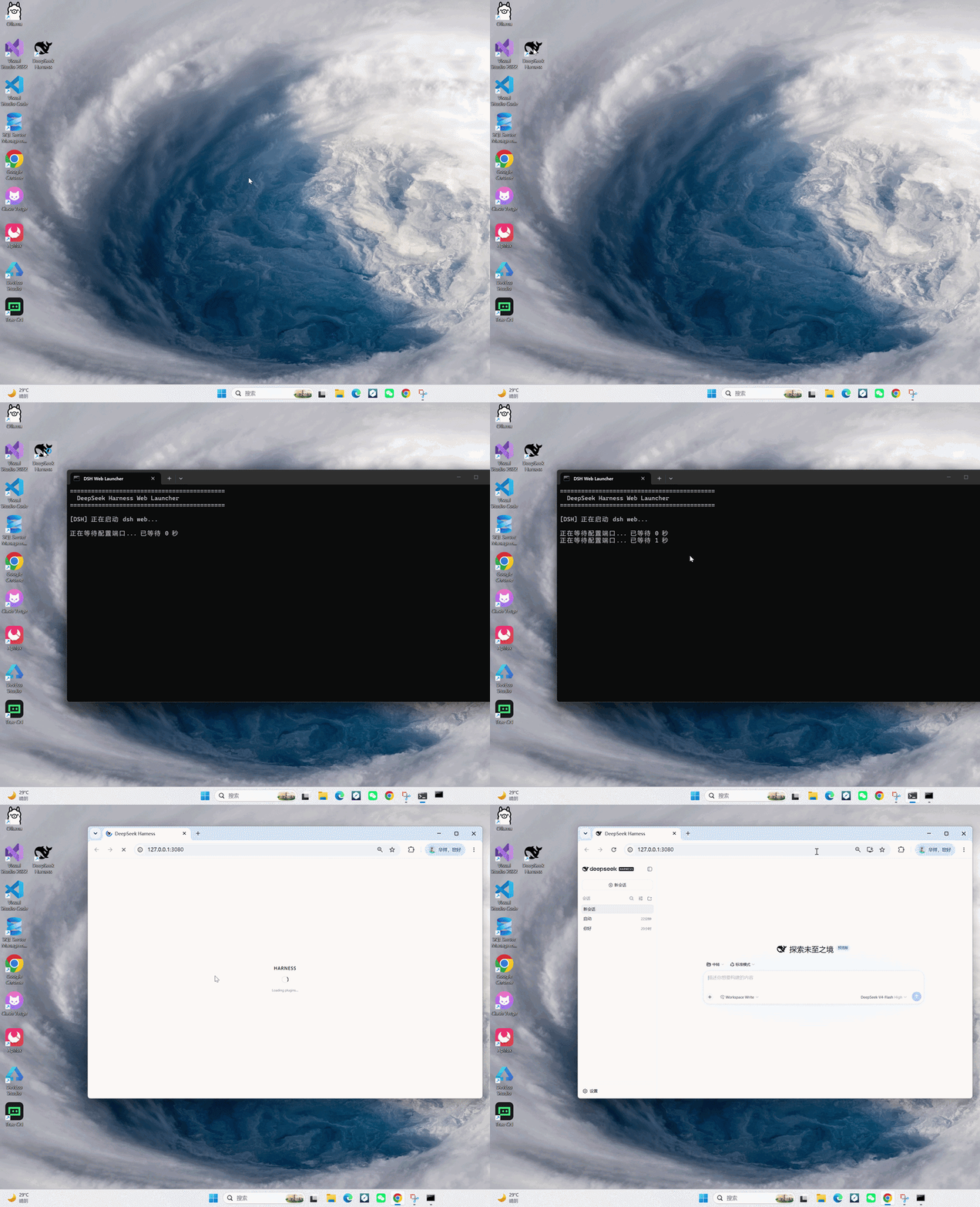
平时启动 DeepSeek Harness Web 需要:打开终端 → 敲 dsh web → 等启动 → 再手动打开浏览器。这个插件把这些全部去掉:
- 启动时自动写入
~/.dsh/launch-dsh.bat—— 一个会"在正确的时机打开浏览器"的启动脚本; - 并在桌面创建指向它的快捷方式(
.lnk),图标可自定义。
以后双击桌面图标即可,完事。
特性
- 不盲等:脚本每秒轮询一次端口,服务一就绪立刻开浏览器;如果服务已经在运行,直接打开浏览器。
- 绝不提前开浏览器:失败时显示逐秒等待计数,120 秒后给出清晰提示。
- 自动收尾:浏览器打开后启动器窗口自动退出;最小化的
DSH Server窗口就是服务本体(关闭它=停止服务)。 - 默认鲸鱼图标:快捷方式默认使用黑色鲸鱼图标;插件还附带一个蓝色(
#4176e6)变体,也支持你自备任意.ico(见自定义图标)。 - 零依赖、无需构建:纯 ESM JavaScript,可以直接从 GitHub 安装。
环境要求
- Windows 10/11(启动器是
.bat+.lnk) - 已安装
dshCLI pnpm(dsh plugin内部转发给 pnpm)
安装
# 安装进 web profile(或其他任意 profile)
dsh plugin --profile web add dsh-one-click-launcher
直接从 GitHub 安装(无需构建脚本):
dsh plugin --profile web add github:cheng249hx/dsh-one-click-launcher
从 tarball 安装:
pnpm pack
dsh plugin --profile web add ./dsh-one-click-launcher-0.1.0.tgz
重启 dsh web。启动时插件会:
- 写入
~/.dsh/launch-dsh.bat; - 把两个内置鲸鱼图标复制到它旁边——
~/.dsh/DeepSeek Harness.ico(黑色,默认)和~/.dsh/DeepSeek Harness Blue.ico(蓝色#4176e6); - 在桌面创建带黑色鲸鱼图标的 DSH Web 快捷方式。
使用
双击桌面上的 DSH Web 快捷方式即可。
- 关闭最小化的 DSH Server 窗口会停止服务。
- 浏览器打开后,启动器窗口会自动退出。
- 修改配置后想重新生成快捷方式:先从桌面删除它,再重启
dsh web。
自定义图标
三种方式,从简到繁:
1. 切换两个内置鲸鱼之一。 在插件配置里设置 icon:
- update:
    - id: desktop-launcher
      config:
        icon: blue        # 'black'(默认)或 'blue'(#4176e6)
图标位于 %USERPROFILE%\.dsh\DeepSeek Harness.ico 和 %USERPROFILE%\.dsh\DeepSeek Harness Blue.ico。
2. 使用你自己的 .ico。 用 iconPath 指向任意图标文件:
- update:
    - id: desktop-launcher
      config:
        iconPath: 'D:\icons\my-whale.ico'
3. 在桌面直接换,无需配置。 右键快捷方式 → 属性 → 快捷方式 选项卡 → 更改图标… → 选择任意 .ico → 确定。纯外观修改,重启后依然生效。
在配置里修改 icon/iconPath 之后,先从桌面删除快捷方式,再重启 dsh web,插件会用新图标重新生成。
配置
编辑你 profile 的 cordis.patch.yml(例如 ~/.dsh/profiles/web/cordis.patch.yml),或用 --patch overlay:
- update:
    - id: desktop-launcher
      config:
        icon: 'blue'                         # 'black'(默认)或 'blue'
        iconPath: 'D:\icons\my-whale.ico'    # 自定义 .ico(优先级高于 icon)
        shortcutName: 'DSH 网页端'            # 快捷方式文件名(不含 .lnk 后缀)
        port: 3080                           # 启动器等待的端口
| 字段 | 默认值 | 说明 |
|---|---|---|
icon | black | 内置鲸鱼图标:black 或 blue(#4176e6) |
iconPath | (见 icon) | 自定义 .ico 的绝对路径;优先级高于 icon |
shortcutName | DSH Web | 桌面快捷方式名称(不含 .lnk) |
port | 3080 | 打开浏览器前等待的端口 |
launcherDir | ~/.dsh | launch-dsh.bat 和图标的写入位置 |
desktopDir | 系统桌面 | 快捷方式创建位置(主要用于测试) |
dshCommand | 自动检测 | 生成脚本使用的 dsh 命令 |
enabled | true | 设为 false 可禁用文件生成 |
工作原理
本包是一个 Cordis 组合包:package.json 声明 dsh.bundle.patch,cordis.patch.yml 插入插件行,index.js(零依赖纯 ESM)在启动时的 apply() 里写入启动器文件。
生成的 .bat 刻意使用纯 ASCII + CRLF 行尾,保证在任何 Windows 语言环境下都能被正确解析。
License
MIT
Comments
Loading…
From the same category
DeepSeek Harness plugin for Reactive Resume: bridges your resumes and job applications into a Harness session over MCP.
★ 41.7k
↓ 115/wk
MIT
Aug 24, 2026
dsh plugin --profile web add dsh-plugin-reactive-resumeby dsh-market
The plugin market inside DeepSeek Harness — browse, search, one-click install · DSH 可视化插件市场
★ 11k
↓ 311.6k/wk
MIT
TypeScript
Nov 6, 2026
dsh plugin --profile web add dshmarketby Tencent
Let AI agents use your real, logged-in browser without interrupting your work. CLI + extension for browser automation across any shell-capable AI agent.
★ 10.1k
↓ 14.8k/wk
MIT
TypeScript
Nov 5, 2026
dsh plugin --profile terminal add @wxg-prc-cpg/browser-skill-dsh-pluginby superdesigndev
OpenRouter for agent tools. Join community here: https://discord.gg/6mQYYfFMAn
★ 7.2k
NOASSERTION
Python
Nov 6, 2026
dsh plugin --profile web add treg-dshby yjh051108
dsh-routing-suite — injector + router-standard kit: install the runtime injector first, then the task-aware reasoning-mode router preset (measured P1-P23).
★ 7k
MIT
JavaScript
Sep 18, 2026
dsh plugin --profile web add @dsh-external/dsh-super-injectorby Q00
Agent OS: the agent gets smarter on its own. We just hold the line: Interview-gated, staged evaluation, budgeted evolution loop. MCP server, 14 runtimes: Claude Code, Codex CLI, Gemini CLI, OpenCode,
★ 6.3k
MIT
Python
Nov 5, 2026