

dsh-web-search-searxng
Manifest valid★ 1Self-hosted SearXNG metasearch web-search plugin for DeepSeek Harness — no API key, adds a Plugins-page settings card. | DeepSeek Harness plugin: provides web search through self-hosted SearXNG metasearch, no API Key required, includes a Plugins-page settings card.
dsh-web-search-searxng
English | 中文




A DeepSeek Harness (dsh) plugin that gives your AI agent free, unlimited, privacy-friendly web search through your own self-hosted SearXNG metasearch instance — no API key, no per-search model cost, no query logs leaving your machine. Installing it also adds a SearXNG search card to the Settings → Plugins page of the Web and Desktop apps, so the endpoint, engine restriction, and result language are editable from the GUI.
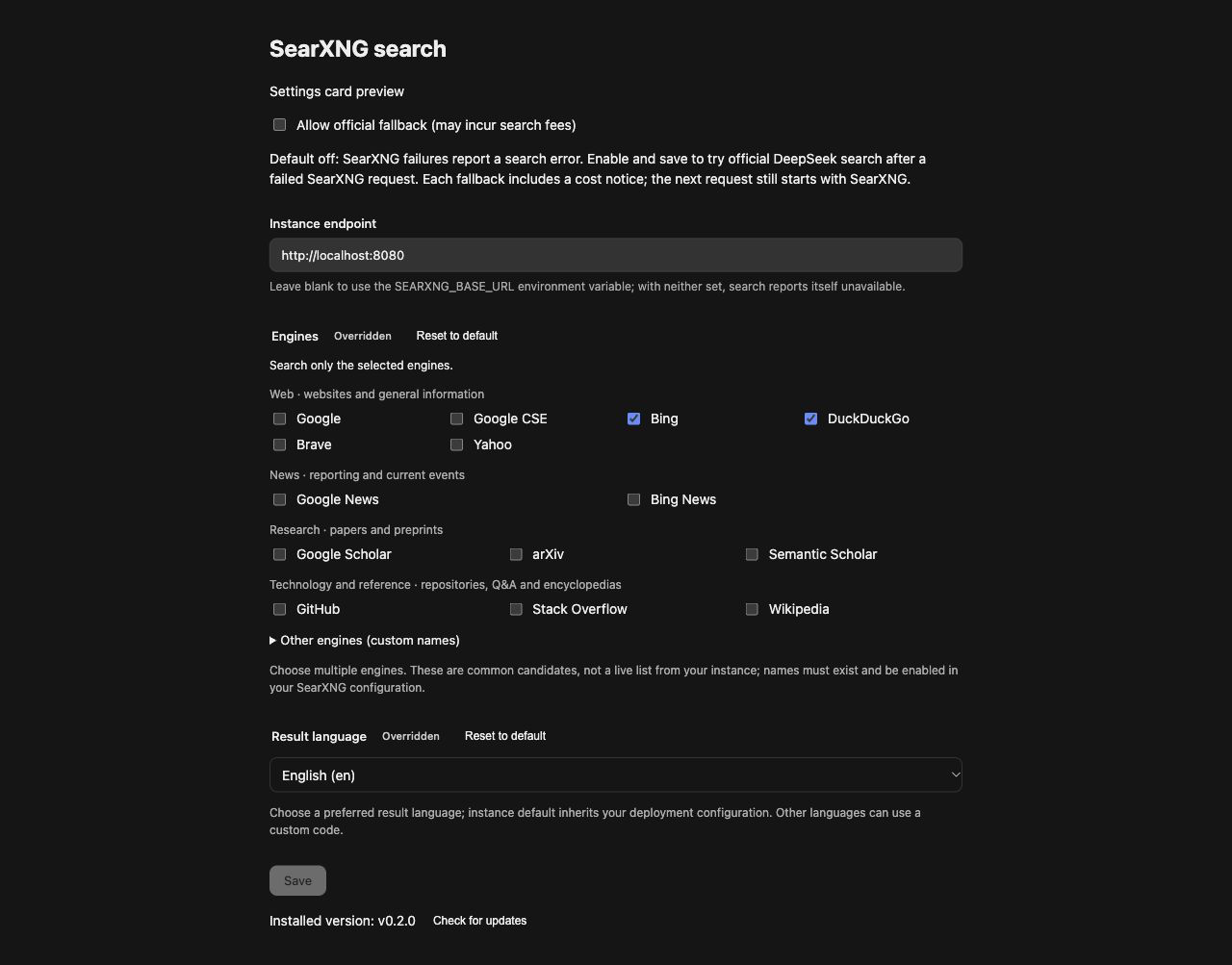
The SearXNG search card on the Settings → Plugins page — endpoint, engines, and result language, applied to the next search without a restart.
Why SearXNG instead of a search API?
| Hosted search APIs | This plugin | |
|---|---|---|
| Cost | Pay per query | Free — your instance, your hardware |
| API key | Required, rotates, leaks | None |
| Privacy | Queries go to a third party | Queries go to your SearXNG, which aggregates 70+ engines for you |
| Rate limit | Yes | Only what your instance allows |
| Works offline / intranet | No | Yes — loopback and private-network endpoints are supported by design |
Features
- 🔍 Metasearch provider — registers a provider with the stable id
searxnginto the dshctx.webseam; every agent web search is served byGET {baseURL}/search?format=json. - 🖥️ GUI settings card — a SearXNG search card appears under Settings → Plugins; edit endpoint, engines, and language without touching config files. Changes apply to the next search, no restart.
- 🔒 Safe by default — no credentials to leak; HTTP redirects fail closed (
WEB_PROVIDER_ERROR) so a redirect can never forward your query text to another origin; a 403 response tells you exactly that the instance's JSON format is disabled. - 🏠 Self-host friendly — loopback (
http://localhost:8080), private IPs, and subpath mounts (http://host/searxng) all work;/searchis appended correctly. - 🌐 Engine & language control — restrict to specific engines (
bing,duckduckgo) and prefer a result language (zh-CN,en,ja…) via SearXNG's native parameters. - 📎 Citeable sources — each result maps to a source with URL, title, engine excerpt as snippet, and publication date when present, ready for the agent to cite.
- ⚡ Zero build step for consumers —
lib/is committed, so installing from the git URL works immediately.
How it works
┌─────────────┐   web search   ┌──────────────┐   JSON API   ┌────────────────┐
│  dsh agent  │ ─────────────▶ │ ctx.web seam │ ───────────▶ │ your SearXNG   │
│  (LLM)      │ ◀───────────── │  (searxng    │ ◀─────────── │ instance       │
└─────────────┘  sources only  │  provider)   │   results[]  └───────┬────────┘
                               └──────────────┘                      │ aggregates
                                                          ┌──────────▼──────────┐
                                                          │ Google / Bing / DDG │
                                                          │ Brave / 70+ engines │
                                                          └─────────────────────┘
SearXNG returns no generated answer, so results carry sources only — the agent reads the pages itself with fetch when it needs content.
Requirements
- A DeepSeek Harness installation whose
ctx.webseam is present (anydshrelease carryingdsh-web). - Node.js
^22.19 || >=24(for development; consumers just need dsh). - A SearXNG instance with JSON output enabled — its
settings.ymlmust listjsonundersearch.formats(SearXNG's default serves HTML only).
Quick SearXNG setup with Docker
mkdir -p searxng && cd searxng
cat > settings.yml <<'EOF'
use_default_settings: true
server:
  secret_key: "change-me-to-a-long-random-string"
search:
  formats:
    - html
    - json   # ← required by this plugin
EOF
docker run -d --name searxng -p 8080:8080 \
  -v "$PWD/settings.yml:/etc/searxng/settings.yml" \
  searxng/searxng
Verify JSON is enabled:
curl "http://localhost:8080/search?q=test&format=json"
Install (import into dsh)
Option 1 — from GitHub (tracks latest):
dsh plugin --profile <name> add https://github.com/Chaos-Paradox/dsh-web-search-searxng
Option 2 — pin a release version (recommended for reproducibility):
dsh plugin --profile <name> add https://github.com/Chaos-Paradox/dsh-web-search-searxng#v0.1.0
See all versions on the Releases page.
Option 3 — from a local clone or tarball: the same command takes an absolute path, e.g. dsh plugin --profile <name> add /path/to/dsh-web-search-searxng. No build step needed — lib/ is committed.
Installing activates the bundle's patch layer, which registers the provider row. Verify the import:
dsh plugin --profile <name> list # dsh-web-search-searxng should appear
# remove
dsh plugin --profile <name> remove dsh-web-search-searxng
Configure and select
Registration alone does not route searches. Two switches, both yours:
1. Point it at your instance
Option A — GUI (recommended): open Settings → Plugins → SearXNG 搜索 and fill in the fields. All fields apply to the next search without a restart.
Option B — environment variable before launching dsh:
export SEARXNG_BASE_URL="http://localhost:8080"
| Field | GUI label | Env fallback | Description |
|---|---|---|---|
baseURL | Endpoint / 实例地址 | SEARXNG_BASE_URL | SearXNG instance base; /search is appended. Empty → provider reports unavailable. |
engines | Engines / 引擎限制 | — | Comma-separated engine restriction, e.g. bing,duckduckgo. |
language | Language / 结果语言 | — | Preferred result language, e.g. zh-CN, en, ja. |
2. Select it for search
Patch the profile's web row (a patch replaces the row's whole config, so restate fetchProvider):
# $DSH_HOME/profiles/<name>/cordis.patch.yml
- id: web
  config:
    searchProvider: searxng
    fetchProvider: http
To switch back, drop the patch (or set searchProvider: deepseek-official). With no endpoint configured the provider reports itself unavailable and nothing changes.
What a search returns
Each SearXNG result maps to a citeable source:
| SearXNG field | dsh source field | Notes |
|---|---|---|
url | url | entries without one are dropped |
title | title | omitted when blank |
content | snippet | the engine's excerpt |
publishedDate | publishedAt | when the engine provides it |
truncated is always false (the web service owns maxResults truncation), and no generated content answer is attached because SearXNG has none the seam could vouch for.
Troubleshooting
| Symptom | Cause | Fix |
|---|---|---|
SearXNG error (HTTP 403); the instance may refuse JSON output | settings.yml lacks json in search.formats | Add it as shown above and restart the container |
| Provider unavailable / nothing changes | No endpoint configured | Set the card field or SEARXNG_BASE_URL |
search request failed / ECONNREFUSED | Instance down or wrong port | Check docker ps, try the curl verify command |
WEB_PROVIDER_ERROR mentioning a redirect | A proxy in front of SearXNG redirects | Point baseURL at the final address; redirects fail closed by design |
Empty sources | Engines returned nothing usable (or all entries lacked URLs) | Loosen engines, check the instance in a browser |
Develop
pnpm install        # dependencies come from npm (@deepseek-ai/* 0.2.1-alpha.1 train)
pnpm run build      # tsdown (host + browser bundles) + tsc (browser declarations)
pnpm test           # vitest: provider behavior, redirect policy, proxy egress, card form
pnpm run typecheck  # tsc --noEmit
src/
  index.ts      plugin entry: config schema, env fallback, provider registration
  provider.ts   SearxngSearchProvider: JSON API call, result mapping, error policy
  types.ts      SearXNG response types
  client/       browser bundle: the Settings → Plugins card (React)
tests/          vitest suites incl. redirect & egress policy
lib/ is committed on purpose: installing from a git URL gives the consumer the built artifacts without a build step. Rebuild and recommit lib/ whenever src/ changes.
Known gap: the card's apply-level registration test lives upstream for now — the published @deepseek-ai/dsh-client-test-runtime references source files its npm package does not ship, so this repo keeps local stand-ins (tests/helpers.ts) for the two helpers the remaining card specs use.
Contributing
Issues and pull requests are welcome. Please keep the provider credential-free and fail-closed on redirects — those are design constraints, not missing features.
License
Links
- DeepSeek Harness — the host project
- SearXNG — the metasearch engine
- SearXNG JSON format docs — enabling
search.formats
Comments
Loading…
From the same category
DeepSeek Harness plugin for Reactive Resume: bridges your resumes and job applications into a Harness session over MCP.
★ 41.7k
↓ 156/wk
MIT
Aug 24, 2026
dsh plugin --profile web add dsh-plugin-reactive-resumeby Tencent
Let AI agents use your real, logged-in browser without interrupting your work. CLI + extension for browser automation across any shell-capable AI agent.
★ 8.6k
↓ 6.1k/wk
MIT
TypeScript
Oct 10, 2026
dsh plugin --profile terminal add @wxg-prc-cpg/browser-skill-dsh-pluginby yjh051108
dsh-routing-suite — injector + router-standard kit: install the runtime injector first, then the task-aware reasoning-mode router preset (measured P1-P23).
★ 7k
MIT
JavaScript
Sep 18, 2026
dsh plugin --profile web add @dsh-external/dsh-super-injectorby Q00
Agent OS: the agent gets smarter on its own. We just hold the line: Interview-gated, staged evaluation, budgeted evolution loop. MCP server, 14 runtimes: Claude Code, Codex CLI, Gemini CLI, OpenCode,
★ 6.2k
MIT
Python
Oct 7, 2026
by dsh-market
The plugin market inside DeepSeek Harness — browse, search, one-click install · DSH 可视化插件市场
★ 6.1k
↓ 112.4k/wk
MIT
TypeScript
Oct 10, 2026
dsh plugin --profile web add dshmarketby superdesigndev
OpenRouter for agent tools. Join community here: https://discord.gg/6mQYYfFMAn
★ 5k
NOASSERTION
Python
Oct 11, 2026
dsh plugin --profile web add treg-dsh