

dsh-unified-context
Discovered★ 21Import pi / opencode / codex / claude-code sessions, chat history, and agents into DeepSeek Harness — one-click Sync button, slash commands, session-start migration prompt
DSH Unified Context
English · 简体中文


DSH Unified Context (dsh-unified-context, 统一上下文) migrates pi, opencode, codex, claude-code, and WorkBuddy (Tencent) into DeepSeek Harness (dsh): sessions and chat history, the full context the model actually saw (AGENTS.md / CLAUDE.md / CODEBUDDY.md, skills, project and per-agent memory, project files), and scheduled automations. Context is shared through symlinks — one real copy, every harness reading it — never copied per harness. Sessions appear in the session list and resume with the full history; custom agents and mode prompts become discoverable dsh skills; a one-click Sync button in the composer runs the whole migration.


 →

pi · opencode · OpenAI Codex · Claude Code · WorkBuddy → DeepSeek Harness
| Resource | Link |
|---|---|
| 中文文档 | README.zh.md |
| npm package | dsh-unified-context |
| Source code | github.com/Chang-Tong/dsh-unified-context |
Table of Contents
- Features
- Why unified context
- Supported harnesses
- Screenshots
- Installation
- Usage
- How it works
- Context parity
- Long-term memory
- Automations
- Configuration
- Testing
- FAQ
- License
Features
- Five sources, one command. Import sessions from pi (JSONL), opencode (SQLite), codex (JSONL), claude-code (JSONL), and WorkBuddy (JSONL) — as real, resumable dsh sessions.
- Truly resumable. Browse the full original history (text, reasoning, tool calls — and real tool results where the source recorded them) and continue the conversation; the model gets the complete context.
- Context parity, not copies.
/link-contextmakes every harness read one sharedAGENTS.md/CLAUDE.md/CODEBUDDY.mdand one shared skill hub through symlinks: one real copy, no per-harness duplication, divergent copies reported instead of overwritten. - Long-term memory, per project and per agent. Project memory (Claude Code / WorkBuddy) converges on
<project>/.agents/memory/; agent memory (Codex layout) converges on~/.agents/agent-memory/<agent>/. Default policy is authority (one harness wins, others link), with an opt-in merge index that references notes in place. A small generated block in the projectAGENTS.mdpoints dsh at the memory notes so they are read on demand. - Automations migrate too. Codex automations and WorkBuddy automations become dsh scheduled tasks (RRULE translated, imported paused by default so the source can be switched off first).
- Agents become skills. pi agents / mode prompts and opencode agents are converted into dsh skill bundles under
$DSH_AGENTS_HOME/skills, with provenance recorded in frontmatter (metadata.source/metadata.kind). - One-click Sync button. A small control in the composer tool row runs
/import-alland shows the result inline — sessions, skills, context links, and paused automations. - Migration prompt on session start. When a new top-level session starts and unimported history exists, the plugin asks whether to migrate — per-project decisions are remembered, so it never nags twice.
- Workspace placement. Imported sessions attach to a workspace matching their original
cwd(created on demand);/attach-workspacesretro-fits existing imports. - Idempotent. Stable ids (
pi-<uuid>/oc-<id>/codex-<id>/claude-<id>); re-imports skip what already exists. - Zero runtime dependencies. Node built-ins (
node:zlibzstd,node:sqlite) plus dsh platform modules.
Supported harnesses
| Harness | What the migration carries |
|---|---|
| pi | sessions, agents / mode prompts → dsh skills, instructions & skills context |
| opencode | sessions (SQLite), agents → dsh skills, instructions & skills context |
| OpenAI Codex | sessions, AGENTS.md context, automations |
| Claude Code | sessions, CLAUDE.md context, project & per-agent memory |
| WorkBuddy (Tencent) | sessions with real tool results, CODEBUDDY.md + skills, project memory, automations |
| DeepSeek Harness | the target: resumable sessions, one shared context, scheduled tasks |
Why unified context
Every harness answers "where does the model's context live?" differently: the transcript here, the instructions file there, skills in another directory, long-term memory somewhere else, automations in a third format. Switch harnesses and the model does not get worse — it gets amnesia, because half of what it knew never came along. Importing the chat transcript alone closes maybe half of that gap.
DSH Unified Context closes the rest:
- One conversation. Sessions from five harnesses become real, resumable dsh sessions — text, reasoning, tool calls, and the real tool results when the source recorded them.
- One instruction set.
AGENTS.md/CLAUDE.md/CODEBUDDY.mdconverge on one canonical file; every harness reads the same bytes through a symlink. - One skill shelf. One shared skill hub, with harness-only skills adopted in place and identical copies collapsed into links.
- One memory. Project memory (Claude Code, WorkBuddy) and per-agent memory (Codex, Claude) converge on one directory per scope, with a generated index in
AGENTS.mdso dsh reads notes on demand instead of bloating every prompt. - One schedule. Codex and WorkBuddy automations become dsh scheduled tasks, imported paused so you can switch the source off before arming them.
The design choice that makes it trustworthy: links, not copies. Every shared piece has exactly one real copy; everything else points at it. Fix a note in any harness and every harness sees the fix; there is nothing to re-sync by hand and nothing that silently forks. A re-run is a no-op; divergent copies are reported, never overwritten; delete a symlink and the old layout comes back.
Migration should feel like moving into a furnished apartment, not buying the furniture again.
Screenshots
Taken from a clean Docker demo environment (English UI) with sample pi / codex sessions.
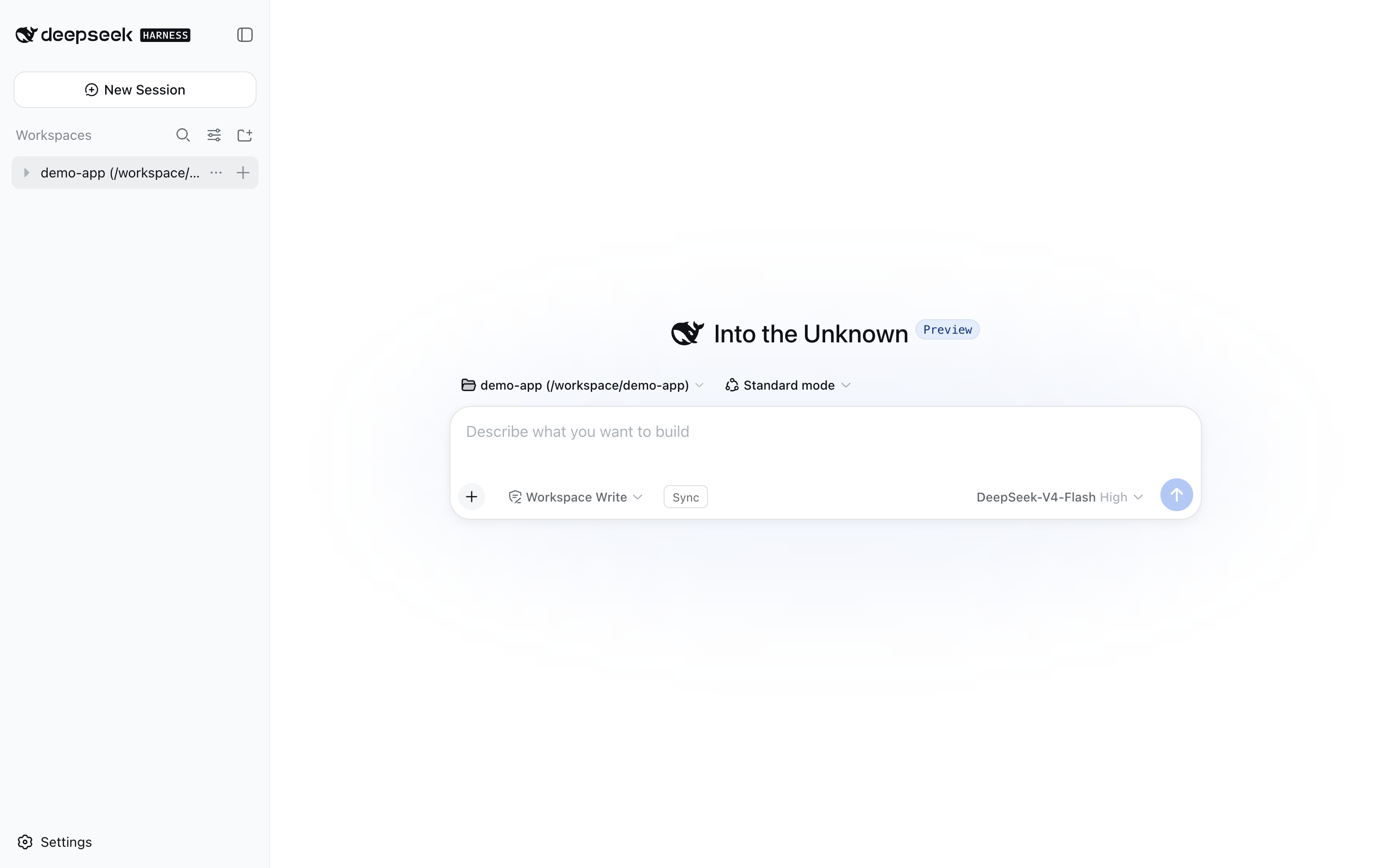
The dsh web UI with the Sync button in the composer tool row:
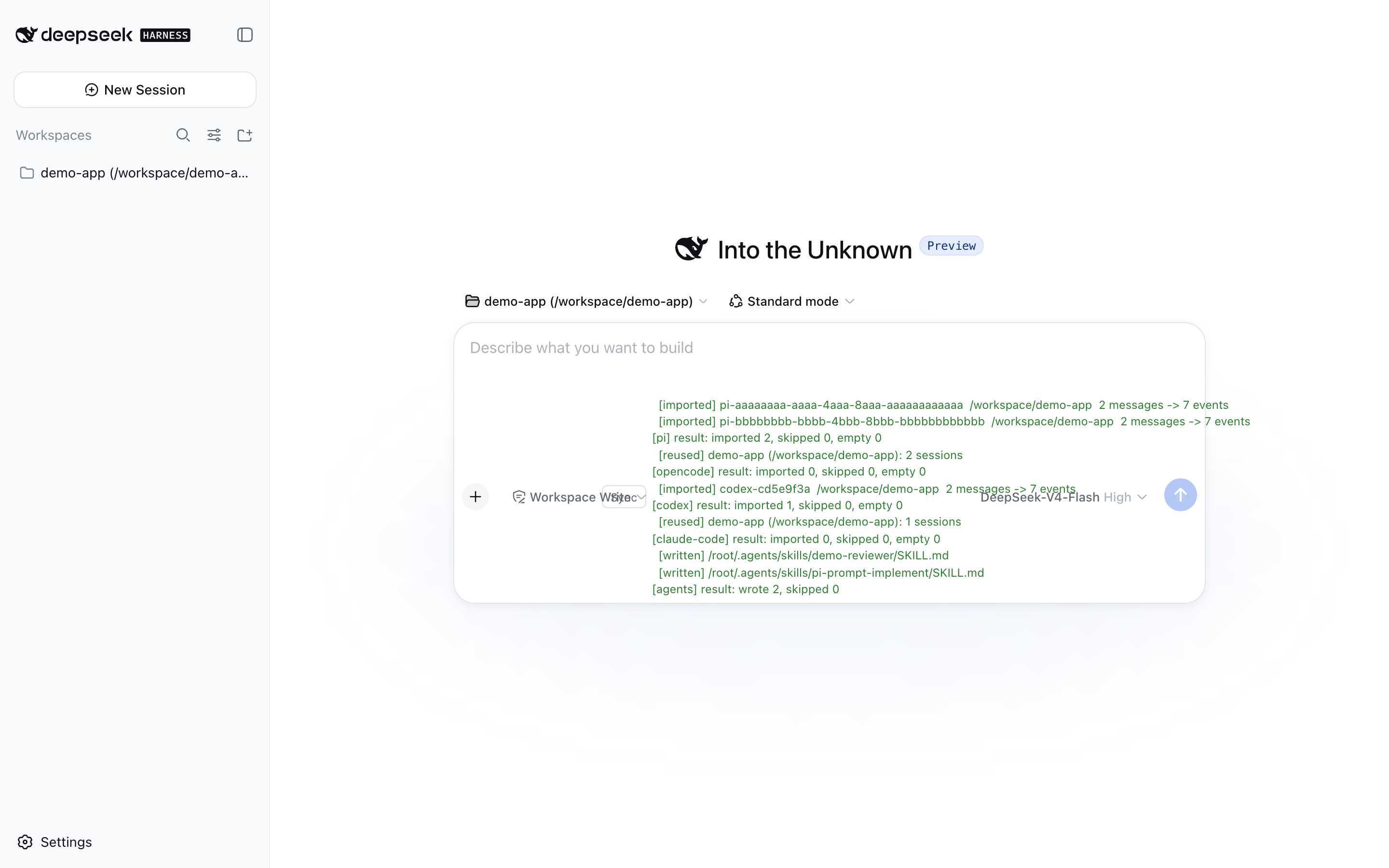
Clicking Sync runs the full import and shows the result inline:
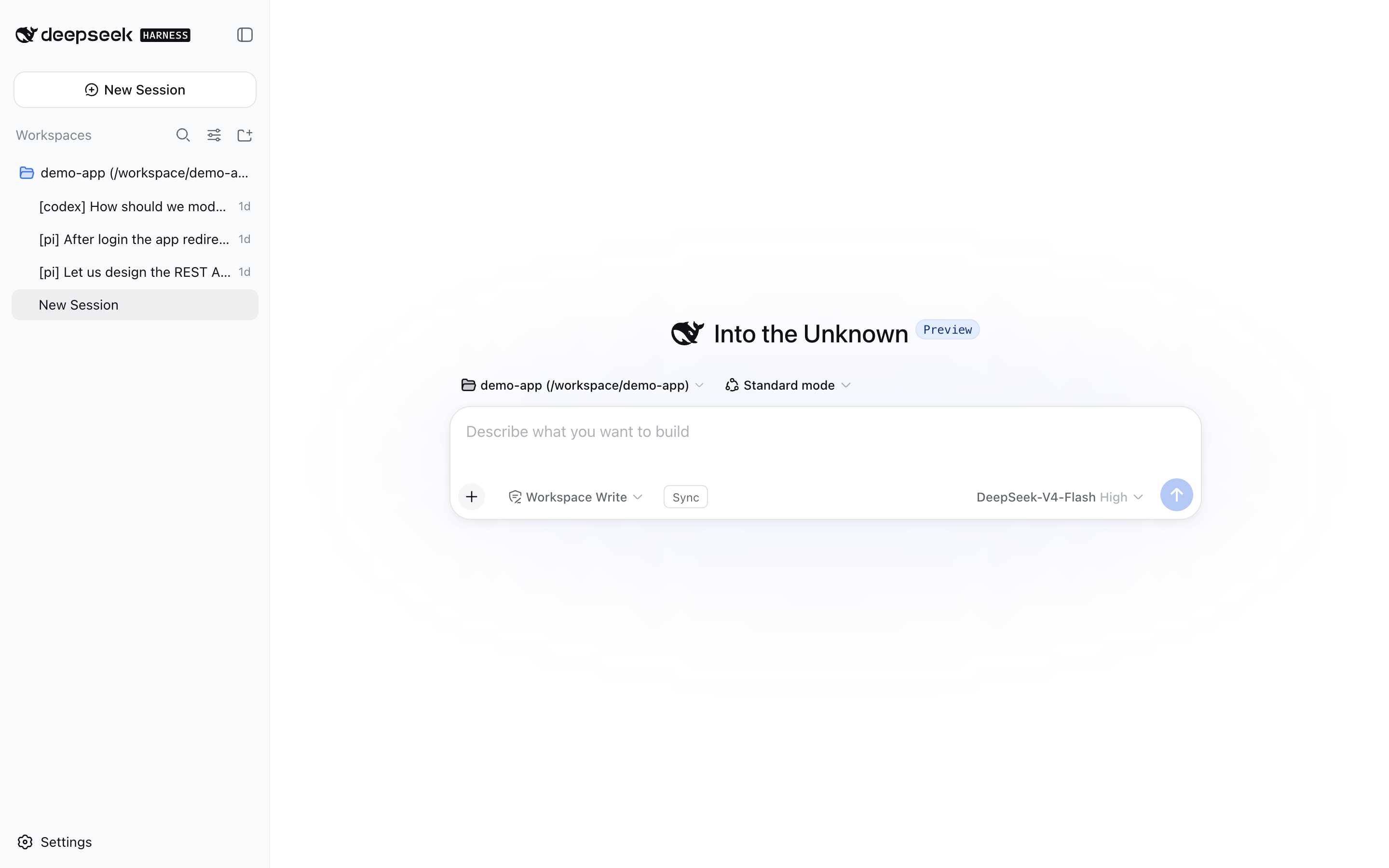
Imported sessions land in a workspace matching their original project folder, with source-tagged titles ([pi], [opencode], [codex], …):
An imported session opens like a native dsh session — text, reasoning, and tool calls are preserved, and you can keep talking:
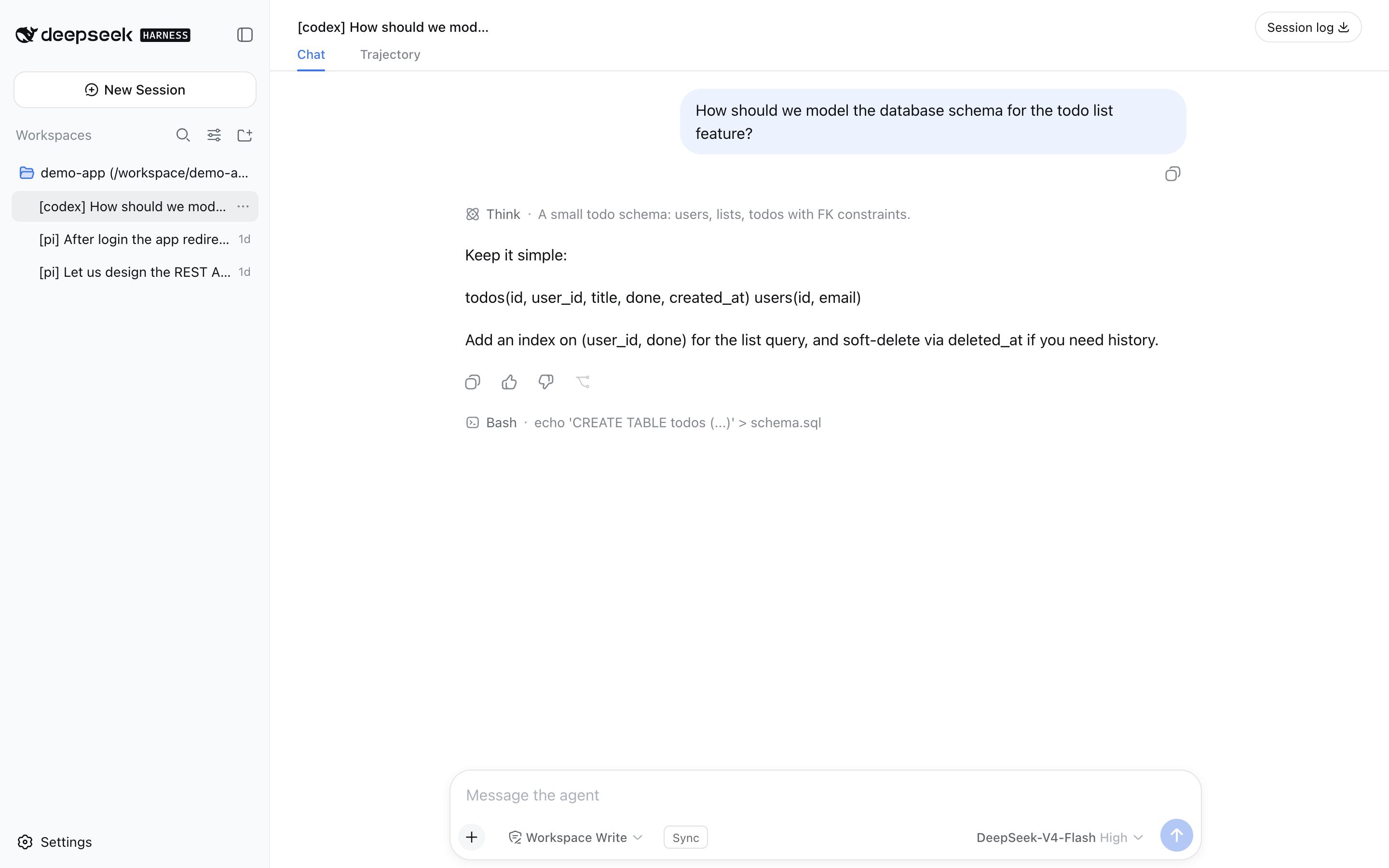
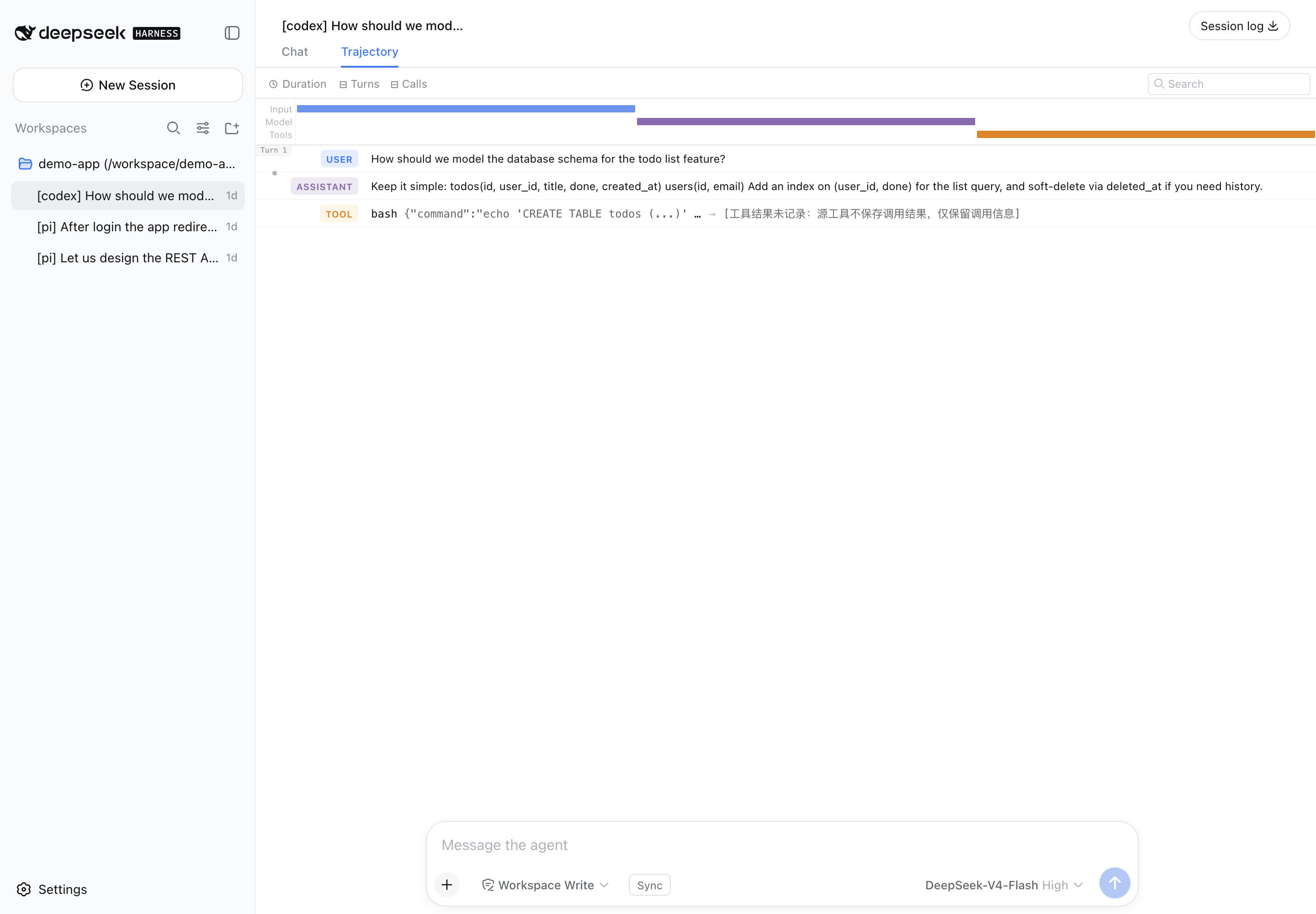
Tool calls survive the import as real trajectory entries — the Trajectory tab renders a card per call (here a bash call from the imported codex session):
Installation
The plugin is published on npm as dsh-unified-context and declares a dsh.bundle, so the official one-command installer activates it automatically. The previous dsh-import-agents package (0.3.1) remains available for old checkouts.
One command (recommended)
dsh plugin --profile web add dsh-unified-context
dsh plugin add installs the package and appends it to the profile's bundle list (the layer is active — no manual config). Then restart dsh web and refresh the page.
Every
pnpmverb works throughdsh plugin --profile <name>— e.g.dsh plugin --profile web remove dsh-unified-contextuninstalls.
Install sources (spec)
The <spec> argument is a standard pnpm package spec:
| Source | Command |
|---|---|
| npm (latest) | dsh plugin --profile web add dsh-unified-context |
| npm (exact / range) | dsh plugin --profile web add dsh-unified-context@0.5.0 · @^0.5 |
| GitHub (short) | dsh plugin --profile web add github:Chang-Tong/dsh-unified-context |
| GitHub (pinned commit) | dsh plugin --profile web add github:Chang-Tong/dsh-unified-context#<sha> |
| Git URL | dsh plugin --profile web add git+https://github.com/Chang-Tong/dsh-unified-context.git · #v0.2.4 |
| Local checkout | cd <checkout> && dsh plugin --profile web add . or file:/path/to/dsh-unified-context |
| Dev link | dsh plugin --profile web add link:/path/to/dsh-unified-context |
| Tarball | dsh plugin --profile web add ./dsh-unified-context-0.2.4.tgz (or an https://… URL) |
Notes:
- Relative specs (
.,../plugin, and theirfile:/link:forms) are anchored to the invoking directory —add .from a plugin checkout installs that checkout. - Git-hosted plugins that build during install run their
preparescript, which pnpm ≥ 10 blocks until allowed: the firstaddfails with anallowBuildshint — copy the printed key into the profile'spnpm-workspace.yamland re-run. Installing a built tarball or a local checkout needs no allowance. - After every install, dependencies whose manifest declares
dsh.bundlejoin the layer stack automatically; bundle-less packages install as plain dependencies (one-time warning).
Restart and verify
- Restart
dsh web— the host plugin registers its slash commands at startup; the client bundle (the Sync button) is served automatically. - Refresh the page — the old page's RPC connection is gone after a restart.
- Verify: the composer tool row shows the Sync button, and
/import-allanswers in the input.
# optional sanity checks
npm view dsh-unified-context version     # latest published version
pnpm list dsh-unified-context            # installed in the profile
Disable the session-start migration prompt with
config: { offerOnStart: false }on the inserted row. Source paths and defaults are overridable the same way — see Configuration.
Usage
Quick start
- Refresh the page after a restart.
- Click Sync in the composer tool row — or type
/import-allin the input. This runs the complete migration: sessions from all five sources, agents → skills, shared context links, and paused automation tasks. - Imported sessions appear in the session list (grouped by workspace); imported agents appear as skills; the Automation tasks page shows the migrated tasks (paused — pause the source automation first, then resume it in dsh).
Everything is idempotent — run it as often as you like; already-imported sessions are skipped, existing links are reused, and identical automation tasks are not duplicated.
Slash commands
| Command | What it does |
|---|---|
/import-pi [options] | Import pi sessions |
/import-opencode [options] | Import opencode sessions |
/import-codex [options] | Import codex sessions |
/import-claude-code [options] | Import claude-code sessions |
/import-workbuddy [options] | Import WorkBuddy sessions |
/import-agents | Convert pi/opencode agents & prompts into dsh skills |
/link-context [--project DIR] [--dry-run] [--push] [--memory=authority|merge|off] [--authority=harness] | Share one AGENTS.md/CLAUDE.md/CODEBUDDY.md, skill hub and long-term memory across harnesses with symlinks (never copies) |
/import-automations [--only id] [--activate] [--dry-run] | Migrate Codex + WorkBuddy automations into dsh scheduled tasks (paused by default) |
/import-all [options] | All of the above (5 session sources + agents + context links + paused automations) |
/attach-workspaces | Attach imported sessions to cwd-matched workspaces (retro-fit) |
Options: --limit N · --project <substr> · --since <iso|ms> · --no-tools · --tools-as-text · --tool-truncate N · --context-project DIR · --push · --activate
CLI (no dsh needed)
node import.mjs all                    # dry-run preview (writes nothing)
node import.mjs all --apply            # sessions + skills + shared context links
node import.mjs sessions codex --apply --limit 20        # one source at a time
node import.mjs sessions workbuddy --apply               # WorkBuddy sessions
node import.mjs agents --apply         # agents/prompts → skills only
node import.mjs context --apply        # share AGENTS.md/CLAUDE.md/CODEBUDDY.md + skills
node import.mjs context --push --apply # also link hub skills into every harness root
node import.mjs context --project-dir ~/work/app --apply # project-level unification
node import.mjs context --memory=merge --apply           # merged memory index (references, no copies)
node import.mjs context --authority=workbuddy --apply    # pick which harness memory wins
node import.mjs automations            # plan Codex/WorkBuddy automations (paused)
node export.mjs                        # export sessions as Markdown for any agent to read
import.mjsdefaults to dry-run; pass--applyto write.all= five session sources + agents + context links (with--apply) + the automation plan. Creating automation tasks needs the running host — use/import-automationsin dsh.contextlinks one shared copy instead of copying: no-op on re-runs, conflicts are reported and left untouched;--pushopts into bidirectional skill parity.export.mjswrites$DSH_HOME/exports/<source>/<session-id>.md(--source,--project,--limit,--since,--out,--no-reasoning,--no-tools).
How it works
flowchart LR
    subgraph sources["Local data"]
        PI["pi sessions<br/>~/.pi/agent/sessions"]
        OC["opencode sessions<br/>~/.local/share/opencode/opencode.db"]
        CX["codex sessions<br/>~/.codex/sessions"]
        CC["claude-code sessions<br/>~/.claude/projects"]
        WB["WorkBuddy sessions<br/>~/.workbuddy/projects"]
        AG["agents & prompts"]
        CTX["context<br/>AGENTS.md / CLAUDE.md / CODEBUDDY.md<br/>skills / project config"]
        AU["automations<br/>codex TOML + WorkBuddy SQLite"]
    end
    subgraph plugin["dsh-unified-context"]
        R["readers<br/>pi / opencode / codex / claude / workbuddy"]
        C["convert<br/>turn structure + tool events<br/>(real tool results when recorded)"]
        W["write<br/>dsh JSONL / ctx.sessionPersistence"]
        S["skills<br/>SKILL.md bundles"]
        L["context linker<br/>one shared copy + symlinks"]
        A["automation planner<br/>rrule → dsh schedule"]
    end
    subgraph dsh["DeepSeek Harness"]
        SL["session list & resume"]
        TR["trajectory & tool cards"]
        SK["ctx.skills.list()"]
        SC["scheduled tasks"]
    end
    PI --> R
    OC --> R
    CX --> R
    CC --> R
    WB --> R
    AG --> S
    CTX --> L
    AU --> A
    R --> C --> W --> SL
    W --> TR
    S --> SK
    L --> SK
    A --> SC
The importer is a pure converter: lib/ parses each source format into a normalized message stream, then emits the exact dsh JSONL event layout (checksummed zstd frames, project-dir encoding) — byte-for-byte the format the dsh persistence backend reads back with its own list / load / prepare.
Sessions. Each user message opens a turn (turn/start + user/message); following assistant messages join it with increasing step numbers; every turn closes with turn/end. pi thinking → dsh reasoning blocks. pi toolCall, opencode tool, claude tool_use, codex tool_use, WorkBuddy function_call → tool-call content blocks plus paired tool/call + tool/result events: the trajectory UI renders call cards, and the tool/result answers every tool_calls so OpenAI-compatible APIs accept resumed requests. WorkBuddy also stores the real result (function_call_result), which is preserved; the other formats only keep the call, so their tool/result carries a clearly marked placeholder. WorkBuddy's injected <system-reminder> context is stripped and only the actual <user_query> turn is imported. --tools-as-text switches to plain text (no trajectory cards); --no-tools drops tool calls. Mechanical records (step-start, patch, compaction, …) are skipped.
Agents & prompts → skills. Written to $DSH_AGENTS_HOME/skills/<name>/SKILL.md (default ~/.agents/skills/), discoverable via ctx.skills.list(). Name conflicts are renamed <name>-<source> (e.g. k3-reviewer-opencode); existing bundles are only completed, never clobbered; identical content is skipped; frontmatter records metadata.source / metadata.kind.
Context. Instructions and skills are not converted; they are linked to one canonical copy (see Context parity). The migration never writes a second copy into a harness workspace.
Automations. Codex automation.toml files and WorkBuddy's automations SQLite database are planned into dsh scheduled tasks (see Automations).
Context parity
Switching harnesses must not change what the model sees. The chat transcript is only one layer of context; the importer migrates the rest too — and does it by linking, not copying:
| Context layer | What it is | How the migration handles it |
|---|---|---|
| Conversation | user/assistant messages, reasoning, tool calls, tool results | imported into dsh sessions (real results preserved where recorded) |
| Instructions | AGENTS.md, CLAUDE.md, CODEBUDDY.md — global and per project | one canonical file; every harness path is a symlink to it |
| Skills | <name>/SKILL.md bundles and flat <name>.md skills | one shared hub (~/.agents/skills); harness-only skills are adopted through links, identical copies become links |
| Project config | opencode.json, .claude/settings.json, .pi/settings.json, .codex/config.toml, .workbuddy/settings.json, … | never copied: every harness opens the same project directory, so the files already stay in place (their formats remain harness-native) |
Where each harness reads context:
| Harness | Global instructions | Global skills | Project instructions | Project skills |
|---|---|---|---|---|
| dsh | $DSH_HOME/AGENTS.md | ~/.agents/skills (hub) | AGENTS.md / CLAUDE.md | .agents/skills |
| codex | ~/.codex/AGENTS.md | ~/.codex/skills | AGENTS.md | .codex/skills |
| claude-code | ~/.claude/CLAUDE.md | ~/.claude/skills | CLAUDE.md | .claude/skills |
| pi | ~/.pi/agent/AGENTS.md | ~/.pi/agent/skills | AGENTS.md / CLAUDE.md | .pi/skills |
| opencode | ~/.config/opencode/AGENTS.md | ~/.config/opencode/skills (also reads ~/.agents/skills and ~/.claude/skills) | AGENTS.md | .opencode/skills |
| WorkBuddy | identity files SOUL.md / IDENTITY.md / USER.md / MEMORY.md (harness-native, not unified) | ~/.workbuddy/skills | CODEBUDDY.md / .codebuddy/CODEBUDDY.md / AGENTS.md | .workbuddy/skills / .codebuddy/skills |
Rules the linker follows:
- One real copy per name. The hub (
~/.agentsfor global context,<project>/.agents/skillsfor project context) holds the canonical file/directory; every harness read-path becomes a relative symlink to it. - Never overwrite a difference. Identical files/copies are replaced with links (content-preserving); divergent copies are listed as conflicts and left untouched — merge them manually and re-run.
- Pull-only by default. Every harness contributes its skills to the hub dsh reads, so migrated sessions see the union.
--pushadditionally links the hub's skills back into every harness root for full bidirectional parity (opencode is skipped because it already reads~/.agents/skills; that would load skills twice). - Idempotent and reversible. Re-running applies only missing links; deleting a symlink restores the previous per-harness file.
- Project scope (
--project DIR/--context-project DIR, default: the current conversation's directory) unifiesAGENTS.md/CLAUDE.md/CODEBUDDY.mdand converges.agents/.claude/.codex/.pi/.workbuddyproject skill roots. It never fabricates a harness root that the project does not already use. - Not unified: WorkBuddy's global identity/memory files (no single-file equivalent in dsh), MCP server definitions, provider/model and permission settings — these stay harness-native, and the README's FAQ says so explicitly.
Run it from the GUI with /link-context (dry-run with --dry-run), or from the CLI with node import.mjs context [--apply] [--push] [--project-dir DIR].
Long-term memory
Memory is a separate context layer with two scopes:
| Scope | Native sources | Canonical store |
|---|---|---|
| Project | Claude Code ~/.claude/projects/<encoded>/memory/; WorkBuddy <project>/.workbuddy/memory/ | <project>/.agents/memory/ |
| Agent | Codex ~/.codex/agent-memory/<agent>/; Claude Code ~/.claude/agent-memory/<agent>/ (per agent — Codex's layout is the reference) | ~/.agents/agent-memory/<agent>/ |
Policies (--memory):
authority(default) — one real directory wins (project: Claude, then WorkBuddy; agent: Codex, then Claude; override with--authority=<harness>); the other harness path becomes a symlink to it. Non-empty, divergent memory is reported as a conflict and left untouched instead of being merged.merge—<project>/.agents/memory/MEMORY.mdbecomes a generated index that references every harness's memory notes in place (absolute paths, no copies); no directory is replaced. Agent memory remains authority.off— do not touch memory.
dsh has no independent memory reader, so a small marked block (<!-- dsh-unified-context:memory:begin -->) is generated in the project AGENTS.md (the file every harness reads) pointing at .agents/memory/; notes are read on demand instead of inflating every prompt. Content outside the marked block is never modified.
Codex's agent-memory is per agent, not per project, so it converges at ~/.agents/agent-memory/<agent>/ instead of being folded into project memory. The whole memory layer is idempotent and opt-out (--memory=off).
Automations
Scheduled work migrates too:
| Source | Location | Mapping |
|---|---|---|
| Codex | ~/.codex/automations/<id>/automation.toml | name → task title, prompt unchanged, rrule → DTSTART;TZID=Asia/Shanghai + RRULE, target: cron → a fresh conversation in the recorded cwds[0]; heartbeat → the migrated Codex conversation (codex-<thread-id>) when it was imported, otherwise one reused conversation |
| WorkBuddy | ~/Library/Application Support/WorkBuddy/automations/automations.db | recurring rows → a fresh conversation in the recorded cwd; model/WeChat-push/skill selection are not carried |
Everything is imported paused by default: pause (or delete) the source automation first, then resume the dsh task from the Automation tasks page. /import-automations --activate arms active sources directly. Before resuming, verify the translated schedule — the reference time is the next occurrence after import, not the original creation time (relevant for INTERVAL>1 rules).
Not carried: the source model and reasoning effort (the scheduled conversation uses the dsh preset default), notification policy / WeChat push, per-automation skill selection, and historical run records. node import.mjs automations prints the plan without writing; task creation needs the running host (/import-automations).
Configuration
| Key | Default | Meaning |
|---|---|---|
offerOnStart | true | Ask about migration when a new top-level session starts |
piRoot | ~/.pi/agent/sessions | pi session root |
piAgentRoot | ~/.pi/agent | pi agents & prompts root |
opencodeDb | ~/.local/share/opencode/opencode.db | opencode SQLite path |
opencodeConfig | ~/.config/opencode | opencode agents root |
codexRoot | ~/.codex/sessions | codex session root |
claudeRoot | ~/.claude/projects | claude-code projects root |
workbuddyRoot | ~/.workbuddy | WorkBuddy data root (sessions, skills) |
workbuddyAutomationsDb | ~/Library/Application Support/WorkBuddy/automations/automations.db | WorkBuddy automations SQLite database |
codexHome | ~/.codex | Codex config root (automations/ is read from here) |
timeZone | Asia/Shanghai | time zone used when translating automation RRULEs |
skillsRoot | $DSH_AGENTS_HOME/skills | skills output root |
toolTruncate | 1000 | tool-call arguments truncation (chars) |
The migration prompt only fires for brand-new top-level sessions (startup, not subagents) that have a cwd and unimported history. Per-project decisions and the global agents decision are stored in $DSH_HOME/unified-context-state.json; headless environments without a UI provider silently skip the prompt.
Testing
verify.mts— mounts the real dsh JSONL backend + skill provider on staged output (node --import tsx/esm ../dsh-unified-context/verify.mts <sessions-root> <skills-root>from the dsh checkout) → expectsSESSIONS ALL PASS / SKILLS ALL PASS.plugin/plugin-test.mts— end-to-end: loads the plugin on a real cordis context, runs the commands and the session-start migration offer, asserts idempotency and state persistence.scripts/e2e-commands.mjs— manual end-to-end for the new commands: mounts the plugin on a real cordis command runtime and invokes/link-context(apply in an isolated fake HOME, then a real-HOME dry run) and/import-automations(in-memory schedule: created paused, re-run created 0 skipped 11).tests/— Vitest component tests for the Sync button (sync-button.spec.tsx,sync-button-hide.spec.tsx), reader tests (opencode-reader.spec.ts,workbuddy-reader.spec.ts), context-linker tests (context.spec.ts), automation tests (automations.spec.ts,workbuddy-automations.spec.ts), memory tests (memory.spec.ts), real-tool-result conversion (convert-tool-result.spec.ts), plusattach-workspaces.spec.ts.- CI (GitHub Actions,
macos-latest, Node 22):pnpm install→pnpm run build→npx vitest run.
pnpm install          # devDependencies (esbuild, vitest)
pnpm run build        # rebuild lib/client.js (Sync button bundle)
npx vitest run        # component tests
FAQ
Why does Sync say "new imports 0, skipped N"? Idempotency working as intended: those sessions were imported before, so they are skipped. Nothing is duplicated.
Tool call results are missing — why?
pi, opencode, codex, and claude-code store only the call, so their imports keep the calls as tool-call blocks with a clearly marked placeholder tool/result (the trajectory still renders cards, and resumed requests stay API-legal). WorkBuddy records real results, and those are imported verbatim.
Does context migration duplicate files into every harness?
No. /link-context creates one canonical copy plus symlinks; identical existing copies are replaced with links, and divergent copies are reported as conflicts (left untouched) instead of being overwritten. Pull-only is the default; --push opts into linking hub skills into every harness root.
Why are migrated automations paused?
To avoid double execution while the source automation (Codex/WorkBuddy) is still active. Pause or delete it in the source harness, then resume the dsh task. --activate skips the paused default if you have already disabled the source.
Are WorkBuddy's SOUL.md / MEMORY.md migrated?
Not into the shared instruction files: they are WorkBuddy-native identity/memory files with no single-file dsh equivalent, and they remain where WorkBuddy reads them. WorkBuddy skills and the project CODEBUDDY.md are part of the shared context.
Will it keep asking me to migrate?
Only while unimported sessions exist, and only per project. Once you decline or an import completes, the decision is remembered in $DSH_HOME/unified-context-state.json.
Why do I need to refresh after a dsh restart? The old page's RPC connection is gone after a restart; commands (and the Sync button) fail until you refresh.
Node version requirement?
Node ≥ 22.19 — same baseline as dsh (node:sqlite, zstd via node:zlib).
License
MIT — see LICENSE.
Comments
Loading…
Similar plugins
by Chang-Tong
Import pi / opencode / codex / claude-code sessions, chat history, and agents into DeepSeek Harness — one-click Sync button, slash commands, session-start migration prompt
★ 13
MIT
JavaScript
Aug 25, 2026
dsh plugin --profile web add dsh-import-agentsby Nwflower
Import 14+ external agent chat histories (Claude Code, Codex, ChatGPT, Cursor, Gemini, Reasonix, opencode, ZCode, Grok Build, OpenClaw, Pi, Hermes, Kimi CLI, DSH) into DeepSeek Harness as resumable se
★ 298
↓ 4.7k/wk
MIT
JavaScript
Nov 6, 2026
dsh plugin --profile web add dsh-chat-importby howtomakeaname
Import local sessions from Cursor, Codex, Claude Code, ZCode, Kimi into DeepSeek Harness.
★ 4
↓ 134/wk
MIT
JavaScript
Oct 21, 2026
dsh plugin --profile web add dsh-agent-session-importby ciskonc
Claude Code-style @path imports for DeepSeek Harness: expands @imports in AGENTS.md/CLAUDE.md and injects referenced files into context at session start
★ 6
↓ 790/wk
MIT
TypeScript
Oct 24, 2026
dsh plugin --profile web add dsh-context-importsby PerryLink
Four-source migration wizard for DeepSeek Harness: move Claude Code, Codex, OpenCode and Hermes sessions, memories, skills, instructions and slash commands into DSH (/move wizard + resumable sessions,
★ 32
↓ 840/wk
Apache-2.0
JavaScript
Nov 6, 2026
dsh plugin --profile web add dsh-claude-moveby JiangHuai24
Mirror WorkBuddy, ZCode, Codex and other coding agents sessions into DeepSeek Harness as live tasks, one workspace per application.
★ 0
MIT
JavaScript
Nov 5, 2026
dsh plugin --profile web add @local/agent-sync