
dsh-quick-model-switch
Manifest validCodex-style composer model picker: a card showing the current model and a draggable slider that sets reasoning effort, with one stop per level the model advertises and an Off stop when the provider su
dsh-quick-model-switch
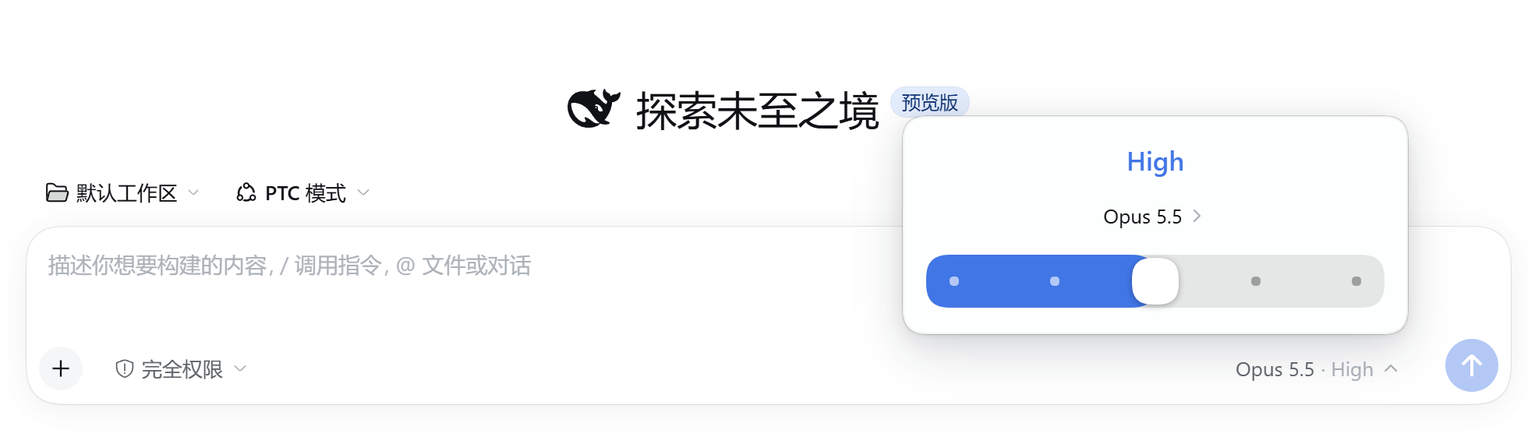
A Codex-style model picker for the DeepSeek Harness composer.
It replaces the composer's model menu with a small card — the reasoning effort on top, the current model below it, and a draggable effort slider at the bottom — the way Codex's model switcher works.

Screenshots
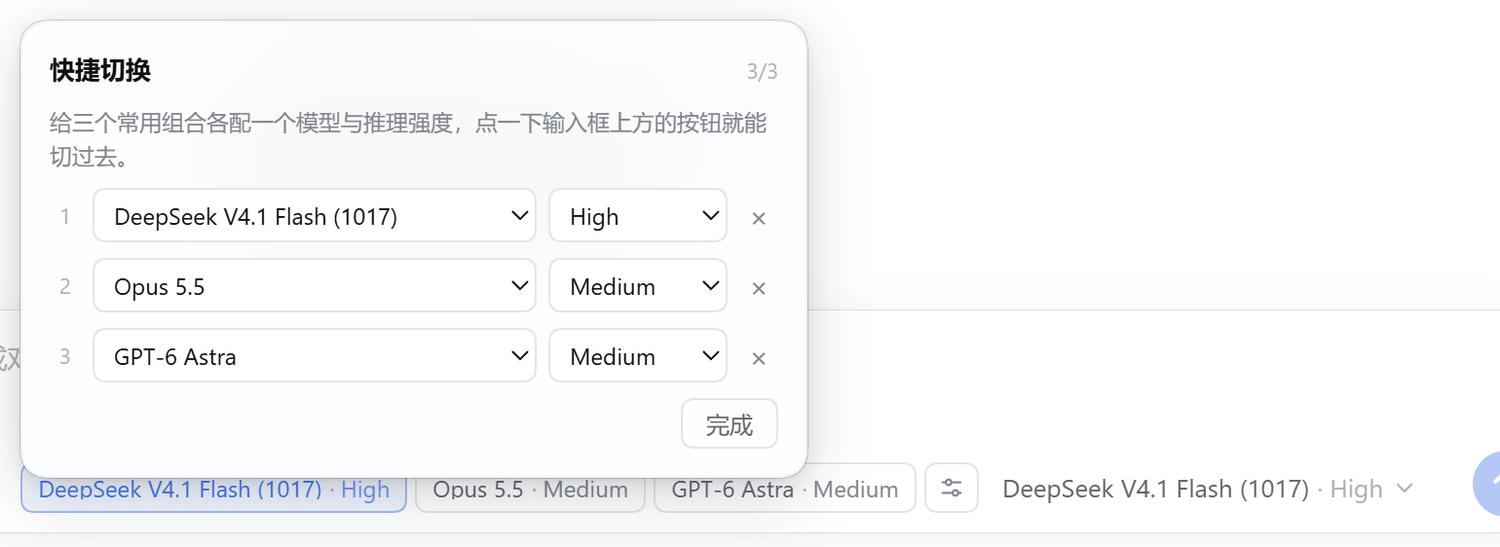
Three quick-switch chips left of the model button:

Configuring them in the plugin's own popover:
Features
- Codex-style card anchored above the composer model button, flipping below when there is no room.
- Draggable effort slider with one stop per effort the model actually advertises (
off,minimal,low,medium,high,xhigh,maxwhen advertised). The thumb snaps to whole stops, animates between them, and the effort label updates while you drag, not only after you release. - No provider-default stop. Levels come from the adapter's advertised
reasoning.efforts. A model without a stored effort showsmediumwhen available, otherwise its advertised default (or the middle level), never a synthetic "default" entry. Offstop when the model advertises it; committing it sendsreasoningEffort: "off", which providers like Codex map to "no reasoning".- Model list with provider grouping, the current selection, badges, loading and error states, and keyboard navigation.
- Quick switch: up to three saved model + effort pairs sit as chips in the composer tool row; one click switches both. The chips are configured in the plugin's own popover (the sliders button next to them), not hard-coded.
- Full keyboard support: arrows move one stop,
Home/Endjump to the ends,Escapecloses and returns focus. - Theme-aware: every color, radius and shadow comes from DSH theme tokens, light and dark.
- Chinese and English UI.
Requirements
- DeepSeek Harness
0.2.2-rc.1or newer (the client slot API it shadows was stabilized in this line). - A web profile (
dsh webor the desktop app).
Install
dsh plugin --profile web add github:caidows/dsh-quick-model-switch
Then reload the page. The plugin registers a client slot occupant at priority -1 on conversation.input.model, shadowing the shipped picker; disabling or removing the plugin restores the stock picker with no state left behind.
To install from a checkout, point dsh plugin add at the package directory instead.
Quick switch
The three chips left of the model button are one-click model + reasoning-effort pairs. Click the sliders button beside them to open the settings popover: each slot has a model select and an effort select (the effort list follows whichever model you pick). Slots store provider, model and effort, so a click switches the session to exactly that combination through session.selectModel.
The chips live in the browser's localStorage under codex-model-picker:quick-picks:v1, so they are per-profile rather than per-session, and they survive restarts. Clearing a slot in the popover removes its chip immediately.
How it works
cordis.patch.yml inserts one row, codex-model-picker, which loads the client bundle in client.js. The bundle renders into the composer's model slot and reads the same per-session model directory (ctx.modelDirectories.directoryFor(sessionId)) the shipped picker uses, so model switches and effort switches go through session.selectModel and stay in sync with the rest of the UI.
view.js and style.css are the sources; client.js is generated:
node build.mjs
License
MIT
Comments
Loading…
Similar plugins
by xuanfenglajiao
Replaces the composer model menu with a recent-models list, an all-providers flyout and a draggable reasoning-effort slider; a Manage models row at the bottom of the flyout opens the Models settings d
★ 0
MIT
JavaScript
Nov 16, 2026
dsh plugin --profile web add dsh-effort-menuCodex-style reasoning-effort slider for the DeepSeek Harness composer
★ 0
MIT
JavaScript
dsh plugin --profile web add dsh-thinking-sliderby WanX609
Codex desktop-style model and reasoning-effort selector: one trigger, one popover, a model list pane and a pixel-replica effort slider, with every provider projected onto the official Off/Low/High/Max
★ 0
MIT
JavaScript
Nov 14, 2026
dsh plugin --profile web add dsh-codex-model-effort-selectorby zszz3
Replaces the composer model control with an inline Provider/Model trigger — clicking it opens a two-column card with providers on the left and the hovered provider's models on the right — and moves th
★ 2
MIT
JavaScript
Oct 22, 2026
dsh plugin --profile web add dsh-model-provider-prefixby timxiang-948
Model and reasoning-effort controls in the DSH composer tool row, with a Pi-Harness-inspired effort slider whose track and composer border tint with the level, plus Shift+Tab cycling.
★ 0
MIT
JavaScript
Nov 10, 2026
dsh plugin --profile web add dsh-composer-model-controlsby caidows
Codex-style model picker for the DeepSeek Harness composer: draggable reasoning-effort slider, model list, no default stop.
★ 0
MIT
JavaScript
Nov 9, 2026
dsh plugin --profile web add dsh-codex-model-picker