

dsh-proxy
Manifest valid★ 5No project description is available for this repository yet.
dsh-proxy
English | 简体中文
为 DeepSeek Harness 注入自定义 HTTP 代理 —— 让 DSH 宿主进程的全部 fetch 流量(LLM 请求、模型发现、插件市场、web 搜索)走你指定的代理(Clash / mihomo / v2ray 等),无需开启 TUN 模式,也不依赖系统代理。
为什么需要它
DSH 桌面端 / Web 端的 LLM 请求由宿主 Node 进程发出,走的是 Node 全局 fetch(undici):
- 不读系统代理:Windows 设置里的代理、Clash 的"系统代理"开关对它无效。
- 不读代理环境变量:
HTTPS_PROXY等环境变量对 Node 全局 fetch 无效。 - 没有内置代理设置:DSH 的设置界面与提供方配置里都没有代理选项。
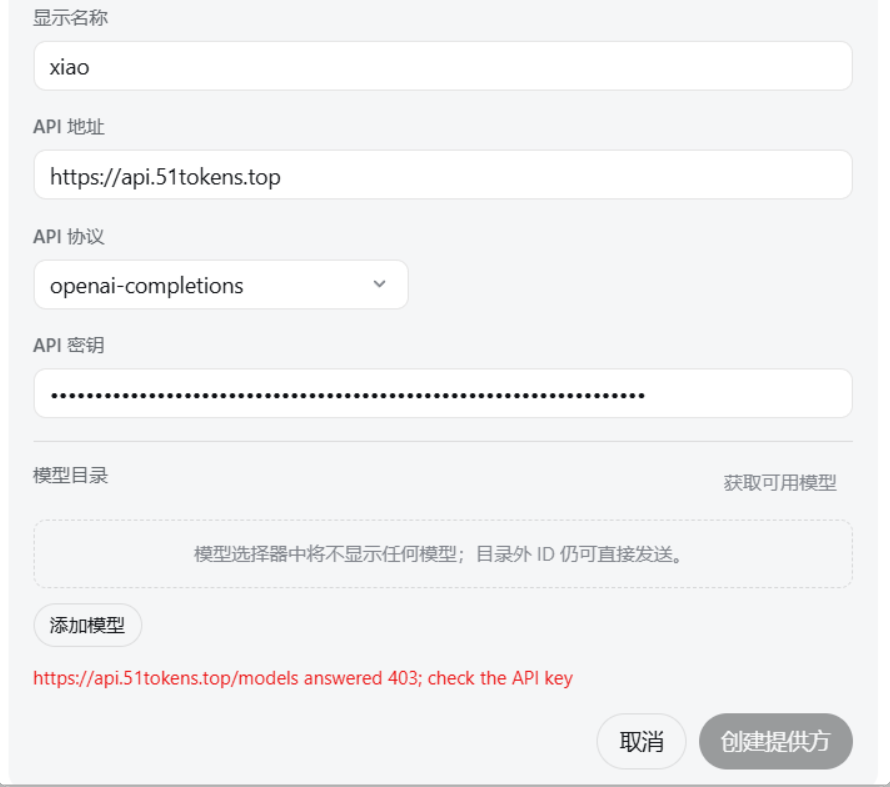
于是当某个 API 端点被 Cloudflare 按 IP 拦截(国内宽带段很常见)、或你必须经代理才能访问时,唯一的选择曾是 Clash 的 TUN 模式。本插件提供了另一条路:在宿主进程内把全局 fetch 的 dispatcher 换成 ProxyAgent,所有请求经你的代理出站,由 Clash 的规则模式继续负责分流(国内直连、国外走节点),互不冲突。
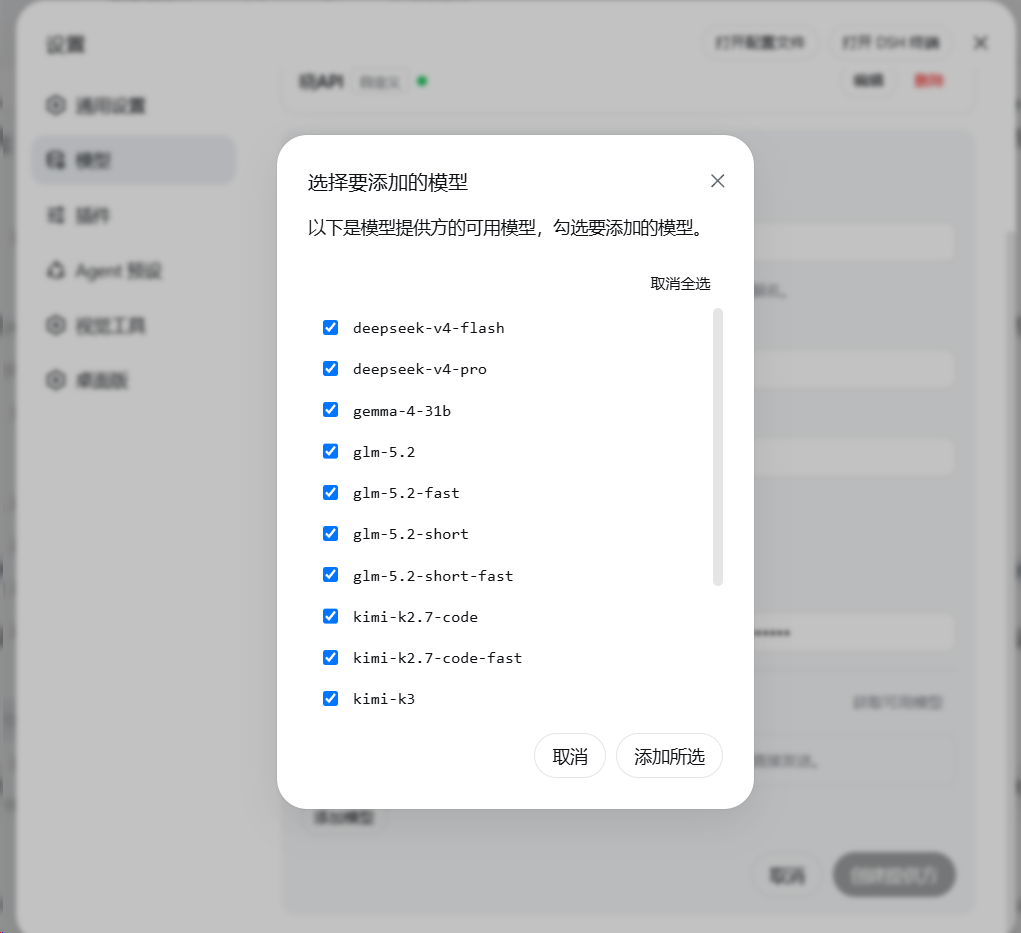
效果对比
| 使用前(被 Cloudflare 按 IP 拦截,403) | 使用后(正常拉出模型列表) |
|---|---|
 |  |
工作原理
插件与 DSH 的 LLM 适配器运行在同一个宿主 Node 进程中。加载时:
- 保存当前全局 dispatcher;
- 用
undici的ProxyAgent构造一个带绕过名单的路由 dispatcher,并通过setGlobalDispatcher安装; - 之后进程内所有全局 fetch(模型发现
GET /models、OpenAI SDK 聊天请求、插件市场、web 搜索等)都经代理出站; - 卸载插件或在设置中关闭开关,即恢复原来的 dispatcher,无需重启。
绕过名单(noProxy)默认包含 localhost、127.0.0.1、::1,本地回环请求永远直连。
安装
方式一:把下面这段提示词直接粘贴到 DSH 对话里(推荐)
复制以下整段文字,发送给你正在使用的 DSH Agent,它会代为完成安装与配置:
请帮我安装并启用 dsh-proxy 插件(DeepSeek Harness 的自定义 HTTP 代理插件)。步骤:
1. 执行:dsh plugin --profile desktop add github:BuLongY/dsh-proxy
   (DSH 桌面端用 desktop profile;纯 Web 部署则把 desktop 换成 web。
    如果提示有挂起的安装恢复事务 "another plugin install recovery transaction is pending",
    先把 %APPDATA%\DSH Desktop\plugin-install-recovery\state.json 重命名为 state.json.bak 隔离,再重试。
    如果报 ERR_PNPM_GIT_DEP_PREPARE_NOT_ALLOWED,按报错提示把完整的 allowBuilds 键加入
    %UserProfile%\.dsh\profiles\desktop\pnpm-workspace.yaml 后重试。)
2. 安装完成后提醒我重启 DSH Desktop 使插件生效。
3. 重启后插件默认启用代理 127.0.0.1:7890(Clash 混合端口)。
   如果我的代理地址或端口不同,请在 设置 → 插件 → 插件配置 → dsh-proxy 中直接修改,保存即生效,无需重启。
4. 用一个需要代理的 API 提供方(点"获取可用模型")验证是否成功。
方式二:命令行手动安装
dsh plugin --profile desktop add github:BuLongY/dsh-proxy
然后重启 DSH Desktop。插件默认启用 127.0.0.1:7890(Clash/mihomo 混合端口)。
发布到 npm 后也可直接 dsh plugin --profile desktop add dsh-proxy(无需构建放行步骤)。
配置
安装后在 设置 → 插件 → 插件配置 → dsh-proxy 中直接编辑(保存即时生效,无需重启):
| 字段 | 默认值 | 说明 |
|---|---|---|
enabled | true | 总开关。关闭即恢复直连,无需卸载。 |
host | 127.0.0.1 | 代理服务器地址。 |
port | 7890 | 代理服务器端口(1–65535)。 |
noProxy | localhost, 127.0.0.1, ::1, [::1] | 绕过名单:精确匹配主机名;以 . 开头匹配域名后缀(如 .lan);* 表示全部直连。 |
也可以直接编辑 %UserProfile%\.dsh\settings.yaml 中的 dsh-proxy 配置节。仅支持 HTTP 代理;SOCKS5 用户请使用 Clash/mihomo 的混合端口。
验证
- 确认 Clash/mihomo 正在运行且混合端口为 7890;
- 打开一个需要代理才能访问的 API 提供方配置页,点 获取可用模型;
- 能拉出模型列表即成功。失败时查看
%APPDATA%\DSH Desktop\logs\中当天日志里dsh-proxy的行。
平台支持
- Windows 10/11:主要开发与测试平台。
- macOS / Linux:插件本身是纯 Node 网络层代码,与平台无关;任何运行 DSH 的平台均可使用(欢迎反馈实测结果)。
常见问题
Q: 开了 Clash 系统代理,为什么 DSH 还是直连? A: 系统代理只对遵循它的应用有效(浏览器等)。DSH 的 LLM 请求在 Node 宿主进程里用 undici fetch 发出,不读系统代理——这正是本插件存在的原因。
Q: 和 Clash TUN 模式冲突吗? A: 不冲突。两者任选其一即可;同时开也没问题(请求会经代理端口再进 Clash,规则分流依然生效)。
Q: 会影响插件市场、web 搜索吗? A: 会——进程内所有全局 fetch 都走代理。在 Clash 规则模式下这正是期望行为:国内站点依然直连。
Q: 支持 SOCKS5 吗? A: 不支持。undici 的 ProxyAgent 只接受 HTTP/HTTPS 代理。Clash/mihomo 的混合端口同时提供 HTTP 代理能力,填它即可。
开发
npm install
npm run build      # tsc -> lib/
npm test           # node --test test/
# 带真实代理的 live 测试:
$env:DSH_PROXY_LIVE='1'; npm test
License
Compatibility
Versions
| Latest version | Published | Size |
|---|---|---|
| 0.0.1 | — | — |
Comments
Loading…
From the same category
DeepSeek Harness plugin for Reactive Resume: bridges your resumes and job applications into a Harness session over MCP.
★ 41.7k
↓ 215/wk
MIT
Aug 24, 2026
dsh plugin --profile web add dsh-plugin-reactive-resumeby dsh-market
The plugin market inside DeepSeek Harness — browse, search, one-click install · DSH 可视化插件市场
★ 10.2k
↓ 361.7k/wk
MIT
TypeScript
Nov 1, 2026
dsh plugin --profile web add dshmarketby Tencent
Let AI agents use your real, logged-in browser without interrupting your work. CLI + extension for browser automation across any shell-capable AI agent.
★ 9.9k
↓ 12.3k/wk
MIT
TypeScript
Nov 2, 2026
dsh plugin --profile terminal add @wxg-prc-cpg/browser-skill-dsh-pluginby yjh051108
dsh-routing-suite — injector + router-standard kit: install the runtime injector first, then the task-aware reasoning-mode router preset (measured P1-P23).
★ 7k
MIT
JavaScript
Sep 18, 2026
dsh plugin --profile web add @dsh-external/dsh-super-injectorby superdesigndev
OpenRouter for agent tools. Join community here: https://discord.gg/6mQYYfFMAn
★ 7k
NOASSERTION
Python
Nov 2, 2026
dsh plugin --profile web add treg-dshby Q00
Agent OS: the agent gets smarter on its own. We just hold the line: Interview-gated, staged evaluation, budgeted evolution loop. MCP server, 14 runtimes: Claude Code, Codex CLI, Gemini CLI, OpenCode,
★ 6.3k
MIT
Python
Nov 1, 2026