

dsh-supervision
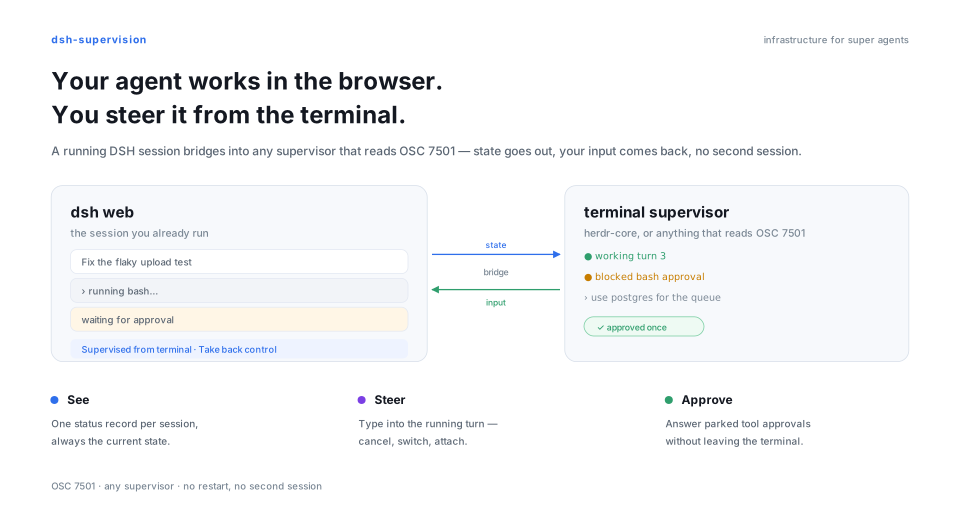
Manifest valid★ 4Bridge a running DSH session into any terminal supervisor — it sees the state, and it can steer.
dsh-supervision




Bridge a running DSH session into any terminal supervisor — it sees the state, and it can steer. The plugin mounts inside the dsh web process you already run: OSC 7501 records go out on the terminal, and operator input comes back into that same session. herdr-core is one supported supervisor; any supervisor that reads OSC 7501 and can write lines back can drive a bridged session, with no changes to DSH or the supervisor.
What you get
- One status record per session. The bridged session is the root record —
idle,working,done,blockedorerror; other sessions in the same process are child records carryingid=. - Operator input goes back in. Bare text steers a running turn,
/cancelends it,/status,/newand/attachinspect and switch sessions, and/approveor/rejectsettle parked asks — all from the terminal. - Approvals stop living in another surface. A parked ask turns the root record into
blocked · kind=permission, is settled from the terminal, and the GUI shows it at a glance — ringed sidebar row, covered input area — and one Unlock button takes the session back — so the person in the browser always sees who holds the session and has a way to take it back.
Works with
| Supervisor | How it connects | What it needs |
|---|---|---|
herdr-core (hc) | in-process tty via its own HC_TERMINAL_ID (or DSH_SUP_TERMINAL_ID when the host exports one) and the control socket with dsh-sup in its PTY; both are open at once | a dsh web started inside the supervised terminal, plus any PTY for the forwarder |
| Any supervisor that reads OSC 7501 | control socket + dsh-sup in its own PTY | it must read the PTY's OSC output and be able to write lines to that PTY's stdin |
| Another supervisor wanting in-process mode | set DSH_SUP_TERMINAL_ID | the variable is read, never written, by this package; any supervisor can set it |
GUI-only dsh web | nothing | the plugin exposes an inert socket and nothing else |
Quick start
Install
Plugins page — in DeepSeek Harness open the Plugins page, click Add plugin, enter dsh-supervision and install; then restart as the host asks. The GUI writes into the web profile, the same profile the command below targets.
CLI — for scripted setups:
dsh plugin --profile web add dsh-supervision   # the plugin, into the web profile
npm i -g dsh-sup                               # the forwarder, for the supervisor's PTY
dsh-sup is a separate package because it runs as its own program in the supervisor's PTY. Pin a version with @<version>.
Supervisor-side agent
Give this to the agent that drives the supervisor's terminal: it sets up the matching forwarder, reads the manual, and keeps what it learned for later sessions:
Read the installed plugin's version: `dsh plugin --profile web list` prints `dsh-supervision@<version>`, and for a `link:` row read `version` from that path's `package.json`. If the `dsh` command is missing or the list shows no `dsh-supervision` (a desktop DSH has no CLI), ask me whether to install the forwarder, and on my yes run `npm i -g dsh-sup@latest` — latest, without asking about a version again. Otherwise run `dsh-sup --version`: if the command is missing or prints anything other than that exact string, say what you found and, only after I agree, install it with `npm i -g dsh-sup@<plugin-version>`. Then run `dsh-sup --skill` and treat that printed manual as the authority: record how to use the forwarder — the version coupling, install and upgrade, and the session operations in the manual's own terms — in the skill, memory or AGENTS.md you use for supervisor work. Do not create or attach a session now; this is only about knowing how to use it before the work starts.
Connect a session
dsh-sup                                  # create a session in the dsh-sup process's directory
dsh-sup --cwd ~/work/project             # create it elsewhere (resolved here, then sent absolute)
dsh-sup attach session-abc123            # attach an existing session (or: dsh-sup session-abc123)
dsh-sup --pid 4711 new                   # pick the backend when several dsh web processes run
dsh-sup list                             # list every session on every live backend
list prints one table for every live backend and binds nothing. It answers from the same account the sidebar groups — the sessions a Workspace owns — so a persisted session appears even when no agent is loaded for it (LIVE no), while archived sessions and sessions no Workspace owns (subagent logs, folded history) are omitted. Blank sessions (never had a turn) are omitted too: the sidebar shows one only while it is the selected session, so listing it would name an id with no row to open — send one line and it appears in both places. An archived session is the single exception: an active bridge holds it, so it stays listed. PID names the dsh web process a row came from, so a multi-backend listing stays attributable:
SESSION            PID    CWD                LIVE  BRIDGED
session-4f2a…      4711   /Users/me/work     yes   -
Backends are found through $DSH_HOME/supervision (~/.dsh/supervision when DSH_HOME is unset). A bridge needs exactly one live backend; with several, the refusal names each candidate's pid and socket, and --pid picks one. --cwd applies to new and list only; list without it shows every session, with the CWD column naming where each one lives.
With --no-tui, or when stdin or stdout is not a terminal, the bridge reads stdin in the terminal's own line mode — it never enters raw mode — so Ctrl+C, Ctrl+Z, Ctrl+\, input echo and line editing keep working as they do without the plugin. Ctrl+S/Ctrl+Q stay the terminal driver's flow control: on the /dev/tty surface a paused terminal holds the bridge's records in an ordered queue instead of blocking the host, and they flush on resume. The stdout fallback (no controlling terminal) keeps a synchronous write, so there a paused terminal still stalls it. Operator input is read a line at a time, after Enter; the line discipline caps one line at its MAX_CANON (4 KB on Linux, 1 KB on macOS), so a much longer paste reaches the agent truncated. In a terminal, an attach opens the full-screen attach surface; a redirected stdout stays machine-clean (see How it reports).
Empty sessions stay out of the web UI. A session created here is attached to its project, but the DSH sidebar lists a session only after its first message. Until then it exists in dsh-sup list and on the bridge, with no row under the project. Send one line from the terminal (or attach and steer) and it appears.
Attach surface
When stdin and stdout are both terminals, an attach opens a full-screen surface
instead of appending lines: the conversation in a scrollable transcript viewport,
a multi-line editor for the next operator line, and a status line carrying the
session id, the reported state and the turn. The turn is shown only while the
plugin's echo config is on: nothing after welcome carries a count when echo
is off, so the bar keeps the state live from OSC records (while programStatus is
on) and shows no turn rather than freezing one. With programStatus off those
records stop arriving, so the state stays at the value the attach reported —
frozen, still shown. Everything the bridge forwards stays
in the transcript, so scrolling back reaches the whole attach. The surface
takes over the terminal's alternate screen while attached: terminal scrollback is
not written, the TUI viewport is the history, and the last frame is printed back
on the normal screen when the attach ends.
| Key | Effect |
|---|---|
Enter | send the editor's text as one operator line |
Shift+Enter | start a new line in the editor, when the terminal reports the modifier (modifyOtherKeys or the Kitty keyboard protocol); otherwise it submits like Enter |
Ctrl+C | clear what you typed; on an empty editor it hints, and a second press within 1.5 s leaves the attach (any other key resets that window) |
Esc | close the completion menu if one is open; otherwise send /cancel, which ends the running turn and keeps the attach |
Ctrl+D | leave the attach; the terminal is restored first |
PageUp / PageDown | scroll the transcript one page |
↑ / ↓ | scroll one line, while the editor is empty |
Home / End | oldest line / back to the newest (when the editor is empty) |
Scrolled back, the last row shows ↓ N new for the entries that arrived
meanwhile, and scrolling to the bottom resumes following the live transcript.
The surface is drawn with @earendil-works/pi-tui.
The surface is themed, so input and output are distinguishable at a glance: the
operator's line is a tinted block behind a ❯ gutter, assistant prose renders as
Markdown (headings, lists, inline code, fenced blocks with a border), tool calls
are coloured status rows (⏳ pending, ✔ ok, ✘ failed) with a dim detail
line, system and echo lines are dim, the status bar is a reverse-video row with a
colour-coded state, and the editor is framed in the accent colour. NO_COLOR, a
non-terminal stdout, or TERM=dumb keeps the same layout with no colour, so
captured output stays clean. Themes change how those lines look, never the keys
in the table above or the bytes a redirected stdout receives.
--no-tui keeps the append-only line surface on a terminal; a redirected
stdout always gets that line surface, so dsh-sup … | tee log stays
machine-clean.
Untested platforms. Windows terminals (ConPTY) and tmux are unverified: no
run has exercised the full-screen surface there. When you do, check three things
first — the alternate screen is restored on every exit path (Ctrl+D, /q, a
lost backend), the terminal reports a keyboard protocol the surface understands
(modifyOtherKeys or the Kitty protocol, which decide Shift+Enter), and the
pane has a /dev/tty the bridge can open; without one only the socket surface
mounts, and the reason lands on stderr.
Suggestions. The plugin sends a catalog frame with the session's skills and
registered host commands once the attach is up, and the editor turns it into a
menu: typing / lists every entry, typing /skill: narrows to the session's
skills as /skill:<name> (fuzzy-matching the bare name works too); Tab inserts
the highlighted completion, while Enter accepts and sends it immediately. Skills
come first, then the host commands the bridge can execute, then the forwarder's
own exits. Local verbs win: a host row whose name the plugin resolves locally
— /cancel, /status, /new, /attach, /approve, /reject, /answer,
bare /skill, /y, /n and the exits — is not offered, and typing that name
runs the local meaning. The one exception is a bare /skill: it is reserved for
the skill menu and answered with unknown command /skill. A host command such as
/compact executes in-process against the attached session and answers as one
echo — its own result text, or /<name>: ok when it reports none. A multi-line
result keeps its line breaks:
each line the command writes arrives as its own terminal line. It sends no model
message; the session log still records command/run and command/done, which
the web view can show.
The catalog frame is surface input only — it never reaches stdout or /dev/tty,
and line mode ignores it.
@file completion resolves against the session's directory when the fd binary
is installed. /skill:<name> is rewritten to /<name> (plus any words after
it) and steered as one user message; the host then injects the rendered skill
body exactly as it does for the web composer. An unknown or non-user-invocable
name answers skill not found: <name>. Known limits: the bridge carries no
attachments, and the command lifecycle (command/run/command/done) is not
mirrored into the terminal — the echo line is the whole report.
Leaving. /q, /quit, /exit and /bye — on a line of their own,
lowercase, nothing after them — leave the attach from either surface (TUI or
--no-tui): the forwarder sends bye, restores the terminal and exits 0. They are
never forwarded to the session, so nothing is left waiting on the model. The
forwarder also puts them at the end of the / menu as leave dsh-sup (local), so
the way out never depends on what the host's catalog advertises. In the
TUI, Ctrl+D still leaves outright, Esc closes an open completion menu first
and otherwise cancels the running turn, and Ctrl+C clears the editor; on an
empty editor it shows Ctrl+C again to exit and a second press within 1.5 s
leaves. /q now or /quiet are ordinary input; trailing spaces are ignored, so
accepting the menu entry and pressing Enter still leaves.
Answer an approval
Ask where the session stands, then answer the parked ask by id:
/status
session=session-4f2a… state=blocked turn=3 asks=3f9ac1

/approve 3f9ac1
[ask 3f9ac1] bash → allowed-once (source=supervisor)
/y and /n answer the only parked ask; with more than one parked they refuse and ask you to name it.
Answer an agent question
An ask_user_question call reaches the supervisor too: its card arrives in the
transcript with every option numbered, and the root reports
blocked:kind=question with msg=question: … [ask <id> /answer <id> N]. Answer
every question of the ask by its id:
/answer 3f9ac1 db=2 why=because
[ask 3f9ac1] question -> answered (source=supervisor)
One token per question: q1=2 picks option 2, q1=1,3 selects both, q1=-
skips it, and any other value is free text — the words after the first token join
it, so q1=two words is one custom answer. With a single question the id may be
omitted and the rest of the line is the value (/answer 3f9ac1 我的 想法). The
full-screen surface prints the same card and, while exactly one ask is open,
rewrites a bare 2 (or -, or 1,3) to /answer <id> 2; a multi-question ask
then answers with the plugin's answer-grammar error line instead of steering the
agent, and anything else is still an ordinary steer. From a
herdr-core HUD the same line needs no attach:
hc send <terminal> "/answer <id> 2". An asker that withdraws, or a bridge that
goes away, skips every question and closes the card.
Take back control
While a session is bridged the GUI marks it in the sidebar and over the input area. The session's sidebar row wears a 3px blue ring on its own rounding, a light-blue translucent fill (rgba(127, 174, 255, 0.30)), and a wider blue capsule that fills the row height with an animated whale tail at its right edge, so a supervised session cannot be mistaken for one that is yours to type into. Opening it covers the whole input area — editor and toolbar — with a blue-bordered, light-blue translucent panel (rgba(127, 174, 255, 0.30)): the editor is made inert, so neither the pointer nor an already-focused caret can type into it. A blue caption tab sits on the panel's top edge, above the frame, quoting the shipped English string — "This chat is supervised from elsewhere — the input box is locked" (localized English/Chinese via the host locale service); a Bridged badge with a small white whale tail is fused into the overlay's bottom-left corner; and the panel's single Unlock button posts the reclaim — only a confirmed release removes the guard, so a refused unlock leaves it in place. On a host whose composer has no [data-composer-card] wrapper, only the editor is made inert; the toolbar stays operable rather than freezing the surrounding page container. The bridge is dropped, the supervisor reports the clear record, and a dsh-sup forwarder exits 0.
Agent skill
The plugin ships a use-dsh-supervision skill, so the agent inside a supervised session knows it needs the same-version dsh-sup forwarder, checks it with dsh-sup --version, and offers the install only after the user agrees. dsh-sup --skill prints the forwarder's full manual.
How it reports
One dsh web process owns one session tree; the plugin mounts in it and opens its control socket, plus an in-process tty when the process runs inside a supervised terminal.
dsh web (the process you already run)
└── dsh-supervision plugin
      ├── control socket   $DSH_HOME/supervision/<pid>-<8hex>.sock   (0600)
      │     └── dsh-sup in the supervisor's PTY ── OSC 7501 + echo + mirror lines ──▶ supervisor (reads OSC 7501)
      └── in-process tty   (added when DSH_SUP_TERMINAL_ID or HC_TERMINAL_ID is set)
            └── OSC 7501 records and mirror lines written to this process's own /dev/tty
Activation. The plugin always opens its socket discovery surface — the listener, the 0600 socket and the <pid>-<8hex>.json registry entry that names it — so a forwarder has something to connect to. The effect layer (session listeners, OSC reports, echo lines, stdin handling) mounts per bridge, which is the same fact as "a forwarder is connected". A GUI-only dsh web therefore exposes an inert socket and nothing else. With DSH_SUP_TERMINAL_ID non-empty (or herdr-core's HC_TERMINAL_ID) the process also supervises the terminal it runs in: the same records go to its own /dev/tty, while the socket stays open for a dsh-sup elsewhere. A session still has exactly one bridge across both surfaces, so a second attach is refused as busy. If the terminal cannot be opened — no /dev/tty and a non-TTY stdout, or a stdin that is not a terminal — the plugin writes the reason to stderr and keeps the socket surface.
Transcript output. The bridge also forwards the conversation itself. A mirror frame carries one item — an operator message, an assistant reply (with a ⟦↑in ↓out⟧ usage line whenever the adapter reported token usage), or a tool call — and the forwarder renders it for a person: in line mode as append-only lines (no colour, no markdown, no spinner, no alternate screen, and no existing line rewritten), in a full-screen attach in the transcript viewport. An attach first replays the last 200 items of the session's persisted log as ordinary mirror frames, and an echo line says so when the replay was truncated (history: showing last 200 items) or the log could not be read. OSC 7501 records keep going to /dev/tty, so a real supervisor still reads the machine surface; the line surface goes to stdout, and only when stdout is a TTY, so dsh-sup … | tee log stays machine-clean, while the full-screen surface exists only when stdin and stdout are both terminals. echo lines reach exactly one place: stdout in line mode when the operator has a TTY, the transcript viewport in a full-screen attach, /dev/tty otherwise. Mirror blocks wrap to the terminal's own width, read per frame; a redirected stdout reports none, so the in-process mirror then falls back to the protocol default of 100 columns even when /dev/tty is a real surface.
❯ implement the mirror
· One assistant/message per step; no deltas to stream.
The mirror prints finished blocks, one line at a time.
⟦↑1,234 ↓340 R900⟧
⏳ bash: List the protocol package
✔ bash: List the protocol package ⟦12ms⟧
  └─ packages/protocol/src
For implementers & agents
This half is reference material for implementers and coding agents; if you only want to use the plugin, jump to Links.
Repo map
| Path | What lives there |
|---|---|
src/ | the host plugin and the browser supervision decoration (src/client/) |
packages/protocol | the OSC 7501 encoder and the NDJSON frame codec |
packages/cli | the dsh-sup forwarder |
lib/ | build output |
docs/ | figures and their captions |
.agents/adr and .agents/knowledge | decisions and the architecture notes behind them |
.changes/ | release fragments |
locale/ | plugin-page strings |
Supervision protocol
The facts a supervisor needs, all of them on this repository's wire:
Socket and registry. One Unix socket per dsh web process, mode 0600, at $DSH_HOME/supervision/<pid>-<8hex>.sock, next to a <pid>-<8hex>.json entry {proto, pid, socket, startedAt, dshVersion} written atomically and mode 0600. A session has exactly one bridge: a second connection claiming it is refused with error code busy and closed. Frames are NDJSON, PROTO is 4, one frame is at most 64 KiB; the forwarder splits its own stdin on \r, \n or \r\n and sends one line frame per input line.
| Direction | Frames |
|---|---|
| forwarder → plugin | hello (attach a session, new {cwd}, or bare), line {text}, list {cwd?}, bye |
| plugin → forwarder | welcome, osc {data}, echo {text}, mirror {item} (item.k is user, assistant or tool), sessions {items}, catalog {skills, commands} (the menu, claimed by the surface), ask {id, questions} (a pending agent question card, or ask {id, closed} when it retires), error {code, message}, bye {reason} |
error.code is one of busy, unknown-session, create-failed, locked, protocol, internal.
OSC 7501 output. One record is replaced whole on every report, so every field is restated:
ESC ] 7501 ; state=<idle|working|done|blocked|error>[ :id=<child id>][ :kind=<permission|question|auth>][ :app=<word>][ :title=<base64>][ :msg=<base64>] ST
A clear is state=clear for the root, state=clear:id=<id> for one child record. kind is legal only on blocked; a parked approval is the root blocked:kind=permission record carrying msg=<tool> <reason> [ask <id>], and a parked agent question is blocked:kind=question carrying msg=question: <question> [ask <id> /answer <id> N]. The approval wins when both are parked for one session. Caps: sequence under 4096 bytes, title 192 bytes, msg 2048 bytes, id 128 bytes as /-joined segments of at most 32 bytes each (8 segments). The root word is blocked > working > done / error / idle, and a parked approval outranks a live turn. The root also stays working while a descendant subagent (origin = subagent, lineage reaching the bridged session) is running, or a background job the session owns is running or stopping — not only while its own turn is live — and msg then carries the count (2 subagents · 1 job). If that activity's identity (a family's status, label or membership) has not changed for 5 minutes, the root falls back to the turn word and msg reads activity stale: …, with one matching echo line; the fallback clears when the identity changes, not merely when an event arrives. It guards against a stalled child or job, so a job that runs longer than 5 minutes without a status change reads done until its identity changes. The reporting surface is /dev/tty on both paths (stdout when it is a TTY); that is what the supervisor reads, not the plugin's or the forwarder's stdout.
Routes, served only when the host mounts a webserver:
| Route | Answer |
|---|---|
GET /dsh-supervision/state | {"proto":1,"sessions":{"<session id>":{"bridged":true,"terminal":"…","pid":<n>,"since":<ms>,"asks":["<ask id>"]}}}; 405 for another method |
POST /dsh-supervision/reclaim | content-type: application/json, body {"session":"<id>"} under 4 KiB → 200 {"reclaimed":true}; 409 {"reclaimed":false} when no bridge held it; 415 for another content type, 400 for a bad body |
Echo lines the supervisor reads, each written when its fact happens: [turn <n>] <state> on a state change, [ask <id>] <tool> parked (<session>), [ask <id>] <tool> → <outcome> (source=supervisor|attached), [ask <id>] question -> answered|skipped (source=supervisor|attached), the /status answer above, refused: <n> ask(s) parked, new failed: …, attach failed: …, a host command's result (its own text, /<name>: ok, or command failed: …; an answer over the frame cap is cut and ends with … (truncated)), unknown command /<verb>. One-off diagnostics take the same sink: history unavailable: …, history: showing last <n> items, new superseded: …, no approval pending, <n> asks pending; name one, no ask <id>, skill not found: <name>, skill service unavailable, skill failed: …, activity unavailable: … and activity recovered. An ask frame carries the question card itself; a closed one retires it. When subagent/job activity outlives its window, its activity stale: … line is written immediately before that publish's [turn <n>] <state> line.
Exit codes of dsh-sup: 0 clean bye, 1 backend lost, 2 usage or no live backend, 3 busy, 4 locked, 5 create-failed, 6 protocol (a frame this process refused, so the backend is alive).
Configuration
Six keys, all of them read by src/index.ts; an unknown shape is refused with a field-level issue instead of half-applying.
| Key | Default | What it does |
|---|---|---|
enabled | true | Mount anything at all. false is a hard off switch: no socket, no routes, no client decoration. |
programStatus | true | Emit OSC 7501 reports. Off leaves the socket answering list only. |
echo | true | Mirror state changes and approval decisions as echo lines for the supervisor. Off also drops the turn from the attach surface's status bar, because the count only advances on those lines. |
app | "dsh" | The program word every report restates. |
titleFrom | "cwd-basename" | Where the root title comes from: cwd-basename, session-title, or none. |
socketDir | $DSH_HOME/supervision | Registry and socket directory. |
Environment variables it reads:
| Variable | Read by | Effect |
|---|---|---|
DSH_HOME | plugin and dsh-sup | Registry directory base; defaults to ~/.dsh. |
DSH_SUP_TERMINAL_ID | plugin | Non-empty ⇒ an additional in-process tty transport; the control socket and registry stay open. |
DSH_SUP_TERMINAL_NAME | plugin | The supervisor label the state route reports; defaults to dsh-sup. |
HC_TERMINAL_ID | plugin | herdr-core compatibility: the same transport, read only when DSH_SUP_TERMINAL_ID is unset or empty. |
HC_TERMINAL_NAME | plugin | herdr-core compatibility: the label, read only when DSH_SUP_TERMINAL_NAME is unset or empty. |
Both DSH_SUP_* variables and their HC_* fallbacks are read, never written, by this package.
Invariants
A change must not break these:
- One bridge per session. A second connection claiming a bridged session is refused with
busy; the in-process path holds one binding per process, and/attachswitches it rather than adding a second. - A record is replaced whole. Every report restates every field that still applies; a field left out is a field cleared.
- A parked approval outranks a live turn. The root word order is
blocked>working>done/error/idle, and a session switch (/new,/attach) is refused while an ask is parked. - Teardown settles every parked ask before the socket closes. Disconnect, dispose, reclaim or an asker's withdrawal resolves each ask as
cancelled; fail closed, never leave one dangling. - The terminal variables are read only. The in-process transport and its label are chosen by the environment, never by configuration, and nothing writes those variables.
- Caps are hard limits. The encoder drops a record it cannot express within its caps rather than truncating it, and a frame over 64 KiB is refused locally.
Links
| Doc | Content |
|---|---|
| CHANGELOG.md | released changes |
License
Released under the MIT License — the license field in package.json is authoritative.
Comments
Loading…
Similar plugins
by FuWenLianggit
Session-level multi-thread orchestration for DeepSeek Harness: create ordinary sessions, send queued or interrupt prompts to any session by id, and enumerate sessions. Installs globally, independent o
★ 0
↓ 474/wk
MIT
TypeScript
Oct 26, 2026
dsh plugin --profile web add dsh-session-bridgeby EasyTZ
终端面板:在当前工作区敲命令、看实时输出,多标签页、Tab 补全、Ctrl+C 中断。Terminal panel for DeepSeek Harness: run commands with streaming output, tabs, completion.
★ 0
MIT
JavaScript
Sep 5, 2026
dsh plugin --profile web add @easytz/dsh-terminal-panelby Wha1eChai
Same-runtime cross-Session discovery and communication for DeepSeek Harness
★ 2
↓ 6/wk
MIT
TypeScript
Aug 14, 2026
dsh plugin --profile web add @wha1echai/dsh-cross-sessionby Asaiuta
Aggregate and natively control multiple remote DeepSeek Harness (DSH) servers' sessions from one official Web UI — hub gateway + official-UI bridge. 多服务器 DSH 会话聚合与原生操控
★ 7
↓ 174/wk
MIT
JavaScript
Nov 3, 2026
dsh plugin --profile web add dsh-session-hubby phoenixlucky
DeepSeek Harness plugin: a normalized session view that renders every turn, message and tool call in one consistent, copyable format.
★ 0
MIT
JavaScript
Nov 3, 2026
dsh plugin --profile web add dsh-session-normsby GooDAnDReaDY
Session management for the DeepSeek Harness sidebar: pin and label conversations, search their contents, jump by keyboard, read and export archived transcripts
★ 1
↓ 275/wk
MIT
JavaScript
Oct 15, 2026
dsh plugin --profile web add @goodandready/dsh-session-control