

dsh-comfyui-panel
DiscoveredDSH's ComfyUI Panel: Drive Workflows in the Session, Browse and Iterate on Generated Results|ComfyUI panel for DeepSeek Harness
dsh-zcode-farm
English | 中文




Let the DeepSeek Harness agent see a whole farm of ComfyUI instances and dispatch each job to the idlest one.
dsh plugin --profile web add dsh-zcode-farm
dsh-comfyui (77★) | this plugin | |
|---|---|---|
| Endpoints it can address | one | many, probed concurrently |
| Queue depth | read from /queue, but with one instance it informs the user rather than a choice | weighted into the ranking, across instances |
| When the job lands | on that one instance | on the instance with the most free VRAM and an empty queue |
| Writes to ComfyUI | yes | yes (comfyui_farm_run), but reading is enough |
Zero runtime dependencies · Node ≥ 22 · MIT
Why this exists
ComfyUI's own docs are explicit: one ComfyUI process executes one workflow at a time.
Real concurrency only comes from running one process per GPU and routing each job to the
least-busy instance. The ecosystem already has pooling libraries such as comfyui-orchestrator.
But when you wire that up to an AI agent, one piece is missing: the agent can't see the farm.
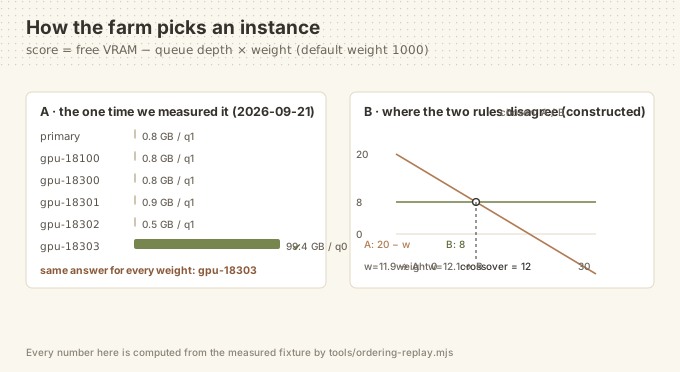
Measured on a real machine (a single moment on 2026-09-21, taken with this plugin's own probe):
| Instance | GPU | Free VRAM | Queue | Verdict |
|---|---|---|---|---|
18100 ← the only one dsh-comfyui can see | RTX 5090 | 0.8 / 33.7 GB | 1 running | too full |
18300 | RTX 5090 | 0.8 / 33.7 GB | 1 running | too full |
18301 | RTX 5090 | 0.9 / 33.7 GB | 1 running | too full |
18302 | RTX 5090 | 0.5 / 33.7 GB | 1 running | too full |
18303 | RTX PRO 6000 Blackwell | 99.4 / 102.0 GB | 0 | ✅ idle |
dsh-comfyui (77★, the most mature plugin in this space) talks to one endpoint, so every
generation request hits the busiest machine — while 102 GB of VRAM sits idle.
This plugin fills exactly that gap: let the agent see, then let it dispatch.
What it does
Three tools:
| Tool | Purpose |
|---|---|
comfyui_farm_status | Full farm view: per-instance GPU, free VRAM, queue depth, what's running, and who should get the next job |
comfyui_farm_pick | Choose without executing: filter by VRAM floor / queue ceiling / GPU-name hint / exclude list, and get the reason |
comfyui_farm_run | Load-aware dispatch: auto-pick (or force an instance), accepting a raw API workflow or a one-shot "prompt + checkpoint" text-to-image |
Install
dsh plugin --profile web add dsh-zcode-farm
Restart the app and the agent gets all three tools.
Configuration
- id: comfyui-farm
  config:
    primaryUrl: 'http://127.0.0.1:8188'
    instances:
      - { id: gpu-18301, baseUrl: 'http://127.0.0.1:18301', label: '5090 shard' }
      - { id: gpu-18303, baseUrl: 'http://127.0.0.1:18303', label: 'Blackwell 102G' }
    needVramGb: 8
    maxQueueDepth: 3
    queueWeight: 1000
    probeTimeoutMs: 5000
    probeRetries: 1
How an instance is chosen (two stages)
- Filter — unreachable, or free VRAM
< needVramGb, or queue depth> maxQueueDepth→ out. - Rank —
score = freeVramGb − queueDepth × queueWeight
The default queueWeight = 1000 is deliberate: queue depth dominates the ranking and free
VRAM only breaks ties. That matches the intuition — an idle small GPU finishes sooner than a
busy large one.
Prefer "biggest VRAM wins"? Set
queueWeight: 0.
Relationship to dsh-comfyui: complementary, not competing
dsh-comfyui (77★) | dsh-zcode-farm | How to check the dsh-comfyui side | |
|---|---|---|---|
| Scope | one endpoint | a whole farm | grep -n baseUrl package/lib/config.js → one z.string() |
| Strength | workflow library, skill packs, canvas, asset panel | awareness, selection, dispatch | ls package/lib |
| How a job is routed | wherever the single endpoint is | ranked by free VRAM − depth × weight | grep -n "constructor(baseUrl" package/lib/comfyui.js |
| Assembly row id | comfyui | comfyui-farm | both appear in this repo's cordis.patch.yml |
The row ids differ, so both can be installed side by side. Neither depends on the other.
dsh-comfyui's single-endpoint design is verified from its published source, not asserted —
see "Reproducing the comparison" below for the three commands.
Relationship to ZCode
This repository is self-developed — there is no ZCode code lineage. ZCode
(zai-org/ZCode, zai-org/GLM-skills) is credited here as a source of inspiration for the
engineering conventions this project follows, not as a dependency: nothing in the install
path, the runtime, or the acceptance checks requires it, and no third-party vendor key is
involved anywhere in this repository.
Most cells below are therefore deliberately blank rather than filled with something invented.
| What ZCode has | What this plugin took | What this plugin adds beyond it | Evidence (run it yourself) |
|---|---|---|---|
| Nothing for ComfyUI farm scheduling | —— | the whole probe → rank → dispatch loop | grep -rli comfyui <zcode-checkout> | wc -l → 0 |
A memory-extraction sub-agent with two skip conditions (apps/zcode-cli/packages/core/src/memory/extraction.ts:23) | —— (different domain) | —— | n/a — nothing was taken, so there is no claim to reproduce |
| Bilingual paired documents | adopted as the house convention | extended to cover figure files (*.svg), so a diagram can't drift from its translation | node tools/verify-translation-pairing.mjs |
| Guard discipline — runnable checks before every commit | adopted as the house convention | extended to six guards, the sixth being a real-boot check | node test/run.mjs and node tools/boot-check.mjs --port 32041 |
A row reading —— is an honest blank, not an oversight.
Reproducing the comparison
Nothing above needs to be taken on trust. These are the commands behind it:
git clone https://github.com/BOWLUNA/dsh-zcode-farm && cd dsh-zcode-farm
node test/run.mjs                        # 23 checks in 2 suites
node tools/ordering-replay.mjs           # the ranking table behind the figure
node tools/boot-check.mjs --port 32041   # really installs and really boots (needs a harness)
The dsh-comfyui claims are checked against its published package, not against this repo:
npm view dsh-comfyui version                # 0.5.1
npm pack dsh-comfyui@0.5.1 && tar xzf dsh-comfyui-0.5.1.tgz
grep -n baseUrl package/lib/config.js       # a single string, not a list
grep -n "constructor(baseUrl" package/lib/comfyui.js
9:    baseUrl: z.string().default('http://127.0.0.1:8188'),
71:    constructor(baseUrl, apiKey, connectTimeoutMs, maxMediaBytes) {
Run on 2026-09-22 against dsh-comfyui@0.5.1.
Design notes
- Zero runtime dependencies. Node's built-in
fetch/AbortControlleronly. - No workflow editing. That's
dsh-comfyui's territory; this plugin only answers "who gets it". - No assumption of locality. Every member is just a URL — SSH tunnels, LAN and remote hosts
are treated identically. The 5 tunnels on the test machine are plain
ssh -Lforwards. - Probe failures are retried. Tunnel flakiness is real: the same instance once timed out at
>3sand answered in106mson the very next call. A single failure is not a verdict — we retry, then reportattemptsso the agent can tell "down" from "hiccup". - Failure reasons are never overwritten. When filtering by GPU hint, an unreachable instance keeps its "unreachable" reason instead of being relabelled "GPU mismatch", which would hide the actual problem.
Development
npm test                              # unit tests (pure functions, no network)
node probes/probe-farm.mjs            # standalone probe: farm status only
node probes/probe-tools.mjs           # load the entry and really execute the tools (read-only)
node probes/probe-tools.mjs --run     # actually dispatch one job (smallest payload: 512² / 12 steps)
During development the host-provided peer deps (@deepseek-ai/schemastery and its deps) must be
present in a local node_modules/, otherwise the entry cannot be imported. This is not needed
when installed into a real profile — the host supplies them.
Known limitations
- The built-in template of
comfyui_farm_runcovers minimal text-to-image only (KSampler + CheckpointLoaderSimple + EmptyLatentImage + 2× CLIPTextEncode + VAEDecode + SaveImage). For anything richer, pass aworkflow. - Aliases pointing at the same backend are not detected. If you configure both a switchable
forwarder (e.g.
127.0.0.1:8188→ "currently focused instance") and its real target, you will see two members with identical readings. That is honest reporting, not a bug — probing cannot distinguish them. numberreturned by/promptis a server-side cumulative counter, not a queue position (measured: it returns 22 even when the queue is empty). Trustcomfyui_farm_statusfor real queue depth.
License
MIT
Status
- 2 suites, 23 checks — run
node test/run.mjs - Declared compatibility:
>=0.1.5-rc.2 <0.2.0-0 || >=0.1.6-alpha.1 <0.2.0-0 || >=0.1.7-alpha.1 <0.2.0-0(seeengines.dshand the peer range) - Pin the version to bypass pnpm's release cooldown:
dsh plugin --profile web add dsh-zcode-farm@1.0.1 - Verified against five SSH-tunnelled ComfyUI instances plus one switchable forwarder
Comments
Loading…
Similar plugins
by fandc520
一个基于DeepSeek-Harness的ComfyUI插件
★ 90
MIT
TypeScript
Sep 27, 2026
dsh plugin --profile web add dsh-comfyuiby shouwang37
DeepSeek Harness(DSH)插件:ComfyUI 自定义节点开发浓缩指南,打包为 comfyui-node-dev 技能
★ 4
MIT
JavaScript
Aug 17, 2026
dsh plugin --profile web add dsh-comfyui-node-developmentby wbin0001
DSH+ComfyUI画布插件dsh-comfyui-canvas embeds your ComfyUI instance as a split-screen canvas inside DeepSeek Harness Web. The agent writes prompts and edits nodes right in chat, applies them live to the ca
★ 10
↓ 1.1k/wk
MIT
JavaScript
Sep 28, 2026
dsh plugin --profile web add dsh-comfyui-canvasby fengyungithub
基于deepseek harness和ComfyUI的AI视频创作工作台
★ 16
↓ 606/wk
Apache-2.0
JavaScript
Sep 29, 2026
dsh plugin --profile web add dsh-short-video-studioby liyi3068238601-oss
Native DeepSeek Harness plugin for controlling ComfyUI queues, history, outputs, models, uploads, and generation.
★ 6
MIT
JavaScript
Aug 31, 2026
dsh plugin --profile web add dsh-comfyui-ctlby ardesp0630
工作进度面板:在输入框下方的带区常驻显示当前会话的任务清单完成度与运行状态,展开可见任务明细、轮次步骤、模型/工具耗时与上下文占用。
★ 0
MIT
JavaScript
Sep 26, 2026
dsh plugin --profile web add dsh-work-progress