

deepseek-pet-Seeki
Discovered★ 3DeepSeek Harness Desktop Pet Plugin: Transparent Always-on-Top Desktop Familiar (2D Pixel-Style State Machine)
Seeki
A tiny DeepSeek-powered desktop companion that lives on your screen and helps you get things done.
Seeki is a pixel pet that floats on your desktop and keeps a DeepSeek Harness agent one double-click away. It's a Desktop Pet × DeepSeek × Agent — persistent conversations organized by workspace, per-task model switching, and a character that actually reacts while your agent is working.


Seeki is an independent community project. It is not an official DeepSeek product.
Why Seeki?
You can already talk to DeepSeek in a browser tab. Seeki adds the layer a chat UI can't:
| Instead of… | Seeki gives you… |
|---|---|
| a tab you have to find | a character that lives on your desktop, always one glance away |
| pasting context every session | persistent conversations, organized into workspaces |
| one default model | per-task model switching — pick a different model for the next message |
| a static web app | a pixel companion with idle / happy / walking / sleeping states |
| reading logs | an at-a-glance status bubble above the character (received → working → done) |
Every one of these maps to something Seeki actually does today — no marketing filler.
Features
🐾 Lives on your desktop
Seeki is a transparent, frameless, always-on-top window — a 2D pixel character that stays on your screen instead of hiding in a tab.
💬 Persistent conversations
Double-click Seeki to chat. Conversations are persistent and multi-turn, organized into workspaces, with a conversation switcher to jump back into any previous thread.
🧠 A DeepSeek Harness agent behind the pet
Seeki is the desktop face of a DeepSeek Harness agent. The head bubble reflects the agent's live status:
| Status | Bubble |
|---|---|
received | 收到啦 · received |
running | Deep diving... |
completed | Completed |
terminated | Stopped |
offline | Offline |
🔀 Per-task model switching
Switch between your configured DeepSeek models straight from the chat window. The switch applies to the next message only and never interrupts a running turn; a new conversation inherits the current model.
🎮 A character, not a static icon
Idle breathing, happy, walking (drag), and sleeping animations — plus drag-direction switching (left / right / up / down with mirroring) and click / idle-timeout interactions.
⚙️ Config-driven, no code edits
Status bubbles, animations, frame rates, and triggers all live in pet.config.json, editable through a built-in /pet/settings page — including uploading, replacing, and deleting animation frames.
Screenshots
💬 Conversation
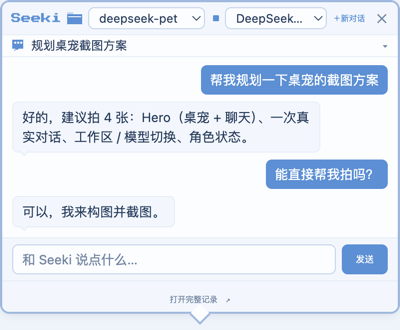
🗂️ Workspace & model switching

🎮 Character states

Quick Start
Prerequisites
- Node.js ≥ 22 and pnpm
- A clone of deepseek-harness with
pnpm installrun once — Seeki runs as a plugin inside it - A DeepSeek API key configured for the harness (see Model Configuration)
# 1. Clone both repos
git clone https://github.com/deepseek-ai/deepseek-harness.git
git clone https://github.com/BenjaminSHI4008/deepseek-pet.git
cd deepseek-harness && pnpm install

# 2. Install Seeki (plugin + a desktop icon)
cd ../deepseek-pet
bash scripts/install.sh
# Windows (PowerShell)
powershell -ExecutionPolicy Bypass -File scripts\install.ps1
- Run — double-click
Seeki.app(macOS) /Seeki.lnk(Windows). The icon launches DeepSeek Harness in the background and wakes Seeki.
The installer auto-detects your deepseek-harness checkout (a sibling directory, ~/deepseek-harness, or ~/Projects/deepseek-harness) and asks if it can't find it.
Installation
Two ways to run, plus a standalone offline mode.
A. One-click desktop icon (recommended)
scripts/install.sh (macOS) / scripts/install.ps1 (Windows) installs the plugin and creates a pseudo-executable desktop icon — it contains only a launch command, no bundled runtime.
- Start: double-click → starts the harness in the background → wakes Seeki.
- Exit: right-click the pet → 「退出桌宠」. Quitting Seeki does not stop the harness (it keeps running in the background; the next double-click just re-wakes the pet).
B. Run with DeepSeek Harness manually
cd <deepseek-pet>
bash scripts/install-harness-plugin.sh   # install the plugin into the web profile

cd <deepseek-harness>
pnpm dsh web                            # Seeki auto-launches with the harness
C. Standalone pet (offline, no agent)
cd <deepseek-pet>
npm install
npm start
This runs only the pet. Without a connected harness the bubble shows Offline.
Electron downloads its binary on
npm install. On slow networks in mainland China, runexport ELECTRON_MIRROR="https://npmmirror.com/mirrors/electron/"first.
Model Configuration
Seeki doesn't hardcode models. The chat window's model list comes from your DeepSeek Harness's configured providers (llm.models), so it always reflects what your harness actually advertises (for example DeepSeek-V4-Pro and DeepSeek-V4-Flash on the deepseek-official route).
- API key — configure it for the harness, not for Seeki: set
DEEPSEEK_API_KEYin the environment, in a.envfile at the harness root, or via the harness's credentials store (~/.dsh/.credentials.yaml). - Default model — the harness's own default. Seeki doesn't impose one.
- Switch models — use the model dropdown in the chat title bar. It affects the next message only; new conversations inherit the current selection; unavailable models show as disabled.
Full pet.config.json reference: docs/config.md.
How It Works
flowchart TB
    U[You] -->|double-click · type| P[Seeki Desktop UI<br/>Electron · transparent window · pixel sprite]
    P -->|WebSocket /api/pet.ws| S[dsh-pet-status plugin<br/>inside DeepSeek Harness]
    S -->|session.prompt · session.models| A[DeepSeek Harness Agent<br/>workspaces · sessions · tools]
    A -->|provider route| M[DeepSeek Model Provider]
    M --> A
    A --> S -->|status · assistant text| P
- The Electron pet renders the character and the chat window.
- A small Cordis plugin (
dsh-pet-status) runs inside DeepSeek Harness, folding agent activity into statuses and streaming assistant text over a local WebSocket. - The harness agent handles sessions, workspaces, and tools; Seeki is its desktop face.
Architecture and extension guide: docs/development.md.
Project Structure
harness-plugin/     dsh-pet-status plugin — status broadcast, pet manager, chat bridge
Deepseek/           pixel sprite assets (animations, 8-direction stills, raw sources)
assets/             bundled font (and the generated launcher icon)
docs/               config reference + developer guide
scripts/            installers + sprite normalization
pet.config.json     all pet behavior — statuses, actions, character states
main.cjs            Electron main process (window, drag, WebSocket client)
renderer.js         pixel sprite state machine (config-driven)
chat.html           chat window UI (workspace, conversation, model switching)
Development
npm install
npm start        # run the pet standalone (offline) while iterating on the UI
Pet behavior is entirely config-driven — editing pet.config.json (or using /pet/settings) changes bubbles, animations, and triggers without touching render code. See docs/development.md for how to add an action, a mouse state, or a drag direction.
Roadmap
- Desktop pet (transparent always-on-top window, pixel state machine)
- Agent status reflection (
received/running/completed/terminated/offline) - Chat: workspaces, conversation history, model switching, cancel
- Visual settings page (statuses / actions / frame upload & delete)
- One-click desktop launcher (
Seeki.app/Seeki.lnk) - Click-through (transparent areas don't capture the mouse)
- Position memory, edge snapping, 8-direction walking
- Standalone packaging (bundled harness runtime)
Contributing
Issues, feature requests, and pull requests are welcome.
License
MIT © 2026 BenjaminSHI4008
Character sprite assets under Deepseek/ were generated with PixelLab; redistribution terms are per PixelLab's license.
Comments
Loading…
Similar plugins
by culture-flask
爱弥斯 · DeepSeek Harness 桌宠 — DeepSeek Harness Web GUI 的像素风宠物插件。
★ 8
Apache-2.0
TypeScript
Aug 18, 2026
dsh plugin --profile web add dsh-aemeath-petby c-ling
DeepSeek Harness 桌面电子宠物插件:跟随 agent 状态变换心情的内置/自定义/Codex 精灵图伙伴。
★ 4
↓ 32/wk
MIT
JavaScript
Aug 22, 2026
dsh plugin --profile web add dsh-plugin-petby cyanfish-x
Live2D 桌宠插件 for DeepSeek Harness:Agent 状态镜像 + 互动陪伴,内置宽松许可预设模型 / Live2D pet plugin: agent state mirror + interactive companion with curated permissive-license presets
★ 30
↓ 604/wk
TypeScript
Sep 24, 2026
dsh plugin --profile web add dsh-live2d-petsby miku00039-01
🐋 DSH 桌宠:DeepSeek Harness 的 Windows 桌面宠物,一键启动/停止/监测服务,双击唤起 GUI,零依赖单文件 exe
★ 3
↓ 238/wk
MIT
C#
Oct 1, 2026
dsh plugin --profile web add @miku00039-01/dsh-whale-petby U1s1-king
MyGO!!!!! Live2D 桌宠插件 for DeepSeek Harness(本地模型同源加载,零外部依赖)
★ 11
JavaScript
Aug 17, 2026
dsh plugin --profile web add dsh-live2d-mygoby xiaoshihou514
DeepSeek Harness:鲸鱼娘桌宠!
★ 43
MIT
JavaScript
Aug 21, 2026
dsh plugin --profile web add dsh-desktop-pet