
dsh-done-check
Manifest validExecutable acceptance checklists for DeepSeek Harness : every "done" backed by a recorded check result, flagged for re-check when the code changes.
dsh-done-check
English | 中文

Executable acceptance checklists for DeepSeek Harness coding tasks: every "done" is backed by a check that actually ran, and old results are flagged for re-check when the code changes.
What it can and cannot tell you
- A summary such as "3 checks: 2 passed, 1 awaiting manual confirmation" covers only the agreed checks. It does not mean the requirement is fully implemented. The plugin never shows a percentage or a "completion" score.
- It guards against an agent casually rewriting the verdict: claiming tests passed, quietly changing a check command, deleting a failing check, or forging a confirmation. It does not stop a malicious agent with an unrestricted shell, which can edit the tests themselves or the files under DSH home.
- Confirming a checklist does not authorize running its commands. Checks run on the shell executor of the current DSH composition;
bash-local/pwsh-localprovide no isolation, so compose the matching sandbox executor if you need it.watchis a scope you declare, not a dependency graph inferred for you.
Demo
A real DSH web session with v0.2 (DSH 0.1.5-rc.1, a small CSV export repository, commands only). Status text is Chinese.
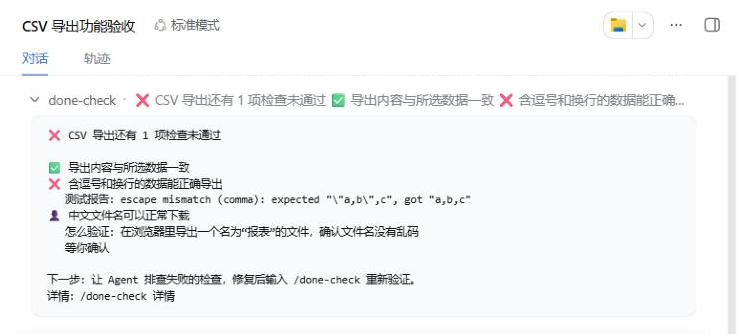
/done-checkpreviews the checklist: which commands will run and which check needs you./done-check 确认confirms it. Confirming does not authorize anything; commands still go through your permission settings./done-checkruns the checks and catches a real bug on the first try: fields containing commas were not quoted. The test report is quoted as printed.- After fixing
toCsv,/done-checkre-runs: both automatic checks pass and only the manual check is left. /done-check okrecords your verdict: all 3 checks pass.
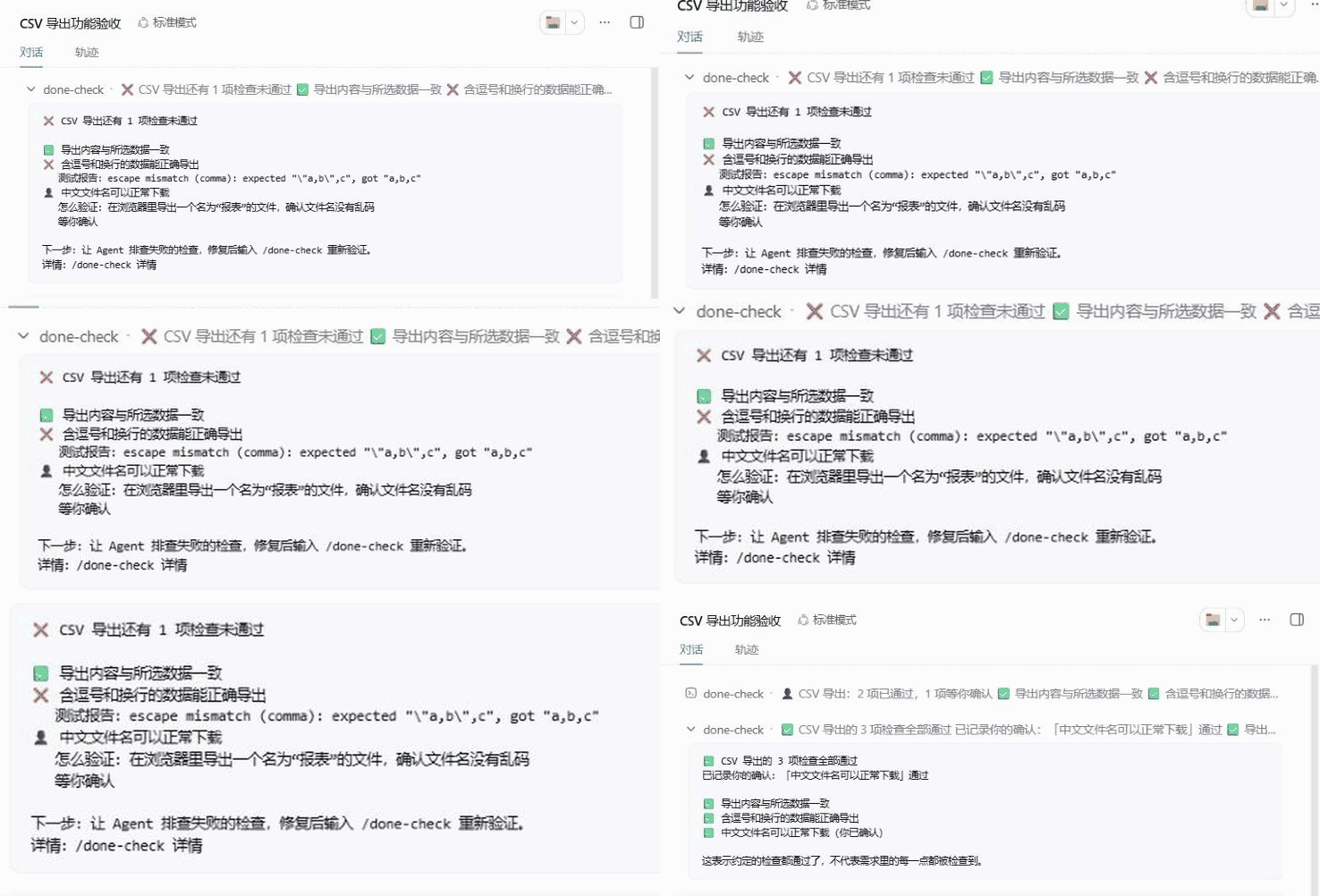
The last frame shows that each step's conclusion is readable from the collapsed row titles alone.
Status
v0.2.0, an early release. v0.2 redesigns only what you read and type; the verification rules are unchanged. The new output was checked on real DSH web hosts (0.1.5-rc.1 and 0.2.1-rc.5), with checks executed by the real pwsh tool inside its sandbox. Supported DSH: >=0.1.5-rc.1 <0.3.0. Design: docs/DESIGN.md (in Chinese). Status messages are currently in Chinese only.
Install
dsh plugin --profile <your-profile> add dsh-done-check
From a checkout: pnpm install && pnpm build, then dsh plugin --profile <your-profile> add /path/to/dsh-done-check.
Commands and tools
One command covers the main path: /done-check does the next thing that is due — preview the checklist, run the checks, or show the verdict. Status messages are currently in Chinese only.
| Who | What | |
|---|---|---|
/done-check | you | Not confirmed yet → shows the checklist and the commands it will run, runs nothing. Confirmed → runs the checks that were never run or whose code changed, then shows the summary. |
/done-check 确认 (confirm) | you only | Confirm the checklist you were just shown. Only works on the exact list from the last preview; otherwise it shows the preview again. |
/done-check ok [n] / no [n] [note] | you only | Record the result of a manual check. With one manual check waiting, no number is needed. |
/done-check 详情 [n] (details) | you | Command, exit code, time, output tail, changed files |
/done-check 全部 (all) | you | Every check, passing ones included |
/done-check 技术详情 [n] (tech) | you | Executor and sandbox, full fingerprint, definition hash, log path |
/done-check 重新检查 (run) | you | Force-run every automatic check |
done_check_draft | Agent | Validate a drafted checklist (the Agent saves it with its own file tool) |
done_check_run | Agent | Run the confirmed automatic checks |
done_check_status | Agent | Read the status (returns verdict and nextStep) |
n is the check's position in the summary; the internal id still works. show, pass and fail remain as aliases for one more version.
Output answers three questions: what was checked, what is still wrong, what to do now. The first line is always a complete conclusion, for example ❌ CSV 导出还有 1 项检查未通过. A failed check quotes up to three lines of the test's own output as "测试报告" — the plugin draws no conclusion from them. A check that could not run (permission denied, timeout, executor error) is reported as ⚠️ 没能运行, never as a failure and never as a pass.
Confirming is not authorizing. Typing /done-check after confirming executes the confirmed commands, through your session's normal permission rules. Every command goes to the shell tool registered in your DSH composition (pwsh/bash), so your approval prompts apply; a refused command leaves no evidence.
How it works
-
Write
done-check.yamlin the project root (or let the Agent draft it). Name each check by something you can judge, and give manual checks ahow:version: 1 task: CSV 导出 checks: - id: export-tests name: 导出内容与所选数据一致 run: node test/export.test.mjs watch: ["src/**", "test/**"] - id: escape-tests name: 含逗号和换行的数据能正确导出 run: node test/escape.test.mjs watch: ["src/**", "test/**"] - id: zh-filename name: 中文文件名可以正常下载 manual: true how: 在浏览器里导出一个名为“报表”的文件,确认文件名没有乱码 -
/done-checkpreviews it; you confirm with/done-check 确认. Confirmation and manual verdicts can only come from you, never from the Agent. -
Checks run through DSH's shell tool; exit code, output, duration and a fingerprint of the workspace at that moment are recorded.
-
Any change to the workspace (uncommitted edits included) turns results bound to the old content into
🔄 代码已更新,需要重新检查, and lists the changed files in the details. Editing a check makes it✏️and asks you to re-confirm; adding or removing checks or rewording the task asks you to re-confirm the whole list. -
A result whose run saw the workspace or definition change is
🔄 检查时代码正在变化,结果不可信; restoring the files does not revive it.
Development
pnpm install
pnpm test
Requires Node.js ≥ 22.19 and git.
License
MIT
Comments
Loading…