
dsh-siyuan-sender
IdentifiedAdds a one-click "send to SiYuan" action to delivered Markdown files: a button on each delivered-file card and on the document-preview toolbar, plus a `siyuan_send` agent tool, all posting through the
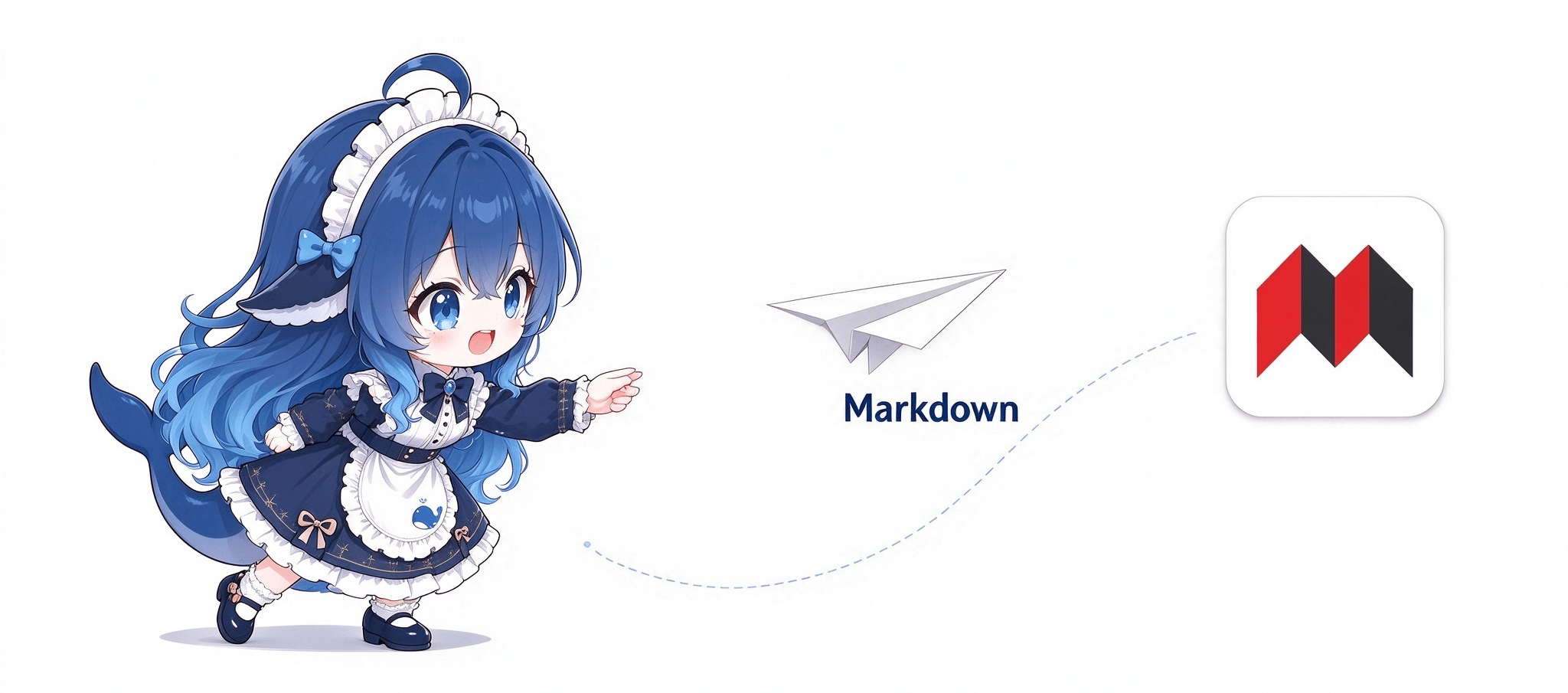
思源笔记直送 · dsh-siyuan-sender
把 DeepSeek Harness 对话里生成的 Markdown 文档,直接送进你自己部署的思源笔记(SiYuan)。
点一下文档卡片上的按钮,标题和正文就落进指定笔记本 —— 不用下载、不用复制粘贴、不用切窗口。
已在 SiYuan 3.8.8(Docker 部署、外网访问)实测通过。
功能
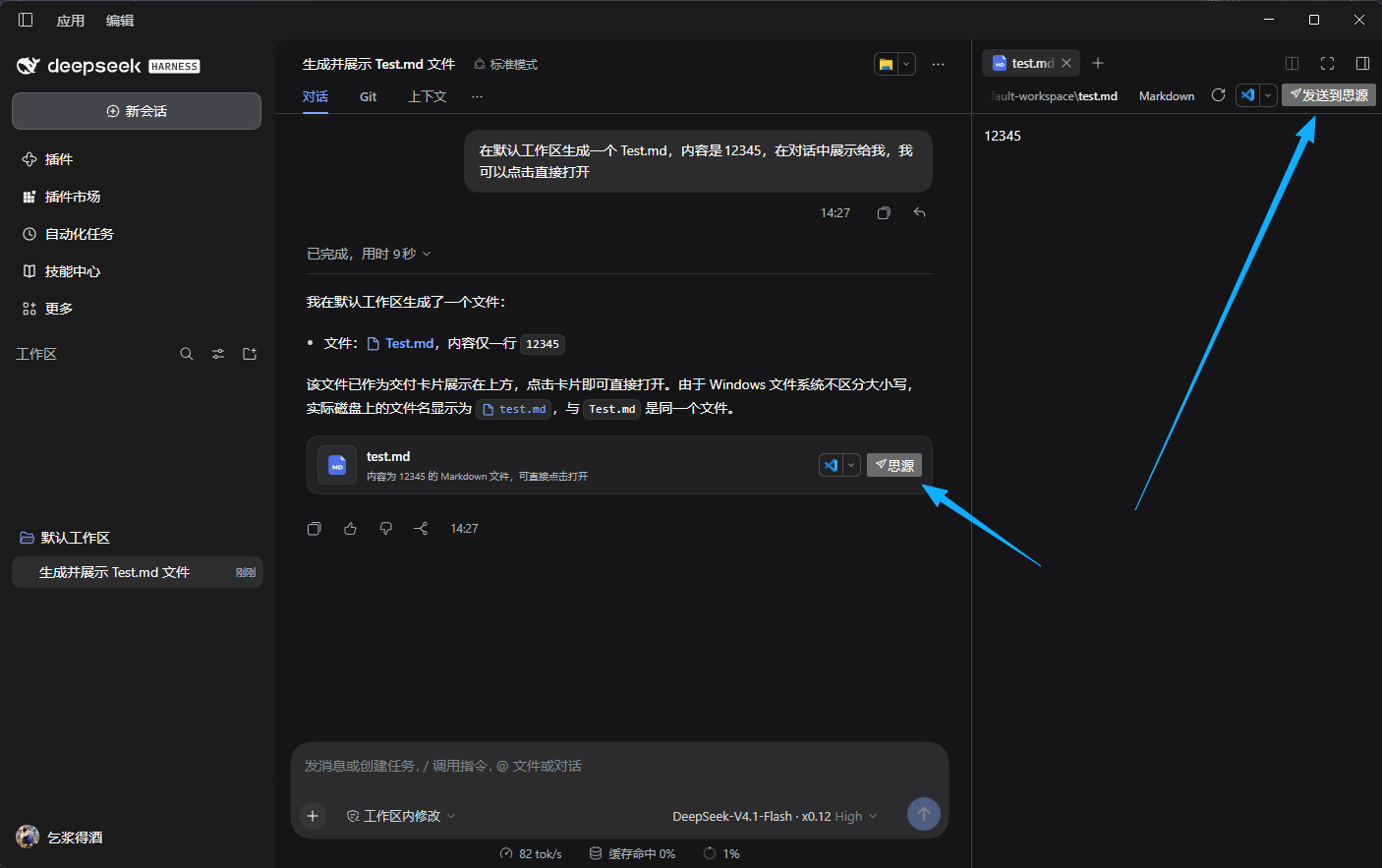
- 文档卡片按钮 —— 每份
.md交付文件右侧多一个「思源」按钮,点即发送 - 预览工具栏按钮 —— 右侧边栏阅读
.md时,标题栏也能发 - 给模型的工具 —— 直接说「把 xxx.md 发到思源」,Agent 自己调用
siyuan_send - 可见的反馈 —— 点击按钮后会提示是否发送成功
- 绝不覆盖 —— 重名自动加时间戳,已有笔记不会被改写
- 绝无隐私问题 —— 数据仅存储在DSH本地,文档会发送到自定义思源笔记,绝无其他数据发送
安装
推荐方式:到 Releases 下载最新的 .tgz,再指向文件安装:
dsh plugin --profile desktop add ./dsh-siyuan-sender-1.0.1.tgz
也可以让 pnpm 直接下载 Release 附件:
dsh plugin --profile desktop add https://github.com/baby7/dsh-siyuan-sender/releases/download/v1.0.1/dsh-siyuan-sender-1.0.1.tgz
或跟踪仓库主分支(不锁版本,随上游变化):
dsh plugin --profile desktop add github:baby7/dsh-siyuan-sender
desktop是 DSH 桌面端的 profile 名;Web 端装的也是同一个 profile 目录,换成你实际使用的名字即可(dsh plugin --profile <名字> add ...)。
装好后刷新页面即可。
配置
需要三样东西:
| 项 | 从哪来 |
|---|---|
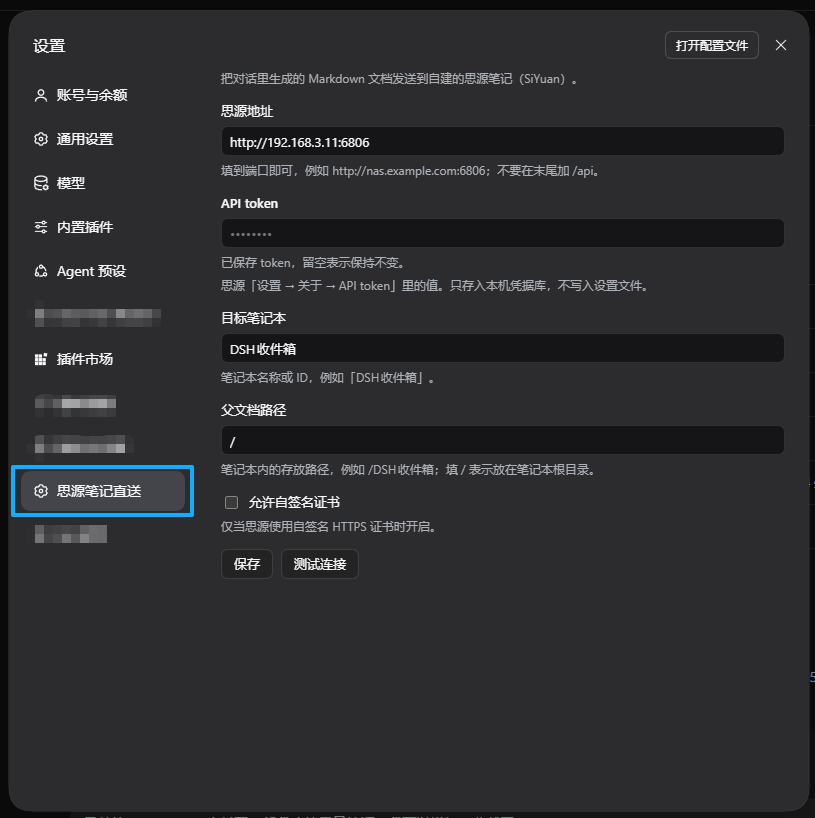
| 思源地址 | 到端口为止,如 http://192.168.3.11:6806(不要加 /api) |
| API token | 思源「设置 → 关于 → API token」 |
| 目标笔记本 | 笔记本名称或 ID,建议专建一个「DSH收件箱」 |
可选:父文档路径(笔记本内位置,/ 表示根目录);允许自签名证书(私有 HTTPS 才需要)。
Token 只存进本机凭据库,不会写入设置文件,也不会发给浏览器。
设置 → 思源笔记直送,填地址、Token、笔记本,点「测试连接」确认无误。
使用
对话里生成 .md 后,卡片右侧点「思源」;或在右侧预览里点「发送到思源」。成功会提示落入的路径。
也可以直接说:
把 report.md 发送到思源
命名规则
标题取正文第一个 # 标题(没有则用文件名)。重名不覆盖,追加时间戳:
/DSH收件箱/季度报告
/DSH收件箱/季度报告 2026-10-28 13:07
只支持 Markdown
扩展名白名单 .md / .markdown / .mdown / .mdx。图片不会一并上传,其它格式请用思源自带的导入功能。
出问题?
| 现象 | 处理 |
|---|---|
| 点按钮没反应 | 重装插件后刷新页面 |
| Token 无效 | 重新从「设置 → 关于」复制 |
| 地址无响应 | 确认填的是思源内核地址,别带 /api |
| 找不到笔记本 | 提示会列出实际笔记本名,照抄一个 |
| 证书校验失败 | 勾选「允许自签名证书」 |
| 超时 | 调大配置里的 timeoutMs(最高 120000) |
发版(维护者)
仓库带了一条 GitHub Actions 流水线 .github/workflows/release.yml:推送 v* 标签即自动跑测试、校验包结构、打出 .tgz 并创建 Release。
# 1. 确认 package.json 的 version 与要打的标签一致,提交改动
git add -A && git commit -m "chore: release v1.0.1"
git push origin master

# 2. 打标签并推送,流水线随即启动
git tag v1.0.1
git push origin v1.0.1
也可以在 Actions 页手动触发该工作流(workflow_dispatch),并在输入框里指定标签。
流水线会先拒绝三类错误:标签与 package.json 版本不一致、exports 指向不存在的文件、打出的 tgz 里缺 index.js / client.js / cordis.patch.yml。发下一版时,把 package.json 的 version 改成新值再推对应的标签。
许可
MIT © 2026 baby7
实现细节、设计取舍与安全模型见 设计说明.md。
Versions
| Latest version | Published | Size |
|---|---|---|
| 1.0.0 | — | — |
| 1.0.1 | — | — |
Comments
Loading…
Similar plugins
by yoursc
SiYuan (思源笔记) notes integration: 17 siyuan_* host tools covering notebook and document listing, full-text search, SQL query, reading documents and blocks, creating and appending content, moving and re
★ 4
↓ 509/wk
MIT
JavaScript
Nov 9, 2026
dsh plugin --profile web add @yoursc/dsh-siyuanby EmptyVessel-000
DSH Web 插件:右侧栏快捷指令库,点一下带进下一条消息,按会话每轮自动注入
★ 1
MIT
JavaScript
Nov 9, 2026
dsh plugin --profile web add @emptyvessel_003/dsh-prompt-shelfby xinming-chenniang
Editable quick-action buttons beside the DSH composer: send 「继续」 or your own saved text, resend your last message, and hide or restore either preset. Text-only: sends text, runs no host commands, and
★ 0
MIT
JavaScript
Nov 14, 2026
dsh plugin --profile web add dsh-buttonby lucagiftzek
DSH plugin for agent email tools: send, mass send (CSV-personalised), scheduled queue, inbox read, domains. Multi-provider: Lettermint, AgentMail, Resend, OVH SMTP, manual SMTP, local self-host.
★ 0
MIT
JavaScript
Sep 19, 2026
dsh plugin --profile web add dsh-mailby YYK0402
Archives DSH conversation output into SiYuan notes: a single siyuan_archive call files content under `<archive path>/<year-month>/<type>/<date>_<time>_<topic>_<content>` with a metadata table and auto
★ 0
MIT
JavaScript
Sep 30, 2026
dsh plugin --profile web add dsh-siyuan-archiveby 1250589385
DSH 快捷发送插件:在输入框下方、上下文进度旁提供可自定义的快捷指令按钮,一键把预设文字直接发送到当前对话,省去重复打字;每条指令的名称、字号、透明度、模块化形状与发送内容均可就地编辑,右键按钮组可拖动换位置。修复上下文进度与累计使用区域被挤压后无法点击的问题。
★ 0
MIT
JavaScript
Oct 23, 2026
dsh plugin --profile web add dsh-quick-send