
dsh-multiview
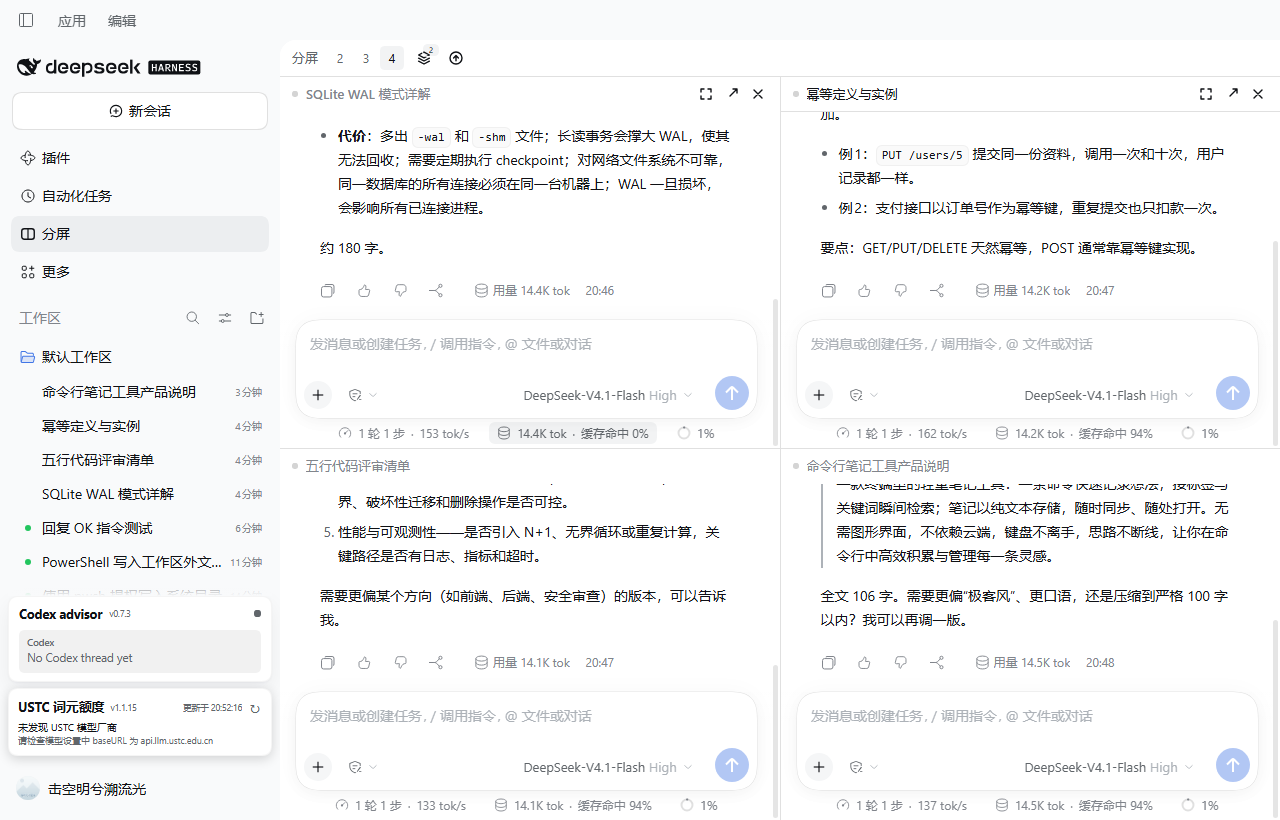
Manifest validMulti-view for DeepSeek Harness: 2-4 live conversations side by side, each pane the real Chat.
dsh-multiview — split view for DeepSeek Harness
2-4 real Chats you rearrange entirely from the keyboard, save as named layouts, and jump through by which pane needs you.
Two to four real conversations side by side in one window. Every pane is the shipped Chat: composer, streaming, tool cards, approval cards,
ask_user_question, attachments, slash commands, stop/queue.The goal is not "a working split view" — it is to read as a feature the app ships with: no title-bar takeover, no layout hijacking, no monkey-patching of private extension points.
中文 | English
Install
Install from npm with dsh plugin add dsh-multiview, or search for it under Plugins → Add in DSH Desktop (a maintainer can also run plugin_manager install_bundle), then quit and reopen DeepSeek Harness so the client bundle loads again.
A "Split" icon appears in the left panel list; click it to turn the central column into the stage, click again to return to the native conversation.
- Requires DSH
>=0.2.1-rc.5 <0.2.2-0 || >=0.2.2-rc.1 <0.2.3-0 || >=0.2.3-rc.1 <0.3.0-0(engines.dsh). Each prerelease line is listed explicitly, because node-semver does not let a prerelease match a range that never names its version. - Uninstall: disable/remove on the Plugins page, restart. Two
localStoragekeys stay behind:dsh.multiview.v1(the saved layout and splits) anddsh.multiview.update.v1(the last update-check result, so the button does not re-check on every reload). The stage's "Reset" clears the layout key; remove them both if you want a clean slate.
Using it
| Action | How |
|---|---|
| Open / close | The "Split" icon in the sidebar panel list |
| 2 / 3 / 4 panes | The 2 3 4 chips in the stage bar |
| Resize | Drag the divider between panes |
| Swap two panes | Drag a pane title onto another pane, or Mod+Alt+S to swap with the next one |
| Maximize / restore | The ⤢ button in the pane header; the stage bar shows "Restore" |
| Bind an empty pane | Search and pick a session right inside the pane — by title, or by what was said in it: from two characters the pane asks the Host's message index and lists matching conversations with a snippet |
| Put any session into the split | Hover a session row in the sidebar → the split button; or the row's … menu → "Open in split view". Nothing leaves the split: an empty pane is filled, a new pane is added under the four-pane cap, and only a full split replaces the focused pane |
| Notice from anywhere | The sidebar Split icon carries a dot when any pane is waiting for an answer or finished unread, so you do not have to be looking at the split to know something wants you |
| Jump to what needs you | The pane header's status dot is a button (a pane that is waiting for an answer or finished unread); Mod+Alt+J cycles to the next such pane, and to the next pane when nothing needs you (the key never does nothing) |
| Change a pane's conversation | The ⇄ button in the pane header re-opens the picker inside that pane and swaps the conversation in place. This is the only way to swap a conversation in a two-pane split, where removing a pane is impossible |
| Open in the native view | The ↗ button: hands the session back to the real conversation (the right sidebar's file preview and diff review only exist there) |
| Remove a pane | The ✕ button; a bound pane goes back to the session list (the split keeps its shape), an empty pane is what ✕ actually removes |
| Views | Bar → Views: a split with 2+ sessions is remembered automatically; click to restore, ✎ to rename it (a name you type survives later layout edits), ✕ to delete. While you are on a saved split, further edits (moving, swapping, adding panes) update that entry instead of piling up near-duplicates |
| Check for updates | Refresh icon at the right of the bar: checked every 24h, red dot on a new release, confirm to update |
Shortcuts (module defaults; rebind in Settings → Shortcuts):
| Command | Default (desktop) |
|---|---|
| Focus previous / next pane | Mod+Alt+[ / Mod+Alt+] |
| Jump to the pane that needs you | Mod+Alt+J |
| Swap places with the next pane | Mod+Alt+S |
| Maximize or restore the focused pane | Mod+Alt+M |
| Remove the focused pane from the split | Mod+Alt+W |
The divider itself is a focusable separator: ←/→ (or ↑/↓ on a stacked split) move it by 2 %,
Shift takes 5 % steps, and Home / Enter / Space restore an even split.
The browser (Web) shell gets no default bindings: DSH's shortcut layer accepts a very narrow set of web/Linux combinations, and forcing one fails at boot with "reserved". Desktop defaults work; bind them manually on Web.
Corners worth knowing
- Two panes is the floor. An empty pane cannot be removed from a two-pane split (its ✕ is hidden), because every preset, the
234chips and the saved-split key assume at least two. - Archiving leaves the split. Archive a conversation anywhere and its pane empties at once; the pane stays where it was.
- Shrinking keeps what you are watching. Going from four panes to two drops two conversations, and the focused one always survives — it takes the first seat.
- Maximize needs a conversation. An empty pane offers no ⤢: enlarging a picker would hide every other conversation.
- Old splits heal. Applying a saved split whose Sessions were deleted or archived restores the shape and empties only those panes; the saved entry is kept (never silently deleted) and rewritten to what could actually be restored.
See docs/VERIFY-BY-HAND.md for the checklist of behaviours that can only be confirmed in a real window.
Where the project stands — what changed since 0.1.28, what is verified and what is not: docs/STATE-OF-PLAY.md.
Who this is for, and the honest state of demand evidence: docs/POSITIONING.md.
Not supported in v1 (on purpose)
- File preview / diff inside a pane — whenever any global panel is active, DSH unmounts the right sidebar's session surface (
no session surface is mounted; shipped panels behave the same). Use ↗ to work in the native view. - Creating a session inside a pane — the hero's workspace picker is application-level navigation. Create sessions natively.
- Trajectory / plugin view switching per pane — panes are pinned to Chat; no invented tabs.
- Sidebar click routed into the focused pane — intercepting the row click means hijacking a private navigation path, so a plain click keeps its native behaviour (it leaves the split). The supported way to send a session to the split is the row's hover button or its
…menu, which you choose to press. - Auto-sleep — resources are released when a pane is removed or rebound; there is no pretend "pause rendering of unfocused panes".
- More than four panes.
When the Split icon is missing
Work through these in order; the first answers most reports:
- Quit completely and reopen. The plugin is a client bundle, read once at boot. Installing while the process keeps running leaves the old build on screen.
- Confirm it is enabled: Settings → Plugins,
dsh-multiviewshould be on. - Compare versions: hover the Split panel's title. The tooltip names the build that is actually running. If it is older than the package you installed, the restart did not take.
- Check the host version against
engines.dsh(above). A newer host still loads the plugin, and the same tooltip says the host is unverified. - The panel list holds three entries (Plugins / Schedules / Split); Split sits last.
Performance
Measured with a CDP rAF sampler on desktop-kfscv8c-1 (1530×851 window):
| Scenario | p50 | p95 | max | long tasks >50ms | JS heap |
|---|---|---|---|---|---|
| Native conversation (baseline) | 16.7ms | 16.7ms | 16.8ms | 0 | 43MB |
| Four panes mounted, idle | 16.7ms | 16.8ms | 16.8ms | 0 | 75MB |
| Four panes, two streams at once | 16.7ms | 16.7ms | 16.8ms | 0 | 85MB |
| Four panes, four long streams at once | 16.7ms | 50ms | 150ms | 2 | 53MB |
Four long streams is the heaviest case measured: still near 60fps on average, but p95 rises to 50ms with an occasional 150ms frame (four virtualized transcripts re-laying out per chunk). v1 deliberately does not throttle — "every pane stays a real Chat" wins over a frame number.
Long frames are not this plugin's work. A 3-minute run with two panes streaming into the VM build recorded 205 long tasks, so the CPU profiler was sampled during a live two-pane stream to attribute them (0.5ms sampling, 3609 samples):
| Owner | Share of sampled time |
|---|---|
dsh-multiview | 0.0% |
| Host / DSH UI packages | 7.1% |
Idle, (program), GC, native | 92.9% |
Over the same 3 minutes: 0 uncaught errors, JS heap 53MB → peak 85MB → 42MB (reclaimed, no unbounded growth), and both panes kept streaming to completion.
Transcripts are virtualized per turn by DSH itself, so a pane costs roughly one active turn plus one editor instance. Below 900px wide or 520px tall the stage degrades to a single pane plus a pane switcher (which shows each pane's status); the layout tree is preserved.
Development
No third-party dependencies; Node ≥ 22.18 (this repo uses 24.13).
npm run build     # src/client/*.ts → client.js (single-file bundle); src/host/index.ts → index.js
npm test          # layout algebra unit tests (node --test)
npm run check     # release self-check: manifest / artifacts / copy / size
Isolated verification (writes no profile):
dsh --profile web --patch <repo>\.dev\dev.patch.yml --port 40602 --no-open
The overlay's row name is an absolute file:/// URL to this repo's index.js (the Loader anchors relative row names at the profile root, not beside the patch file).
Rendering goes through public surfaces only: a keyed main panel, a session-scoped child slot,
SessionProvider, the conversation.content factory (variant:'embedded'), sessions.retain,
shortcuts and locale.
Two things fall outside that and are worth knowing before you install it: to open a file preview
from inside a pane it finds the host's own file chip by class name and click-dispatches it (the
right sidebar has no session surface while a main panel is active), and it reads one private store
field (retainedBy.mainView) to decide which session currently owns the native view. Both are
fallbacks with a documented reason, not the primary path. See docs/DESIGN.md.
Status and support
Pre-1.0: the surface is stable enough to use daily, but small breaking changes can happen in a minor bump, and every one of them is listed in CHANGELOG.md. Versions are published from a tag by CI with npm provenance, so what npm serves is exactly what this repository built.
The only network requests the client makes are the plugin market's same-origin API and, for version
discovery only, a public read of registry.npmjs.org/dsh-multiview/latest (no credentials, no
referrer). Installs still go through the market. scripts/check.mjs enforces that list.
engines.dsh accepts the 0.2 line from 0.2.1-rc.5 upward; 0.2.0 and 0.2.1 prereleases before
rc.5 are excluded. Builds are verified against 0.2.1-rc.5 and 0.2.2-rc.1, and the toolbar
tooltip stays silent across those two whole lines (patch-level differences are expected to keep the
API). On any other minor it appends 「DSH x.y.z 尚未验证」 instead of pretending the build was tested.
- Bugs and feature requests: issues (templates ask for the two things that matter — plugin version and host version).
- Multi-pane rendering cost: filed upstream as discussion #12559.
- Theme-token gaps that cap overlay contrast (no light surface step, missing state-business-secondary): discussion #12770.
- Anything that is not split-view specific (sessions, permissions, providers) belongs to the harness project.
License
MIT.
Comments
Loading…