
dsh-shell-select
Manifest validDeepSeek Harness plugin: one model-facing `shell` tool whose shell is a user setting. Resolves and validates through the harness's own seams, and refuses to run when the selected shell cannot be confined.
dsh-shell-select

Choose which shell DeepSeek Harness runs agent commands in. PowerShell, Windows
PowerShell, cmd.exe, Git Bash, WSL Bash, bash, zsh, fish, or the system
sh: you pick one, it is stored as a setting, and every agent command uses it.
The selection belongs to the deployment, not to the model. Agents get a single
shell tool and cannot choose a different shell for one command, and a shell the
current permission mode cannot confine is refused rather than run outside the
sandbox.
Features
- One shell for every agent command. The selector becomes
ctx.shell, so theshelltool, hook commands, and the harness's own probes all run through it. The shippedbashandpwshtools are denied with a reason namingshell. - Discovery, with an explicit override when you want one. Shells are found by
name through the harness's own executable resolution. Set
executablewhen a shell lives somewhere unusual, or when two installs of it exist. - Persistent and editable in the Web UI. The choice lives in your DSH
settings document under
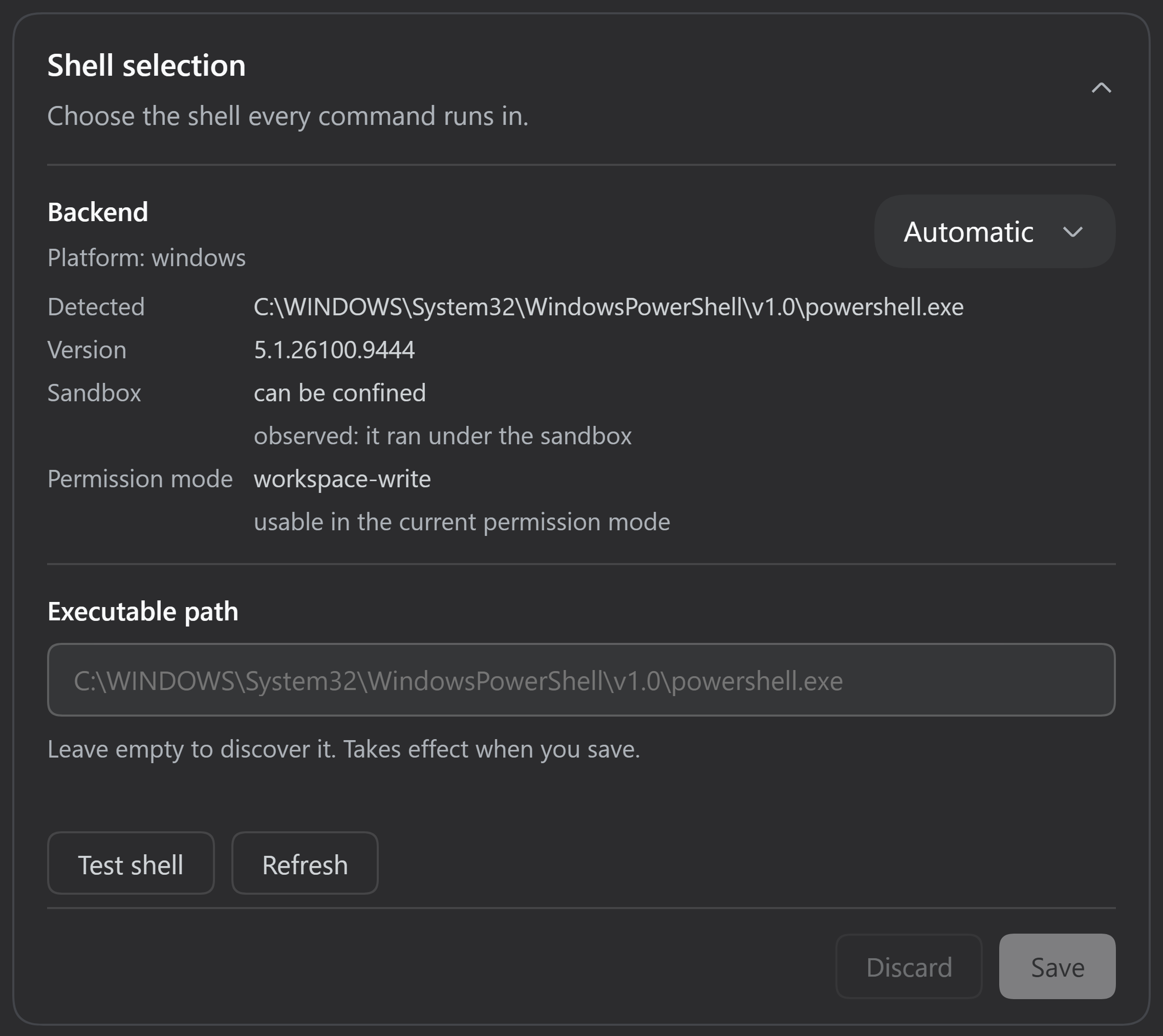
shell-selectand is managed from a Settings → Plugins → Shell selection card with Save, Discard, and a Test action. - The model is told what the selected shell needs. Each shell carries its own
syntax notes (PowerShell paths,
cmdvariable expansion, WSL's/mnt/...paths, fish's non-POSIX syntax), so the agent writes commands that fit. - Runs inside the harness's existing sandbox. Deadlines, output limits, background jobs, and confinement come from the harness unchanged; this plugin adds no execution machinery of its own.
Quick start
Install into a dsh profile, which is a pnpm project under ~/.dsh/profiles/<name>:
dsh plugin --profile web add dsh-shell-select
The command forwards its arguments to pnpm in the profile directory and then
registers the package as a bundle layer in dsh.profile.bundles for you. Existing
entries in that list are left alone, so there is nothing to edit by hand. A
running profile keeps the bundle set it started with, so restart it:
dsh web # the same as dsh --profile web
Then, in the app:
- Open Settings → Plugins and expand Shell selection.
- Choose a shell from the dropdown. Automatic, the default, picks a shell for you and says which one it resolved to.
- Press Save. Until you do, the edit is staged and nothing runs differently.
- Press Test shell to run one fixed command through the selection.
Test shell runs the saved selection, not the edits staged in the card. If it reports a refusal, that refusal is what a command would get right now.
Installing from a checkout
git clone https://github.com/athif23/dsh-shell-select
dsh plugin --profile web add link:/absolute/path/to/dsh-shell-select
A link: install keeps the checkout live, so editing the plugin and restarting
the profile is enough to see a change. The plugin installs into a profile that
already provides the harness, because it declares the harness packages as peer
dependencies rather than carrying a second copy of them.
Supported shells and compatibility
| Platform | Catalog entries | Executed through the plugin | Confinement verified |
|---|---|---|---|
| Windows (primary) | pwsh, powershell, cmd, gitbash, wsl | PowerShell 5.1, cmd.exe, Git Bash, WSL Bash | cmd.exe and PowerShell 5.1, yes. Git Bash and WSL Bash, no |
| Linux (secondary) | bash, zsh, fish, sh, pwsh | bash, sh, and pwsh on the CI runner; bash, zsh, and sh by an independent review | yes, for bash on the CI runner |
| macOS (unverified) | bash, zsh, fish, sh, pwsh | none | no |
"Catalog entries" means the plugin can select the shell and build its arguments. "Executed through the plugin" means someone ran agent commands with it. The last column is stricter than both: it means a write outside the workspace was actually denied, which the suite asserts wherever the runner's profile promises it.
Windows is the primary platform. There, Git Bash and WSL Bash cannot start
under the restricted token the sandbox uses, so they are refused under
workspace-write and read-only, including for the card's version probe; they
run only under danger-full-access. That refusal is deliberate, since the
alternative would be running a shell the sandbox cannot confine. pwsh
(PowerShell 7) is supported and was skipped on the test host only because it is
not installed there.
Linux is secondary. The CI runner executes bash, sh, and pwsh through
the plugin and asserts the workspace-write denial, which holds there. An
independent review ran the suites on a Linux host with no usable sandbox backend,
so on that machine the refusal path was what got exercised. zsh and fish were
installed on neither. macOS is unverified. The test workflow runs on Windows
and Linux only; check its latest run rather than trusting a claim here.
Measurements, exceptions, and what remains untested are in testing.md. The routing rules and execution detail are in architecture.md.
Configuration
Settings live in ~/.dsh/settings.yaml under the shell-select namespace:
shell-select:
  shell: gitbash
  loginShell: false
| Setting | Default | Meaning |
|---|---|---|
shell | auto | A catalog id, or auto. |
executable | empty | Explicit path for the selected shell. Wins over discovery. A path that cannot be resolved, or that names a different shell, is an error rather than a cue to search. |
loginShell | false | Run a bash-family shell with -l, which sources your profile scripts on every command. |
wslDistro | empty | WSL distribution name; empty uses the distribution's default. |
wslMountRoot | /mnt | Where the distribution mounts Windows drives. |
enableRunInBackground | true | Offer run_in_background on the shell tool. |
The remaining fields are the inherited local executor's budgets, carried through
so one composition row configures the whole executor: cwd, timeoutMs
(120000), maxTimeoutMs (600000), maxOutputBytes (64000), maxSpillBytes
(67108864), and graceMs (3000). pwshPath is the harness's own PowerShell path
setting, still honored for the PowerShell entries so an existing value keeps
working.
Automatic is the default because it reproduces what the deployment already
does: the first catalog entry that resolves, which on Windows is PowerShell
(what the harness's own executor runs) and on Linux follows a $SHELL that names
a catalog entry. An explicit executable override changes the answer, because an
override naming a shell claims that shell: setting executable to a
bash.exe path while shell is auto runs that bash, with bash's arguments.
A settings change applies to subsequent calls. It never alters a call that is already being prepared, a running process, or the facts a finished call recorded.
Troubleshooting and limitations
No <shell> executable found. The plugin looked for the shell by name and
found nothing. Install it, or set executable to its full path. The error lists
every location that was probed.
Refused under the current permission mode. The selected shell cannot be
confined by the sandbox the session resolved. On Windows this is expected for Git
Bash and WSL Bash under workspace-write and read-only. The refusal names the
shell and the mode; pick a shell the mode can confine.
Automatic shows unknown. You have staged an executable path that the host
has not resolved yet. Automatic is resolved from the saved selection, so save the
path and the card will name the shell it picks.
Test shell reports a refusal or the wrong shell. Test runs the saved selection. If you have staged edits, save them first, or discard them.
cmd quirks. The command reaches cmd.exe in one pass, so a %NAME% in your
command stays literal; write call echo %CD% when you need expansion. Non-ASCII
output depends on the console code page, so it can arrive as replacement
characters. Unicode paths and filenames are unaffected.
Routes the selector does not control. Agent commands go through the selected
shell, but run_code program bodies, PTY-based terminal tools, and out-of-process
subagents spawn their own processes. The full list, with reasons, is in
architecture.md.
Shell selection is not destructive-command protection. The sandbox restricts write-class access according to the session's permission mode; this plugin adds no destructive-command detection and is not a safety layer. The other known limitations are listed in testing.md.
Development
pnpm install --frozen-lockfile
pnpm test              # every suite
pnpm test:execution    # only the suites that spawn real processes
Tests create their fixtures under <projectRoot>/.test-tmp/<unique-id>/. They
refuse a root inside the real user profile, so a checkout that lives inside the
profile (a clone in $HOME, a CI runner) must name an approved root outside it:
# Linux, macOS, or Git Bash
DSH_SHELL_SELECT_TEST_TMP=/var/tmp/dsh-shell-select pnpm test
# Windows: name a path outside the profile, since %TEMP% is inside it
$env:DSH_SHELL_SELECT_TEST_TMP = 'D:\dsh-shell-select-test-tmp'
pnpm test
pnpm is the supported installer, pinned by packageManager; npm cannot express
the harness workspace's link: graph. See
architecture.md for why the
harness packages are peers, and
testing.md for what each suite covers and
which platforms have been exercised.
License
MIT, copyright 2026 Muhammad Athif Humam.
Comments
Loading…
From the same category
by zhu1090093659
DeepSeek Harness (DSH) Web Plugin Aggregation Ecosystem · Everything is a plugin, distributed via the Creative Workshop
★ 8.3k
↓ 203/wk
Apache-2.0
TypeScript
Oct 3, 2026
dsh plugin --profile web add dsh-webby ccch1mneyyy
DSH 官方公众号收录的 TUI 补位插件:Claude Code 风,鲸鱼顶栏/实时状态/流式思考/双击 Esc 回滚/上下文进度+TPS。npm 一键装。 DSH official WeChat featured TUI plugin — Claude Code style: whale bar, live status, streaming thoughts, double-Esc rol
★ 3.9k
↓ 15.9k/wk
MIT
TypeScript
Oct 3, 2026
dsh plugin --profile terminal add @deepseek-harness-tui/dsh-tuiby YuJunZhiXue
DeepSeek Harness 破甲:让所有模型都能破甲,不同模型可换不同提示词;默认提示词面向国模「小码酱」。Jailbreak for every model — swap prompts per model. 求 Star 收藏 ⭐
★ 3k
MIT
JavaScript
Oct 2, 2026
dsh plugin --profile web add dsh-purgeby bowenliang123
The best DeepSeek Harness plugin for context insight and management, with context dashboard / browser / sidebar and context command, for context statistics, composition, breakdown, evolution details,
★ 1.8k
↓ 37.3k/wk
Apache-2.0
TypeScript
Sep 30, 2026
dsh plugin --profile web add dsh-contextby agentrq
AgentRQ: Human-in-loop realtime conversational task manager for AI Agents. Self-hosted! Control your own agents from wherever you want Mobile, Web, Desktop. Designed to work well with your own Claude
★ 1.1k
↓ 46/wk
Apache-2.0
JavaScript
Oct 2, 2026
dsh plugin --profile web add @agentrq/dsh-plugin-agentrqby vshulcz
One memory shared by Claude Code, Codex, Cursor, Copilot CLI, OpenClaw and 20 more coding agents, built from the session history already on disk. A fix found in one agent comes back in any of them, in
★ 1.1k
↓ 1.2k/wk
MIT
Go
Oct 2, 2026
dsh plugin --profile web add dsh-deja