

dsh-powerbox
Manifest valid★ 1DeepSeek Harness Web interface power button: In the conversation title, click a small dialog box that prompts "Restart DSH or Exit DSH" — each dialog box will confirm again before any action is taken.
dsh-powerbox
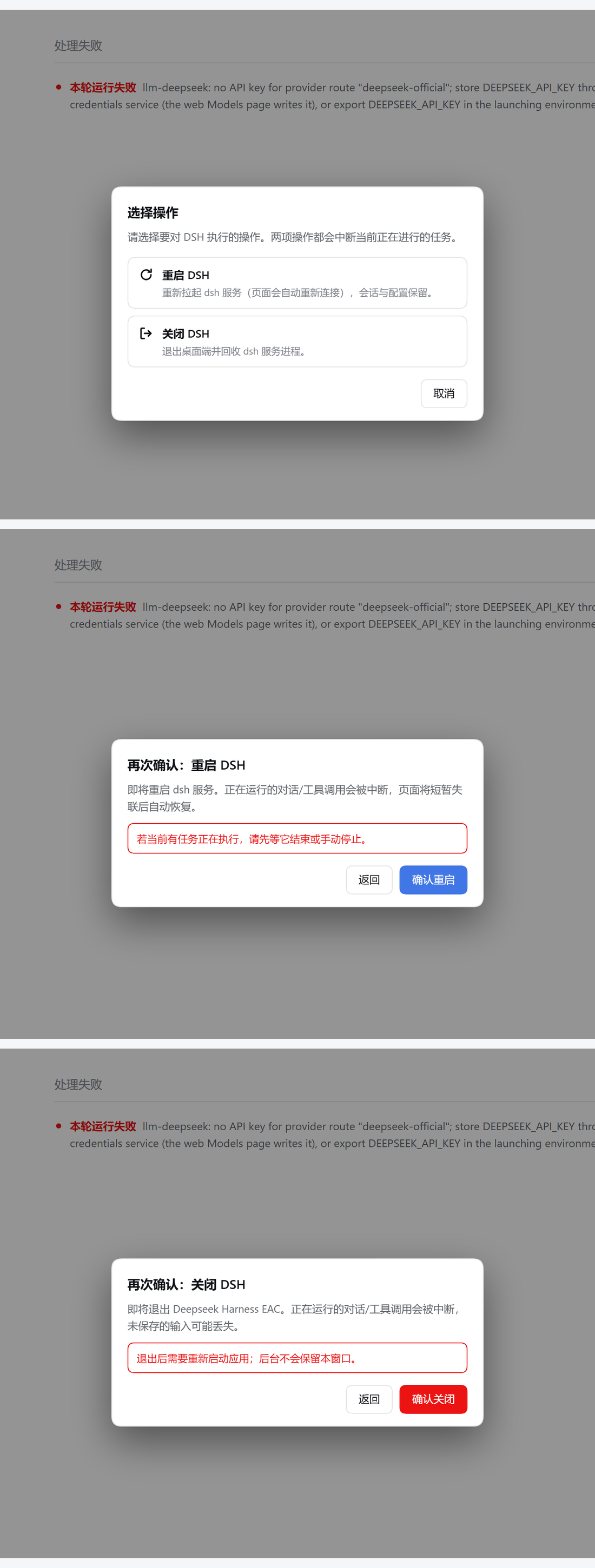
A power button for the DeepSeek Harness Web UI: one click in the conversation header opens a small dialog offering Restart DSH or Quit DSH — and each of those asks for confirmation again before anything happens.

The two-step flow — pick an action, then confirm it:
Why
Restarting or quitting DSH normally means reaching for the tray icon / title bar and hunting through menus. That is awkward when the window is in the foreground and you are mid-session. This plugin puts both actions where you already are looking: the top-right of the conversation header.
Because both actions are destructive — restarting kills in-flight tool calls, quitting closes the app — the flow is deliberately two-step:
[⏻]  →  Choose an action  →  Restart DSH / Quit DSH
                            ↓
                         Confirm  →  act
Cancel, Esc and clicking the backdrop all exit without touching anything.
Requirements
- DSH with the Web UI (
dsh --profile <name>), version 0.2 or newer. - A desktop shell that exposes
window.dshDesktopfor the power actions. In a plain browser the button renders disabled with an explanatory tooltip instead of half-working.- Restart calls
dshDesktop.boot.restart(). - Quit calls
dshDesktop._call('win.close-force', {}).
- Restart calls
Install
dsh plugin --profile <your-profile> add github:AsterLuo/dsh-powerbox
The package declares dsh.bundle.patch, so the official CLI appends dsh-powerbox to dsh.profile.bundles on its own. You do not need to edit cordis.patch.yml or package.json by hand. Restart DSH (or reload the Web UI) and the button appears in the conversation header.
Using an older CLI that does not reconcile bundles? Then add the row manually to your profile's cordis.patch.yml:
- insert:
    - id: powerbox
      name: 'dsh-powerbox'
Uninstall
dsh plugin --profile <your-profile> remove dsh-powerbox
If you added the patch row by hand, delete it as well. Restart DSH afterwards.
How it works
| Piece | Role |
|---|---|
cordis.patch.yml | Inserts the plugin row into the composed profile (this is what makes it load). |
lib/index.js | Host half. Intentionally a no-op — it only exists so the package is a valid bundle (the loader requires name + apply). |
lib/client.js | Everything else: the header button, the mode dialog, both confirmation dialogs, and the bridge calls. |
The client half registers one entry in the conversation.session.header.utilities slot (a list slot, session scope — the same one the official Open in app action uses), which is what places the button at the right end of the conversation header.
- No build step. It is a hand-written
window.__ModuleLoader__.load({ id, factory })bundle, exactly like the built-in plugins. - No runtime dependencies.
reactis provided by the host through the module loader. - Styling uses only
--dsw-alias-*theme tokens, so it follows light and dark themes.
Safety details
- The confirm button disables itself while the request is in flight, and a synchronous re-entry guard makes a second call impossible even if the click is dispatched programmatically.
Esccloses the dialog — except while an action is running, so you cannot hide a restart you already triggered.- Focus returns to the power button when the dialog closes.
- Failures are reported in the dialog with a retry path, never swallowed.
Development
npm install
npm test        # node --test, jsdom-backed
npm run check   # syntax check both halves
The tests drive the real plugin bundle in a jsdom window with a recording window.dshDesktop stub. react is replaced by a small hook-compatible stub (see test/harness.mjs), because the real one is supplied by the host at runtime and is not a dependency of this package. Covered: slot registration contract, the full click-through of both flows, "no bridge call before the second confirmation", exactly-one-call, in-flight disabling, Esc, backdrop, focus restore, missing-bridge degradation, error surfacing, and the package/patch metadata that the installer relies on.
License
MIT © AsterLuo
Comments
Loading…
From the same category
by awesome-dsh-plugin
A curated list of plugins for DeepSeek Harness (dsh) · DeepSeek Harness 插件精选列表
★ 19.7k
CC0-1.0
Python
Oct 20, 2026
by 0xsline
DeepSeek Harness (DSH) ecosystem: curated plugins, tools, and infrastructure from dsh-external/hub and the public dsh-plugin topic.
★ 1.2k
CC0-1.0
Python
Oct 16, 2026
by pax-beehive
Open-source CLI, schemas, resolver, and DSH agent tools for DSH Plugin Hub
★ 386
MIT
TypeScript
Oct 20, 2026
by xiajiajun516
DeepSeek Harness (DSH) backup & restore plugin — export, import, migrate and sync your complete DSH configuration, plugins, MCP servers, skills and workspace. One-click migration to another machine.
★ 217
MIT
TypeScript
Oct 18, 2026
dsh plugin --profile web add dsh-config-managerby yjh051108
推荐组件(非必须):DeepSeek Harness 运行时注入器;已随 dsh-routing-suite 单仓库化保留,本仓库继续维护/发布。
★ 165
TypeScript
Oct 16, 2026
dsh plugin --profile web add @dsh-external/dsh-super-injectorby jigjoy-ai
A CLI that turns a goal into a pull request - and a sandbox for testing concurrent AI coding agents on the Mozaik runtime.
★ 124
MIT
TypeScript
Oct 13, 2026