
dsh-opencodego-status
Manifest validFloating overlay in the Harness Web UI with OpenCode Go usage: 5-hour rolling, weekly and monthly percentages, reset countdowns and the renewal date, with device-code sign-in and silent token refresh.
dsh-opencodego-status
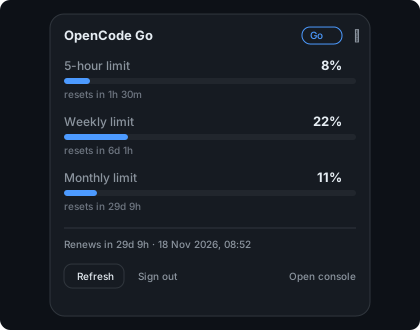
A floating overlay for the DeepSeek Harness Web UI that shows your OpenCode Go usage — the 5-hour rolling limit, the weekly limit and the monthly limit — at a glance.

The collapsed pill lives in the corner of the window and shows the three percentages with a colour dot per limit. Click it for progress bars, reset countdowns, the renewal date, and the sign-in controls.
What you get
- Collapsed pill —
5h · 7d · 30dpercentages, coloured by how close you are to the limit (brand → warning from 60% → error from 80%), plus the weekly reset countdown. - Expanded card — one progress bar per limit,
resets inandrenews incountdowns, Refresh, Sign out, and a link to the OpenCode console. - Device-code sign-in — connect from the overlay; the code is shown in the card and approved in the browser. No password is ever typed into the overlay.
- Silent token refresh — the stored session is refreshed before it expires.
- English and Chinese UI, following the Harness locale service.
- Theme-aware — every colour and border comes from the Harness theme tokens, so light and dark themes both look native.
The numbers come from the OpenCode Console Go subscription meters, the same source the console page itself renders.
Requirements
- DeepSeek Harness Web UI (
0.2.x). - An OpenCode Go subscription. The overlay reads the Go plan meters; it shows
Not connectedwhen no OpenCode session is stored, and an error state when the subscription is missing or the API changes.
Install
dsh plugin --profile web add github:Assidefok/dsh-opencodego-status
Then refresh the Harness Web UI. A small pill appears in the top-right corner.
Connect
- Click the pill, then Connect.
- The card shows a short code (for example
GNNM-XQHS) and an Open approval page button. Approve the device in the browser. - The overlay switches to your live usage as soon as the console confirms.
The session is stored locally at $DSH_HOME/opencodego-status/state.json with 0600
permissions ($DSH_HOME defaults to ~/.dsh). Sign out in the card deletes it.
Tokens are sent only to opencode.ai; the browser half never receives them.
Configuration
The bundle row in the Harness profile's cordis.patch.yml accepts:
- id: opencodego-status
  name: dsh-opencodego-status
  config:
    enabled: true        # hide the overlay without uninstalling the bundle
    position: top-right  # top-right | top-left | bottom-right | bottom-left
    refreshSeconds: 60   # 15 – 3600
    showResets: true     # show reset countdowns
How it works
- The host half (
index.js) registers a prefix route at/api/opencodego-statusand talks to the OpenCode Console:<origin>/console/auth/device/code,<origin>/console/auth/device/token(device grant and refresh grant) and<origin>/console/api/go/status. - The client half (
client.js) registers one entry in theshell.overlayslot and polls/api/opencodego-status/status. It never sees an access token. - No dependencies, no build step: the client module is plain JavaScript and React comes from the Harness browser module table.
The console endpoint is not a documented public API. If OpenCode changes it, the overlay degrades to an error state with a Retry button instead of breaking the UI.
License
MIT — see LICENSE.
Comments
Loading…
Similar plugins
by jiekesu967
Shows OpenCode Go subscription usage (rolling, weekly and monthly used and remaining percentage with reset times) in a floating panel anchored to the bottom-left of the session window.
★ 3
↓ 232/wk
MIT
JavaScript
Sep 30, 2026
dsh plugin --profile web add dsh-plugin-opencode-usageDeepSeek Harness插件,一个极简的浮窗同时显示 DeepSeek 官方余额与 OpenCode Go 的 5h/w/m 用量
★ 1
MIT
JavaScript
dsh plugin --profile web add dsh-opencode-go-usageby xueayi
OpenCode Go plan usage monitor for DeepSeek Harness: real-time 5h-rolling / weekly / monthly quota in a floating web dock
★ 4
↓ 16/wk
MIT
TypeScript
Aug 24, 2026
dsh plugin --profile web add @xueayi/dsh-opencode-go-usageby WihteCo
OpenCode Go quota in the DeepSeek Harness sidebar foot: one 42px cell plus a hover popover with the rolling 5-hour, weekly and monthly windows, each carrying a usage bar, an elapsed-time marker, the remaining share and a reset countdown.
★ 0
MIT
JavaScript
Oct 7, 2026
dsh plugin --profile web add dsh-opencode-go-quotaby ColorlessBoy
Shows the remaining OpenCode Go quota (5-hour, weekly, monthly) in the DeepSeek Harness Web composer dock.
★ 0
MIT
JavaScript
Sep 26, 2026
dsh plugin --profile web add dsh-opencode-usageby xiaweiliang060035
DSH (DeepSeek Harness) web plugin — floating widget showing real-time OpenCode Go subscription usage (rolling / weekly / monthly) for every API key. 悬浮实时展示 opencode-go 各 key 用量。
★ 3
↓ 270/wk
MIT
JavaScript
Aug 15, 2026
dsh plugin --profile web add @xiaweiliang060035/dsh-opencode-go-usage