
@april-jk/dsh-mobile
Manifest validInstallable DSH bundle and remote companion for mobile access
DSH Mobile Remote
Access a local DeepSeek Harness Web UI from a paired phone through an outbound-only Relay connection.
DeepSeek Harness plugin submission: this plugin has been submitted to the official DeepSeek Harness plugin repository and is published in the official community plugin showcase.
Complete project, signed Android APK, and private Relay package: DSH Mobile Suite
Compatibility
The current release is tested against @deepseek-ai/dsh@0.1.0-rc.6. DeepSeek Harness is in Developer Preview and may introduce breaking plugin changes. CI pins this version so compatibility changes are explicit.
Requirements:
- Node.js 18 or newer
- DeepSeek Harness
0.1.0-rc.6 - A phone running the companion DSH Mobile app
- HTTPS access to the configured Relay
Install
The immutable GitHub tag is the recommended public installation path. It requires neither a global DSH installation nor a local plugin directory:
npx @deepseek-ai/dsh plugin --profile web add "github:april-jk/dsh-mobile-plugin#v0.1.9"
npx @deepseek-ai/dsh web
Each GitHub Release also contains a prebuilt .tgz. DSH can install it directly from its release URL without a manual download or local path:
npx @deepseek-ai/dsh plugin --profile web add "https://github.com/april-jk/dsh-mobile-plugin/releases/download/v0.1.9/april-jk-dsh-mobile-0.1.9.tgz"
npx @deepseek-ai/dsh web
The package metadata is ready for npm, but @april-jk/dsh-mobile is not yet published to the public npm registry. After its first npm release, the registry command will be:
npx @deepseek-ai/dsh plugin --profile web add "@april-jk/dsh-mobile@<published-version>"
npx @deepseek-ai/dsh web
To uninstall:
npx @deepseek-ai/dsh plugin --profile web remove @april-jk/dsh-mobile
For local development, clone the repository and let the shell supply its current path:
git clone https://github.com/april-jk/dsh-mobile-plugin.git
cd dsh-mobile-plugin
npm ci
npm run build
npx @deepseek-ai/dsh plugin --profile web add "$PWD"
npx @deepseek-ai/dsh web
Pair a phone
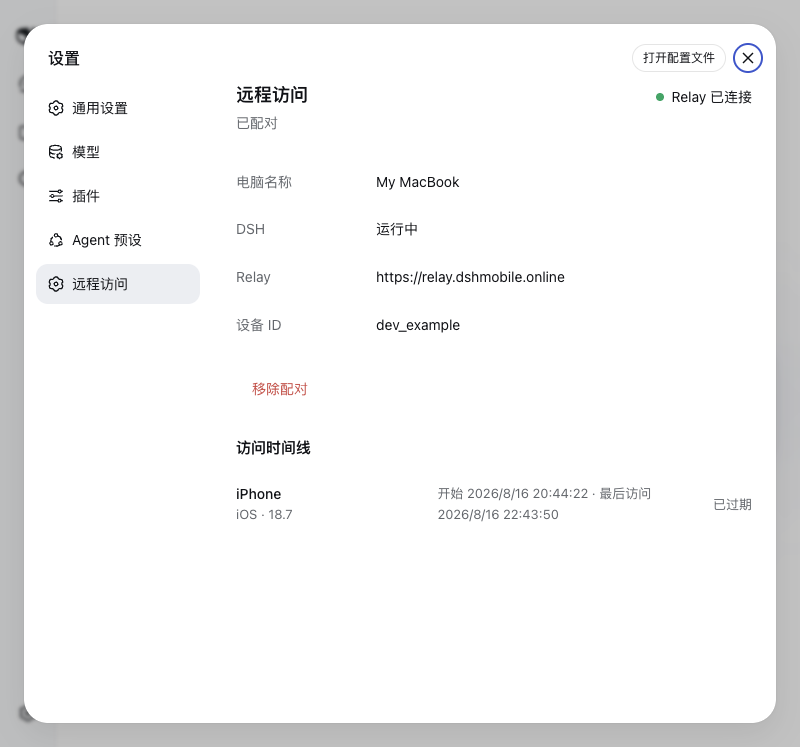
Open Settings > Remote Access in the local DSH Web UI and scan the QR code with iPhone Camera or the mobile app. New QR codes open the Relay browser client directly; their one-time code and end-to-end encryption key stay in the URL fragment and are not sent in the page request. A six-digit code by itself is not sufficient. Later DSH starts reuse the device credential stored in ~/.dsh-remote/config.json with owner-only permissions.
The same settings page can remove the pairing. Removal revokes the Relay device credential, disconnects active remote access, and clears the local credential only after the Relay confirms the operation. The dsh-mobile unpair command provides the same behavior when the Web UI is unavailable.
Network and data behavior
- DSH remains bound to
127.0.0.1:3080; the plugin never creates a public listener. - The computer opens an outbound WSS connection to
https://relay.dshmobile.onlineby default. SetDSH_RELAYbefore starting DSH to use another compatible Relay. - HTTP, SSE, and WebSocket payloads are end-to-end encrypted between the mobile app and this Companion with AES-256-GCM. The Relay only forwards sealed frames; TLS additionally protects connection metadata in transit.
- Version 0.1.9 uses a QR-provisioned pre-shared key and does not provide forward secrecy. Unpair a device and pair it again if the QR code or either endpoint may have been compromised.
- The plugin stores its Relay device token locally in
~/.dsh-remote/config.jsonand never sends that token to the mobile client. - The Relay records bounded phone metadata and access times for the access timeline. It does not persist DSH request or response bodies.
- Installing this bundle disables DSH's native directory picker and enables the browser-based picker so remote browsers can choose a directory without opening Finder or another native dialog.
For a private Relay, start DSH with the same HTTPS origin configured in the mobile app:
DSH_RELAY=https://relay.example.com npx @deepseek-ai/dsh web
Standalone commands
The fallback CLI is installed as dsh-mobile and supports start, pair, status, check-update, update, and unpair. The DSH settings page checks the project Release periodically and offers a one-click update on the computer running DSH. Restart DSH after an update so the new plugin is loaded. Update requests are local-only and use only validated tags from the DSH Mobile plugin repository.
Development
npm ci
npm run build
npm test
npm pack --dry-run
dist/ is committed intentionally so GitHub installs have a complete plugin without lifecycle scripts. CI runs build, tests, bundle freshness checks, and an npm pack check on Node.js 18, 20, and 22. It also verifies installation against the pinned DSH Developer Preview.
To publish a release, update package.json and package-lock.json, rebuild dist/, and push a tag that exactly matches v<package.version>. The tag workflow repeats all release checks, then creates an immutable GitHub Release with the prebuilt npm tarball and SHA256SUMS. A rerun succeeds only when the existing asset set and both asset contents are identical; it never overwrites an existing asset. A mismatched tag fails before any artifact is uploaded.
npm publishing is disabled by default. Repository maintainers can opt in by setting the Actions variable NPM_PUBLISH_ENABLED to true and adding an NPM_TOKEN Actions secret with publish access to @april-jk/dsh-mobile. With either setting absent, GitHub Releases continue normally and no npm publish is attempted.
Official community submission
The repository uses the dsh-plugin and deepseek-harness GitHub topics. The project is published in the official plugin Discussion category with the title:
DSH | DSH Mobile Remote | Access your local DSH Web UI from a paired phone
A ready-to-post project description is maintained in docs/SHOW-YOUR-PLUGIN.md.
License
Comments
Loading…
From the same category
by ccch1mneyyy
DSH 官方公众号收录的 TUI 补位插件:Claude Code 风,鲸鱼顶栏/实时状态/流式思考/双击 Esc 回滚/上下文进度+TPS。npm 一键装。 DSH official WeChat featured TUI plugin — Claude Code style: whale bar, live status, streaming thoughts, double-Esc rol
★ 4.1k
↓ 16k/wk
MIT
TypeScript
Oct 5, 2026
dsh plugin --profile terminal add @deepseek-harness-tui/dsh-tuiby strukto-ai
The World's First Virtual Terminal for AI Agents
★ 3.7k
↓ 320/wk
Apache-2.0
TypeScript
Oct 5, 2026
dsh plugin --profile agent add @struktoai/mirage-dshby bowenliang123
The best DeepSeek Harness plugin for context insight and management, with context dashboard / browser / sidebar and context command, for context statistics, composition, breakdown, evolution details,
★ 1.9k
↓ 38.8k/wk
Apache-2.0
TypeScript
Oct 5, 2026
dsh plugin --profile web add dsh-contextby huiliyi37
官方 DeepSeek Harness 的交互式终端 UI 插件:自研 ANSI 极简交互渲染、流式 Markdown/工具卡、16+ 主题、slash 命令与选择器、输入历史与本地偏好持久化、LSP 诊断、memory记忆,很丝滑的开发体验。
★ 282
↓ 571/wk
Apache-2.0
TypeScript
Sep 30, 2026
dsh plugin --profile terminal add @huiliyi37/dsh-tianshu-tuiby Hilbert-beinghappy
面向 DeepSeek Harness 的 Claude Code 风格终端界面,支持 Windows、macOS 与 Linux,兼容透明终端、VS Code 主题和自定义配色。
★ 197
↓ 108/wk
MIT
TypeScript
Oct 1, 2026
dsh plugin --profile web add seekttyby T-Auto
deepseek-harness Plugin Access and Implementation Standards / deepseek-harness交互生态插件规范与实施标准
★ 81
MIT
JavaScript
Oct 3, 2026