
dsh-telegram-channel
Manifest validDeepSeek Harness Telegram mobile remote: workspace→session, /last context, /model — dsh-plugin
dsh-telegram-channel
English · 中文 · Upstream docs
Fork notice — English UI. This is a fork of hi-wenw/dsh-telegram-channel that translates the whole Telegram bot UI from Chinese to English: every user-facing string, button label, and BotFather command description. Upstream hardcodes the bot copy in Chinese — upstream issue #4 was closed promising a
localeoption in "v0.4.0" that was never released (master is still 0.3.5, and no commit after 2026-08-18 touches i18n). This fork also fixes the session picker, which showed the workspace name instead of the session title for untitled sessions, and resolves real titles via the hostsessionTitleservice. Based on upstream commit2e9a307. This fork's own documentation is in English and comes first; upstream's original Chinese/English docs are kept at the end under Reference. MIT licensed, original copyright retained.
Changes in this fork
1. English UI. All bot copy, button labels, workspace/session picker text,
/status output, /last blocks, and the 13 BotFather command descriptions are
English. Upstream hardcodes them in Chinese. The MSG table in
src/commands.ts is the single source for most of it.
2. Outbound images. Upstream is inbound-only: images you send reach the
session, but images the session produces never reach your phone. Upstream's
contentToText() filters assistant content down to text blocks, so every
screenshot a browser/dev tool returns is silently discarded. This fork:
- forwards images found in tool results and assistant messages to the bound Telegram chat, automatically;
- sends them as documents, not photos —
sendPhotore-encodes to JPEG, caps dimensions and drops PNG data, which destroys screenshots and UI text; - reads bytes through the host attachment service (
ctx.attachments), with a fallback to the content-addressed layout for hosts where the service is out of scope; - de-duplicates by
attachmentId, so a screenshot present in both a tool result and the assistant's reply is sent once; - caps uploads at 20 MB and reports unreadable/oversized images instead of failing silently.
TelegramClientLike gains sendDocument(chatId, bytes, fileName, caption?),
which POSTs multipart/form-data via undici (proxy-aware), matching the existing
text path.
3. Session picker and titles.
- The picker showed the workspace name for a session with no title, so every
untitled session in a workspace rendered identically (
1. music_prep,2. music_prep, …). It now falls back to a short id tail and never uses the workspace name. - Titles are resolved through the host
sessionTitleservice. The host'ssessions.listomits the title projection on a freshly booted process —projectionsFor()performs a zero-I/O read of a projection-cache record that only exists after a durable checkpoint — so titles were unavailable and every session rendered as an id tail. displayLabelno longer appends a redundant workspace to a titled session, and no longer doubles the ellipsis (music_prep · ……X9M2P7V3).
4. Smaller fixes.
detailLinesemitted a fullwidth colon (ID:).IMAGE_MODEL_UNSUPPORTEDnow names the/modelcommand, since the message is shown when a text-only model rejects an image.
Not changed: format.ts keeps a fullwidth 。 as a sentence boundary when
chunking long messages. That is line-breaking for CJK text, not leftover UI copy.
Install this fork
Every install command in the upstream documentation below targets
github:hi-wenw/dsh-telegram-channel(upstream). To install this fork, substitutegithub:an21p/dsh-telegram-channel. Thescripts/install.ps1andscripts/install.shone-liners below fetch from the upstream raw URL and are left as upstream wrote them; the explicit commands above are the supported path for this fork.
export DSH_TELEGRAM_TOKEN='<BotFather token>'
export DSH_TELEGRAM_ALLOWED_USER_IDS='<your numeric id>'
dsh plugin --profile web add github:an21p/dsh-telegram-channel
dsh web
pnpm may refuse the build script for a git install; if you see
ERR_PNPM_IGNORED_BUILDS, approve the git specifier in
~/.dsh/profiles/web/pnpm-workspace.yaml and reinstall.
No configuration option is needed for the language — this fork emits English only.
Upgrading from upstream
Because this fork's package.json still declares dsh-telegram-channel, it
replaces upstream in place. Repoint the profile dependency and reinstall:
# ~/.dsh/profiles/web/package.json
#   "dsh-telegram-channel": "github:an21p/dsh-telegram-channel"
cd ~/.dsh/profiles/web && pnpm install
pnpm uses nodeLinker: hoisted, which copies the build rather than linking
it, so pnpm install must be re-run after any change for it to take effect.
Gotcha:
pnpm installwill lie to you after a rebuild. For afile:orgithub:dependency pnpm can reportAlready up to dateand skip the copy even thoughlib/changed on disk, so your rebuild silently never reaches the profile. If a code change appears to have no effect, force the copy:rm -rf ~/.dsh/profiles/web/node_modules/dsh-telegram-channel cd ~/.dsh/profiles/web && pnpm installConfirm with
grep <your new symbol> ~/.dsh/profiles/web/node_modules/dsh-telegram-channel/lib/*.jsbefore concluding the code is wrong. This cost real debugging time: a change appeared broken when it had simply never been installed.
Develop, build and test
The repo commits lib/ so github: installs work without a build step, so
rebuild after editing src/ and reinstall for the change to reach a running
profile.
pnpm install --store-dir <a writable store>   # dev deps: typescript, tsx
pnpm run build        # tsc -p tsconfig.json  -> emits lib/
pnpm run typecheck    # tsc --noEmit
pnpm test             # node --import tsx --test tests/**/*.test.ts
Notes that cost time if you discover them the hard way:
-
tscreports 8 type errors inherited from upstream (threeimplicitly has an 'any' type, threeProperty 'data' does not exist on type 'never', two comparisons with no overlap).noEmitOnErroris not set, solib/is still emitted correctly. The count is the same on pristine upstream — treat 8 as the baseline, not as breakage. -
Building needs the peer type packages on the module path. If every
@deepseek-ai/*ornode:*import fails to resolve, link the profile's installed copies intonode_modulesrather than reinstalling from the registry (some peers, e.g.@deepseek-ai/dsh-type-meta, are not published to npm). -
Bindings isolation. The plugin persists chat bindings to
<DSH_HOME>/telegram-channel-bindings.json, overridable withDSH_TELEGRAM_BINDINGS_FILE. It writes in place withwriteFileSync— no temp-and-rename — so anything that binds a chat without the override overwrites the real file and the previous contents are unrecoverable, which also breaks a live bot (its next message tries to resume a session id that only ever existed in a test).pnpm testis safe:tests/setup-env.tssets an isolated temp path before any test module loads. If you write your own harness, setDSH_TELEGRAM_BINDINGS_FILEyourself, and neverdeleteit in a teardown — restoring it to undefined makes the nextsaveBindings()fall back to the real profile path and clobber it. -
DSH_HOMErelocates the profile home (and therefore the default bindings and attachment store paths).
Troubleshooting
| Symptom | Cause / fix |
|---|---|
/model unavailable | Needs dsh web (apiProxy). Attach a session with /sessions first. |
| Images rejected | The bound session's model is text-only. /model → pick a multimodal model. |
| No images forwarded | The session produced none, or the attachment bytes are unreadable — the bot reports the latter explicitly. |
| Bot silent, no reply | Check the token and that dsh web was restarted after the plugin changed. |
| Bot says the bound session is gone right after you attached | Something overwrote ~/.dsh/telegram-channel-bindings.json with a stale id (a test harness is the usual culprit). Send /sessions to re-attach. |
| Menu still in the old language | setMyCommands runs at boot; restart dsh web. |
ERR_PNPM_IGNORED_BUILDS | Approve the git specifier in the profile's pnpm-workspace.yaml. |
Usage
- Start
dsh webon the desktop. - In Telegram:
/start→/sessions→ pick a workspace → pick a session → attach. - Send text, or an image, and it enters that session. Web and phone share one trajectory.
/modelswitches the bound session's model (takes effect the next turn).- To pick up context, tap View last conversation or send
/last.
Commands
| Command | What it does |
|---|---|
/sessions | Lists workspaces, then that workspace's sessions (Web-aligned; archived, blank and subagent sessions excluded). Attaching a cold session resumes it. |
/last | Shows the bound session's previous Q/A. The View last conversation button does the same. |
/model | Switches the bound session's model. |
/status | Session status: bound session, session ID, workspace, model, reasoning effort, context, avg first token, output rate, input/output tokens — same source as the Web footer. |
/compact | Compacts the bound session's history to shorten context. The session must be idle; messages queue during compaction. |
/rich | Rendering mode: on = rich text (needs a recent client), off = HTML compatible (default). Persists per chat. |
/unbind | Detaches the phone. Does not close the desktop session. |
/stop | Aborts the currently running task. |
/mission | Shows the task list and progress. |
/new | Starts a new conversation in the current workspace and attaches. |
/cancel | Closes TG-side answering/approval (the Web side can still answer). |
/help | Shows help. |
Configuration
| Key / environment variable | Meaning |
|---|---|
token / DSH_TELEGRAM_TOKEN | Bot token. |
allowedUserIds / DSH_TELEGRAM_ALLOWED_USER_IDS | Allowlist. Both empty means nobody can use the bot. Multiple IDs may be comma- or space-separated; non-numeric entries are silently dropped. |
allowAllUsers | true for debugging only. |
maxMessageLength | Default 4096. |
pollingTimeoutSec | Default 30. |
rendering | html (default, works on every client) or rich (native Rich Message). |
If the host reaches Telegram through an HTTP(S) proxy, the plugin uses it
automatically — no need to set NODE_USE_ENV_PROXY.
To change the allowlist in YAML, override by id — never insert a duplicate
id:
- id: dsh-telegram-channel
  config:
    token: ""
    allowedUserIds: [123456789]
See examples/telegram-agent/cordis.patch.example.yml.
Reference — upstream documentation
The fork documentation above is authoritative. Below is upstream's own
documentation, kept for reference: the Chinese original first, then upstream's
English translation. Its install commands target github:hi-wenw/... — see
Install this fork.
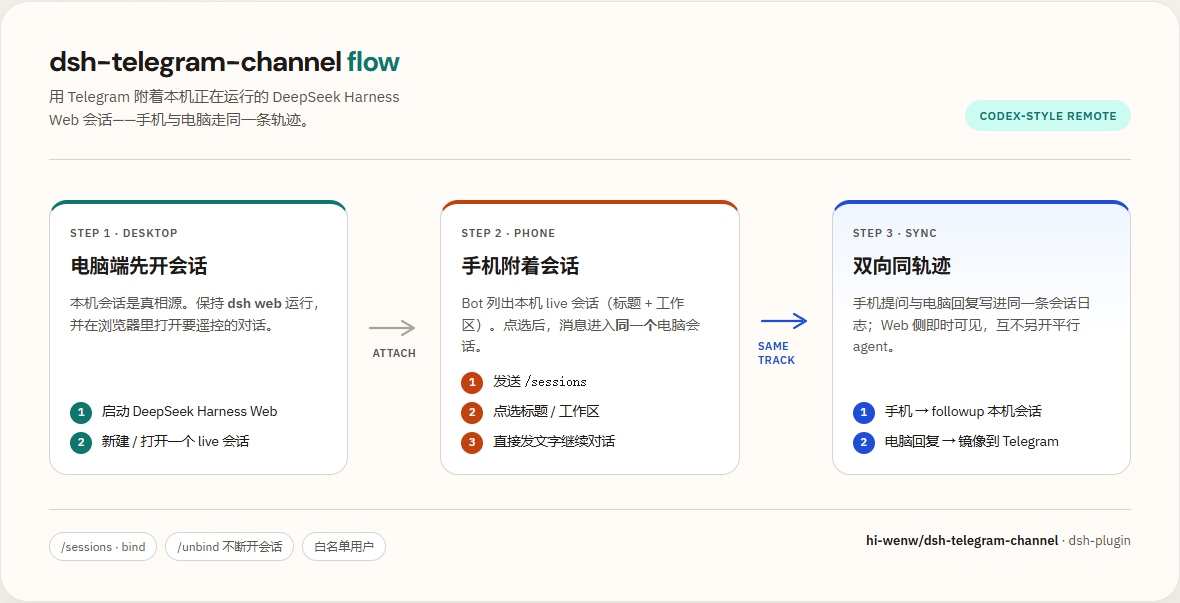
Telegram 手机遥控器 for DeepSeek Harness:附着本机正在跑的 Web 会话,与电脑 同轨迹、双向可见(Codex-style)。
来源: dsh-plugin topic · 原始安装:dsh plugin --profile web add github:hi-wenw/dsh-telegram-channel
Keywords: Telegram · Bot · Mobile · Remote · DSH · Cordis · dsh-plugin · sessions · bind
中文(上游原文)
使用前需要什么
| 需要 | 说明 |
|---|---|
DeepSeek Harness(dsh) | 本机已能跑通 dsh web |
| Node.js | 跟 Harness 走,建议 ≥22 |
| Telegram Bot Token | @BotFather → /newbot |
| 数字 User ID | @userinfobot |
| 代理(可选) | 若直连不上 api.telegram.org,需本机 HTTP(S)_PROXY |
不需要 Python。
30 秒理解
- 电脑
dsh web开着(会话列表与 Web 对齐,已归档除外) - 手机 Bot:
/sessions→ 工作区 → 会话 → 附着 - 之后手机 ↔ Web 走同一条轨迹;可用
/model切换模型(下一回合生效)
支持的消息:文本、图片(照片或以文件形式发送的 png/jpeg/webp/gif,可带文字说明;多张相册照片合并为一条消息进入会话)。语音/视频/其他文件暂不支持(会收到提示)。图片经宿主附件服务持久化,与 Web 端上传走同一通道;当前模型不支持图像输入时会收到明确提示。
效果截图
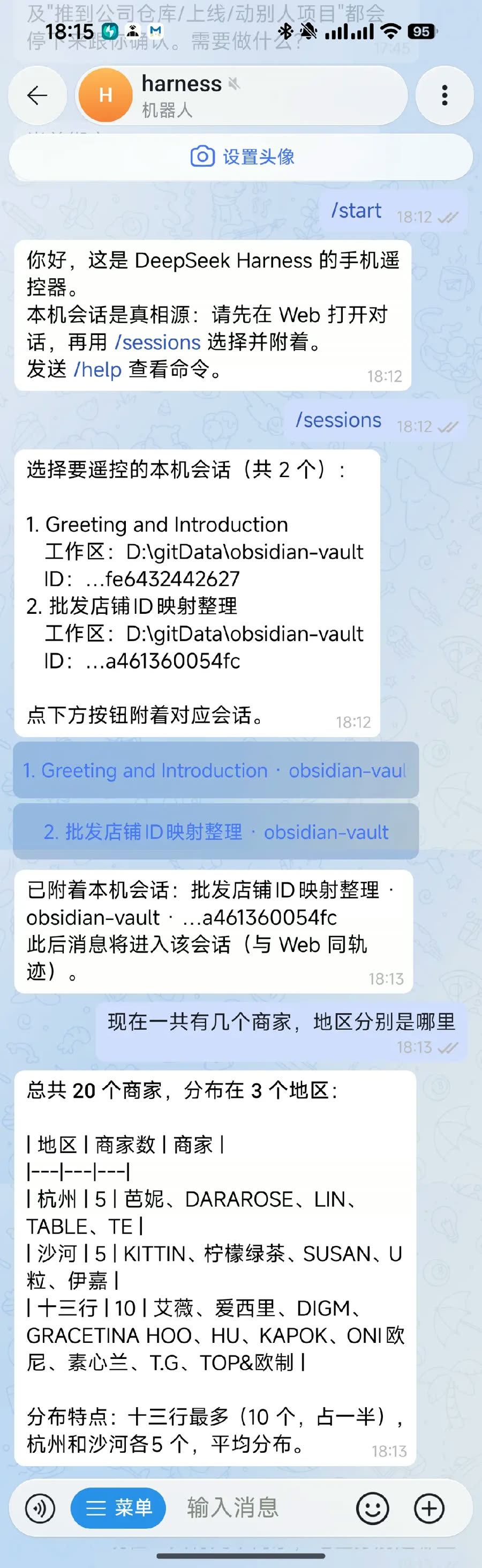
手机选择会话并发问:
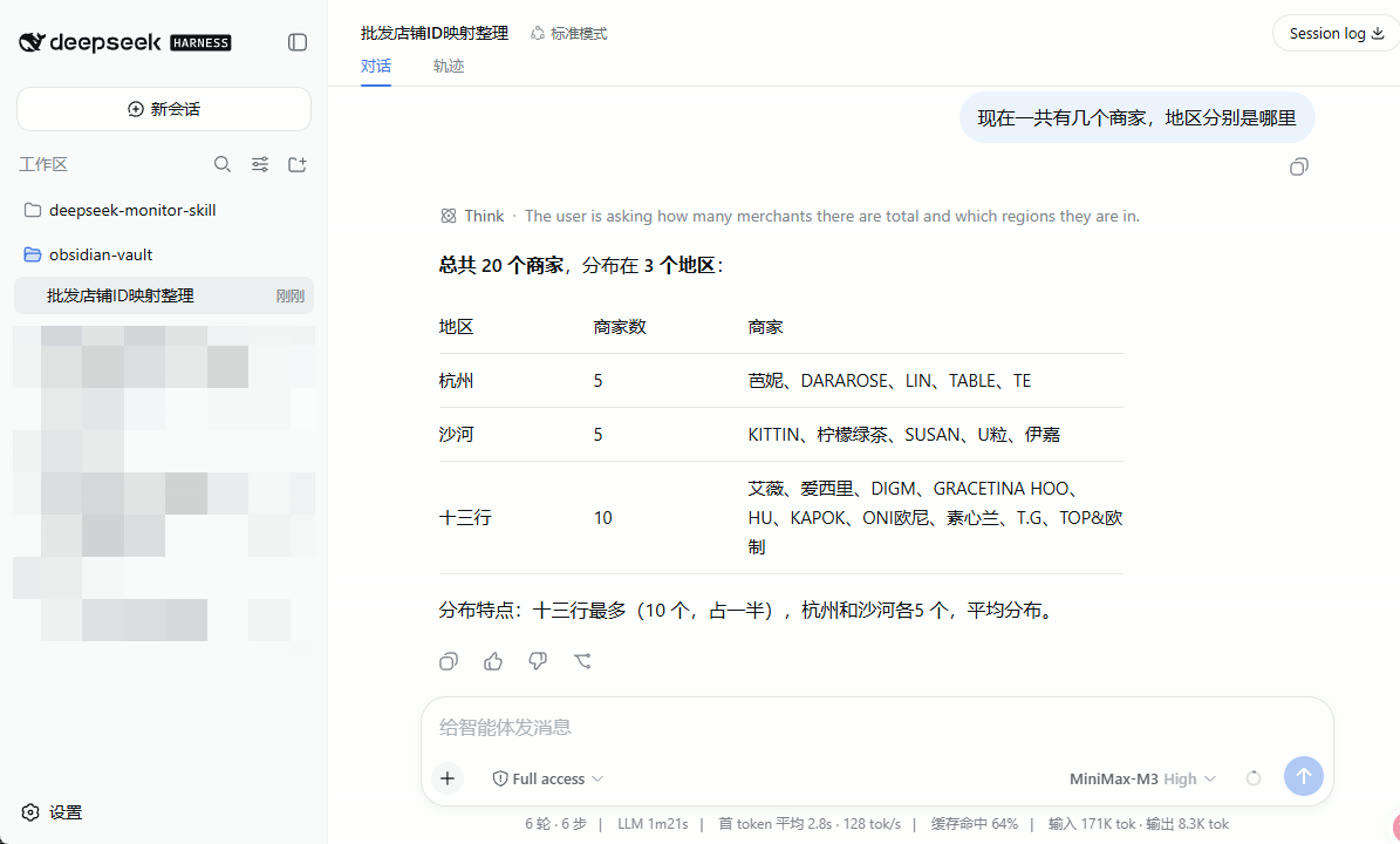
电脑 Web 同步收到同一条消息与回复:
一键管理菜单(推荐)
先准备两样东西:
| 准备 | 怎么拿 |
|---|---|
| Bot Token | Telegram 搜 @BotFather → /newbot → 复制 token |
| 数字 User ID | 搜 @userinfobot → Start → 复制纯数字 |
Token 不要发到公开群;泄露了去 BotFather
/revoke。
Windows
请在 PowerShell 执行。若当前是 CMD,用下面「CMD 一键」那行。
irm https://raw.githubusercontent.com/hi-wenw/dsh-telegram-channel/master/scripts/install.ps1 | iex
脚本已兼容
irm | iex(菜单逻辑包在 scriptblock 里)。CMD 请用下面整行。
CMD 一键:
powershell -NoProfile -ExecutionPolicy Bypass -Command "irm https://raw.githubusercontent.com/hi-wenw/dsh-telegram-channel/master/scripts/install.ps1 | iex"
备用(先下载再执行):
powershell -NoProfile -ExecutionPolicy Bypass -Command "iwr -UseBasicParsing https://raw.githubusercontent.com/hi-wenw/dsh-telegram-channel/master/scripts/install.ps1 -OutFile $env:TEMP\dsh-tg.ps1; & $env:TEMP\dsh-tg.ps1"
启动后用数字选择:
1) 安装 / 重装插件(写入 Token + 白名单)
2) 启动 dsh web(新窗口)
3) 停止 dsh web
4) 查看状态
5) 打开浏览器
0) 退出
也可直接指定动作(不进菜单):
.\scripts\install.ps1 -Action install -Token '...' -UserId '123456789'
.\scripts\install.ps1 -Action start
.\scripts\install.ps1 -Action stop
.\scripts\install.ps1 -Action status
安装时脚本会:写环境变量、补 allowBuilds、执行 dsh plugin add(不会再 insert 同名 id)。
macOS / Linux
curl -fsSL https://raw.githubusercontent.com/hi-wenw/dsh-telegram-channel/master/scripts/install.sh | bash
# 同样出现数字菜单;或:
# ./scripts/install.sh install --token '...' --user-id '...'
# ./scripts/install.sh start|stop|status
手机怎么用
- 菜单选 2 启动
dsh web(或自己运行dsh web) - 浏览器里可看到工作区与会话(归档会话不会出现在手机列表)
- 手机对 Bot:
/start→/sessions→ 选工作区 → 选会话 → 聊天 - 需要换模型时:
/model→ 点选(与 Web 同 API,下一回合生效) - 续接上下文:附着后点 查看上次对话,或发
/last
输入框旁的 / 菜单应有:start sessions last model status compact unbind help。
| 命令 | 作用 |
|---|---|
/sessions | 先列工作区,再列该工作区会话(与 Web 对齐,排除归档/空白/子代理);冷会话附着时会自动 resume |
/last | 查看绑定会话的上次问答(附着后也会出现「查看上次对话」按钮) |
/model | 切换当前绑定会话的模型 |
/status | 通用状态显示:绑定会话/会话 ID/工作区/当前模型/思考强度/上下文长度/首 token 平均/输出速率/输入输出 tokens(与 Web 底部统计条同源) |
/compact | 手动压缩当前绑定会话的历史(缩短上下文;会话需空闲,压缩期间新消息排队) |
/unbind | 只断开手机,不关电脑会话 |
/help | 帮助 |
手工安装(可选)
若不想跑脚本:
# 用户环境变量(或当前会话 $env:...)
# DSH_TELEGRAM_TOKEN = BotFather token
# DSH_TELEGRAM_ALLOWED_USER_IDS = 数字ID

dsh plugin --profile web add github:hi-wenw/dsh-telegram-channel
dsh web
本地目录安装:
dsh plugin --profile web add D:\path\to\dsh-telegram-channel
需要改 YAML 白名单时,只能按 id 覆盖,不要再 insert 同名 id:
- id: dsh-telegram-channel
  config:
    token: ""
    allowedUserIds: [123456789]
示例:examples/telegram-agent/cordis.patch.example.yml。
配置
| 键 / 环境变量 | 含义 |
|---|---|
token / DSH_TELEGRAM_TOKEN | Bot token |
allowedUserIds / DSH_TELEGRAM_ALLOWED_USER_IDS | 白名单;都空 = 谁都不能用 |
allowAllUsers | true 仅调试 |
maxMessageLength | 默认 4096 |
pollingTimeoutSec | 默认 30 |
rendering | html(默认,兼容所有客户端)或 rich(原生 Rich Message) |
若本机用了 HTTP(S)_PROXY 访问 Telegram,插件会自动走代理(无需再设 NODE_USE_ENV_PROXY)。
故障排查
| 现象 | 处理 |
|---|---|
ERR_PNPM_IGNORED_BUILDS / allowBuilds | pnpm 11 起:仅 dsh-telegram-channel: true 不够(git 包无效)。在 ~\.dsh\profiles\web\pnpm-workspace.yaml 写入仓库级授权后重装:'dsh-telegram-channel@git+https://github.com/hi-wenw/dsh-telegram-channel.git': true再跑菜单 1(新版安装脚本会自动写) |
duplicate loader entry id: dsh-telegram-channel | 用户 patch 不要 insert 同名 id;用上面的 - id: 覆盖,或只用环境变量白名单 |
| 手机完全没回复 / ConnectTimeout | 打开本地代理(如 7890),重启 dsh web |
missing bot token | 检查环境变量;新开终端再 dsh web |
| 「无权限」 | User ID 必须是 @userinfobot 的数字 |
/sessions 无会话 | 确认 Web 有未归档会话;空白会话会被隐藏 |
/sessions 比电脑少很多 | 升级到 ≥0.3.0:应按工作区列出;仍少则检查是否归档 |
/model 不可用 | 需 dsh web(apiProxy);先 /sessions 绑定。≥0.3.2 已修复「未 inject 读不到 apiProxy」 |
| Telegram 401 | Token 错了或被 revoke |
开发
git clone https://github.com/hi-wenw/dsh-telegram-channel.git
cd dsh-telegram-channel
npm install --legacy-peer-deps
npm test
npm run build
发布与发现(社区插件)
社区发现入口主要是 GitHub topic,不是封闭应用商店审核:
- 仓库 公开,
package.json声明dsh.bundle.patch(本仓库已有) - About → Topics 加上
dsh-plugin(已加;可浏览 topic 列表) - 用户安装:
dsh plugin --profile web add github:hi-wenw/dsh-telegram-channel
- 可选:收录到 awesome-deepseek-harness 等精选列表;可选再发 npm
官方也建议插件作者使用 dsh-plugin topic 方便检索。
许可证
English
Prerequisites
- Working DeepSeek Harness (
dsh web) - Node.js (typically ≥22 with Harness)
- Telegram bot token + numeric user id
- Optional HTTP(S)_PROXY if Telegram API is blocked
- No Python required
What this is
Telegram mobile remote for DeepSeek Harness Web sessions. Desktop/Web is the source of truth; the phone attaches (no parallel hidden agent). /sessions is workspace → session (Web-aligned, archived excluded). /model switches the bound session’s model for the next turn.
Screenshots
Phone: pick a session and chat:
Desktop Web shows the same trajectory:
One-click manager (Windows)
Run in PowerShell (not CMD). Opens a number menu: install / start / stop / status / open browser.
irm https://raw.githubusercontent.com/hi-wenw/dsh-telegram-channel/master/scripts/install.ps1 | iex
CMD:
powershell -NoProfile -ExecutionPolicy Bypass -Command "irm https://raw.githubusercontent.com/hi-wenw/dsh-telegram-channel/master/scripts/install.ps1 | iex"
Direct actions:
.\scripts\install.ps1 -Action start
.\scripts\install.ps1 -Action stop
.\scripts\install.ps1 -Action install -Token '...' -UserId '123456789'
The script sets user env vars, ensures allowBuilds, and runs dsh plugin add. After start, phone: /sessions → workspace → session → bind; optional /model.
Unix
export DSH_TELEGRAM_TOKEN='...'
export DSH_TELEGRAM_ALLOWED_USER_IDS='123456789'
curl -fsSL https://raw.githubusercontent.com/hi-wenw/dsh-telegram-channel/master/scripts/install.sh | bash
Manual
dsh plugin --profile web add github:hi-wenw/dsh-telegram-channel
Allowlist via DSH_TELEGRAM_ALLOWED_USER_IDS (preferred) or id-targeted YAML override — never re-insert the same plugin id.
Discoverability
Listed under the public GitHub topic dsh-plugin. Install:
dsh plugin --profile web add github:hi-wenw/dsh-telegram-channel
License
MIT
Comments
Loading…
From the same category
by zhu1090093659
DeepSeek Harness (DSH) Web Plugin Aggregation Ecosystem · Everything is a plugin, distributed via the Creative Workshop
★ 8.3k
↓ 203/wk
Apache-2.0
TypeScript
Oct 3, 2026
dsh plugin --profile web add dsh-webA collection of independent Web UI plugins and skins, including task boards, Git graphs, mobile access, and live token stats.
★ 7.4k
↓ 203/wk
Apache-2.0
TypeScript
dsh plugin --profile web add dsh-webby dsh-market
The plugin market inside DeepSeek Harness — browse, search, one-click install · DSH 可视化插件市场
★ 5.4k
↓ 165.2k/wk
MIT
TypeScript
Oct 2, 2026
dsh plugin --profile web add dshmarketby crafter-station
A public gallery of animated pets for Codex, Claude Code, DeepSeek Harness, Hermes, OpenCode, Gemini CLI, and more.
★ 4.2k
MIT
TypeScript
Sep 28, 2026
by superdesigndev
OpenRouter for agent tools. Join community here: https://discord.gg/6mQYYfFMAn
★ 4.1k
NOASSERTION
Python
Oct 3, 2026
dsh plugin --profile web add treg-dshby xiaobright
Two-phase DeepSeek Harness preset: Minimal-aligned bootstrap, then full Standard tools (Project2 98/99)
★ 3.8k
JavaScript
Sep 10, 2026